


Organizing a library can be tricky. A clear chart helps you see the library’s structure, staff roles, and workflow all in one place. This article shows how to keep library organization simple and easy to understand.
In this article
Organizing Libraries Effectively
Charts help organize information by turning complex ideas into a clear and easy-to-follow visual layout. They allow you to show relationships between different sections, roles, or processes in a single, simple diagram. Organizational charts make it easy to see the overall structure, identify gaps or overlaps, and plan improvements efficiently.
This visual approach also makes it easier to communicate the structure or plan to others, ensuring everyone understands their roles and how different parts interact. Additionally, charts can be updated easily as systems evolve, making them a flexible tool for long-term planning. By simplifying complex organizational details, charts help create a more efficient, well-structured, and easy-to-navigate environment.
Examples of the Organizational Structure
Organizational structures can vary depending on the type and size of an organization. Below are two examples that show how roles and responsibilities can be arranged clearly through charts.
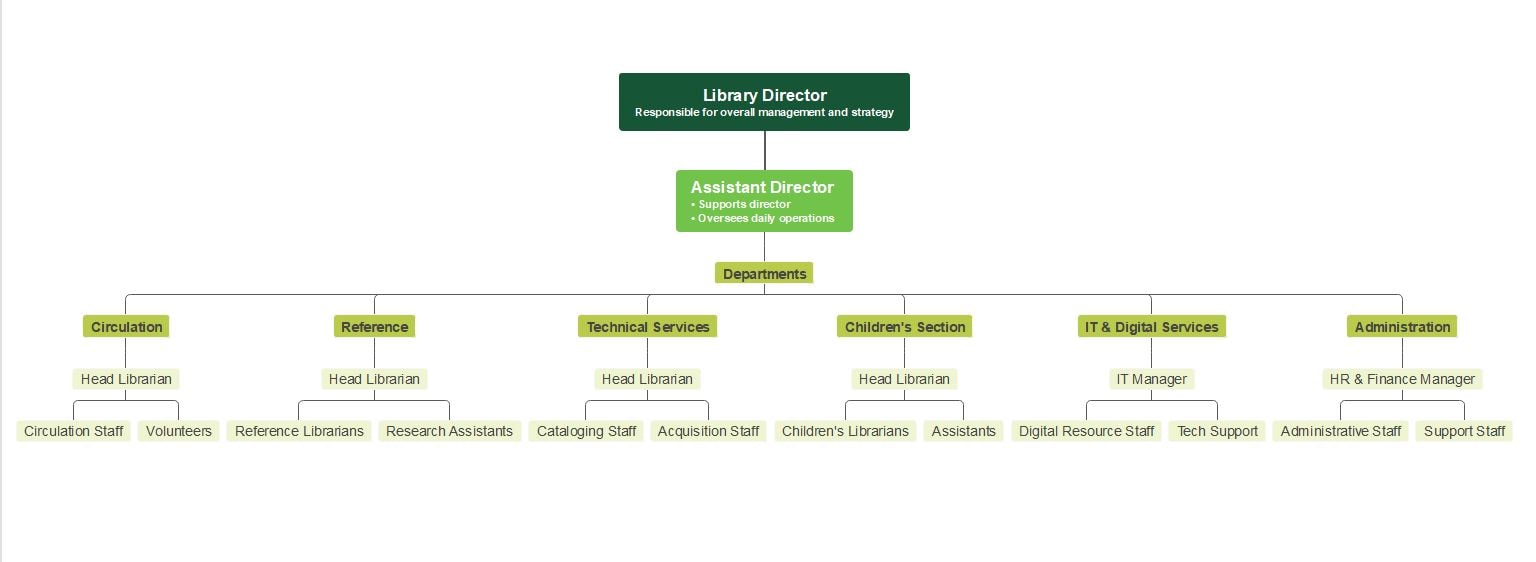


The first example is a library organizational structure. It begins with the Library Director, who manages the overall strategy and operations. Under the director is the Assistant Director, who supports daily activities and oversees various departments. Each department has its own Head Librarian or Manager with specific staff. For example, the Circulation Department includes the Head Librarian, circulation staff, and volunteers, while the Technical Services Department includes cataloging and acquisition staff. This structure helps define responsibilities and makes it easier to manage library functions efficiently.
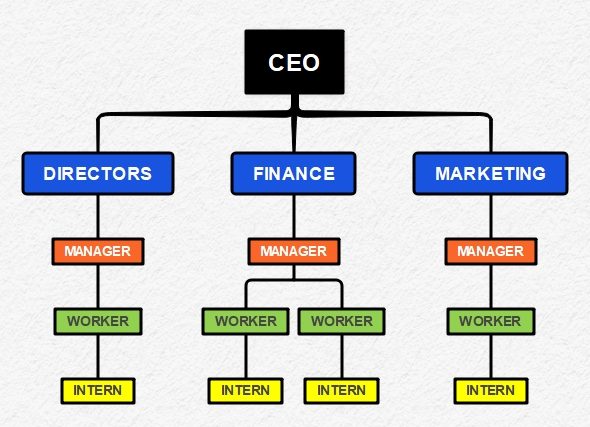
The second example shows a simple company structure. It starts with the CEO at the top, followed by Directors, Managers, Workers, and Interns. Each department, such as Finance and Marketing, has a manager overseeing workers and interns. This setup shows a clear chain of command and helps maintain smooth communication and workflow across the company. Both examples show how visual organizational charts can make it easy to understand how people and roles connect within an organization.
Advantages and Disadvantages of the Structure
Every organizational structure has its strengths and weaknesses. Understanding these can help in choosing the right design for your library or company.
Advantages
- Clear Roles and Responsibilities: Each position is defined, making it easy to know who is in charge of what.
- Better Communication: A well-organized structure helps information flow smoothly between departments.
- Improved Efficiency: Tasks are divided properly, so work is completed faster and with less confusion.
- Easier Management: Leaders can supervise staff more effectively when roles are clearly outlined.
- Growth and Planning: The structure helps in tracking performance and planning for future expansion.
Disadvantages
- Less Flexibility: Having a fixed structure can make it difficult to adapt to quick changes.
- Slow Decision-Making: Information may need to pass through several levels, delaying actions.
- Risk of Overlap: In large organizations, some duties may overlap if not clearly assigned.
- Limited Creativity: Strict roles can sometimes limit employees from sharing new ideas outside their area.
Overall, an organizational structure is essential for order and coordination, but it should remain flexible enough to grow and adapt as the organization changes.
Tips for Creating Effective Library Organizational Charts
Creating an effective library organizational chart requires careful planning and clear presentation. A well-designed chart not only shows roles and responsibilities but also helps improve communication and workflow within the library. Here are some simple tips to make your chart more effective:
- Keep it clear and simple. Avoid overcrowding your chart with too much text. Use short titles and clear lines to show relationships between positions.
- Use consistent formatting. Apply the same font, color scheme, and box shapes throughout the chart to maintain a professional look.
- Group related departments. Place departments such as Circulation, Reference, and Technical Services close to each other to show how they connect within the library system.
- Highlight leadership roles. Use color or size differences to make key positions like the Library Director or Head Librarian stand out.
- Update regularly. Revise the chart when staff roles, departments, or responsibilities change to ensure it stays accurate and useful.
- Make it accessible. Share digital copies of the chart with library staff and display a printed version in a common area so everyone can easily refer to it.
By following these tips, your library organizational chart will be clear, informative, and an effective tool for managing your team and resources.
Step-by-Step Guide to Creating Organizational Charts
 Try the app & get 500 free AI tokens


Step 1 Open EdrawMind
Open EdrawMind and start by selecting a blank mind map or an organizational chart template. This gives you a base layout where you can easily add and connect roles within your organization.

Step 2 Add the Top Position
Add the top position by creating the main node, such as “Library Director” or “CEO.” This will be the highest level in your chart, representing the head of the organization.

Step 3 Insert Child Nodes
Insert child nodes for the next level, including roles like “Assistant Director” or department heads. These nodes show the chain of command and how responsibilities are divided.
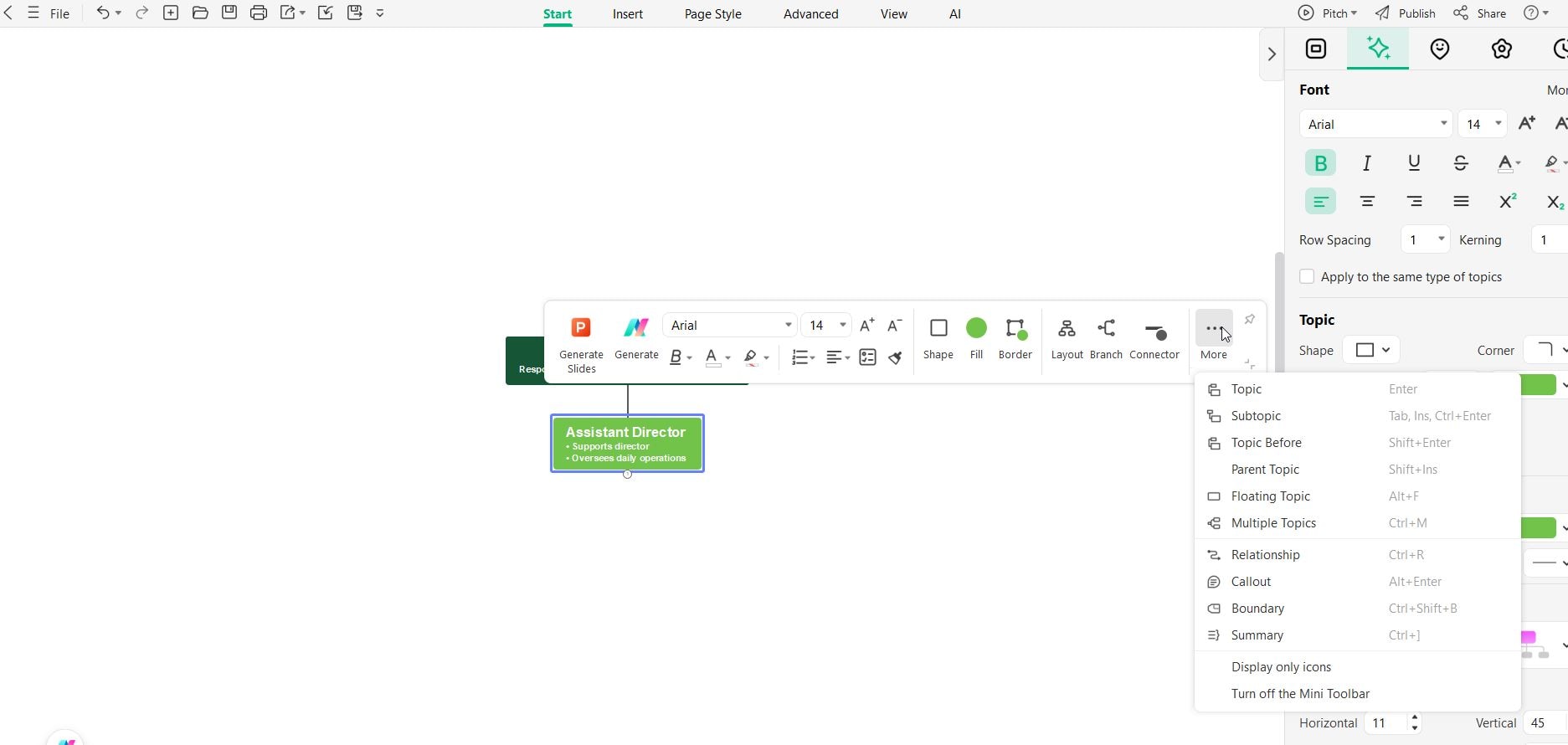
Step 4 Add Sub-nodes
Add sub-nodes under each department to include detailed positions such as managers, librarians, or assistants. This helps visualize how each team fits within the larger structure.
Step 5 Customize the Chart
Customize the chart by adjusting colors, shapes, and layouts to make it visually appealing and easy to understand. You can also add icons or notes to highlight key roles or responsibilities.
Conclusion
Creating a clear and well-structured library organizational chart helps improve communication, efficiency, and teamwork. It allows everyone to understand their roles and how different departments work together to support the library’s goals. Tools like EdrawMind make this process easier by providing ready-made templates and user-friendly features for designing professional charts.
With EdrawMind, you can visually map out positions, departments, and reporting lines in just a few steps. You can also customize colors, shapes, and layouts to fit your library’s needs. A well-designed chart not only keeps the organization running smoothly but also serves as a valuable reference for planning, management, and future growth.
FAQs
-
1. How can I create a library organizational chart easily?
You can use tools like EdrawMind to create your chart. It offers templates and drag-and-drop features that make it simple to design and customize charts without advanced skills. -
2. Can EdrawMind be used for other types of organizational charts?
Yes. EdrawMind can be used to design charts for companies, schools, hospitals, and other organizations. It’s a flexible tool that adapts to different needs and structures. -
3. How detailed should a library organizational chart be?
It depends on your needs. A small library might only show key staff and departments, while a larger one may include more detailed roles and subteams.
 EdrawMind
AppsEdrawMind Online
EdrawMind
AppsEdrawMind Online

