

Mind maps help organize and structure a structured, meaningful set of knowledge related to a single topic. They are beneficial in UX because they perform a categorical creation task.
In this article
Why Use a Mind Map for UX Design
Mind Maps are tools for idea generation, pattern recognition, and process visualization, and can be endlessly used in UX design practices. They are useful in UX when they perform categorical ideation tasks. Some mind map characteristics are:
- Clear structure and organization: A Mind map is defined in the form of a tree structure. It has transparent, directed flows from the root of the tree outward.
- One parent node: All nodes in a mind map have only one parent node (except for the tree root). Every node can have children that represent the subtopics of that term.
- No relationship concept: There is no differentiation between the relationships between various node forms — all the edges in a tree are unlabelled and represented similarly
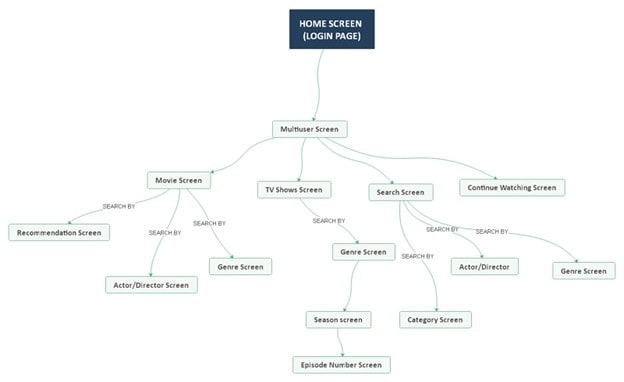
The above diagram is a UX mind map of how Netflix’s user interface works. And the flow of information when a user logs into the application or website.
Creating a Mind Map for UX Design
Steps involved in creating a mind map for UX design:
Brainstorm
An organization needs to place itself into users' shoes and recognize their likes and dislikes, context, desires, discomfort, etc.
Is it essential to learn about the buyer's journey and answer critical questions like the financial model? What metrics will contribute to business success? What are the challenges? In which product cycle are the consumers?
Define
Discover the problems and opportunities with the team, particularly the product manager. It is crucial to collect insights and synthesize data, and provide an abstract insight into the situation.
Visualize
Come up with ideas that create a win-win situation for both the users and the company. Then get the larger team involved at this phase so that everybody can contribute as per their expertise.
Ensure that the concepts are formulated and eventually appear on the product. Think about how success can be measured.
Execute
The UX mind map process facilitates construction and communication. User empathy is necessary to obtain. And therefore, feedback or other information from developers and others allows us to succeed.
It is also beneficial to schedule a handover meeting with developers and demonstrate a well-thought-out flow of all existing cases and a vibrant prototype.
Validate
It is vital to validate the metrics of the execution. Pay attention to specific metrics or suggestions besides searching for what you had expected.
Ensure that there is an analysis of the consistency of the company from the beginning. This part of the process solidifies that the organization can have a good foundation for its customers.
Easiest Tool for Making Mind Maps for UX Design
EdrawMind is the simplest tool to make any kind of mind map. Even if you're not a designer, you can create eye-catching maps as well.
Presentation
The most effective way of exploring concepts and sharing knowledge is visualization. With the built-in presentation feature of EdrawMind, you convert mind maps into beautiful, interactive slideshows in seconds.
You can export the slides as an editable PPT or PDF file once you have finished the process.
Group Collaboration
While working with a team of external partners, the project plans will be updated for everyone automatically and in real-time. Just email people or create an EdrawMind link. You choose who can edit or only view the mind map.
Smart Layout
While you concentrate on your thinking process, EdrawMind handles the rest. The intelligent layout keeps the branches ordered and readable. The software has fully automatic structures for the UX mind map.
Tips on Making a Mind Map for UX Design
There are some tips for making a UX mind map to help with UX design and arrangement further:
Same Canvas for Multiple Maps
Use the same canvas for multiple maps. No rule recognizes how many plans on the same canvas exist.
Various maps can be created for multiple user functions for complex systems, different apps that belong to the same application, or the old and new versions of the application.
List the Map Hierarchy
Enlist the map hierarchy. Because mind maps are, by their definition, hierarchical, some divisions that look the same often have greater significance than others.
When you draw the map, you should consider the most significant branches of a particular node and emphasize them through color, an icon, or text.
Optimize Post-Brainstorming
After the initial iteration of a mind map, enable ideas to flow freely and map them. Some images are not meaningful or need to be transferred to other branches.
Mind Map Examples for UX Design
Like in UX Design, it’s easier to visualize or realize the benefits of mind mapping in this field if you are provided with examples. This can also serve as your starting point if you want to start a UX design mind map.
You can see examples from EdrawMind’s Mind Map Gallery. This is a place where users who created their own mind maps from EdrawMind upload their beautiful and creative works.
Since you’re a designer, you’ll probably enjoy the variations of UX design mind maps people have made with their hundreds of symbols, diagram types, and AI functions. Check them out below:
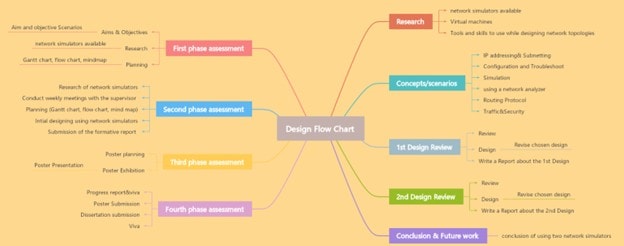
Design Development Mind Map
This is a general design development mind map that illustrates how a concept moves from initial ideas to final implementation. Each branch represents a specific design or research/development phase.
You can easily edit this template to match your own workflow, whether for product design, website layout, or user experience mapping.


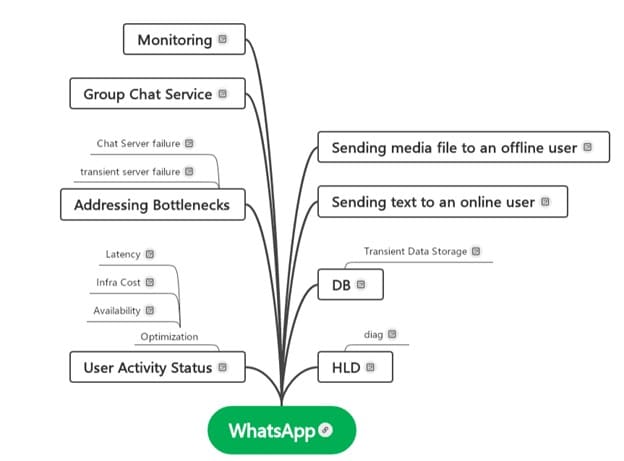
WhatsApp Design Mind Map
This one focuses on the UX design flow of WhatsApp, showing how different app features and user interactions are structured.
You’ll see sections for User Interface Elements, Navigation Paths, and Feature Logic. It’s good for studying how an existing app organizes its functions and user flows.
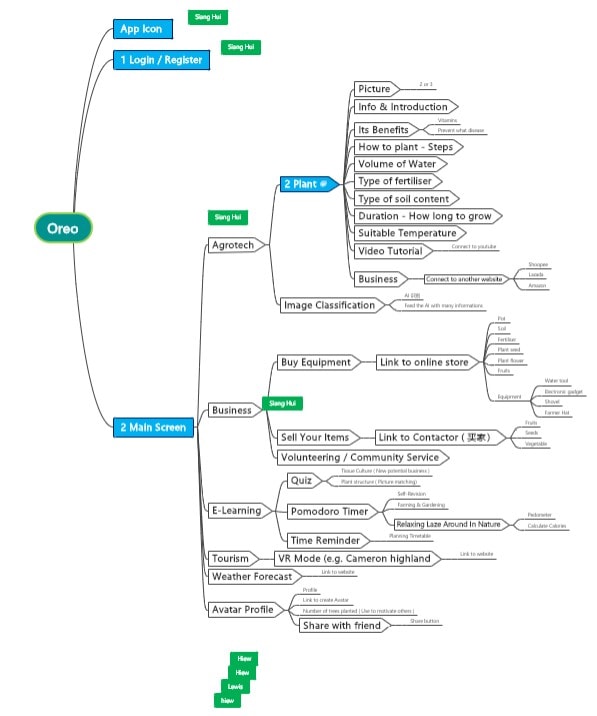
Oreo Design Mind Map
This example presents a creative UX concept for an Oreo-themed application. It’s a unique case showing how branding and product identity can translate into app structure.
Its comprehensive detailing of the different parts of the app is ideal for inspiration when developing themed products. You can modify it easily to experiment depending on your app or website’s needs.
Explore More Examples or Make One Free Now
Suppose you want to explore more UX mind maps, open EdrawMind and click Gallery on the left panel.
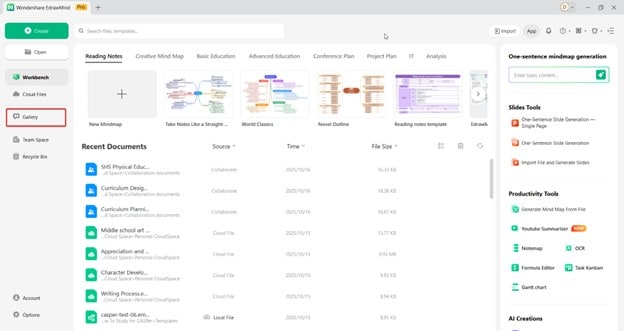
Then, search for “UX design,” “wireframe,” or “user flow.”
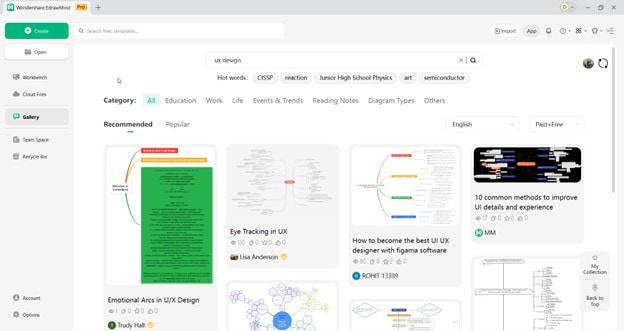
Each mind map can be previewed before downloading. Once you find one that fits your needs, click Duplicate to open it directly.
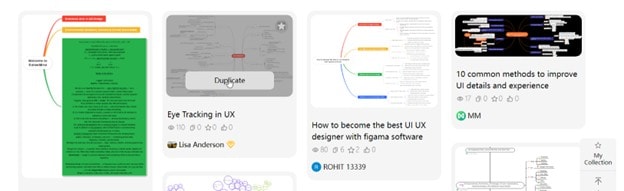
You can edit nodes, change colors, or attach links and images to visualize product structure, user feedback, or design priorities.
How To Make a UX Design Mind Map for Free
If you’d rather start from scratch, Wondershare EdrawMind also lets you create a UX design mind map from the ground up.
As a designer, you’ll definitely love the thousand ways in which you can create your first mind map in EdrawMind.
Check out the steps below:
-
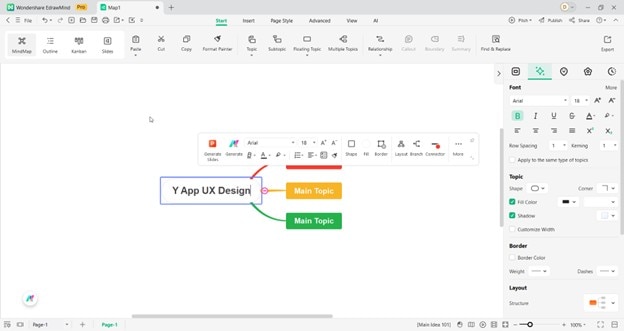
Step 1:
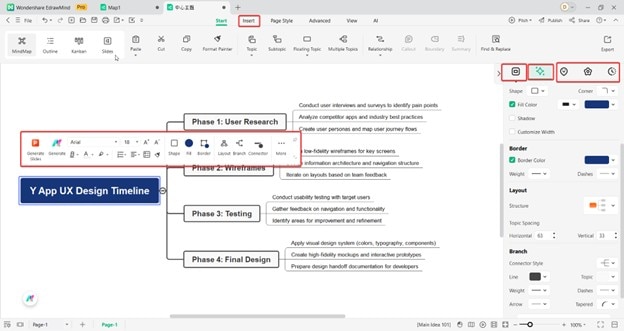
First, edit the Main Idea node by double-clicking on it. You can add here the name of your project, such as “Y App UX Design.”
 Try the app & get 500 free AI tokens

 Get 500 AI tokens free on the app
-
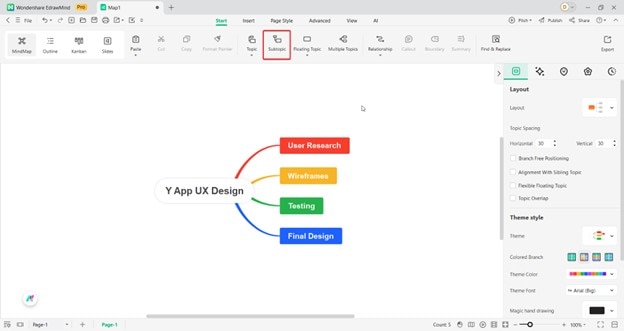
Step 2:
Then, edit the Main Topic nodes next. Here, you can branch out the different parts of the user design planning, such as “User Research,” “Wireframes,” “Testing,” and “Final Design,” among others. Add Subtopics to expand on each.
-
Step 3:
Once done with the mind map’s structure, it’s time to design it by editing the layout, shapes, colors, lines, and fonts within the mind map. You can also add pictures of design inspiration or target layouts for the UX design.
-
Step 4:
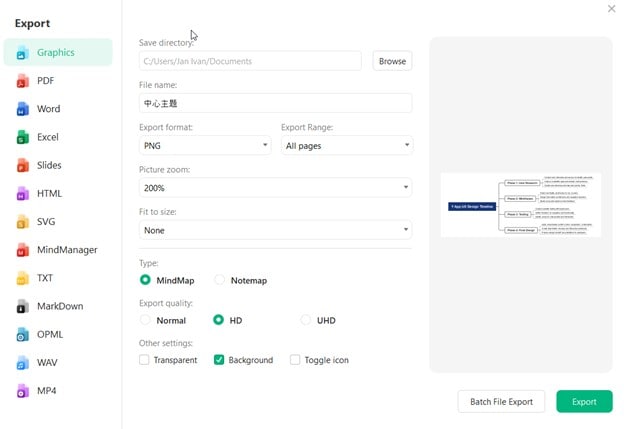
Lastly, export your UX design mind map for sharing with your team or for presentation later on.
 EdrawMind
AppsEdrawMind Online
EdrawMind
AppsEdrawMind Online

