

Using mind maps is a great tool when preparing for the UPSC Exam. Mind maps allow you to organize your thoughts and make connections between different concepts.
In this article
What Is Mind Mapping
Mind mapping is a visual technique to organize and structure information using a diagram. It involves breaking down complex information into smaller, more manageable chunks. These chunks are then arranged in a hierarchical structure.
Mind maps help you make connections between different topics and prioritize study materials. It’s also useful for note-taking, brainstorming, planning, and problem-solving.
A mind map can improve your understanding and retention of information, helping you gain a more precise overview of a topic.
Are Mind Maps, Concept Maps, and Brainstorming the Same?
As mentioned, a mind map is a visual tool that allows users to organize and connect ideas in a hierarchical or branching manner. Meanwhile, a concept map is similar to a mind map but is more structured and hierarchical.
It provides a clear focus on relationships between ideas and concepts. Concept maps are often used to represent complex systems, processes, or theories and are popular in academic and scientific contexts.
On the other hand, brainstorming is a technique used to generate new ideas and solutions in a group setting. Brainstorming initially evaluates without any judgment given. It can be done through various methods, including mind mapping.
While all three techniques involve organizing and generating ideas, they have unique characteristics and applications. They are helpful in combination to enhance the creative process. They also improve people’s understanding of complex topics.
What Are the Benefits of Mind Maps for the UPSC Examination
The UPSC exam is a highly competitive nationwide civil service exam in India conducted annually. The exam aims to recruit candidates for various administrative services in the Indian government. These include the Indian Administrative Service, Police Service, and Forest Service.
The UPSC exam is considered one of the toughest exams in India. The exam has a rigorous selection process that includes multiple stages, such as preliminary, main, and interview rounds.
The exam tests candidates on a wide range of subjects, including history, geography, economics, politics, and current affairs. Successful candidates have prestigious careers in various government and administrative roles in India.

Benefits of Mind Mapping Tools
A mind-mapping tool such as EdrawMind makes understanding, retaining, and prioritizing study materials easier. Here are the benefits of using a mind map when preparing for the UPSC examination.
- Visual representation: Mind maps provide a visual representation of complex information. They make it easier to understand, remember, and organize.
- Organization and structure: Mind maps allow a structured approach to studying. You can break down large topics into smaller, more manageable chunks.
- Better retention: Mind mapping helps to organize study materials hierarchically. This enhances information retention and memory recall.
- Identifying knowledge gaps: Mind maps help identify gaps and areas needing further study. This ensures that you focus on the most critical information.
- Time-saving: A clear topic overview saves time and streamlines your studying. Mind maps will enable you to cover more material in less time.
Use Wondershare EdrawMind As Your Mind Mapping Tool
Wondershare EdrawMind provides a powerful visual platform for organizing thoughts, ideas, and information. It offers features and customization options suitable for personal and professional applications.
You can brainstorm, manage projects, plan studies, and more. Its seamless collaboration and integration with popular applications make it an efficient platform.
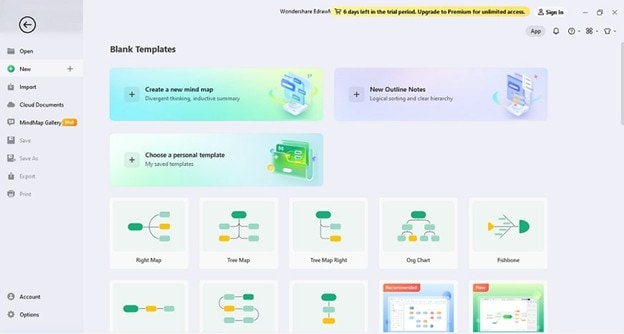
What Is EdrawMind?
EdrawMind by Wondershare is a product of a leading software company. It is a powerful and intuitive mind-mapping tool for individuals, businesses, and educational institutions. With over ten years of experience, EdrawMind offers a comprehensive range of features.
They enable users to create, edit, and share visual representations of ideas and concepts. The software is designed to be user-friendly to help users get started quickly.
The company is committed to innovation and providing top-notch technical support to its customers, making it a popular choice for those looking for an efficient and reliable mind-mapping tool.
Key Features of EdrawMind
Here are the key features of EdrawMind that you can take advantage of.
- EdrawMind has an intuitive interface and user-friendly design for easy navigation.
- It’s equipped with an extensive template library, themes, and symbols for customization and personalization.
- Seamless collaboration and teamwork with real-time editing and sharing features.
- Integration with popular applications such as Microsoft Office, Google Drive, and Gantt Chart
- It has cross-platform compatibility and is accessible on Windows, Mac, Linux, and mobile devices.
Pricing of EdrawMind
EdrawMind offers three pricing plans for individuals:
- Free Plan: This plan is for personal use and offers limited features and templates.
- Subscription Plan: It offers more advanced features, a richer range of templates, and access to technical support. For individual users, the pricing starts at US$39 for semi-annual periods and US$59 per year.
- Perpetual Plan: This plan offers a one-time payment for a perpetual license, including all future updates and technical support. The pricing starts at US$118 for individuals.
For more pricing information about EdrawMind for personal and commercial use, please visit here.
Pros and Cons of EdrawMind
Here are some pros and cons of using EdrawMind as your dedicated mind-mapping tool.
Mind Map Examples for UPSC Preparation
Next up, you can see some examples of how users maximized mind maps for UPSC prep. These are taken from Mind Map Gallery, which is EdrawMind’s central platform for sharing mind maps and other diagram creations.
As you’ve learned above, EdrawMind offers a lot of creative options for you, and since it’s beginner-friendly, you’ll be uploading your own UPSC mind maps in no time to the Mind Map Gallery. For now, look at these examples:
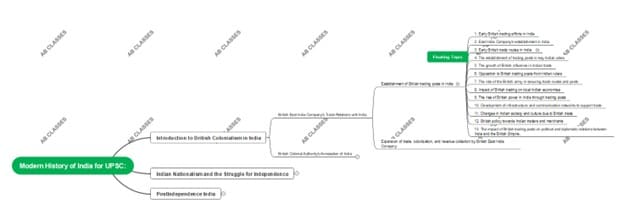
UPSC History Mind Map
First in our list of examples is this UPSC history mind map. It outlines the key parts of the Modern History of India and how the UPSC as an exam came up in the first place.
The history part is fun to learn, but using the layout for other history-related subjects can also be of big help as you prepare for the examinations themselves.


Exam Preparation Mind Map
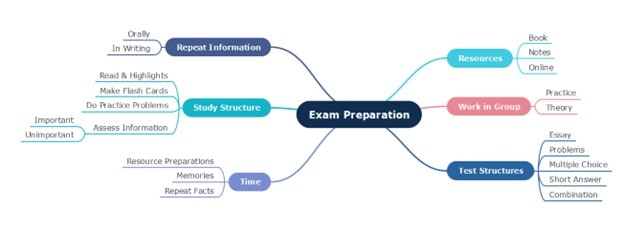
Second is a general exam preparation mind map. It’s arranged so that it can apply to other examinations as well, not just UCSP. Thus, all you have to do is edit it, and you have an easy tracker to follow.
For example, you can add the actual tasks you do under “Repeat Information,” such as the timing for recall, oral exams, or even writing tasks.
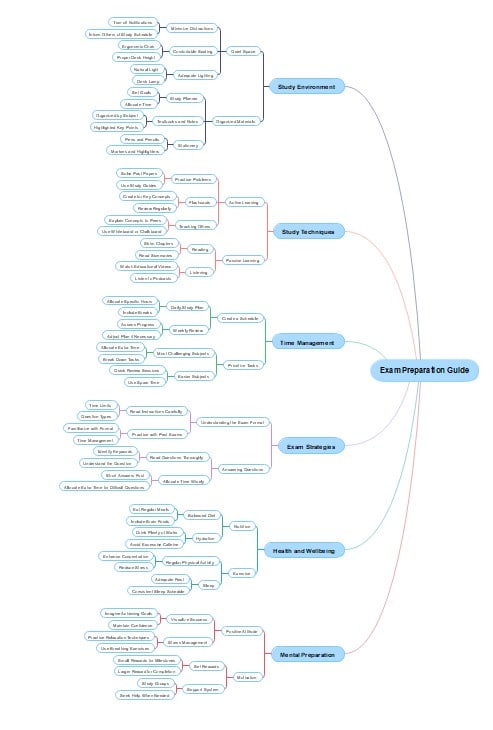
Exam Preparation Top-Down Guide
Lastly, for a more comprehensive approach to UPSC preparation, here’s a top-down exam preparation mind map. It’s really extensive and includes several key techniques or functions that you should do if you want to ace any exam.
Again, edit it with EdrawMind according to the steps provided in the next section, and one item will be crossed off your list: a tracker for the preparation phase.
Explore More Examples or Make One for Free Now
If you want to see more examples for exam preparation, open EdrawMind and go to the Gallery from the left panel.

In the search bar, type “UPSC,” “exam preparation,” or “study planning.”
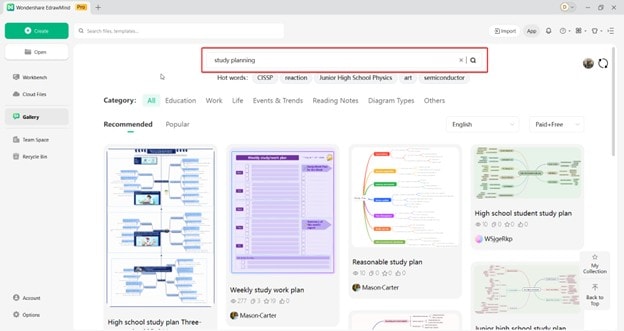
You’ll find numerous templates created by other students and educators for exam planning. If you’ve found something you want to edit, use the Duplicate function.

This feature is especially useful when reviewing multiple topics at once, such as General Studies, Current Affairs, and Essay Writing for the UPSC. Once the mind map loads, make sure to edit it accordingly.
How To Make a Free UPSC Exam Prep Mind Map for Free
However, if you prefer making mind maps from scratch, you can make use of EdrawMind’s creative functions. With over 210+ diagram types, you won’t run out of visual tools to use for your UPSC exam preparation.
In addition, you can use AI tools and the hundreds of shapes, colors, and symbols to make your UPSC reviewer mind map.
Nevertheless, you can take a look at the basic way to make your very first UPSC mind map in EdrawMind:
Step 1
Double-click the Main Idea node to edit it. You should name it as the topic or subject of UPSC you want to focus on.
 Try the app & get 500 free AI tokens


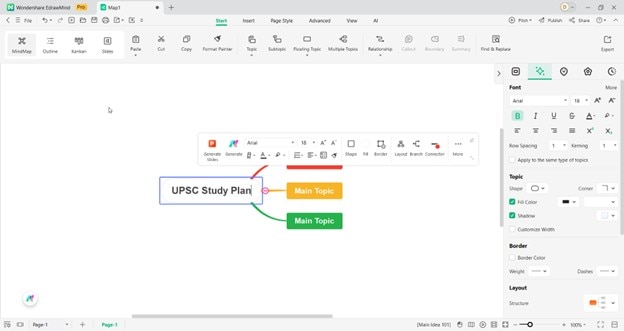
Step 2
Then, edit the Main Topic nodes – use these as the key areas in the subject. Use the Subtopic function to add more content under the main topic nodes you edited earlier. These are basically your details.
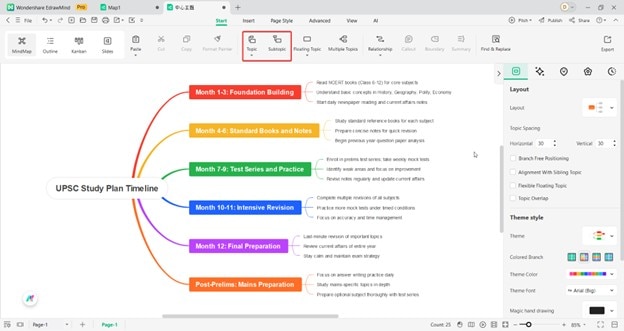
Step 3
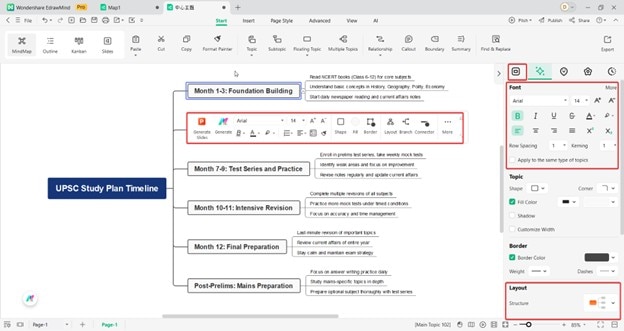
Once done with the overall structure, try editing the mind map by changing its fonts, lines, colors, theme, or layout. Add images wherever relevant to make the visuals more enriching.
Step 4
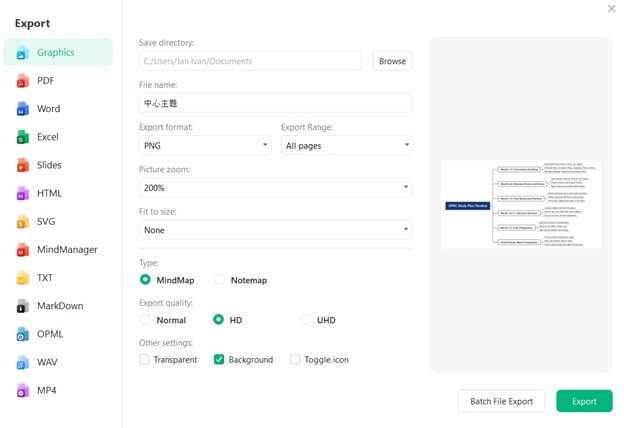
Lastly, export the content to print it as a PDF or to share it with your friends.
FAQs
-
What Is the Difference Between the EdrawMind Free and Paid Versions?
The free version of EdrawMind offers limited features and templates with restricted export options. The paid version provides access to advanced features, more templates, and technical support. In addition, the paid version allows for exporting mind maps to various formats. It also seamlessly integrates with other applications and is available for personal and commercial use. -
How Can Mind Mapping Techniques Help on Exams?
Mind mapping techniques can help with exam preparation by organizing and visualizing complex information. Mind maps can enhance memory retention and recall by breaking down a topic into key concepts and using connecting lines to show relationships. They can also help reduce stress and anxiety by providing a structured approach to exam preparation. -
Are Mind Maps Better Than Text Notes?
Mind maps are often better than text notes because of their visual nature. The ability to organize information more memorably and engagingly allows for a non-linear and creative approach to note-taking. In turn, it can enhance memory retention.
 EdrawMind
AppsEdrawMind Online
EdrawMind
AppsEdrawMind Online

