


Understanding the structure of a charity organization is essential for effective management and collaboration. It shows how leadership, departments, and teams work together to achieve the organization’s mission. A clear structure also helps define roles and responsibilities, making operations more efficient.
In this article
Types of Charity Organizational Structures
Charity organizations can adopt different structures depending on their size, mission, and operational needs. Choosing the right structure helps improve communication, define roles, and streamline decision-making. Common types include:
Hierarchical Structure
This is the most traditional model. Authority flows from the board of directors to the executive leadership and down to staff and volunteers. Each role and department has clearly defined responsibilities, making accountability simple.
Functional Structure
In a functional structure, the organization is divided by specific functions such as fundraising, programs, volunteer coordination, and administration. Each department focuses on its area of expertise, which can improve efficiency and specialization.
Matrix Structure
A matrix structure combines elements of hierarchy and function. Employees may report to more than one supervisor, for example, a department head and a project manager. This allows flexibility and collaboration across different teams but requires strong communication to avoid confusion.
Flat Structure
Some smaller charities use a flat structure with few levels of management. Decision-making is shared, and volunteers or staff often take on multiple roles. This model encourages teamwork but can be less clear in terms of responsibility.
Selecting the right structure depends on the organization’s size, goals, and the complexity of its programs. A well-chosen structure ensures clarity, accountability, and smooth operations.
Examples of Charity Organizational Charts
Charity organizations can use different types of organizational structures depending on their size and needs. Here are two common examples:


In this example, the CEO / Executive Director oversees all operations. The organization is divided into key departments, each with a manager and staff responsible for specific tasks:
- Programs Department: Manages programs and coordinates volunteers.
- Fundraising & Development: Handles donations, grants, and donor relationships.
- Marketing & Communications: Promotes the charity and manages public relations.
- Finance & Administration: Takes care of accounting and office management.
- Human Resources: Manages recruitment, training, and staff support.
- IT & Operations: Ensures technology and operations run smoothly.
This setup focuses on clearly defined roles within each department, helping teams work efficiently.
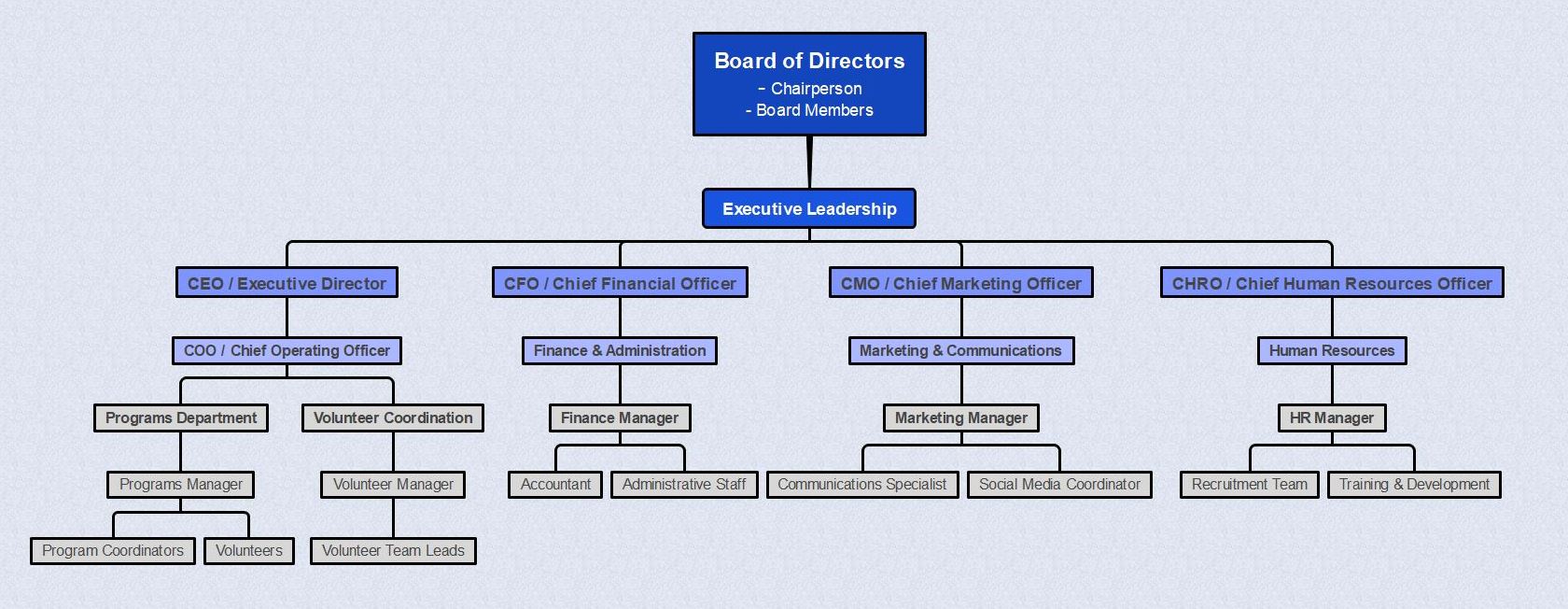
This chart starts with the Board of Directors at the top, setting the overall mission and strategy. The CEO / Executive Director manages daily operations and is supported by senior leaders: COO, CFO, CMO, and CHRO. Each executive oversees specific departments:
- COO: Oversees Programs and Volunteer Coordination.
- CFO: Leads Finance & Administration.
- CMO: Handles Marketing & Communications.
- CHRO: Manages Human Resources.
This layout makes reporting lines and responsibilities clear. It helps staff understand who to report to and how departments work together.
Advantages and Disadvantages of the Structure
Every charity setup has its strengths and challenges. Understanding both helps leaders choose a structure that supports smooth operations and clear communication.
Advantages
- Clear roles and reporting lines: Staff and volunteers know who to report to, which reduces confusion.
- Better coordination across teams: Departments can focus on their own tasks while still working toward the same mission.
- Easier management and oversight: Leaders can monitor progress and address issues quickly.
- Improved accountability: Each department and leader has defined responsibilities.
Disadvantages
- Slower communication between departments: Information may take longer to move across teams.
- Risk of departments working in silos: Teams may focus only on their own duties and overlook bigger goals.
- Less flexibility: Changes in programs or priorities may be harder to manage.
- More layers to manage: Larger structures may require more meetings, approvals, and coordination.
This balance helps organizations decide which setup fits their size, goals, and daily operations.
How to Create a Charity Organizational Chart
 Try the app & get 500 free AI tokens


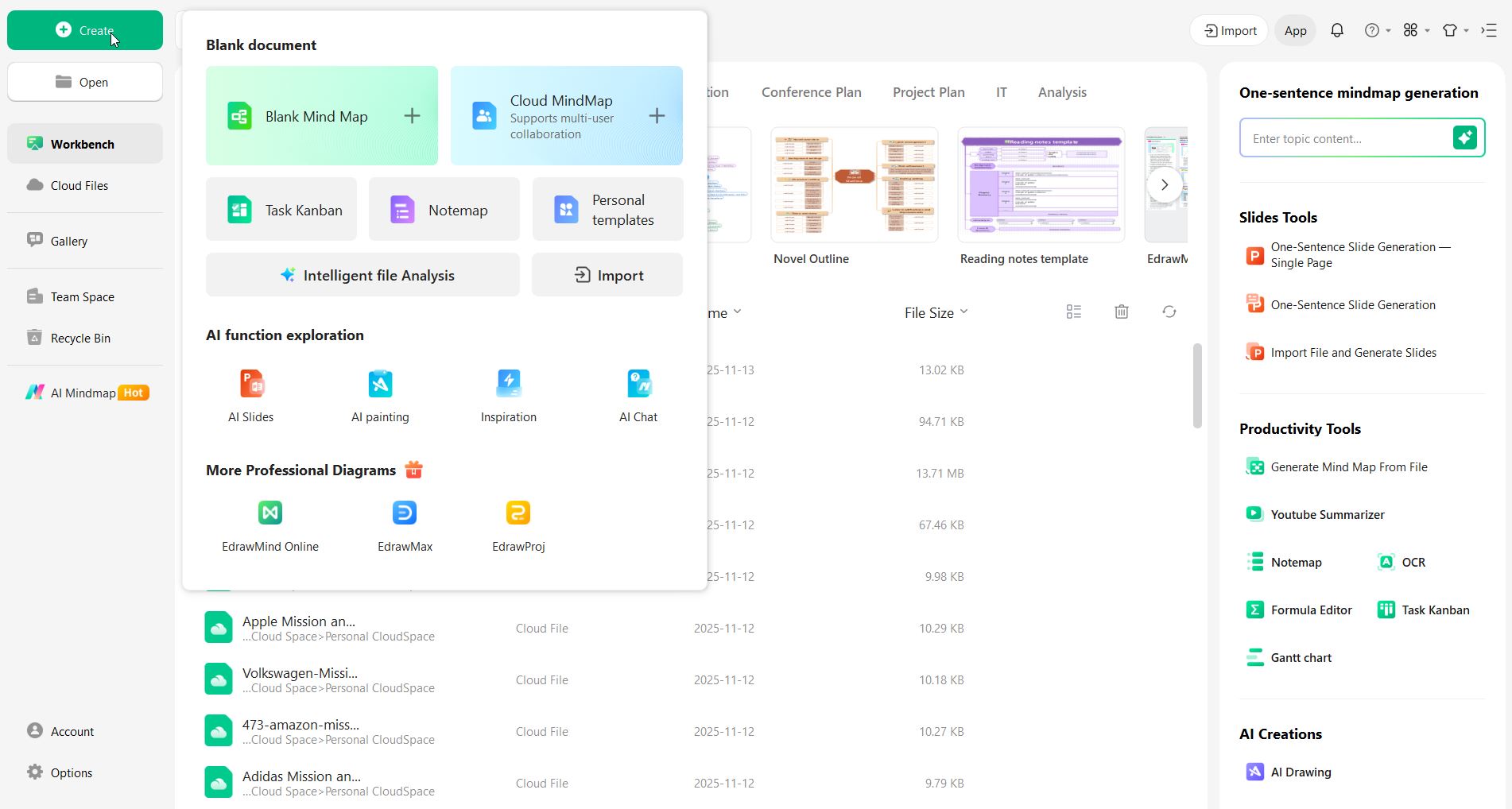
Step 1 Open EdrawMind and choose a template or blank canvas
Start the app and select an organizational chart template if available. If not, open a blank canvas to create your chart from scratch. Templates save time by giving a ready layout.
Step 2 Create the main node
Add the top node for leadership. For example, label it “Board Of Directors.” Then add another node if there are additional leaders at the same level.

Step 3 Add department heads under the main node
Place managers or team leads directly beneath the main node. For example, add nodes for Programs, Fundraising, Finance, Marketing, HR, and IT.

Step 4 Add individual roles under each department
Under each department node, add the specific roles. For example, Programs Manager, Program Coordinators, Volunteers. Keep labels short and consistent.

Step 5 Review, style, and share
Check the chart for accuracy. Use simple shapes and consistent formatting. Export the chart as PDF or PNG and share it with staff.
Quick tips: Keep titles short, group similar roles together, and update the chart after any staff or role changes.

Tips for Maintaining an Effective Chart
A charity organizational chart is only useful if it stays accurate and easy to read. Here are some tips to keep it effective:
1. Update regularly
Revise the chart whenever there are staff changes, new roles, or departmental shifts. This ensures everyone has the correct information.
2. Keep it simple
Use short titles and clear labels. Group related roles together to make the chart easy to understand.
3. Standardize formatting
Use consistent colors, shapes, and fonts. Visual consistency makes it easier for staff to read and follow.
4. Include notes if needed
Add brief descriptions or links to explain roles without cluttering the chart.
5. Share with the team
Make the chart accessible to all staff and volunteers. Encourage them to reference it for reporting and collaboration.
Conclusion
A well-designed charity organizational chart does more than show roles. It clarifies responsibilities, reporting lines, and how teams work together. Using tools like EdrawMind makes it easy to create and update charts that reflect real workflows. Keeping the chart accurate and accessible helps the organization stay organized, promotes transparency, and supports smooth collaboration as the charity grows and changes.
FAQs
-
1. How do I create or update a charity organizational chart?
There are many tools available to create and update organizational charts, but EdrawMind is recommended for its ease of use and flexibility. -
2. What are common mistakes when creating a chart?
Common mistakes include making it too complicated, using unclear titles, or failing to update it regularly. Keeping it simple and current is key. -
3. What is the best format for a chart?
Charts can be digital or printed. Using a visual tool like EdrawMind allows easy updates, sharing, and exporting in PDF or PNG formats.
 EdrawMind
AppsEdrawMind Online
EdrawMind
AppsEdrawMind Online

