In this article
An SEO content brief is the assignment a writer receives before drafting a search-focused article. It connects the reader's task, the intended answer, the article's scope, supporting sources, and review requirements. A useful brief lets the writer explain what to produce and which decisions still need an editor.
The template below turns those requirements into eight mind map branches. Copy the fields into EdrawMind, add the source links beside the claims they support, and review the same material in Outline mode before giving it to your writer. The filled example shows how the fields work together, rather than treating the brief as a list of keywords.
On November 12, 2026, Xmind published an official tutorial about building a content brief with its Agent. That tutorial offers a current example of using a mind map to organize an assignment. The practical task applies across tools: the editor must resolve the audience, evidence, and scope before a writer can use the structure. This guide uses EdrawMind for that organization and reserves EdrawMax for a separate approval flowchart when several people manage the handoff.
Choose a brief, an outline, or a content plan
A content brief explains the assignment for one piece. An outline arranges the proposed sections of that piece. A content plan coordinates several pieces across topics, dates, and channels. These documents can reference each other, but each answers a different planning question.
| Document | Decision it records | Typical contents |
|---|---|---|
| Content plan | What should the team publish, and when? | Topics, channels, publication dates, and owners across multiple pieces. |
| Content brief | What must this article help its reader do? | Audience, promise, boundaries, evidence, proposed structure, and delivery requirements. |
| Article outline | In what order should the article explain the answer? | Headings, section purposes, examples, and the sequence of the argument. |
Use a brief when a writer needs an assignment they can act on, especially when the editor and writer are different people. If you are organizing a whole publishing schedule, start with a content planning mind map. If the assignment is an entire campaign with channels and a budget, the marketing brief template is a closer starting point.
Copy the SEO content brief template
Put the working article topic in the center of the map. Use the eight fields below as main branches, then add the short answers and source records as subtopics. A field can contain an unresolved question, provided the brief names who will resolve it before drafting.
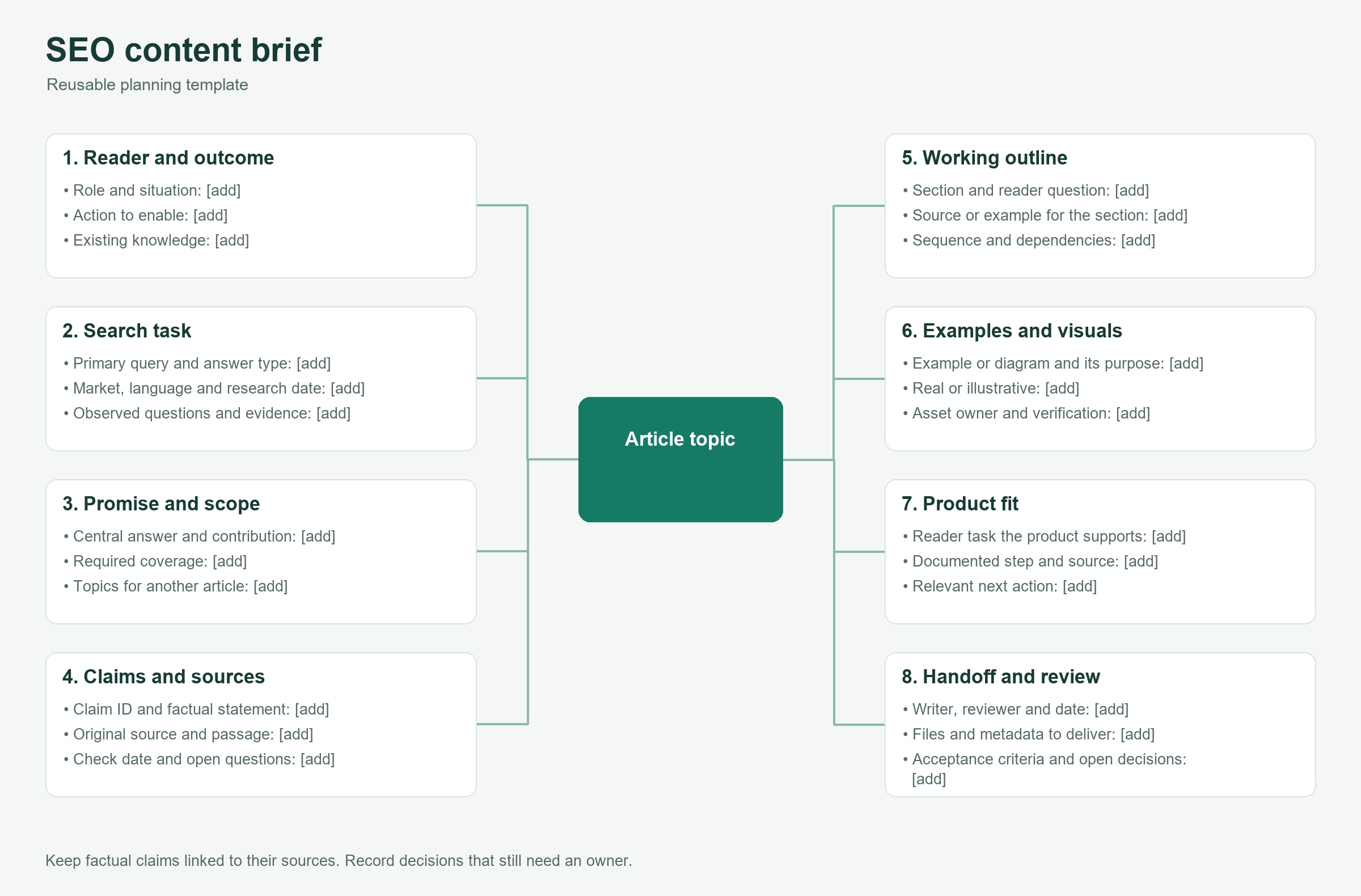
| Branch | What to record | A useful completion check |
|---|---|---|
| 1. Reader and outcome | The reader's role, situation, existing knowledge, and the action or decision the article should enable. | The outcome describes something the reader can do after reading. |
| 2. Search task | The primary query, the type of answer needed, target market and language, research date, and any questions actually observed in search or reader research. | Each research input has a source. Proposed queries remain distinguishable from observed questions. |
| 3. Promise and scope | The article's main answer, required coverage, and boundaries. Explain what useful contribution the article adds. | The writer can identify both the central answer and requests that would change the assignment. |
| 4. Claims and sources | Claim IDs, original source links, the passage or section supporting each claim, verification dates, and unresolved factual checks. | A reviewer can trace every important factual statement to its evidence. |
| 5. Working outline | Proposed headings, the question each section answers, and the source or example it will use. | Every section helps complete the promised reader task. |
| 6. Examples and visuals | The example, diagram, screenshot, or template needed, its purpose, and whether it is real or illustrative. | The asset demonstrates a specific point without implying unverified results. |
| 7. Product fit | The relevant product step, documentation to check, and the point where a call to action helps the reader continue. | The product connection follows from the task and uses verified capabilities. |
| 8. Handoff and review | Writer, reviewer, draft date, delivery format, metadata, acceptance criteria, and decisions that need an owner. | The writer knows what to deliver and how approval will be assessed. |
Start with the reader rather than the keyword list. GOV.UK's content design guidance bases user needs on tasks and recommends reviewing existing evidence. For a commercial article, adapt that approach by naming the person, the job they are trying to finish, and why the answer matters in that situation.
The search branch then helps you shape the answer for people looking for it. A software comparison needs a different brief from a definition or a reusable template. Record the research you actually have; leave a named research task where evidence is missing. The presence of a query in a brief does not establish its search volume.
Keep source links beside the relevant claims. Google's people-first content guidance asks creators to consider originality, value, and clear sourcing. In the brief, turn those checks into concrete requirements, such as an annotated example and a source for a product instruction.
See a filled article brief
Consider this fictional assignment: a content team wants an article that helps a project lead write a useful weekly update. The example below illustrates editorial choices; it does not represent customer interviews, measured search demand, or a real company's process.
A request such as “write a comprehensive guide to project updates” leaves the audience and output unclear. This filled brief narrows the assignment to a project lead who needs to make blockers and decisions visible across three projects.
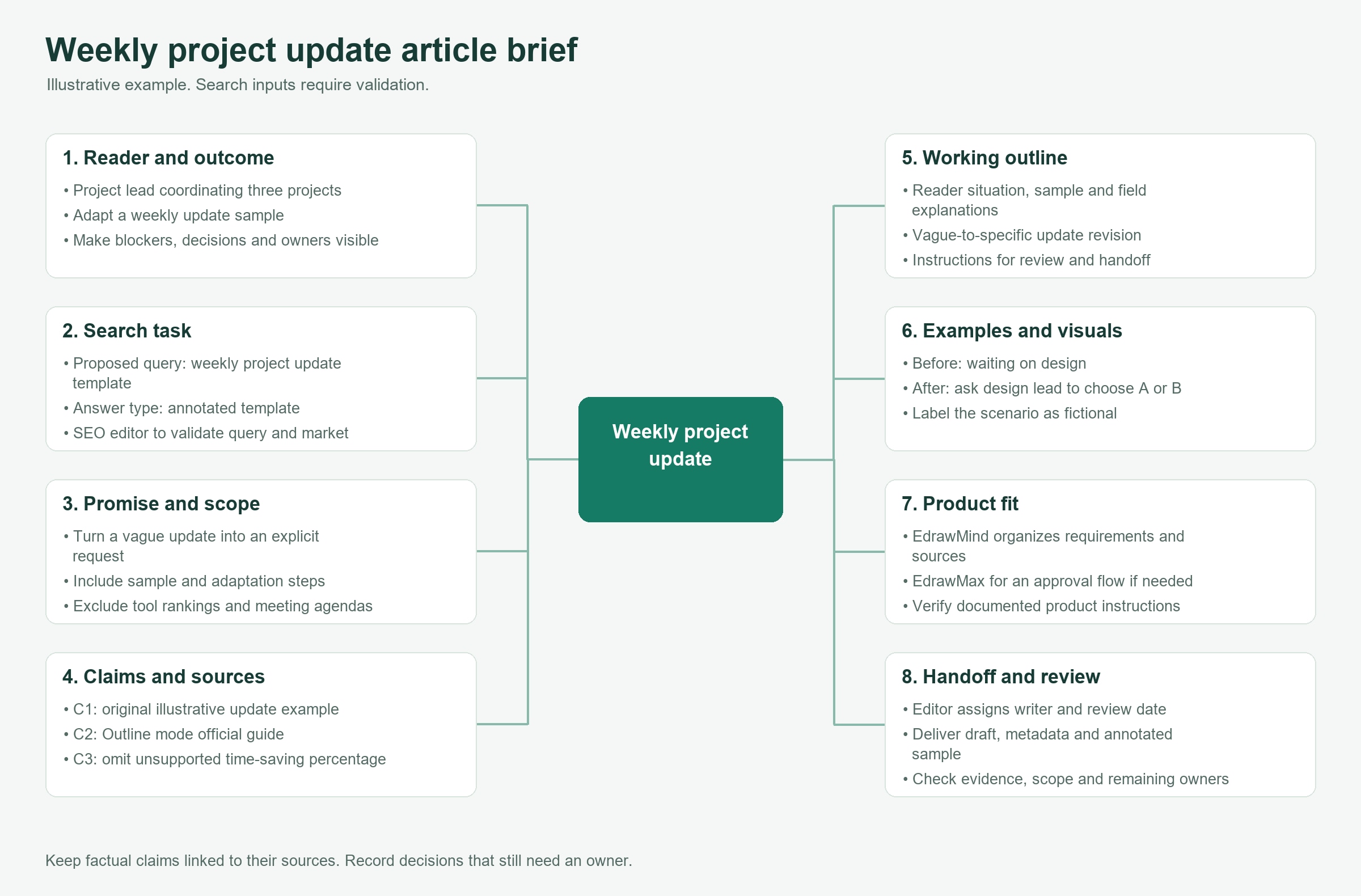
| Branch | Filled example |
|---|---|
| Reader and outcome | A project lead coordinating three projects needs to prepare one weekly update. After reading, the lead should be able to adapt a sample that identifies progress, blockers, a decision needed, and the next owner. |
| Search task | Proposed primary query: “weekly project update template.” Intended format: an annotated template with instructions. The SEO editor must validate the query and record the target market and research date before assigning a search-led draft. |
| Promise and scope | Show how to turn a vague status message into a clear update. Include the sample and adaptation steps. Keep software rankings, meeting agendas, and a complete guide to managing remote teams outside this article. |
| Claims and sources | Label the sample as illustrative. Check any product steps against current documentation. A numerical claim that the update saves time requires relevant evidence before it can be used. |
| Working outline | Explain who uses the update; show the sample; annotate its fields; demonstrate one vague-to-specific revision; explain how to send it for review. |
| Examples and visuals | A before-and-after update: replace “waiting on design” with “the draft needs the design lead's decision on option A or B before the next build.” Label the names and scenario as fictional. |
| Product fit | Use EdrawMind to organize the assignment and its source records. Include a workflow diagram only if the article needs to explain an approval sequence. |
| Handoff and review | The editor assigns a writer and review date. Deliver the draft, title, description, and annotated sample together. Approval requires a usable example, verified instructions, and an explicit owner for any remaining factual check. |
Give each claim an evidence record
For the same fictional assignment, a small claim list prevents an unsupported statement from blending into the draft. The IDs below are example labels you can reproduce in a mind map.
| Claim ID | Proposed content and evidence | Editorial decision |
|---|---|---|
| C1 | The weekly update sample. Evidence type: an original illustrative example, not a research finding. | Use it with a clear example label and explain the purpose of each field. |
| C2 | The brief can be reviewed as an outline in EdrawMind. Source: the official Outline mode guide. | Describe the documented workflow and verify the labels in the installed version before capturing a screenshot. |
| C3 | The template reduces reporting time by a stated percentage. Supporting measurement: not supplied. | Omit the numerical claim unless appropriate evidence is obtained. |
The editor can now review the assignment without having to reconstruct which claims are facts, examples, or open questions. Once the research task is resolved, the writer can draft against the agreed scope.
Build the brief in EdrawMind
Use EdrawMind as the main workspace for the brief because the requirements form a hierarchy of connected topics. The following steps use functions described in the official desktop guides. Interface labels can differ between versions, so follow the corresponding command in your installation.
Step 1. Create a map for one article
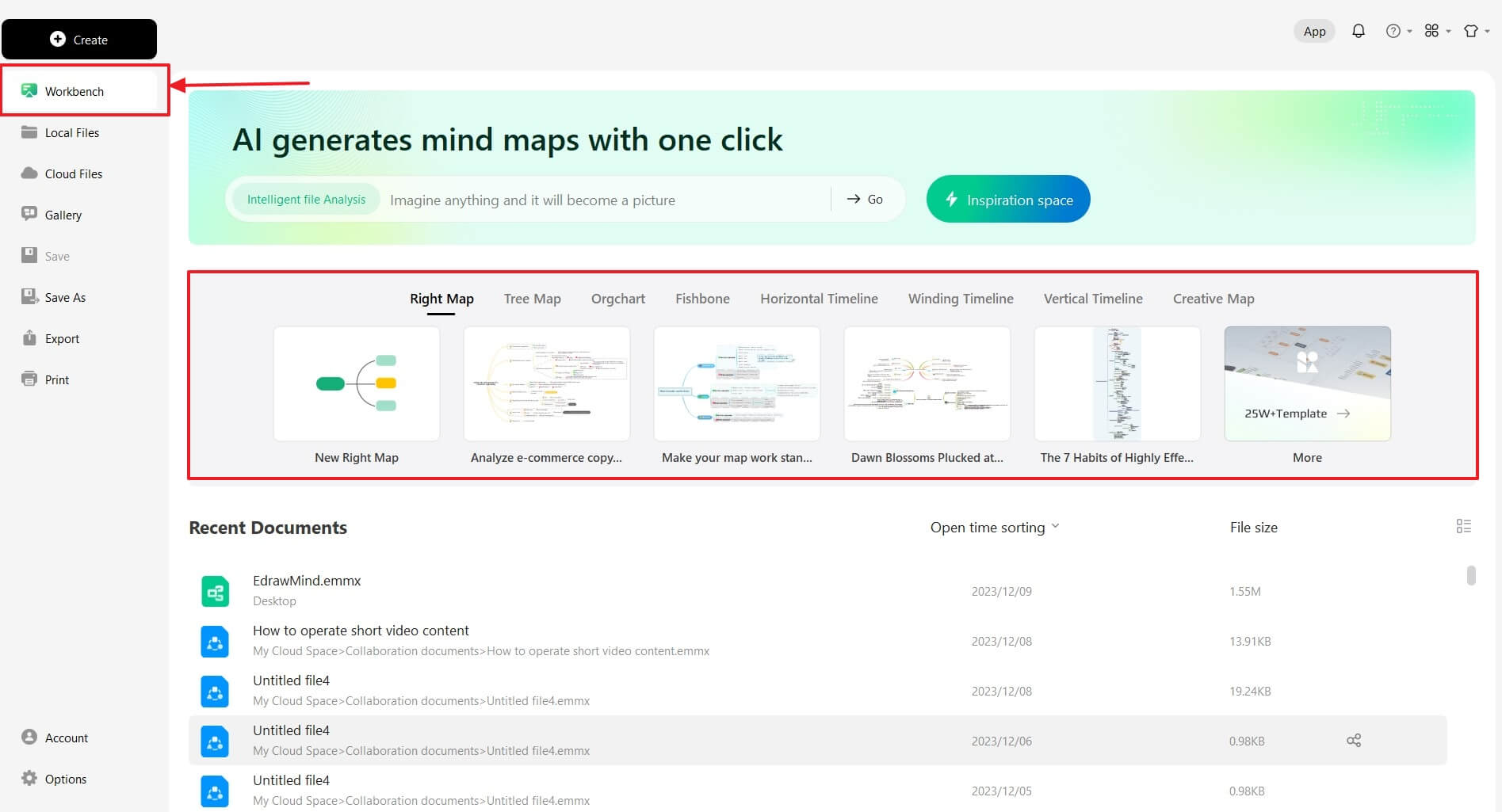
Open EdrawMind and choose a simple map structure from the Workbench, as described in the first mind map guide. Rename the central topic to the working article title. Put a version or revision date in a subtopic so the writer can identify the assignment being reviewed.
Step 2. Add the eight main branches
Add the eight template field names as main topics. EdrawMind's topic editing guide explains the Topic and Subtopic commands. You can also use Multiple Topics to enter one topic per line; the guide uses Tab to indent a subtopic. Keep the brief fields as siblings and place their answers underneath them.
Step 3. Write the reader, promise, and boundaries
Fill Reader and outcome, then Promise and scope. Write a specific action the reader should be able to complete and name the required output. Under the scope branch, separate required sections from ideas that belong in another article. This gives the writer a basis for deciding whether a new request fits the assignment.
Step 4. Attach sources to the claims they support
Add a subtopic for each important claim under Claims and sources. Include an ID, a concise statement, and the verification status. Use a topic hyperlink to attach the original source and a topic note for the supporting passage, relevant qualification, or check date. Keep these records when you move the claim into an outline section.
Step 5. Read the assignment in Outline mode
Use Start > Outline, following the Outline mode instructions. Read from the audience through the handoff requirements. Increase or decrease indentation where a point sits under the wrong parent. An editor who reads the outline should be able to explain the article's purpose and identify any unanswered question that prevents drafting.
Step 6. Save the reviewed version and deliver it with its sources
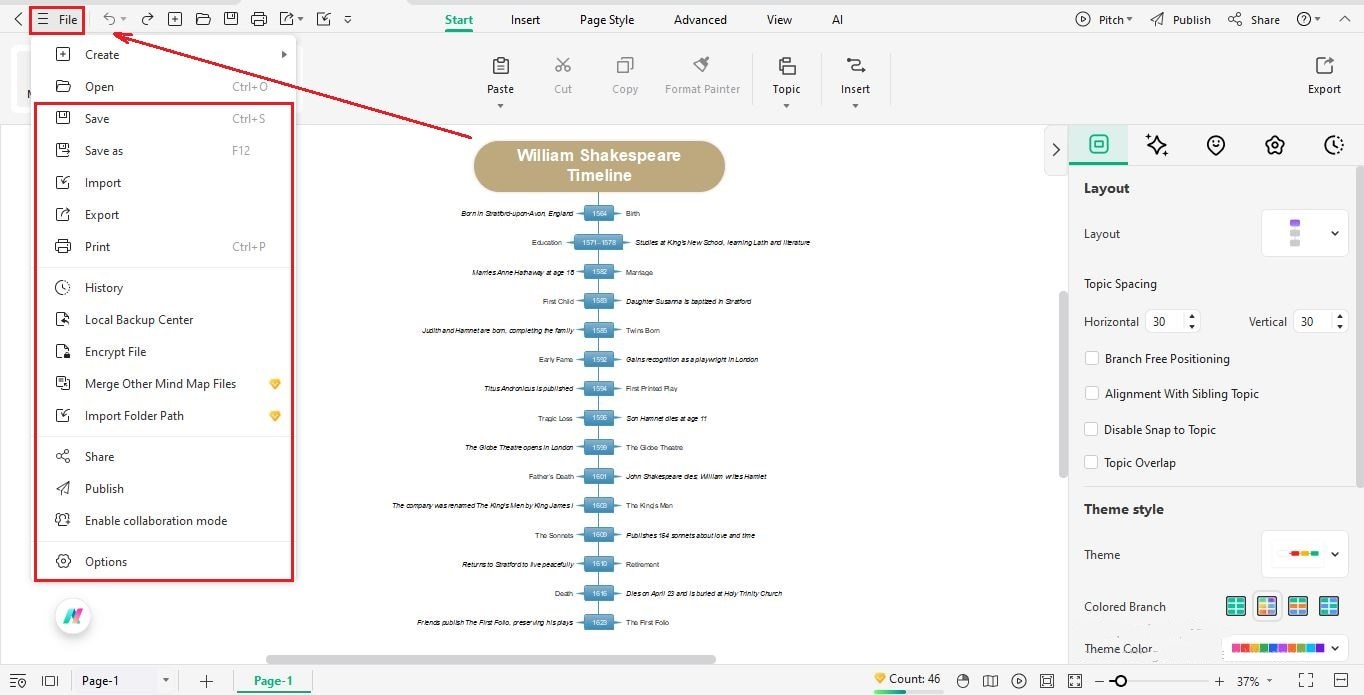
Save the working map and keep the original source records with the assignment. If your writer needs another format, check EdrawMind's export guide and choose a format available in your version. Reopen the delivered file and check that the required text is present. When importing an existing Markdown or FreeMind outline, review the result: the official import guide notes that imported files may not be fully compatible.
You can start by copying the eight fields into a blank map, then add the requirements for your next article in EdrawMind.
 Try the app & get 500 free AI tokens


Use AI to organize the supplied requirements
EdrawMind's official creation guide describes AI Mind Map Generation from an entered command. If you use it to start a brief, supply the actual assignment and ask it to organize those inputs. A generated branch is a proposal to review, and a plausible source reference still needs to be opened and checked.
For example, you can adapt this instruction:
Organize the supplied article assignment into these branches: Reader and outcome, Search task, Promise and scope, Claims and sources, Working outline, Examples and visuals, Product fit, and Handoff and review. Preserve explicit requirements and the supplied source links. Label proposed additions as suggestions. Mark missing information as “To confirm.” Do not invent search metrics, quotations, product behavior, or supporting sources.
Compare the result with the original assignment. Check whether a required example disappeared, a source was attached to the wrong claim, or the suggested outline introduced another audience. Resolve those differences before saving the version the writer will use.
Check the brief before handing it over
Use a short review that tests the assignment itself. A finished-looking map can still leave the writer with decisions they cannot make.
- Reader: Can the writer name the person's situation and the action the article enables?
- Answer: Does the proposed structure deliver the promised example, explanation, or decision?
- Evidence: Are important claims linked to the original sources, with qualifications preserved?
- Scope: Are competing audiences and additional topics separated from the current assignment?
- Assets: Does every diagram or screenshot have a specific purpose and a person responsible for checking it?
- Review: Are the delivery format, reviewer, date, and acceptance criteria clear?
Set a working length range when it helps the writer budget the draft, but let the required answer determine the final length. Google explicitly says it has no preferred word count. Adding words to reach an assumed ranking target can distract from the reader's task.
For a single editor and writer, the handoff branch may be enough. If an article passes through factual, legal, and design reviewers with different return paths, use EdrawMax as the auxiliary tool to draw the agreed review workflow. Put the reviewer, decision point, and next step on that flowchart; keep the article's audience, sources, and structure in the EdrawMind brief. The tools serve different parts of the task.
Hand over the brief when the writer can explain the assignment and the editor has identified any remaining checks. Keep the reviewed map available during drafting. When the audience or scope changes, update the affected requirements together so the writer and reviewer continue working from the same decisions.
 EdrawMind
AppsEdrawMind Online