



Microsoft, founded in 1975 by Bill Gates and Paul Allen, is a global tech leader known for Windows, Xbox, and cloud tools. Its success stems from grouping customers, selecting key markets, and implementing smart strategies.
In this article
Overview of Microsoft
Microsoft is one of the world’s biggest technology companies. Founded in 1975 by Bill Gates and Paul Allen, it started with computer software and now creates products like Windows, Xbox, and cloud tools used by millions worldwide.
Its success isn’t just from great products. Microsoft carefully studies customers, chooses who to serve, and shows why its brand stands out. These smart segmentation, targeting, and positioning tactics help it stay strong in a fast-changing tech world.
This article explains each strategy step-by-step. You’ll see how Microsoft groups its audiences, picks key markets, and builds a clear brand image. Understanding these moves will reveal how Microsoft keeps growing and inspiring users everywhere.
Here’s a quick overview of the company:
| Aspect | Information |
| Founded | 1975 |
| Headquarters | Redmond, Washington |
| CEO | Satya Nadella |
| Annual Revenue (2025) | $281.7 billion USD (Q2 2025) |
| Market Cap | $3.719 trillion USD |
| Industry Classification | Technology; Software & Cloud; AI; Consumer & Business Services |
| Latest Growth | 15%-18% |
| Official Website | microsoft.com |
Microsoft’s Market Segmentation
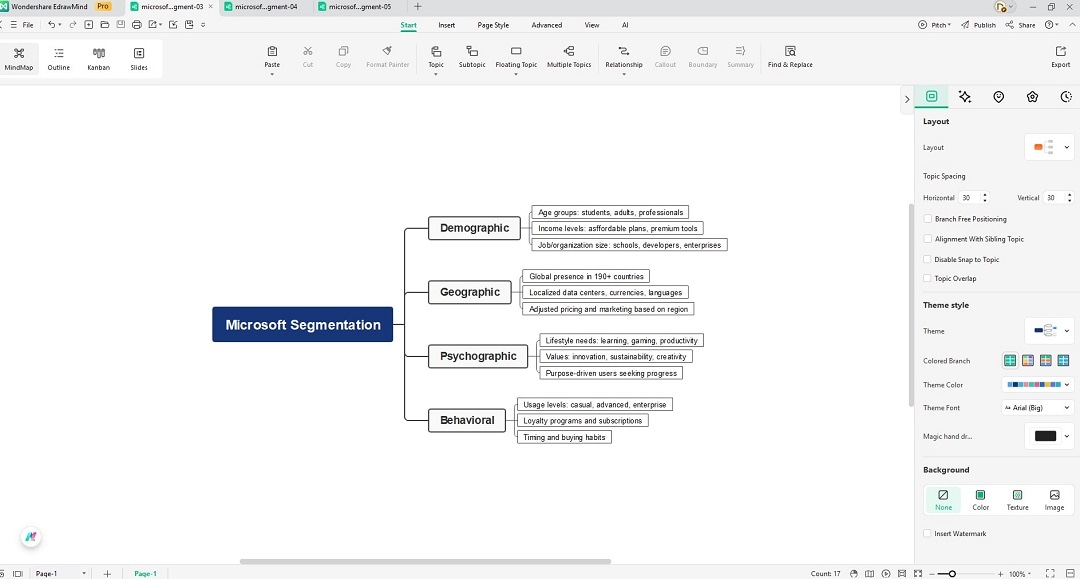
Microsoft’s success comes from understanding its customers. By dividing people into clear groups, it designs tools and services that match unique needs. This analysis looks at Microsoft’s segmentation tactic in demographic, geographic, psychographic, and behavioral aspects.
Demographic Segmentation
Microsoft serves many age groups, from students to adults and professionals. Its products match different income levels, offering low-cost tools like Microsoft 365 plans and premium solutions such as Azure or Surface devices for businesses, schools, and high-end consumers.
It also segments by job role and organization size. Students, teachers, developers, small companies, and large enterprises get products tailored to their needs. By aligning offers with education, work, and household demands, Microsoft stays useful for people worldwide.
Geographic Segmentation
Microsoft operates in over 190 countries. It customizes services to fit local markets, offering regional data centers, language support, and currencies. This helps it meet needs from urban hubs to rural regions, supporting users wherever they live or work.
The company also adjusts marketing and pricing for each area. Emerging markets may get affordable plans, while advanced economies see premium bundles. Microsoft’s wide global presence ensures its software and cloud tools stay relevant to different regions and economies.
Psychographic Segmentation
Microsoft looks at lifestyles and values. It appeals to students eager to learn, gamers who value entertainment, professionals wanting productivity, and businesses chasing innovation. Its tools, from Xbox to Teams, match people’s goals and personal or professional ambitions.
Sustainability and creativity also guide its offers. Eco-friendly projects, AI, and open collaboration target users who care about progress and social good. By focusing on purpose and personal drive, Microsoft inspires loyalty and builds a meaningful connection with audiences.
Behavioral Segmentation
Microsoft studies how customers use technology. Casual users get easy apps, while power users enjoy advanced cloud features or developer kits. Xbox players, Office workers, and Azure clients each receive tools designed for their habits and performance needs.
It also tracks loyalty and purchase timing. Subscriptions like Microsoft 365 reward repeat users, while business clients gain perks for long-term deals. Understanding when and how people buy helps Microsoft design experiences that fit customer behavior and boost retention.
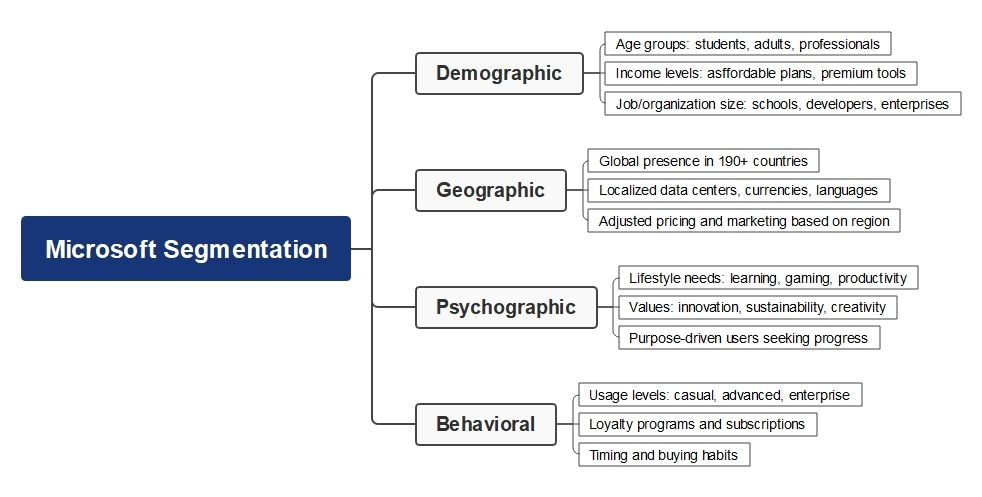


Through deep segmentation, Microsoft aligns technology with customer needs and goals. Whether for students, gamers, businesses, or eco-conscious innovators, its clear focus helps maintain loyalty and relevance, ensuring products and services meet expectations across global markets.
Microsoft’s Targeting Strategies
Microsoft targets businesses of all sizes, from small offices using Microsoft 365 to large enterprises running Azure. Its tools support productivity, security, and data storage, helping companies stay efficient, protect information, and grow in an increasingly digital world.
Education is a major focus. Students, teachers, and schools use Office apps, Teams, and learning platforms. By offering affordable software and digital classrooms, Microsoft builds trust early, encouraging young users to learn, work, and create with its products.
Gamers, developers, and creative users form another big audience. Xbox consoles, Game Pass, GitHub, and Surface devices support entertainment, coding, and design. These products reach casual players, professional programmers, and artists who enjoy innovation, technology, and exciting, modern tools.
Microsoft’s targeting strategy also focuses on global and eco-conscious markets. It adjusts pricing, services, and languages for regions worldwide and promotes eco-friendly cloud solutions. These efforts make its technology accessible, sustainable, and appealing to people and businesses everywhere.
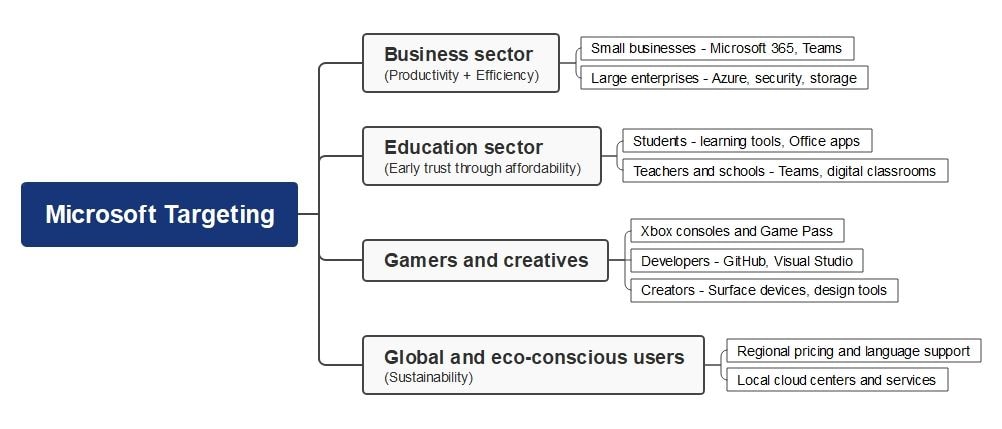
Microsoft targets businesses, schools, gamers, innovators, and eco-conscious users through flexible pricing, global outreach, and personalized services. These strategies keep its software, cloud, and entertainment tools relevant, building loyalty and ensuring steady growth across professional, educational, and leisure markets worldwide.
Microsoft’s Positioning Strategies
Microsoft positions itself as a leader in technology by shaping how people work, play, and connect. Its approach blends innovation, smart branding, and long-term planning, helping the company stay strong while guiding industries toward new tools, trends, and opportunities.
Industry Transformation
Microsoft’s positioning aligns with its goal to drive industry change. Products like Azure, Microsoft 365, and Copilot reshape how businesses, schools, and individuals handle tasks, making technology faster, smarter, and easier for people everywhere to use every day.
Partnerships and investments also push transformation. Microsoft works with startups, governments, and global brands to deliver solutions across healthcare, education, and finance. By helping other sectors grow through technology, it cements its role as a key innovation partner worldwide.
Competitive Advantage
Microsoft’s strength comes from its wide product mix. Windows, Azure, Office, Xbox, and Surface let it meet different customer needs, giving it an edge over rivals like Apple, Google, and Amazon by offering both powerful platforms and flexible services.
Its cloud dominance and strong AI research boost this lead. With reliable security, global support, and advanced tools, Microsoft keeps customers loyal. Constant updates and integration across devices ensure users get seamless, high-quality experiences that competitors struggle to match.
Future Plans
Microsoft plans to grow with AI, sustainability, and global expansion. It invests in machine learning, green data centers, and better access for new markets, ensuring its products meet future demands while supporting communities and the environment responsibly.
The company also focuses on mixed reality, quantum computing, and advanced collaboration tools. These projects aim to create new ways to learn, work, and entertain, keeping Microsoft at the front of technology as trends and industries evolve.
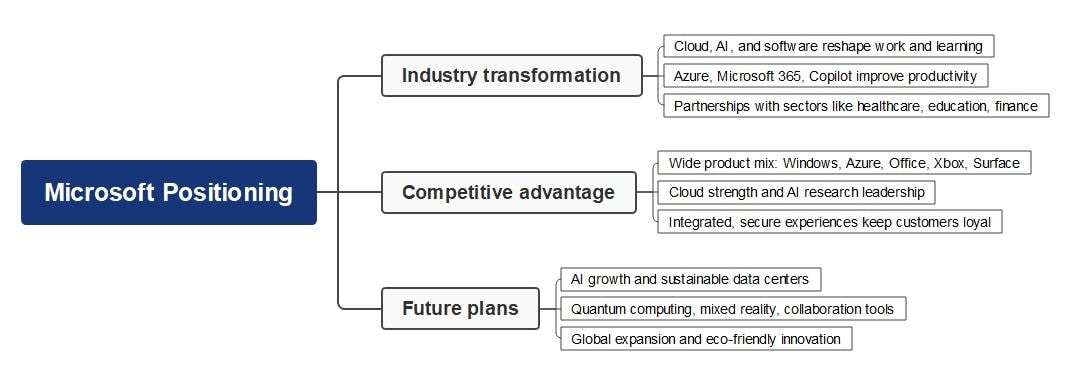
Looking ahead, Microsoft invests in AI, sustainability, and advanced tools like quantum computing and mixed reality. These plans strengthen its leadership, helping the company stay competitive, eco-friendly, and ready to guide users through future changes in technology and business.
How To Make a Segmentation, Targeting, and Positioning Analysis
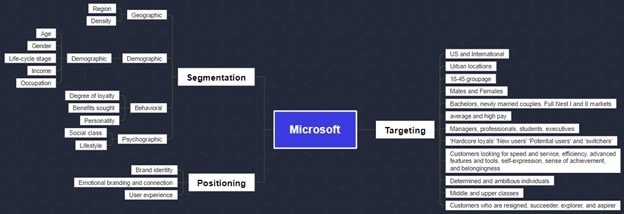
Understanding Microsoft’s segmentation, targeting, and positioning shows how it reaches businesses, schools, gamers, and eco-conscious users. Mind maps help by clearly linking markets and strategies, making it easier to see which audiences benefit most from Microsoft’s wide range of products.
Building on this view, Microsoft’s strategies focus on one market. By mapping Microsoft’s many customer groups, you can see how it balances broad reach with tailored offers, creating value for people with varied needs.
To make this work even smoother, using digital mind map tools is helpful. Whiteboard apps and diagram creators turn complex data into visuals, making it simple to organize insights, highlight strengths, and guide smart planning for Microsoft’s future growth.
Use a Professional Mind Map Maker
Good news: you don’t need to draw mind maps from scratch anymore!
With Wondershare EdrawMind, AI tools, built-in icons, and ready-to-use templates, you can easily and quickly design clear and professional marketing mix analyses with less effort.
How To Make an Analysis Mind Map
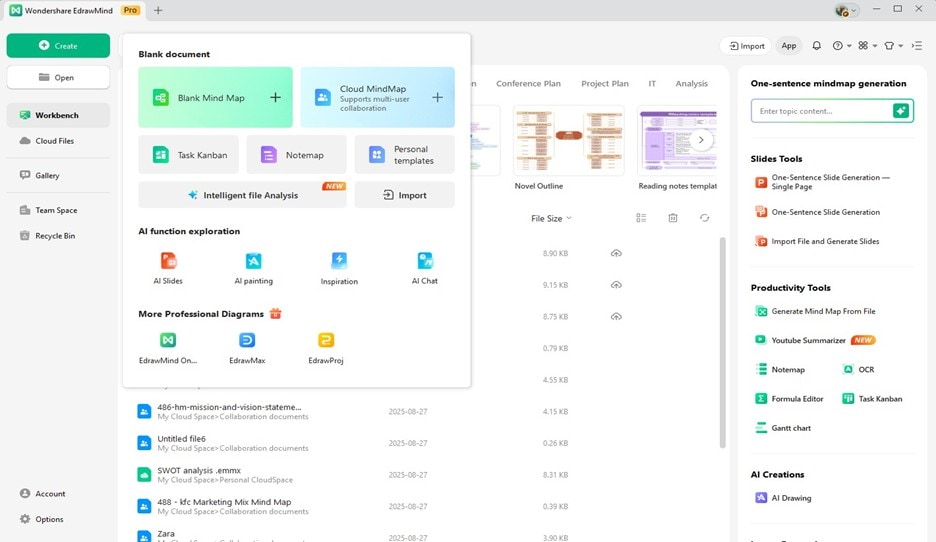
Step 1:
Click Create > Blank Mind Map to create a mind map.
 Try the app & get 500 free AI tokens


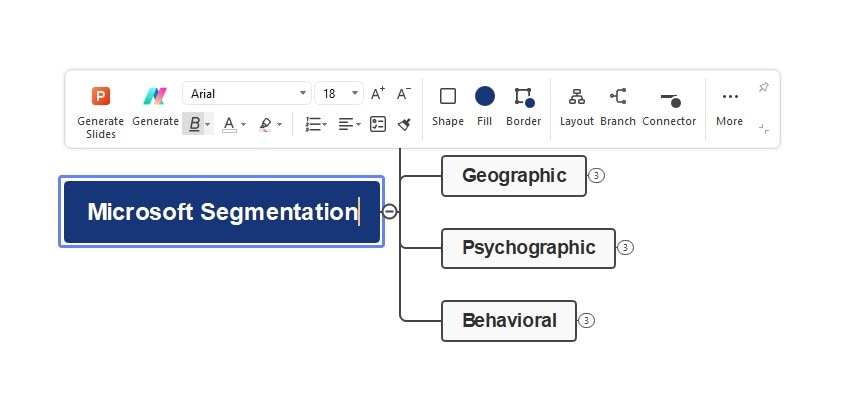
Step 2:
Then, edit the Main Idea to specify the aspect that you want to analyze. For example, you can use “Microsoft Segmentation.”
Step 3:
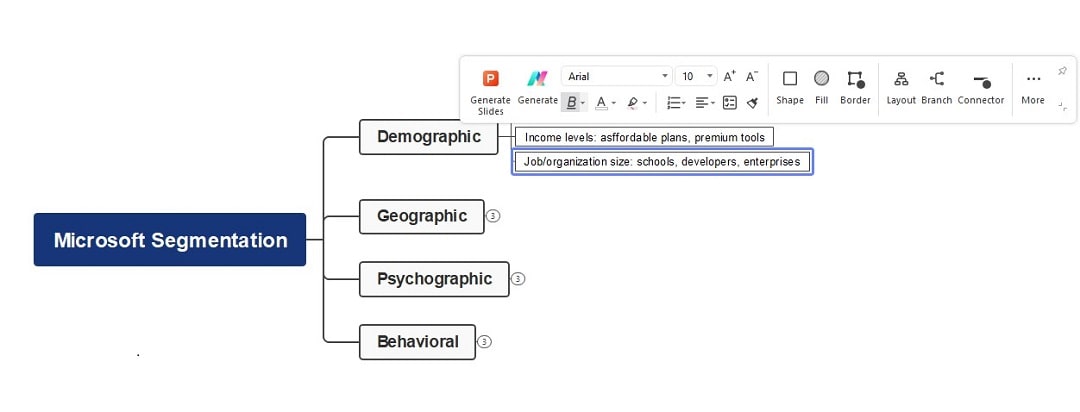
Add the main branches to show the main segments of the analysis. To add more main branches, press the Enter key. You can also add subtopics to expand on the idea by pressing the Tab key.
Step 4:
Change the theme or layout, or add images or icons to improve your diagram's visual appeal and add more information.
Step 5:
Export and share with your friends via PDF, JPG, or other file formats supported by EdrawMind.
Tips When Making a Segmentation and Targeting Analysis Mind Map
- Begin with the key ideas – Place Segmentation, Targeting, and Positioning at the center, then branch into details for each area to keep your analysis clear and organized.
- Use hierarchy and short phrases – Break each section into smaller points using simple keywords so the map stays neat and easy to follow.
- Add visuals and structure – Use icons, colors, or highlights to show links between customer groups, markets, and brand messages, making the map more engaging.
- Leverage digital tools – Try apps like EdrawMind or similar platforms with templates, AI help, and collaboration features to build professional STP mind maps quickly.
FAQ
-
1. What does Microsoft do?
Microsoft is a global technology company that makes software, hardware, and cloud services. It’s best known for Windows, Microsoft 365, and Xbox. It also builds developer tools, AI platforms, and Azure, a cloud service used by businesses worldwide. -
2. How does Microsoft make money?
Microsoft earns money from many sources. It sells Windows, Office, and other software, provides cloud tools through Azure, and offers devices like Xbox and Surface. Subscription services and advertising also add to its income, making it a very profitable company. -
3. Who are Microsoft's biggest competitors?
Microsoft’s biggest competitors are other large tech companies. Apple rivals it in computers, tablets, and software. Google (Alphabet) competes in cloud services, apps, and AI.Amazon challenges Microsoft with its AWS cloud platform, while Sony competes with Xbox through its PlayStation gaming business.
 EdrawMind
AppsEdrawMind Online
EdrawMind
AppsEdrawMind Online

