




Improving productivity at work means using your time, focus, and energy more effectively. It is not about working longer hours but about working smarter.
With the right strategies, you can complete tasks faster. The page will teach you how to reduce stress and get consistent results.
Mind maps make productivity planning more effective. They organize tasks, deadlines, and priorities into clear structures. Instead of feeling overwhelmed, you see exactly what to do and how to manage time.
Wondershare EdrawMind supports productivity planning with AI-powered tools. This article will explore how to improve your productivity at work!
In this article
What Does Improving Your Productivity at Work Mean?
Productivity at work means doing more in less time with the same or fewer resources. It reflects how well you manage tasks, focus, and priorities to create meaningful outcomes.
High productivity does not mean rushing through tasks. It means balancing efficiency with quality. Productive employees contribute more value, enjoy less stress, and build stronger career growth.
Here’s a productivity planning mind map made using Wondershare EdrawMind:
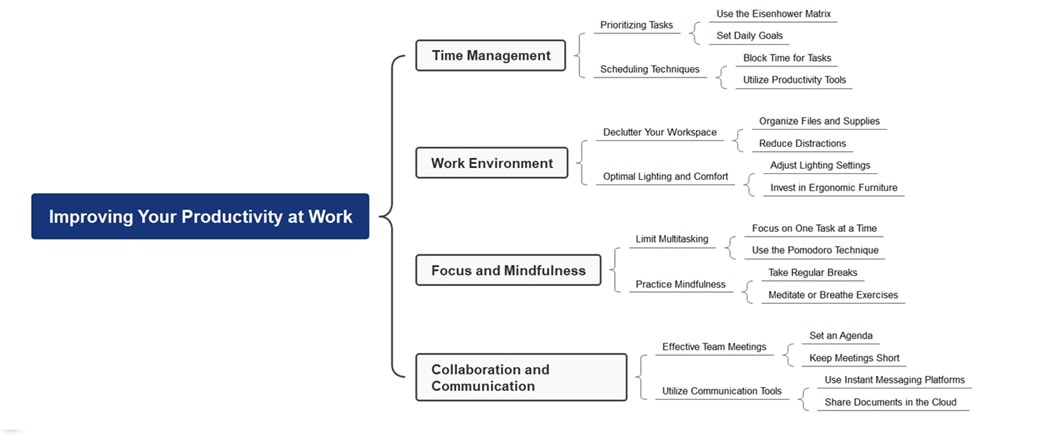


This productivity mind map was generated using EdrawMind’s AI. It organizes work improvement into four main areas: time management, work environment, focus, and collaboration. Each branch expands into practical steps, making complex strategies easier to understand and apply.
The time management section highlights task prioritization and scheduling techniques. Using the Eisenhower Matrix, setting daily goals, and blocking time ensure structured work. Productivity tools add extra support, helping complete tasks with efficiency and clarity.
The work environment, focus, and collaboration areas emphasize workplace setup and habits. Decluttering, ergonomic furniture, and proper lighting reduce distractions. Mindfulness, breaks, and Pomodoro sessions strengthen focus. Communication tools and shorter meetings improve teamwork. Together, these elements build long-term productivity.
How Productivity Shapes Your Success
Work productivity influences more than daily results. It impacts career progress, stress levels, and job satisfaction. A productive person delivers consistent quality and earns trust from peers and leaders.
Low productivity often leads to missed deadlines and frustration. Improving work habits strengthens focus and efficiency. With the right strategies, productivity becomes a long-term advantage.
10 Essential Tips To Improve Productivity at Work
Productivity does not improve overnight. It requires steady habits and practical methods. These ten tips will help you increase efficiency at work:

-
Delegate
Delegation is a skill that boosts efficiency by letting others handle tasks suited to their strengths. By trusting capable team members, you create room to focus on critical responsibilities without stretching yourself too thin.
When you delegate, you encourage collaboration and skill development within your team. It prevents burnout, balances workloads, and ensures projects move forward. Delegation strengthens both productivity and workplace relationships.
-
Prioritize Your Time
Time is a limited resource, and prioritization ensures it is spent right. Tackling important tasks first keeps you aligned with goals. Meanwhile, delaying less urgent activities reduces unwanted stress.
By organizing priorities, you avoid wasting energy on distractions. Tools like the Eisenhower Matrix or simple task rankings help identify where your effort matters most. This clarity fuels steady progress throughout the day.
-
Make a To-Do List
A to-do list is more than a reminder; it is a productivity map. Writing tasks down makes responsibilities clear and actionable. They provide structure to even the busiest schedules.
Each completed item builds momentum and motivation. Having a to-do list reduces mental clutter and anxiety. It allows you to focus with confidence. Organized planning turns overwhelming goals into manageable daily steps.
-
Take Breaks
Constant work lowers focus and creativity. Regular breaks allow your brain to reset. It keeps energy levels consistent throughout the day and prevents fatigue.
Simple actions like walking, stretching, or hydrating improve clarity. Even short pauses encourage better problem-solving. Make breaks a valuable tool for long-term productivity instead of wasted time.
-
Limit Distractions
Distractions like social media, noise, or unnecessary notifications drain focus. Removing them helps you stay concentrated on tasks that truly matter. It prevents time from slipping away unnoticed.
Creating a distraction-free environment strengthens deep work. Silence alerts, set boundaries, or use productivity apps to safeguard your attention. With fewer interruptions, efficiency improves, and goals are achieved faster.
-
Reduce TV Time
Television can consume hours that might be used productively. Reduce your viewing time to gain opportunities for other activities. Use the extra time for reading, learning new skills, or exercising.
Balanced entertainment keeps relaxation healthy without dominating your schedule. Choosing purposeful downtime over passive watching makes days more fulfilling. It keeps the momentum strong in both personal and professional life.
-
Set Goals
Clear goals create purpose and motivation. They help structure daily activities to support long-term achievements. Goals keep you on track instead of drifting between unproductive tasks.
Measurable objectives allow progress tracking and highlight accomplishments along the way. With defined targets, every action feels more meaningful. They fuel motivation and ensure consistent improvement in productivity.
-
Reward Yourself
Small rewards for completed tasks motivate you to continue. Treating yourself reinforces positive habits. It turns productivity into a cycle of effort and recognition.
Rewards can be simple, like breaks or personal indulgences, yet they create lasting satisfaction. This balance between discipline and enjoyment sustains energy. It prevents burnout while encouraging ongoing progress.
-
Self-Monitor
Regularly checking progress builds accountability. Tracking habits and completed tasks shows strengths and highlights areas where improvement is needed.
Self-monitoring creates awareness that sharpens focus. Reflection and adjustment become second nature. It ensures productivity strategies stay aligned with goals. It also encourages consistent self-improvement over time.
-
Prepare the Night Before
Planning tasks reduces stress and wasted time in the morning. A prepared start sets a productive tone for the rest of the day.
Organizing priorities, materials, or schedules the night before creates clarity. This habit builds consistency, strengthens focus, and ensures smoother workflows. They give you an advantage before the day even begins.
Why Use EdrawMind To Improve Productivity?
Productivity planning often feels scattered. EdrawMind simplifies it by turning ideas, tasks, and priorities into clear maps. This visual approach helps you spot problems, save time, and increase focus.
With mind mapping, you can organize daily work. Diagrams can break down large projects and manage deadlines with ease. EdrawMind helps transform busy schedules into structured, actionable plans.
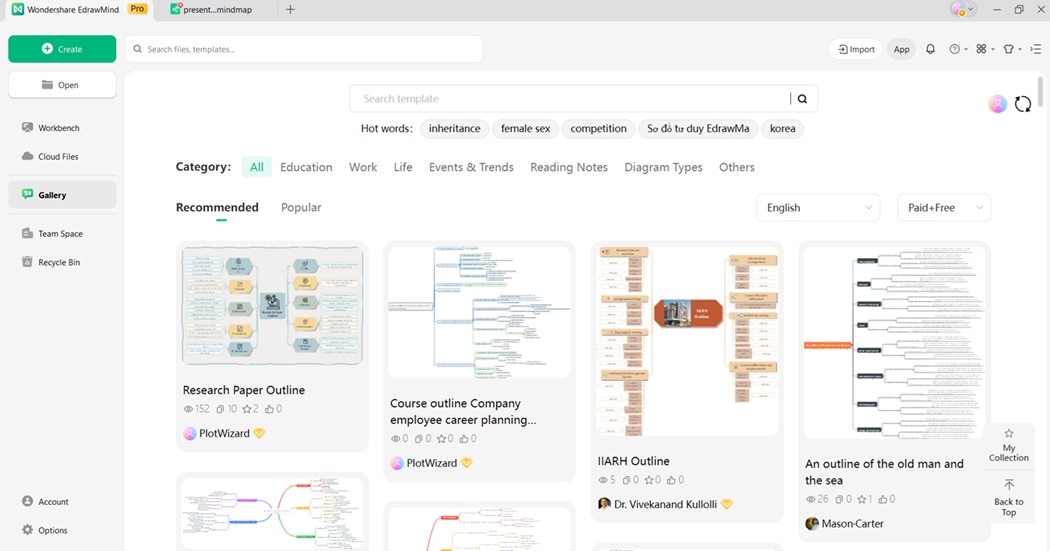
AI Task Planner
Type your work goals into EdrawMind. Wait for the AI to make a structured plan for you. It builds a roadmap that can be followed and adjusted. It ensures your projects stay clear, actionable, and easy to manage.
File to Slide Task Map
Upload your notes, reports, or schedule. EdrawMind can organize them into a productivity map in seconds. This feature saves time by connecting scattered details into a single visual view. It makes your workflow efficient and well-structured.
Pic to Slide Productivity Map
Take a photo of notes, whiteboards, or meeting sketches. Let EdrawMind transform them into editable diagrams. This ensures ideas captured on the go are never lost. The tool gives you an organized way to refine and reuse them.
AI Mapping
Enter prompts like “weekly tasks” or “project goals,” and EdrawMind generates a mind map in seconds. You can then edit and customize it, turning rough ideas into a polished plan for your projects.
Concept Map Maker
Build concept maps linking your goals, deadlines, and resources. EdrawMind’s tool helps you see how each element connects. It makes relationships and dependencies clear, allowing you to manage tasks and objectives easily.
Text to Mind Map Maker
Paste raw text from lists, notes, or emails. EdrawMind will convert it into an organized mind map. It turns any information into a structured outline, making task planning simpler and more effective.
How To Improve Your Work Productivity With EdrawMind
EdrawMind’s AI Mind Map Generation helps you structure ideas and tasks. It simplifies planning, decision-making, and time management.
The tool can create diagrams that connect goals, priorities, and opportunities. Follow these steps to begin improving your productivity:
Step 1:
Download and install EdrawMind. Log in with your Wondershare account or register a new one. Once inside, create a new mind map project to begin.
 Try the app & get 500 free AI tokens


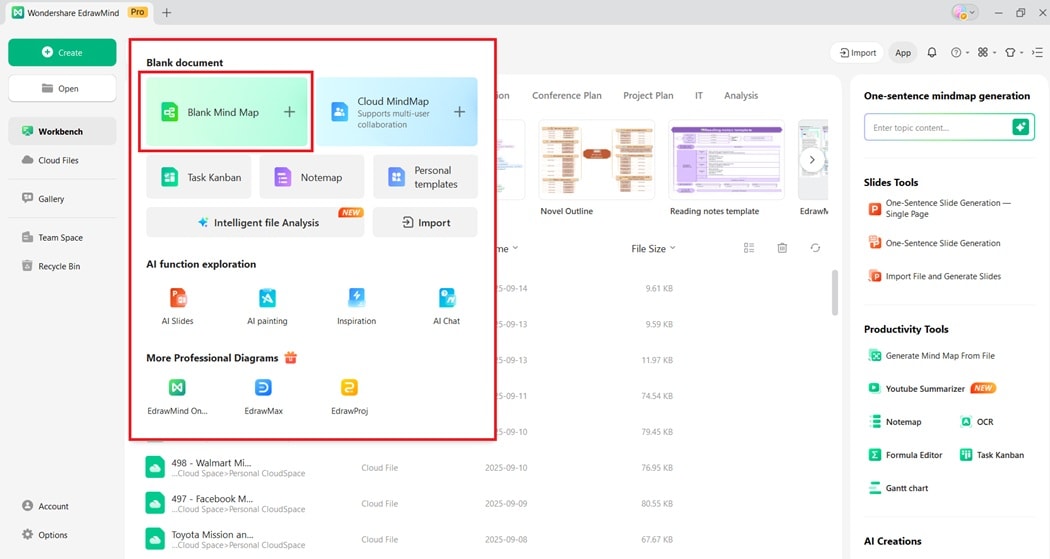
Step 2:
Select the AI Mind Map Generation tool from the top menu. Type in your work goals, current tasks, or skills you want to focus on. Wait for the AI to build your diagram in seconds.
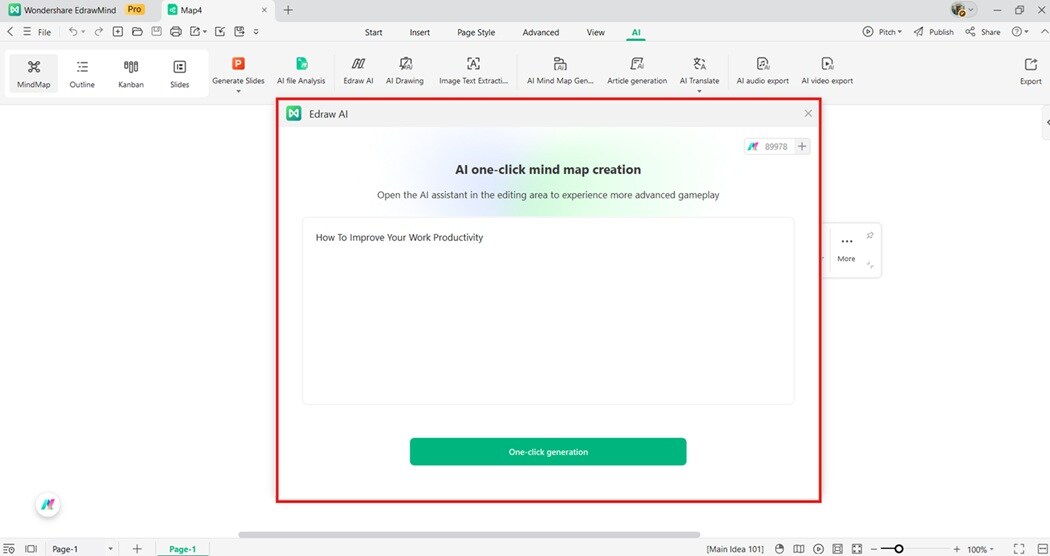
Step 3:
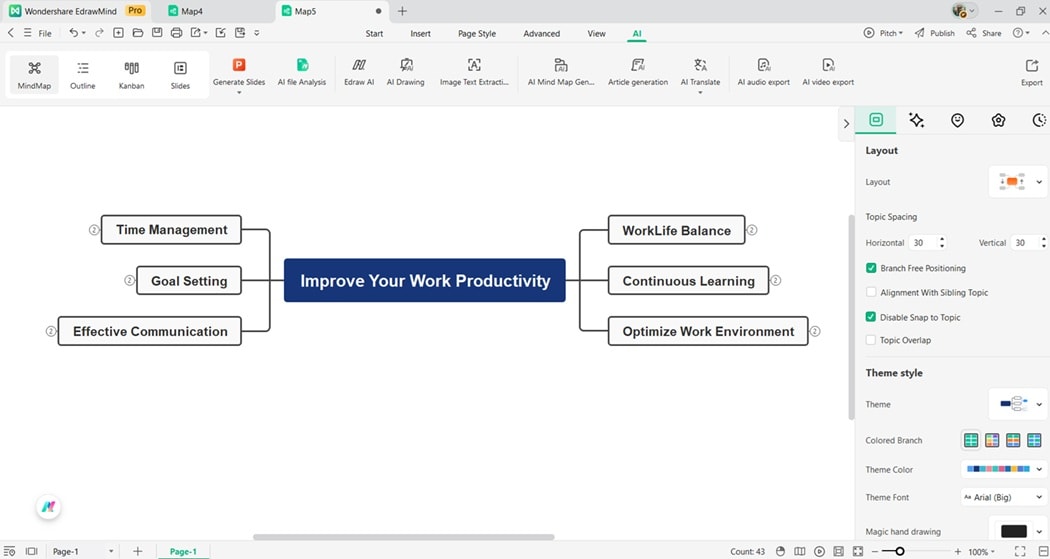
Review the generated map, then start customizing. Add your tasks, deadlines, or performance goals as subtopics. Rearrange the structure to reflect your workflow.
Step 4:
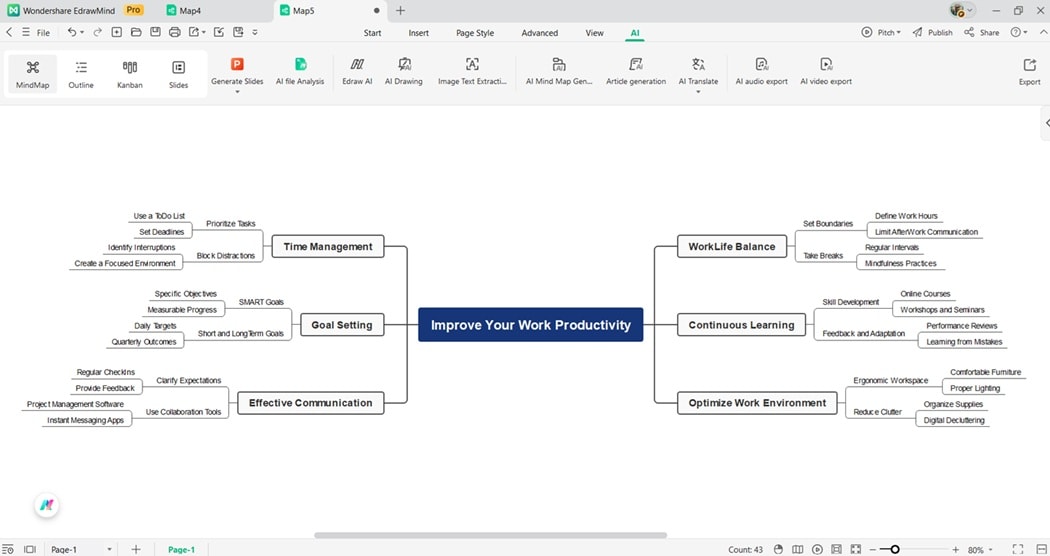
Grow your map by adding deeper layers. Build a complete picture of your productivity plan.
Step 5:
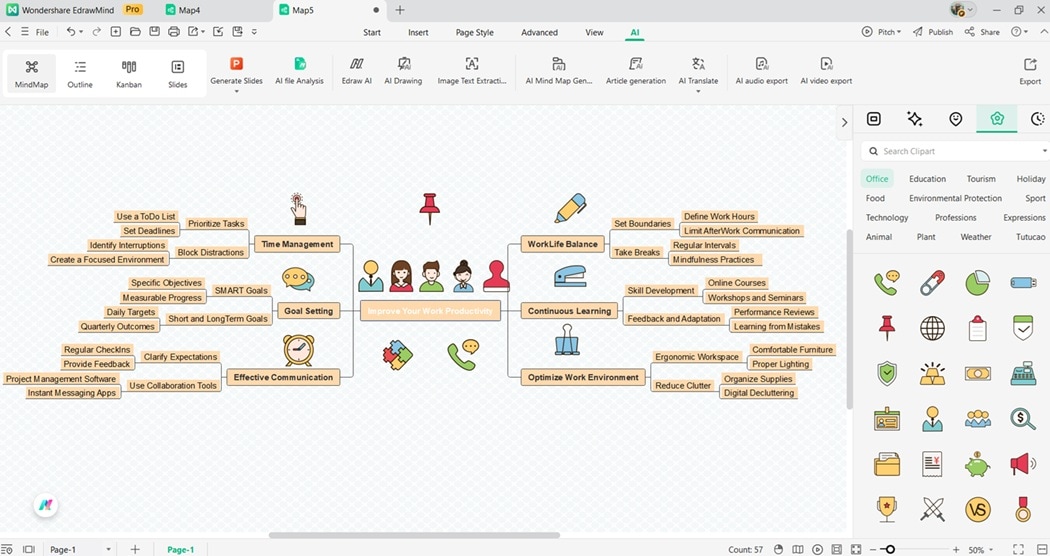
Choose from different layouts, themes, and color palettes to personalize your diagram. Use the right-side panel to add icons, clipart, or images to highlight important information.
Step 6:
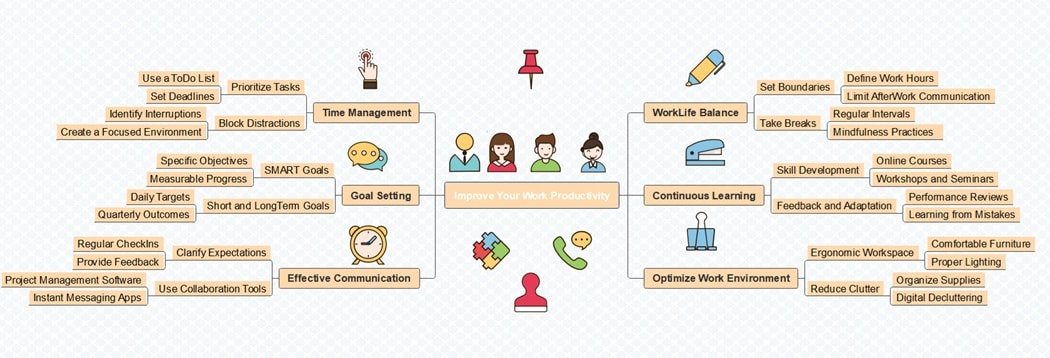
Finalize your productivity map and review its structure. Export it as a PDF, Word file, or image so you can revisit it later. Share it with your audience as you want.
Free Mind Map Templates To Improve Productivity
Free productivity templates in EdrawMind provide ready-to-use layouts for task planning, time management, and goal tracking. They save setup time, ensure clarity, and help boost workplace efficiency. Try these templates today to streamline your workflow:
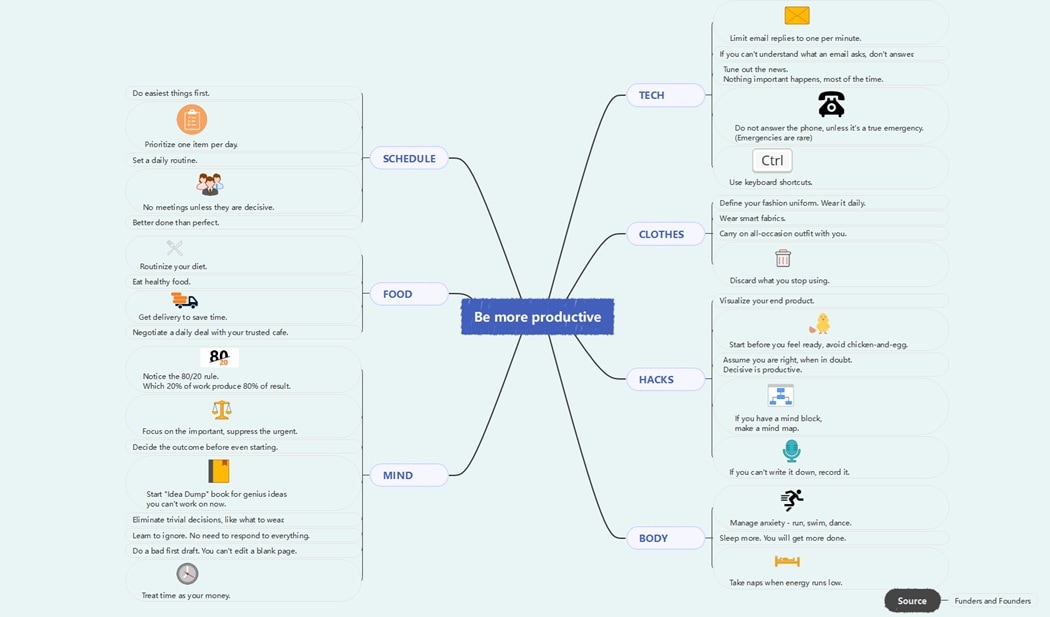
Be More Productive Mind Map
This productivity mind map highlights practical tips across technology, clothing, food, body, and scheduling. It shows how small changes can save energy and increase focus.
It also emphasizes mindset and habit. The examples used are using the 80/20 rule, ignoring trivial tasks, and starting before feeling ready. These strategies combine to build efficiency.
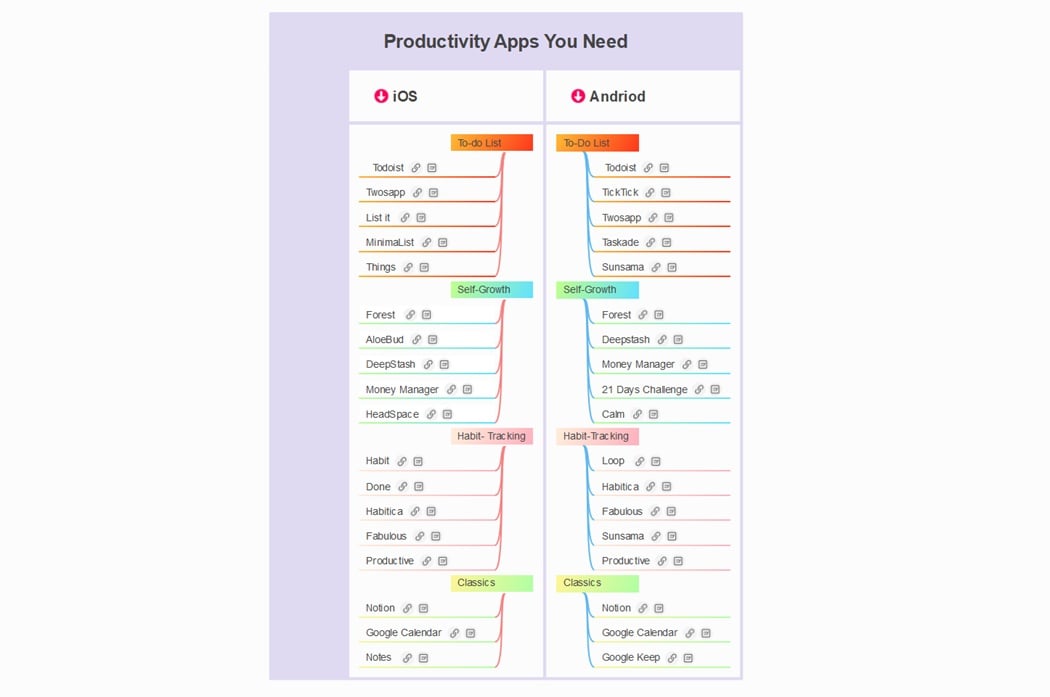
Productivity Apps You Need Mind Map
This mind map organizes top productivity apps for iOS and Android. It covers to-do lists, self-growth, habit-tracking, and classic tools. Each category helps users stay on track with tasks, routines, and personal development.
It compares options across platforms. There are flexible apps like Todoist, Notion, and Forest, along with niche tools for wellness and planning. This guide helps you select the right app to match your productivity style.
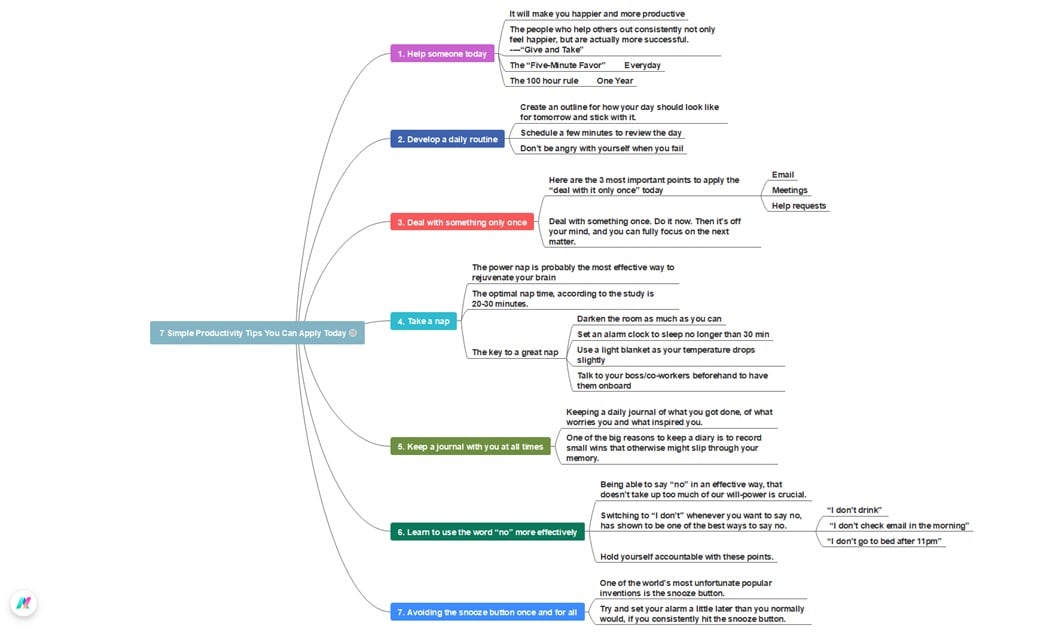
7 Simple Productivity Tips You Can Apply Today Mind Map
This mind map highlights seven easy strategies to increase productivity. It includes helping others, building routines, handling tasks once, and avoiding the snooze button. Each tip focuses on improving focus, energy, and efficiency throughout the day.
It also emphasizes practical habits such as journaling, taking short naps, and learning to say no. By adopting these steps, you can reduce stress and stay motivated.
Conclusion
Improving productivity at work needs structure, reflection, and consistency. Mind maps simplify the process by organizing tasks, goals, and deadlines. They make priorities clear and execution easier.
EdrawMind enhances this process with tools that turn busy schedules into structured productivity maps. With clear layouts, you gain control and efficiency in your daily work.
Use EdrawMind to guide your work habits, manage projects, and stay focused. It helps you adapt, grow, and succeed with better productivity.
FAQ
-
Can multitasking harm productivity?
Yes. Multitasking often lowers efficiency because attention is split across tasks. Focusing on one task at a time allows you to finish faster with fewer mistakes. It leads to higher quality and less stress. -
Is EdrawMind suitable for team collaboration?
Absolutely. EdrawMind supports shared projects, allowing team members to contribute ideas in real time. This makes collaboration smoother. EdrawMind reduces miscommunication. The platform ensures everyone stays aligned on project goals, tasks, and deadlines. -
Who can benefit from EdrawMind’s productivity tools?
Students, professionals, and teams can all benefit. The tools help manage daily tasks, career goals, and group projects. By providing clarity and structure, EdrawMind supports better planning. It helps improve your productivity across many situations.
 EdrawMind
AppsEdrawMind Online
EdrawMind
AppsEdrawMind Online

