



At the beginning of each year, most people have goals—even if vague—thinking "I hope I can do ○○" or "I wish I could become ○○." Whether you spent the past year aimlessly or achieved significant goals, why not visualize your objectives for the new year with a "bucket list" to make it a fulfilling year?
This article introduces specific examples of a personal "100 Bucket List," key points for creating one, and methods for creating and managing it using a "Kanban board," which is useful for task management.
1. 2026 Bucket List Example: 100 Things to Do [For People in Their 30s-40s]!
While you might often think "I want to do this someday" or "I'd like to try that," when it comes time to "list 100 things you want to do," many people struggle to come up with ideas immediately.
Here, we'll introduce specific examples of a "100 Bucket List" aimed at people in their 30s to 40s. Use this list as a reference to plan your own fulfilling year.
|
|
Try entering your "2026 Bucket List of 100 Things to Do" in the space below!
Even if you create a list, it will end up as "satisfied just by making it" unless you manage it properly. This is where the "Kanban board" comes in handy—it visualizes tasks by dividing them into columns like "To Do," "In Progress," and "Completed." While famous as a business tool, the Kanban board is also ideal for personal task management due to its simple and intuitive management method.
Below is a sample template of the 100-item list mentioned above organized into a Kanban board.
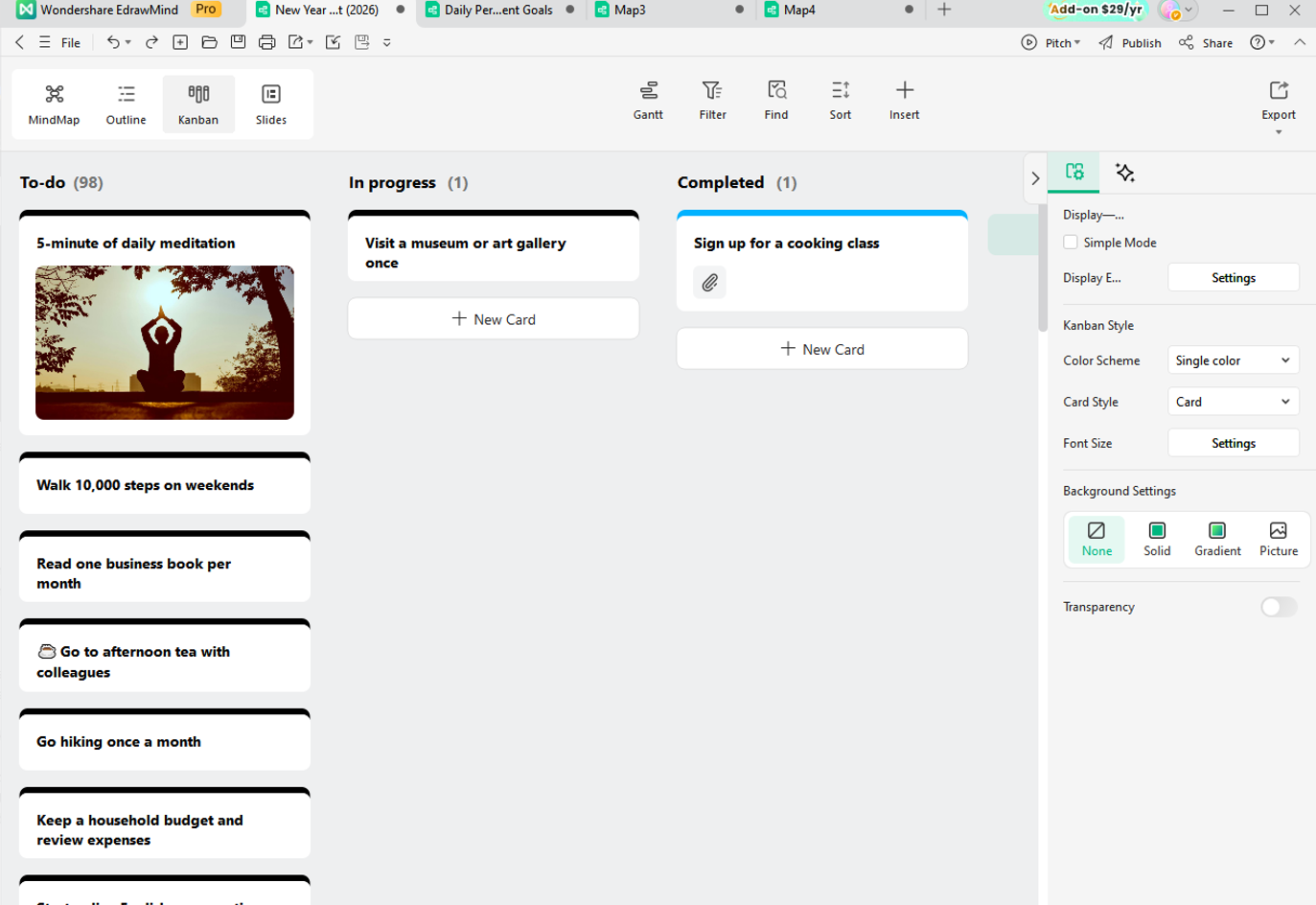
By managing your bucket list with a Kanban board, you can grasp your progress at a glance and work toward achieving your goals while maintaining motivation.
2. Key Points for Creating a Bucket List
If you're going to create a bucket list, let's master the techniques and prepare a fulfilling list. Here are some key points to consider when creating your bucket list.
2.1 What Should You Include in Your Bucket List?
While you can add items later as you think of them, when brainstorming your bucket list, dividing it by categories—such as life, work, hobbies, family and friends—helps you list everything without missing anything.
Besides categorizing by genre, you can also think in terms of timeframes: short-term, mid-term, and long-term goals. Another key point is setting specific goals so you can objectively determine whether they've been achieved.
Also, even if something seems "impossible" or "too expensive," writing it down first can break through mental blocks and help you think of many more things you want to do.
One important caution: setting too many high goals can make viewing the list itself feel burdensome. Therefore, include plenty of easily achievable goals that make working through the list enjoyable. For example, including items like "visit that café I've been curious about" or "invite a friend to watch that movie" makes the list fun and easy to act on, helping you build the habit of checking it regularly.
The final key point is not to be fixated on the items you created initially. Your interests will change throughout the year. By regularly reviewing your list and deleting or adding items, you can maintain a fresh and appealing list.
Of course, there's no need to be obsessed with the number "100." Wouldn't a year overflowing with more than 100 things you want to do be even more attractive?
2.2 What Should You Use to Create Your Bucket List?
While writing your bucket list in a notebook is fine, using digital tools that allow easy creation and management is recommended. With notebooks or planners, you need to carry them around or deliberately open them, but by using apps or software accessible on smartphones or computers, you can easily check, modify, and update anytime, anywhere.
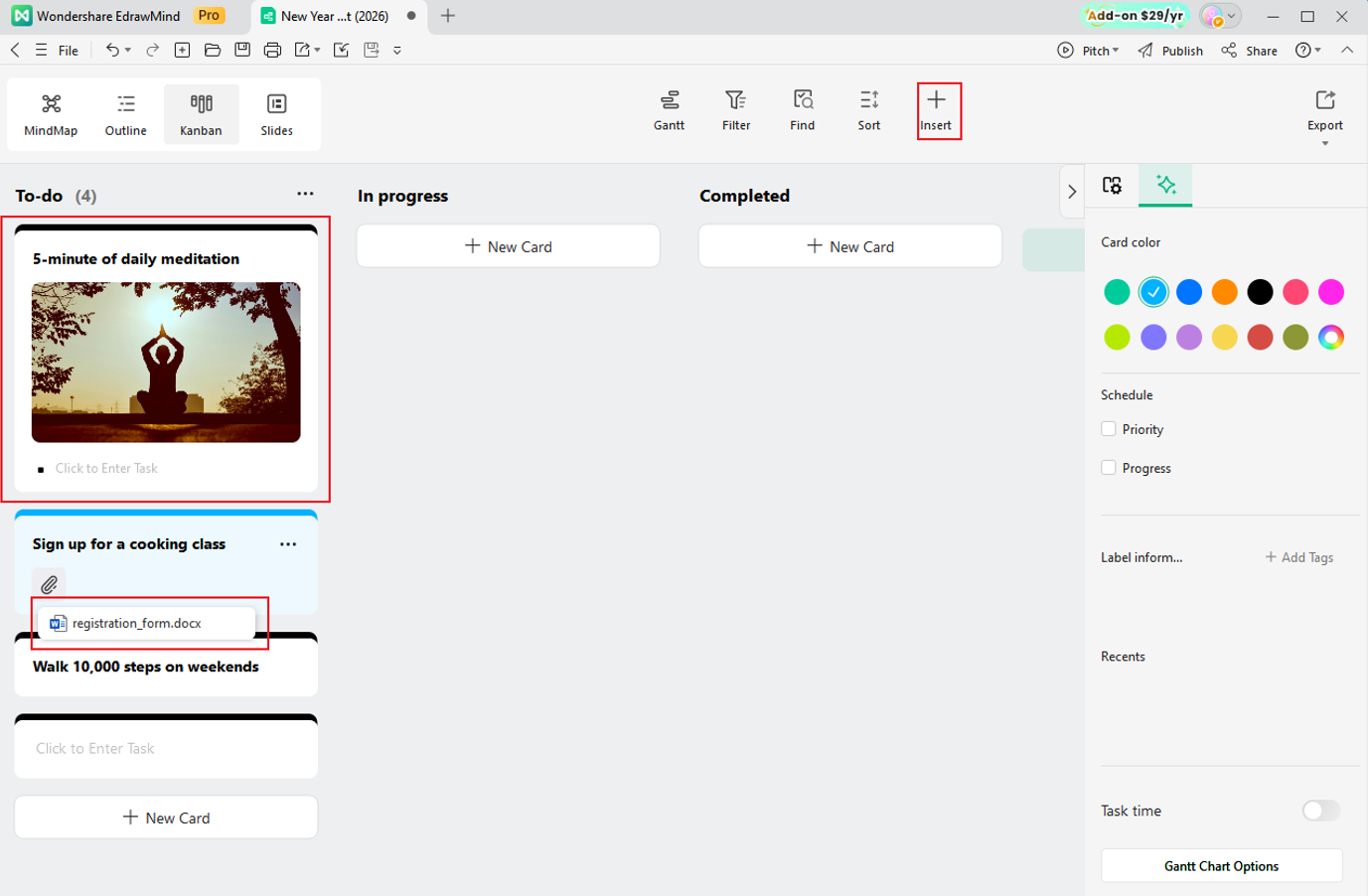
Another advantage of apps is the ability to attach images and related links. Since you can check images and reference sites anytime, it boosts motivation and makes it easier to get started on your goals.
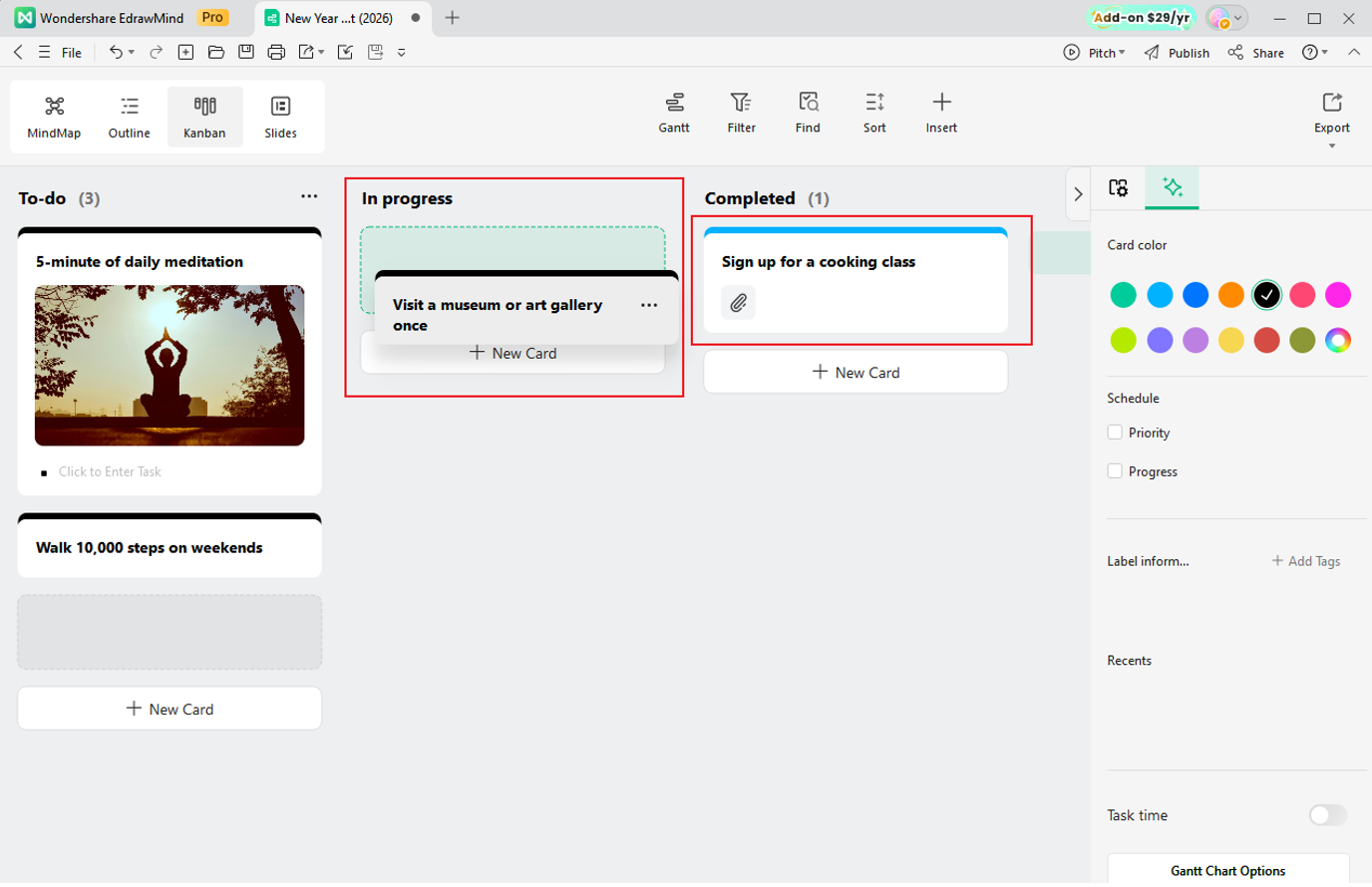
Furthermore, moving an item to the "Completed" column increases your sense of accomplishment and effectively maintains motivation. Enjoy the satisfaction of accumulating small achievements while progressing toward bigger goals.
3. How to Create a Bucket List with a Kanban Board
To effectively manage your bucket list, using digital tools is recommended. In particular, the mind mapping software "EdrawMind" includes not only convenient mind map features for organizing ideas but also Kanban board functionality, optimal for goal management. Using this Kanban board feature, you can visually manage your bucket list and easily track progress.
 Try the app & get 500 free AI tokens


Next, we'll introduce how to create and manage a bucket list using EdrawMind's Kanban board feature.
3.1. Create Items as Cards
Launch EdrawMind, and from the "Workbench," click "Create" → "Kanban Board."
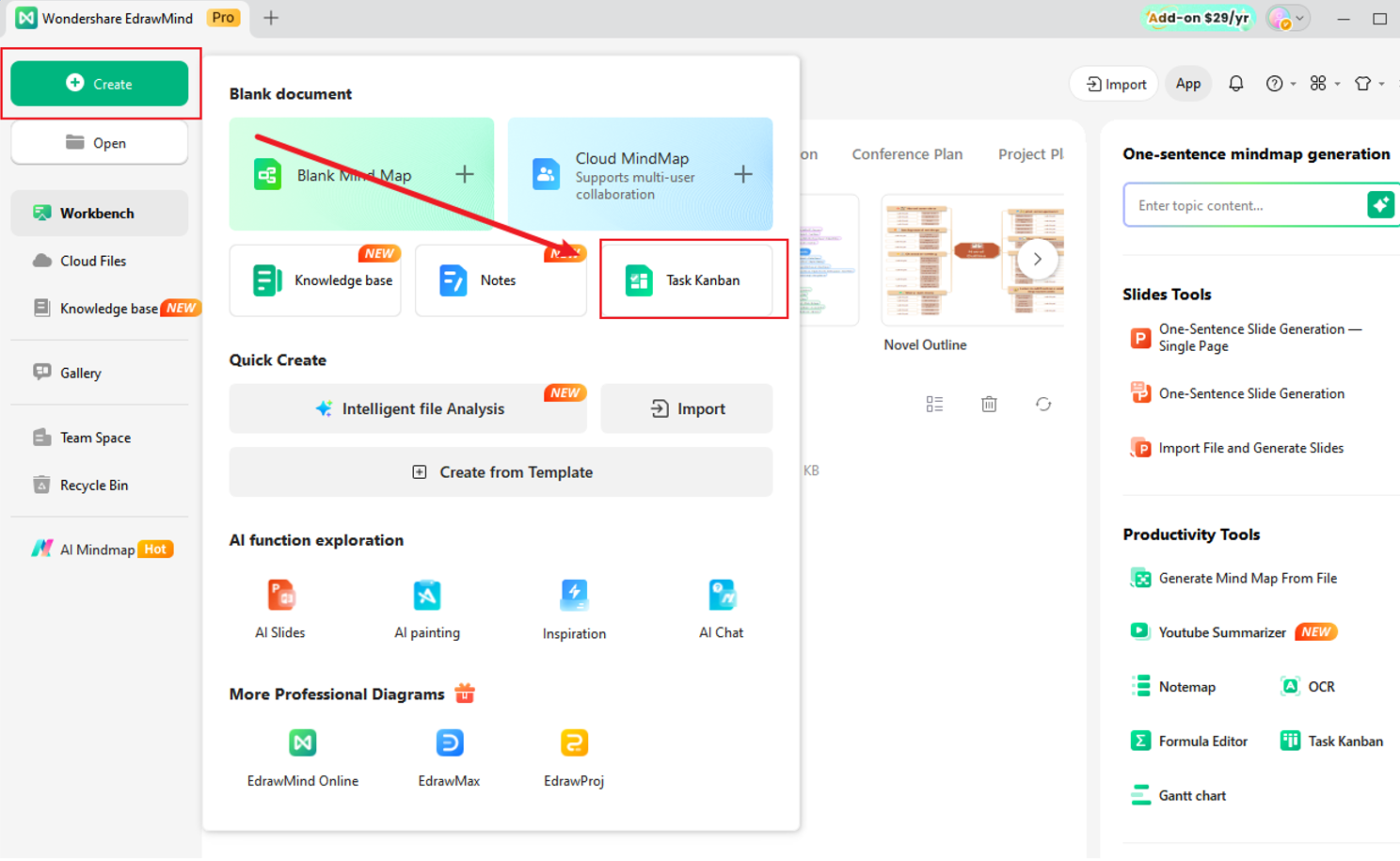
Initially, a mind map is displayed, so switch to "Outline" or "Kanban Mode" from the upper left corner of the screen. In Kanban mode, clicking "+ New Card" in the leftmost column creates a new card. Enter what you want to do on the card.
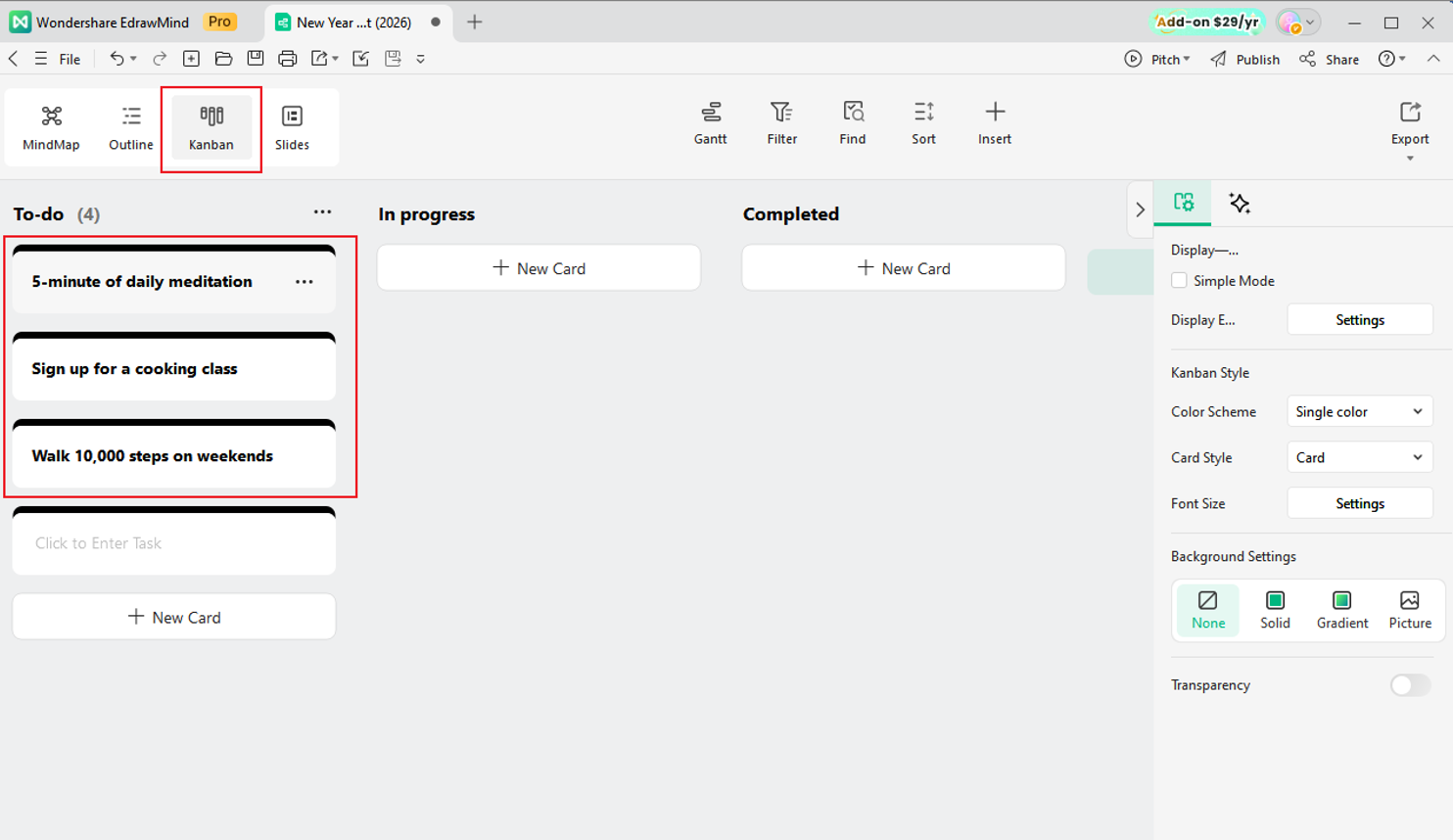
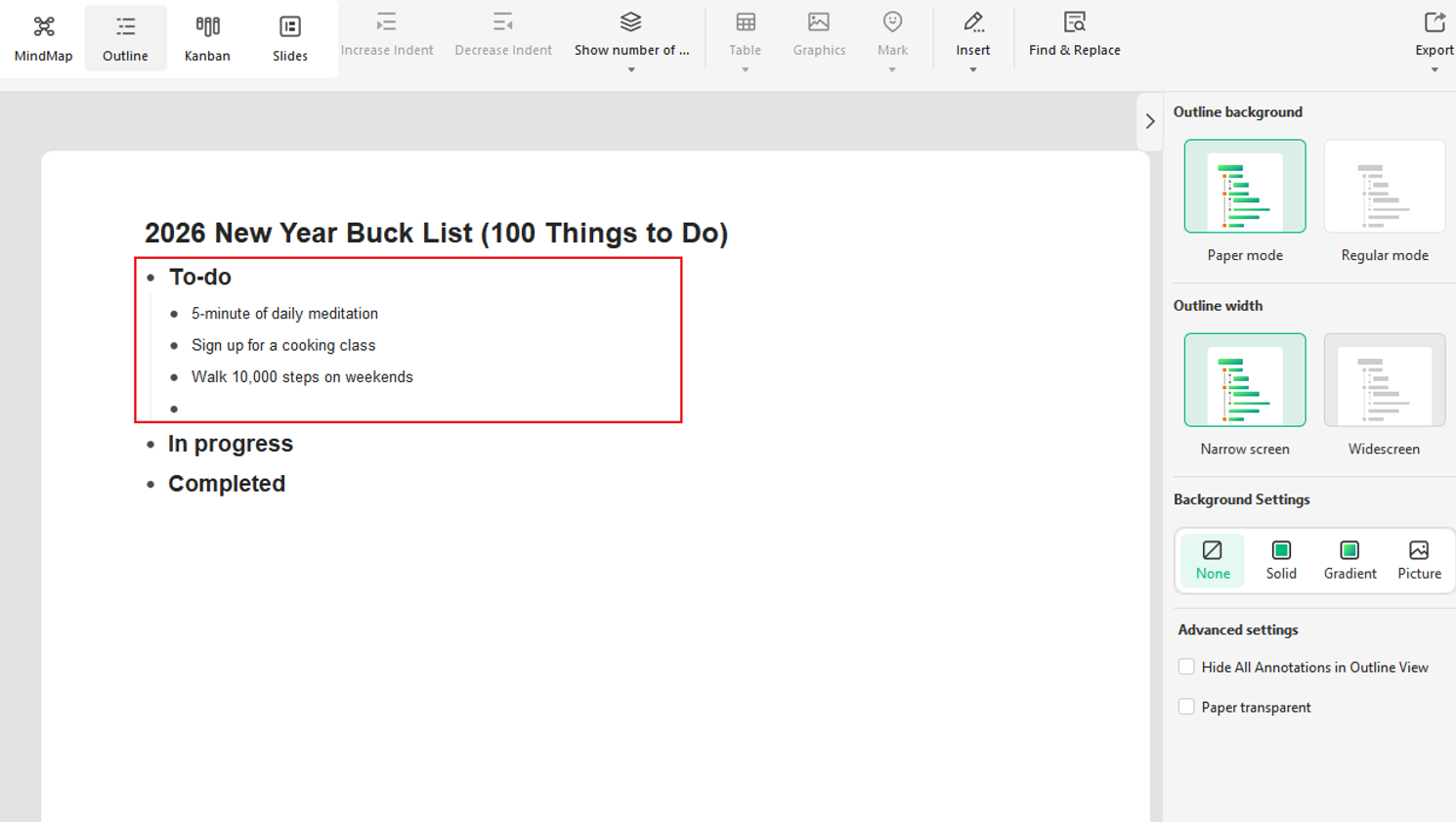
When there are few items, entering them directly one by one is fine, but with 100 items, that becomes difficult. When you have many items to enter, switching to Outline mode allows you to input continuously as text, making it easier to create items.
3.2. Column Setup
Once you've finished entering all your goals, set up columns from Kanban mode.
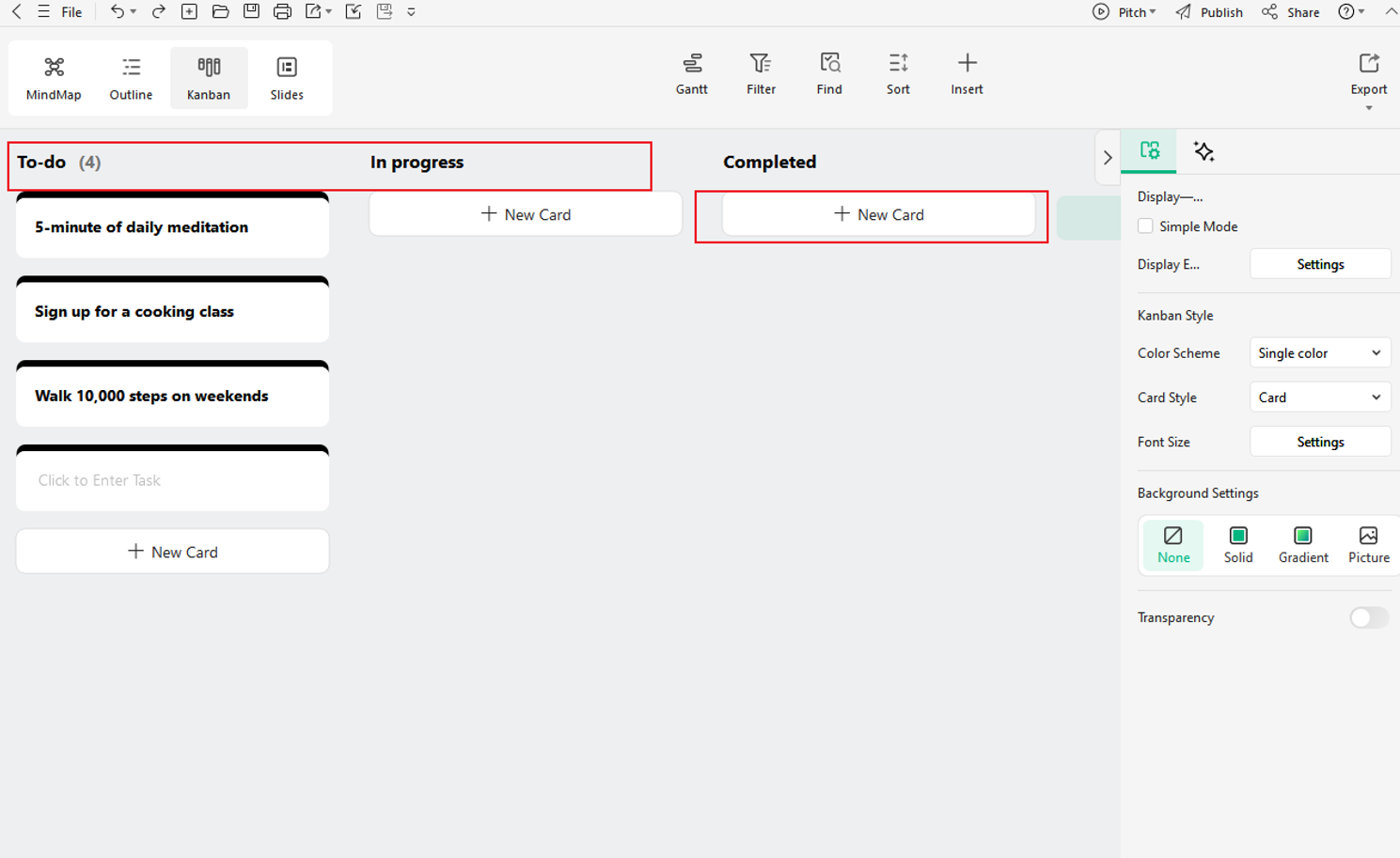
Clicking the "+ Add Group" button at the top of the drawing screen adds a new column (category), so create easy-to-understand columns like "Bucket List," "In Progress," and "Achieved." Column colors can also be changed from the three-dot mark next to the title.
Feel free to customize further, such as dividing goals into "short-term, mid-term, long-term," etc.
3.3. Card Detail Settings
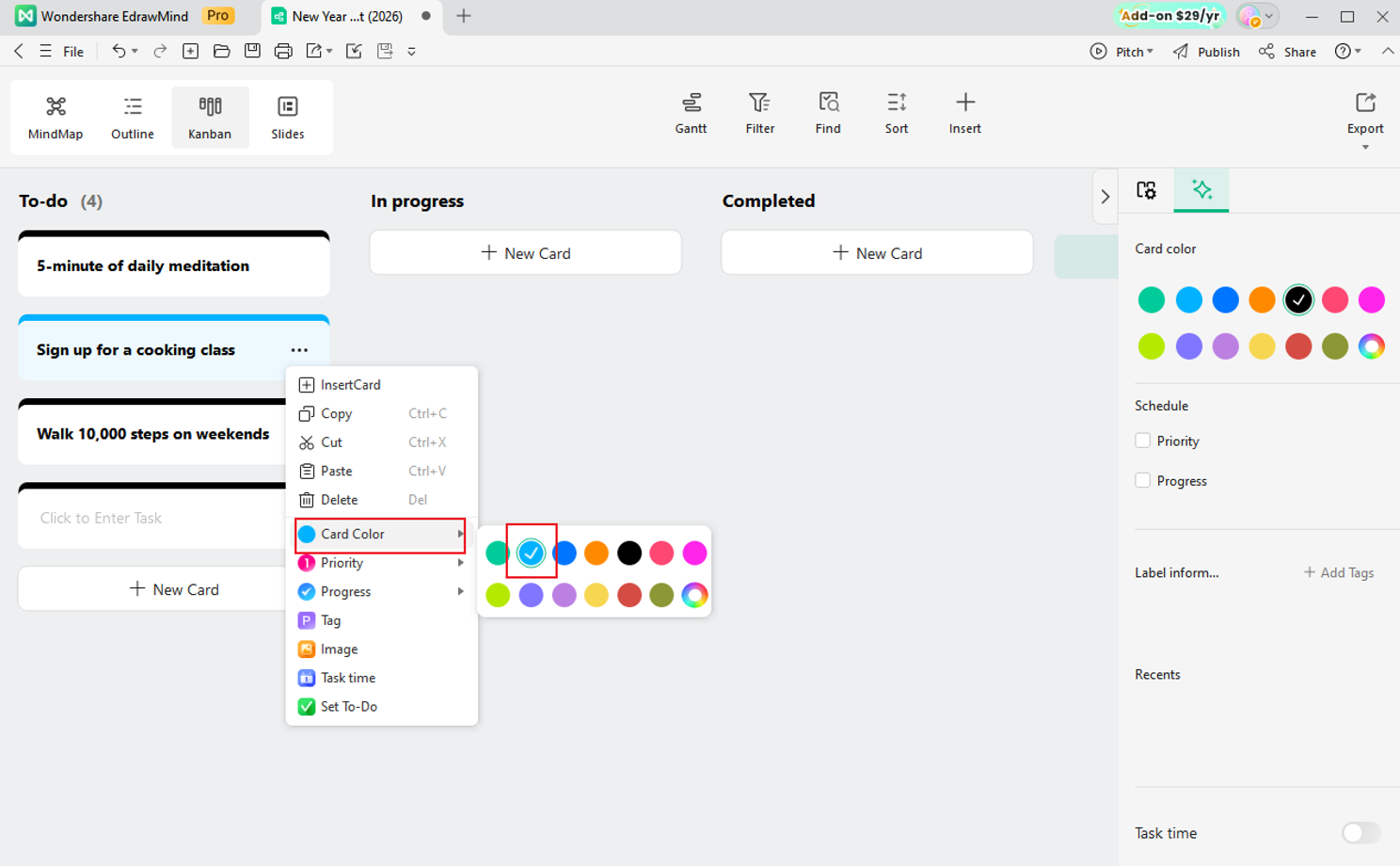
Individual cards can be color-coded, and you can also set priority, progress status, and deadlines. You might organize by color—orange for hobbies, blue for self-improvement, green for exercise, pink for outings, etc.
Additionally, you can add images, files, and hyperlinks to cards from the "Insert" menu. Attach reference sites and inspirational images to manage related information and boost motivation.
3.4. Progress Management
Bucket list cards can be easily moved between columns via drag-and-drop—to the "In Progress" column when you start working on them, and to the "Achieved" column when completed.
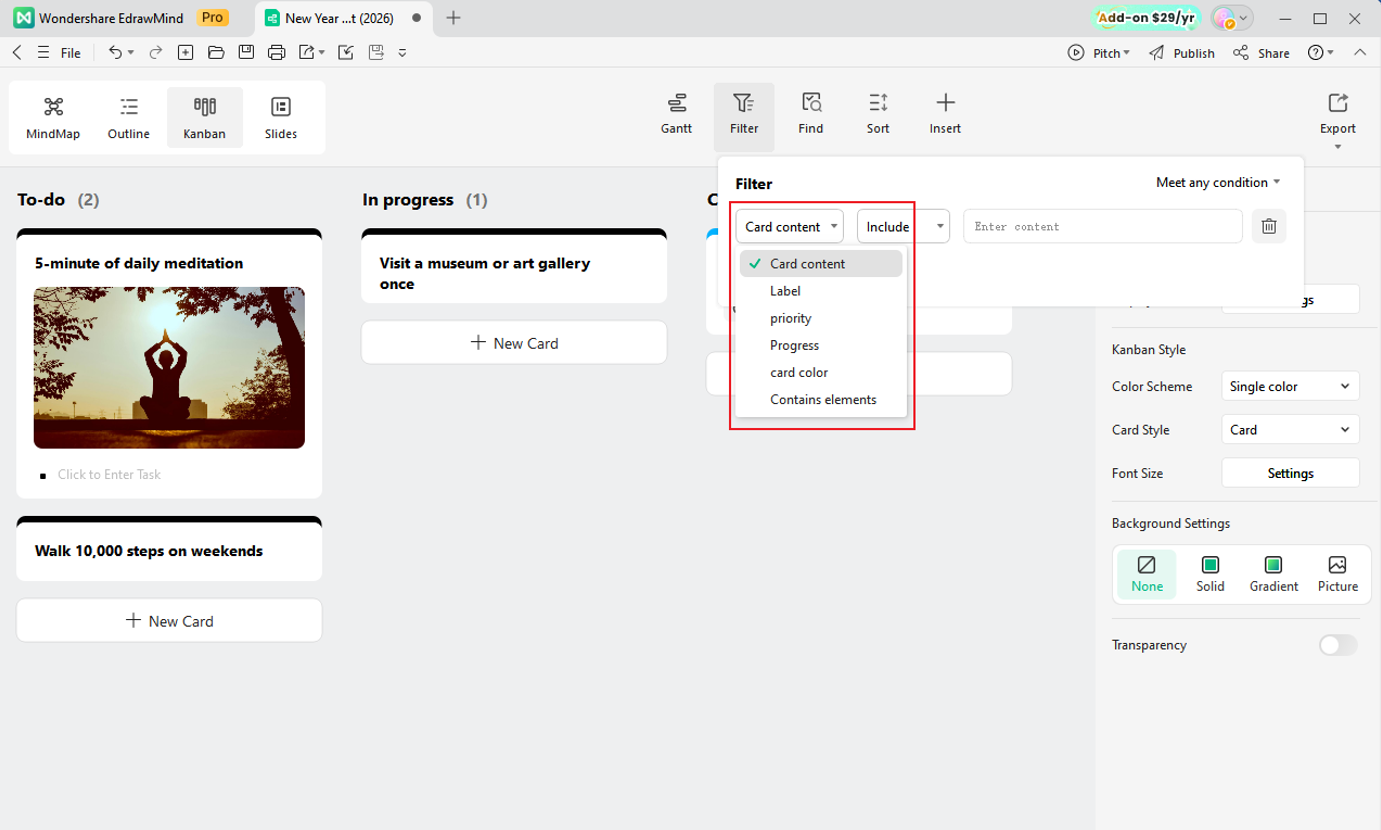
Also, with 100 items, finding specific goals can be challenging. EdrawMind has "Filter" and "Sort" functions, making searchability excellent.
3.5. Regular Review and Updates
Review your bucket list regularly. Reflect on achieved goals to savor the sense of accomplishment, and flexibly update the list by adding new goals as they emerge or deleting ones that no longer interest you, maintaining a fresh and appealing list.
Conclusion
Do you have things you've been thinking "I'd like to try that someday" but never got around to? A bucket list allows you to freely write down and visualize those dreams and goals. For us, often caught up in daily busyness and forgetting what we truly want to do, a bucket list becomes an opportunity to reflect on ourselves.
To fill your year with fulfilling and enjoyable experiences and make the new year even better, use "EdrawMind" to organize your goals and dreams with a bucket list, and take the first step toward realizing your ideals.
 EdrawMind
AppsEdrawMind Online
EdrawMind
AppsEdrawMind Online

