



Our team lost momentum when other competitors entered the market ahead of us. They moved fast because they caught the regulatory shift and the change in audience early.
My research was scattered in emails, notes, and random comments, so nothing came together in time.
Putting all outside factors in one shared view speeds up decisions. A shared visual map helps everyone see risks and openings simultaneously.
In this write-up, I'll explain how to create a PESTEL Analysis map in EdrawMind.
In this article
What PESTLE Analysis Actually Tells You
PESTLE examines six external categories that determine whether market conditions support your plan right now.
The Scope
- Political: Policy, tax, and trade moves.
- Economic: Growth, rates, and costs.
- Social: Demands, values, and skills.
- Technological: New tech and rollout speed.
- Legal: Compliance duties and fines.
- Environmental: Energy, supply risk, and rules.
Why the Full View Works Best
Trends connect. A tech jump shifts the law. A price jump changes demand. With all six in one pass, you judge impact and timing. You pick where to enter, which feature to cut, or when to delay, with clear reasons.
How to Do PESTLE Analysis on EdrawMind
Besides starting from scratch, I map PESTLE in EdrawMind in two ways, depending on the level of control I want to achieve.
Both provide me with clean, editable maps that I can refine, share, and export. If I need precision, I start with templates. If I’m racing a deadline, I use AI.
Method 1: Template Approach
 Try the app & get 500 free AI tokens


Step1 Select a Suitable Template
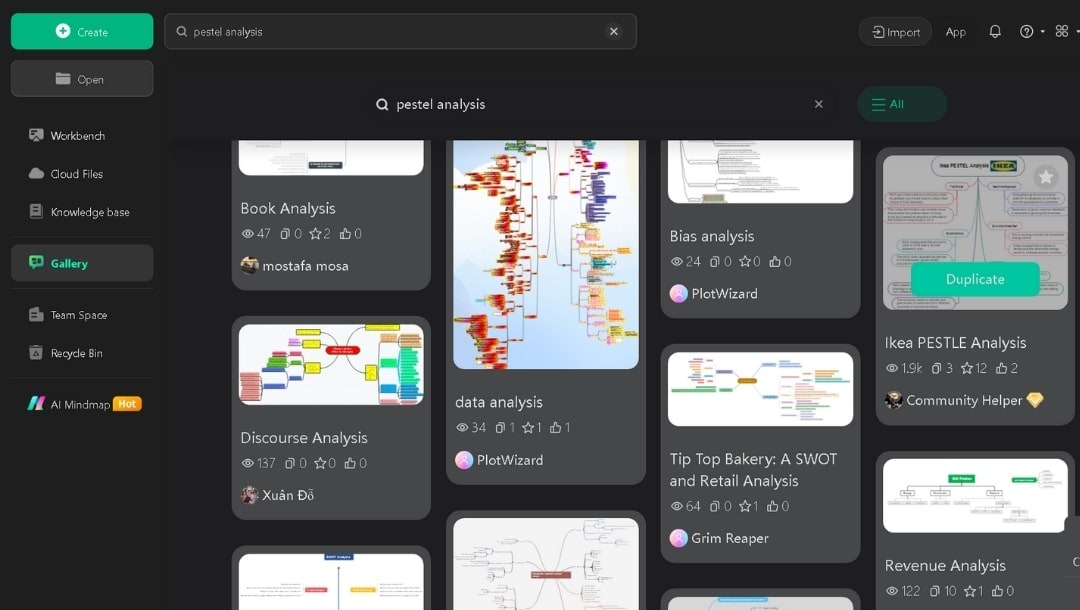
- I get started by opening the Gallery in EdrawMind and searching for “PESTEL analysis.”
- Then, I skim the options. Some spread out like a wheel, others use a simple grid.
- Finally, I press Duplicate to edit one that matches the tone of my presentation.
Step2 Enter Your Data
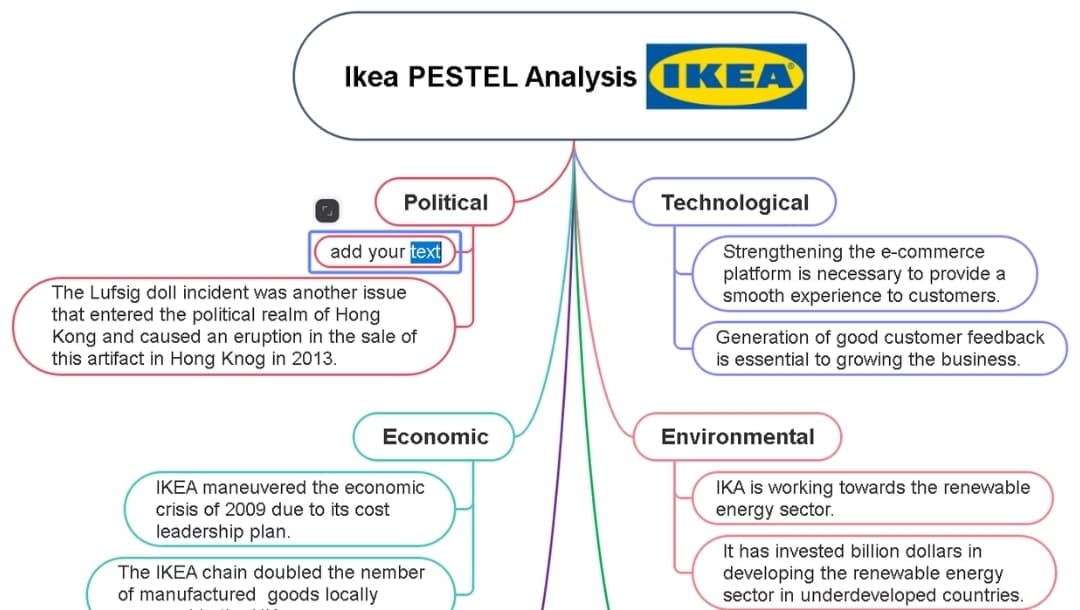
- Here, I double-click each node to type my own text.
- Then, I delete branches I don’t need and add new subtopics using the Tab or Shift+Enter key.
- I keep the main points concise and use subtopics to provide proof, data, or links.
- After that, I move through each category: Political, Economic, Social, Technological, Legal, and Environmental.
Step3 Enhance with Formatting
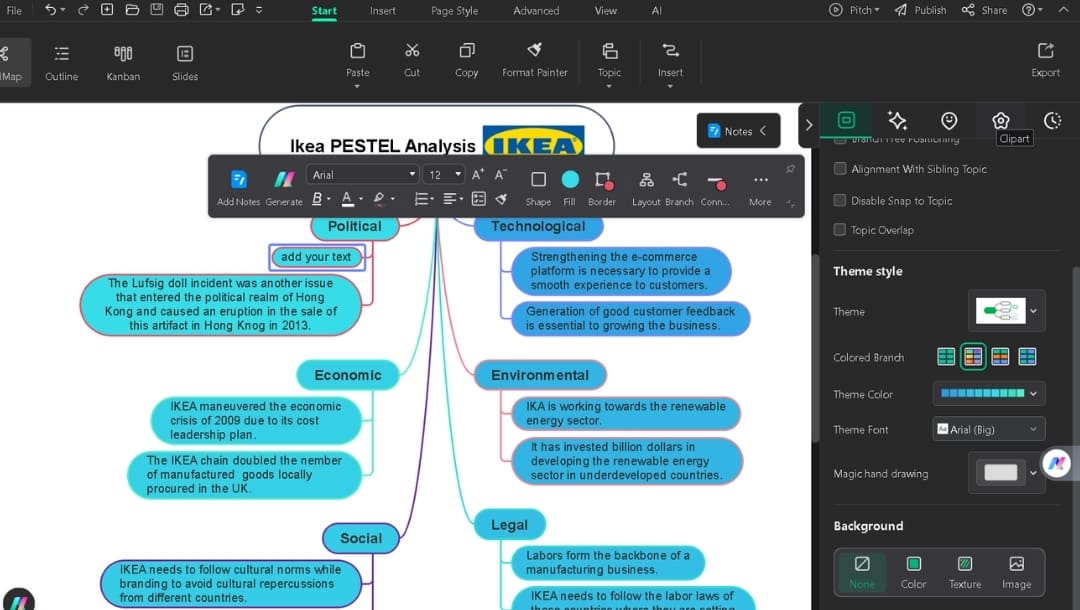
- When I select a node, a pop-up menu appears. It lets me adjust text, shapes, colors, and more for each node.
- I can also switch themes and layout with a single click from the right panel.
- When presenting to leaders, I opt for a simple theme.
- For internal brainstorming, I use something more colorful and unique.
- Icons/clipart help the map breathe, so I add simple cues: a building for Political, a chart for Economic, and people for Social.
Step4 Export Your PESTEL Analysis
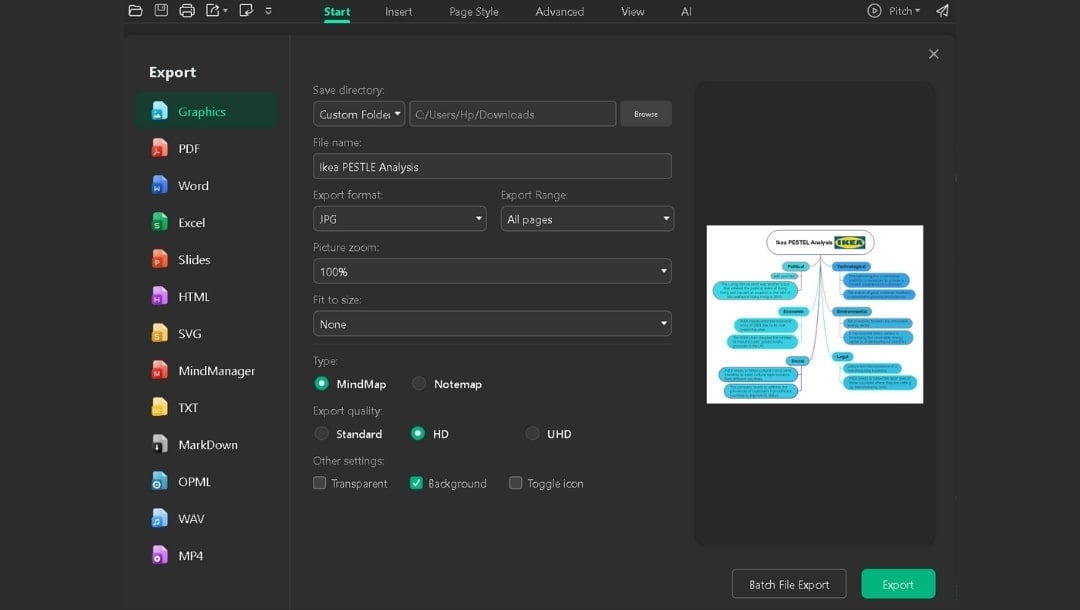
- When the map looks fine, I hit the export icon.
- Edrawmind offers multiple export options so that I can download it as:
- PDF for reports.
- PNG for slides.
- SVG for sharp graphics for the web.
- And more.
- Finally, I choose the location and press the Export button to download it.
Method 2: AI-Generated Framework
Step1 Generate Initial Map
- I start with a blank mind map in EdrawMind.
- From the toolbar, I go to the AI tab and select AI Gene > AI MindMap Generation.
- Then, I drop in a prompt like: Create a PESTEL analysis for expanding coffee shops into Germany.
- Next, I hit One-Click Generation.

Step2 Review the Draft Map
- When created, I check whether all six categories are present and relevant.
- If something’s missing, I refine my prompt and regenerate.
- It usually takes 10–15 seconds to produce a workable structure.
- After that, I follow the same formatting and export steps outlined in the template method to complete the map.

Why Use EdrawMind for PESTLE Analysis Mapping
EdrawMind streamlines PESTLE mapping with features like:
- 6,000+ templates, including dozens of PESTLE layouts, radial, matrix, and fishbone structures.
- Live collaboration enables teams to edit diagrams simultaneously, allowing everyone to review the updates in real-time.
- Offline mode works without the internet; syncs changes when reconnected.
- Cross-platform support: Windows, macOS, Linux, Web, iOS, Android.
- AI assistance generates frameworks from text prompts in 10–15 seconds.
Best PESTLE Analysis Templates in EdrawMind
I switch templates depending on my audience and depth needs.
Professional Strategy PESTLE Framework
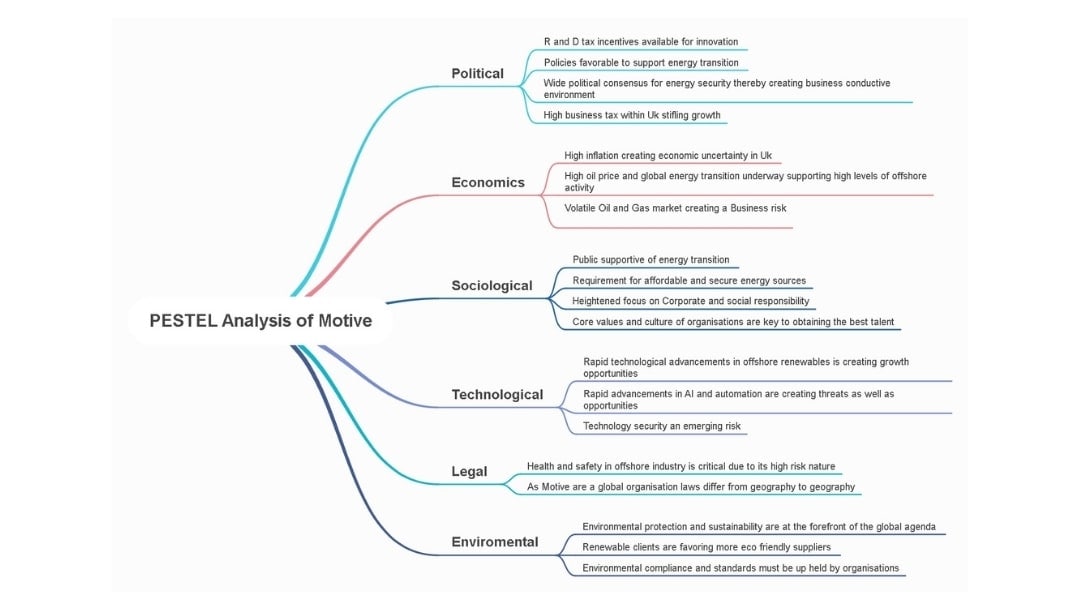


When I present to executives, I pick this one. The radial layout, with its soft curves and pastel colors, looks polished without feeling cluttered.
Every branch spreads evenly, making the whole picture scannable in seconds. I've used it for quarterly board reviews where clarity beats detail.
Comprehensive PESTEL Analysis Study Framework

When starting research, I need structure. This template splits factors into question prompts that force complete thinking.
Under "Economic," it inquires about growth rates, inflation, and employment. I answer each question, and my analysis builds itself. The format prevents lazy "we'll figure it out later" placeholder text that never gets replaced.
PESTLE Analysis Map for Training and Education
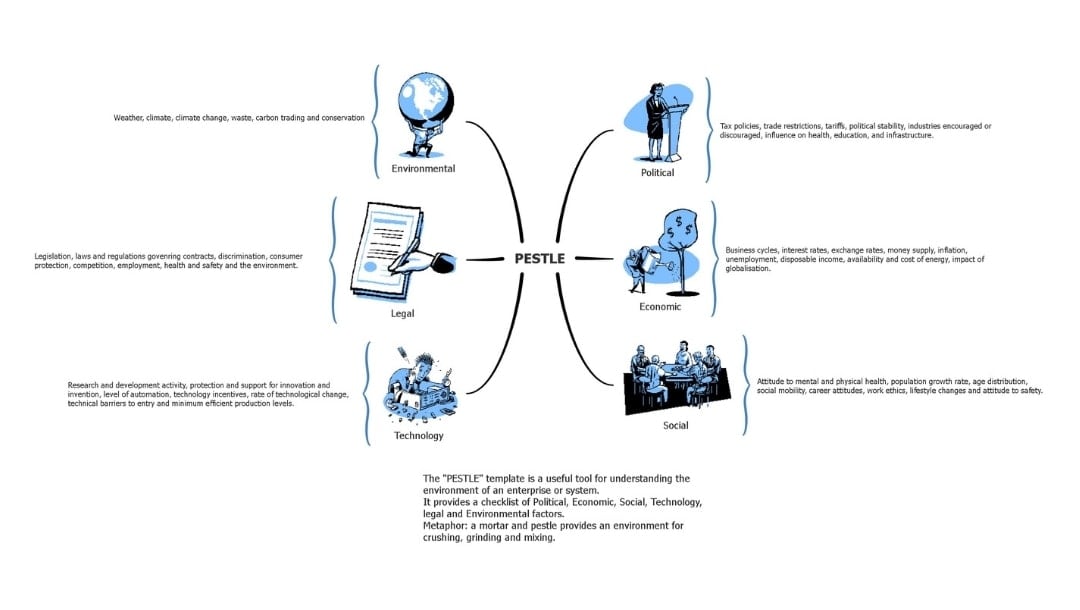
When onboarding new team members, I duplicate this template. The monochrome icons and bracketed definition notes teach the framework while we build.
New hires see "Political: tax policies, trade barriers, tariffs" and immediately grasp what belongs in each category. It doubles as a learning tool and a working document.
Tips for a Better PESTEL Analysis
Before You Start
- State the decision this map supports: price change, market entry, or hiring plan.
- Adjust the time window to the next quarter or next year. Do not mix both.
- List the unknowns you must answer first. This sets your research path.
While You Map
- Capture numbers first, then notes. Numbers anchor the claim.
- Avoid double-counting. If two items have the same effect, keep one.
- Mark links between factors. Example: New chip rules affect device price.
- Write one risk and one chance per factor, because balance matters.
After You Map
- Add a simple 'go', 'hold', or 'stop' flag for the plan today.
- Set the next review date now. Put one question you aim to solve by then.
- Track one outcome metric per top item. Example: gross margin, churn, or on‑time ship rate.
- Archive a snapshot copy. You need a trail to see how your view changed over time.
Final Words
There’s always that moment when you realize a rival has already reacted to a shift you barely noticed. I hated that. So, I started using PESTLE Analysis maps to monitor the landscape with intent: one page, all factors, no guesswork.
EdrawMind takes the friction out of setting it up. I choose a template, drop in my notes, and let the AI generate a quick map when deadlines are looming. It keeps my research tight and my response time sharp.
FAQs
-
Is the macro analysis/PESTEL analysis about customers or about the industry?
PESTLE is about the outside world. It scans the market, rules, tech, and climate around you. Customers show up only as broad trends.
You can use separate studies, like surveys and analytics, to learn why people buy.
Join both to make a plan.
-
How are PESTEL Analysis and SWOT Analysis useful in business?
Run PESTLE analysis monthly to update signals and SWOT each quarter to set goals. Use color tags to show which SWOT items come from which PESTLE force.
Now you have moves you can execute.
-
How are political factors different from legal factors in PESTEL analysis?
Aspect Political Factors Legal Factors What they reflect Policy direction, government priorities, power shifts Written laws, regulations, acts, codes, and court decisions Nature Signals and intentions of leaders and agencies Mandatory rules you must follow Time horizon Change fast and often signal what may come Change more slowly, but have strict compliance deadlines How to track Watch elections, policy debates, budgets, and regulatory agendas Review statutes, regulations, compliance notices, and case law Why they matter Help you anticipate future rules and adjust early Help you avoid penalties, lawsuits, and operational risks -
What are common PESTLE mistakes?
Here are the main mistakes people make during a PESTLE analysis:
- Adding internal issues even though PESTLE covers only external forces.
- Writing vague points with no numbers, units, or sources.
- Mixing signals from different geographic levels.
- Confusing long-term trends with one-off events.
- Using outdated data without checking the date or source.
- Applying global data to a local decision.
- Ignoring second-order effects on customers, suppliers, or teams.
- Allowing the board to grow beyond one page.
- Leaving items without a clear time frame.
- Skipping ownership for follow-up steps.
- Listing points with no link to the decision you need to make.
-
Are there different types of pestles?
Yes, by context.
- PEST scans four forces.
- PESTLE adds legal and environmental.
- STEEPLE adds ethics.
Select what helps make a decision, then maintain it over time.
 EdrawMind
AppsEdrawMind Online
EdrawMind
AppsEdrawMind Online

