



What makes Amazon the marketplace for both shoppers and entrepreneurs? The platform captures 37.6% of all U.S. retail e-commerce spending, giving it a reach that no other online marketplace can match.
In 2024, sellers in the United States averaged over $290,000 in annual sales, out of which 60% were independent sellers, showing that opportunities exist for those who approach it with the right plan.
With that motivation, this article discusses ten practical tips on how to run an Amazon business.
In this article
- 20 Proven Tips for Running an Amazon Business
- Opt for the Right Selling Plan
- Pick the Right Product or Position What You Have
- Validate with Market Research
- Create an Amazon Seller Central Account
- Create Optimized Product Listings
- Leverage A+ Content and Brand Registry
- Price Competitively
- Use Fulfillment by Amazon (FBA)
- Maintain Your Inventory
- Employ Amazon PPC
- Offer Coupons and Promotions
- Use Customer Reviews to Improve Your Offerings
- Optimise for Mobile Shoppers
- Track Analytics and Refine Strategy
- Stay Compliant with Amazon's Policies
- Master Keywords with Amazon SEO
- Build a Strong Brand Presence
- Invest in Professional Product Photography
- Expand Internationally with Amazon Global Selling
- Stay Updated with Amazon Trends and Tools
- Conclusion
- FAQs
20 Proven Tips for Running an Amazon Business
Selling on Amazon can seem big at first, but it's really about taking it step by step. Starting from product hunt, keyword research, competition, products, and marketing, all this is too much to handle. You will need a fool-proof plan and some goals to set.
To start, you must draft a plan to follow. Let's learn some tips from successful Amazon businesses. Here are 20 simple tips that can help you grow and do well.
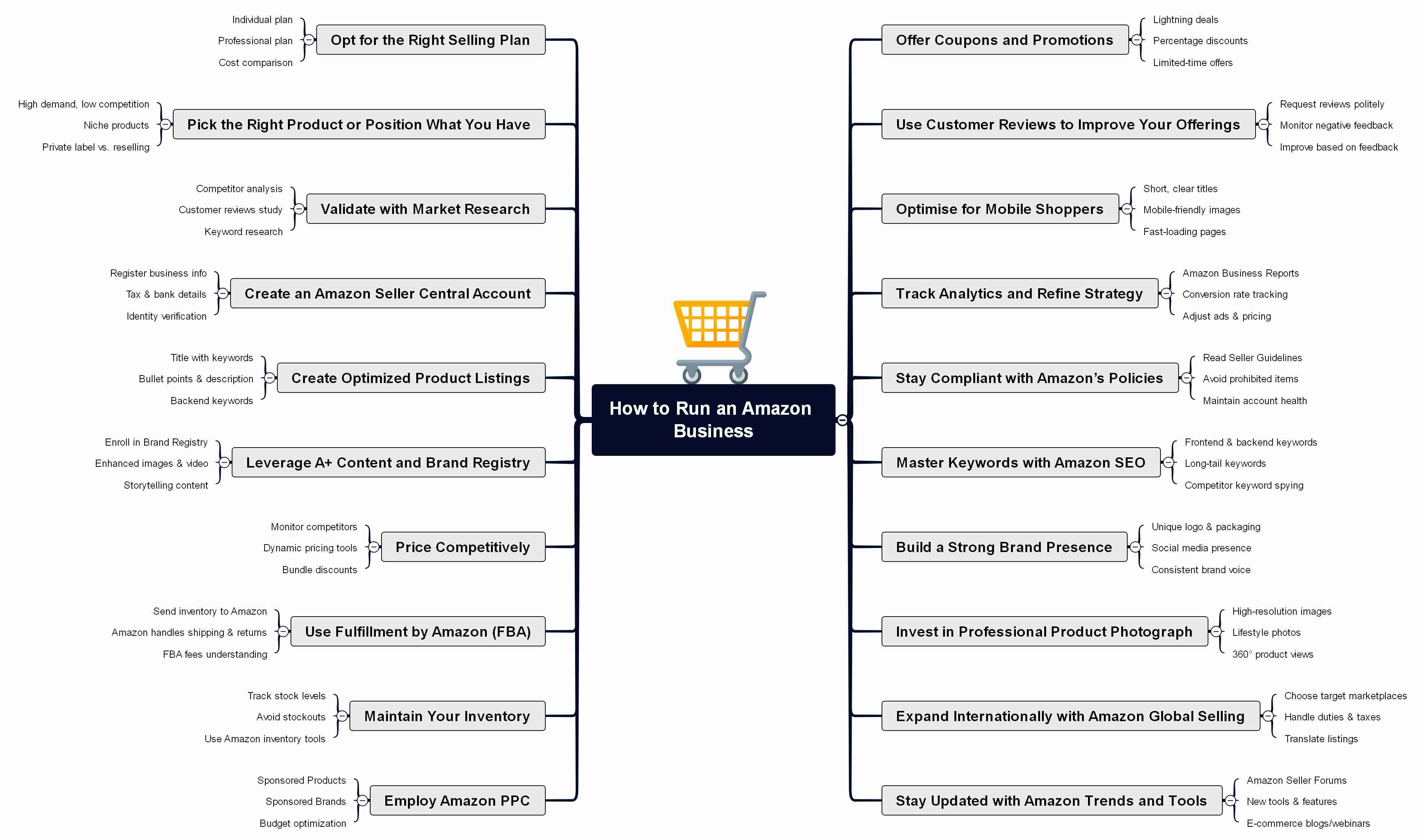


Opt for the Right Selling Plan
It's important to understand its selling plans because they affect how much you'll spend and the tools you can use. It offers two plans, an individual one and a Professional one. The Individual plan works best if you're only selling a few items and costs $0.99/item, while the Professional plan gives you more features like bulk listings and Buy Box access and costs $39.99/month.
| Feature | Individual Plan ($0.99/item sold) | Professional Plan ($39.99/month) |
| List one product at a time | ✔ | ✔ |
| Set static prices | ✔ | ✔ |
| Fulfillment by Amazon (FBA) | ✔ | ✔ |
| Fulfilled by Merchant | ✔ | ✔ |
| Bulk operations (list, price, manage inventory faster) | ✔ | |
| Automate Pricing & Featured Offer eligibility | ✔ | |
| Access New Seller Guide (6x more first-year sales avg.) | ✔ | |
| Brand-building tools (enhanced pages, digital store, etc.) | ✔ | |
| Amazon Ads | ✔ | |
| Amazon Business (B2B selling) | ✔ | |
| Global Selling (expand worldwide) | ✔ | |
| Apps and APIs for advanced selling | ✔ |
Pick the Right Product or Position What You Have
If a product with high sales but hundreds of identical listings and very slim margins is chosen, it will be difficult to stand out from the competition. It can be positioned by differentiating it with a feature or by bundling it with an accessory. Since no one knows your product yet, you'll need to create demand by clearly showing what makes it different.
Validate with Market Research
This refers to checking if your product idea has demand and room for profit before you invest in it. On Amazon, you can research existing listings, sales rankings, reviews, and prices to get actual data.
Let's say your product is a reusable water bottle. Searching "reusable water bottle" on Amazon and sorting out the best sellers. One can notice how many reviews they have, what customers like, and the common complaints. If most reviews say bottles leak or don't keep drinks cold, there is an opportunity to position your product as "leakproof and double-walled" to differentiate.
To visually plan your findings, you can use a tool like EdrawMind AI Mind Map to map out customer pain points and product opportunities for all of your competitors.
Create an Amazon Seller Central Account
Seller Central is a platform for sellers to manage their business. Think of it as your control panel where you can list products, track inventory, adjust pricing, manage orders, and observe performance metrics.
Follow these basic steps to create your Amazon Seller Central Account:
- Head to the Amazon Seller Central webpage and sign up.
- Choose Create your Amazon Account.
- Fill in the required credentials, and hit Next.
- Proceeding, it will prompt you about some business info, like its location, type, its legal name, and company registration number, followed by some of your personal information.
- It will also ask for necessary banking details; fill those out.
- Next, it will ask for your Digital Store's info.
- Now it will ask you for Identity Verification, for which you can allow it to take a picture or join a video call with an Amazon associate.
Create Optimized Product Listings
Help shoppers find your product and want to buy it by how you list it. This involves highlighting benefits and adding strong visuals.
If the product is a handmade soy candle, you can't list it as just Candle and call it a day. Something like Hand-Poured Soy Candle, Lavender Scent, Long Lasting, would capture common search terms while showing its unique value. For its description, you can add how it's made with natural soy wax for a cleaner burn and saturated with lavender essential oil.
High-quality images reflecting the description also add to the experience. To refine these visuals, you can use tools like Link Image to Slide, where product images can be turned into informative slides or storyboards.
Leverage A+ Content and Brand Registry
This involves using Amazon's advanced brand tools to make your listings look more professional and reliable. Such tools are locked behind Brand Registry. Once you unlock it by registering your brand, you can access A+ Content, which lets you add extra images and comparison charts.
If the product is something like an organic skin care lotion, a standard listing will be composed of a simple description with one or two pictures. Using A+ Content, you can add a banner, which can visually describe your journey, lifestyle images of someone applying the lotion, and a comparison chart that highlights how your lotion is better compared to competitors.
Such attractive content can be crafted using Word to PPT, by drafting your product description in Word and then uploading it there.
Price Competitively
Price competition on Amazon is very different from pricing in a physical shop. For some cases, selling for less might work out, but here, pricing is tied to algorithms, the Buy Box, customer trust, and value.
Therefore, decreasing your price can also backfire, as it makes you compromise on your margins or even suspend you from the Buy Box if the price goes suspiciously low. This is why it is important to understand how Buy Box works.
Since most customers click "Add to Cart" there without comparing every seller, you need a price that's within the range of competitors while also keeping strong reviews, and fast shipping. Or instead of racing to the bottom with a stainless steel water bottle at $9.99, you could sell it for $19.99 by adding features like double insulation and a free cleaning brush, as customers can pay more if they find value for their purchase.
At the end, it's all about creating the most attractive listing that buyers will choose.
Use Fulfillment by Amazon (FBA)
Fulfillment by Amazon stores your products in Amazon's warehouses, packs and ships them to customers, and even processes returns. In short, the logistics side of your business is outsourced to Amazon.
It might not be a wise choice for every product. If your items are very large, heavy, or slow-moving, storage fees can eat into your profits. But if products are small to medium in size and are in demand with Prime shoppers, FBA is best for automating their logistics.
Maintain Your Inventory
When sales data is closely monitored and restocks are planned ahead of demand surges, such as having extra mats before January fitness routines, steady sales are achieved.
Competitiveness and profitability are supported over time through this kind of inventory management. A balance must be found since running out of stock can cause ranking and sales momentum to be lost, while unnecessary costs are added through overstocking.
Employ Amazon PPC
Amazon PPC, or Pay Per Click, is an advertising system that lets sellers pay to have their products appear in sponsored spots across the marketplace. You are offered to bid on keywords or product placements, and your ad shows up when shoppers search or browse. You only pay when someone actually clicks your ad, not just when it's displayed.
When shoppers search, your product can appear at the top of the results with the sponsored tag, giving your listing more visibility than competitors and driving traffic.
Offer Coupons and Promotions
Although coupons and promotions on Amazon can drive sales, it's not as simple as just slapping a discount on your product. Amazon is highly competitive, and shoppers are savvy. If you offer a coupon without thinking it through, you might reduce your profit without actually improving sales.
For example, if you add a 10% coupon while dozens of competitors are already doing the same, your listing won't stand a chance. You also need to have perfect timing to make your promotions actually worth it, like discounts for back-to-school or holiday seasons.
Use Customer Reviews to Improve Your Offerings
Reviews are used not just as feedback for reputation but as insights into what customers like and dislike. Expectations are shown through them, as well as where a product falls short, and both listings and future versions of the product are improved with their help.
If your listing is selling leather sneakers, negative reviews might mention issues like sizing or scuffing. You can address sizing by adding a clear chart and a note about ordering one size up, while scuffing concerns can be managed by working with the manufacturer.
Customer reviews are a free research tool that can make shortcomings of your products and services visible, allowing you to improve in almost every bad aspect.
Optimise for Mobile Shoppers
Make sure every aspect of listing is perfectly optimized for other devices, especially when it comes to mobile devices, as 57% of Amazon traffic comes from mobile. Their screens are smaller, so shoppers see less text and fewer images at once, and they tend to skim before adding to the cart.
The goal is to make it simple for the mobile shoppers to understand what is being presented.
Track Analytics and Refine Strategy
Utilizing the metrics provided by Amazon, to validate what is working, what is not, and how to improve sales, rather than relying on guesswork, understand numbers like click-through rates, conversion rates, and advertising performance to guide decisions.
Your Amazon Business Report shows that your listing has a low conversion rate. This means shoppers are clicking but not completing purchases. On closer look, reviews reveal that customers leave confused rather than satisfied.
From that insight, you can improve the description to make it transparent for the shopper, or add an infographic to give them a visual understanding using Text to Mind Map, turning the report into an action plan.
Stay Compliant with Amazon's Policies
Amazon sets rules to make sure that your store stays in good standing. They have strict guidelines for product listings, customer communication, intellectual property, and safety standards. Ignoring even one of these can result in a warning, suspension of listings, or even suspension of your entire account.
Master Keywords with Amazon SEO
Understand what words shoppers type into the search bar, and salt those into your product listings so your items appear higher in search results. Unlike Google SEO, Amazon's algorithm (A9) is focused on one thing: sales. That means the keywords you choose must convert visitors to buyers.
If your listing title just says Yoga Mat, you will get lost among thousands of other listings. But by harvesting keywords from Amazon's search suggestions, or some other third-party tools, you will find that users are searching for a non-slip yoga mat or a thick yoga mat. Therefore, updating your title accordingly can make your listing more visible.
Build a Strong Brand Presence
Go beyond just listing products and build an identity that customers recognise and trust. This is done by presenting a clear brand story, consistent visuals, and a professional storefront that makes you stand out as a Brand.
Let's say you sell coffee beans, instead of just putting them under a plain name, you build a brand called Copper Cup. Using Brand Registry, you design a storefront with your logo, banner images of coffee farms, and sections visually explaining positive aspects of your supply chain.
This can be done using EdrawMind AI Presentation, which can visually map your ideas before you upload them to your Amazon listings.
Invest in Professional Product Photography
Go beyond basic snapshots and create images that actually sell your product. Photos are the first piece of sight for your listings, and can make the difference between someone clicking on your listing or scrolling past.
Keep in mind, it is not only about owning expensive cameras or lighting equipment, it's about communicating with photos, or they won't convert for you.
Expand Internationally with Amazon Global Selling
Amazon Global Selling allows you to market your products beyond your home market and sell them in Amazon's marketplaces around the world. Currently, Amazon has its marketplaces across 22 to 25 countries, use that to your advantage.
Through Global Selling, you can list directly on these platforms and let Amazon deal with currency conversion, international shipping solutions, and even customer service in local languages.
Stay Updated with Amazon Trends and Tools
Keep an eye on new features, policies, and shopping habits so your business stays ahead. Amazon keeps changing with new ad formats, fulfillment programs, and customer tools, and sellers who adjust are the ones who benefit.
Stay updated by checking Seller Central notifications, joining seller forums, and following trusted third-party tools that share the latest trends.
Conclusion
Understanding how to run an Amazon business is about taking steady, smart steps. It starts with selecting the right products, delivering your brand's story, and making listings stand out. Employing tools like FBA, ads, and Brand Registry, while monitoring reviews and trends, to keep improving. Employ EdrawMind in your business journey to make your listings convert more, with thoughtful visuals.
FAQs
FAQ
-
How much does the Amazon Brand Registry cost?
Enrolling in Amazon Brand Registry is free, but you must have a registered or pending trademark, which costs money. The price for obtaining a trademark varies depending on the country you are residing in. -
Who is eligible for the Amazon buy box?
To be eligible, the seller must have a professional seller account, the products being sold must be in "New" condition, should be in stock, and the overall account's health must be in good standing. -
Does Amazon remove negative reviews?
Yes, a seller can request to remove a negative review only if it violates policies such as offensive language, personal details, or unrelated content.
 EdrawMind
AppsEdrawMind Online
EdrawMind
AppsEdrawMind Online

