


Imagine you’re conducting a meeting where half the people are yawning. And the other half are clueless as to why they’re even there. That’s not a meeting. That’s chaos in the making.
By the end, everyone walks out of the room wondering, “What was even the point of it?”. Or the age-old thought, “This could’ve easily been an email”.
I know the frustration.
Now contrast that with an organized meeting. A meeting where each person knows their role, the meeting agenda, and the outcomes. All based on the core principles of meeting management.
Yes, the latter sounds like a dream come true. Lucky for you, it’s not impossible to achieve. Let’s go through our article to learn how to run a meeting effectively.
In this article
But What is an Effective Meeting?

There’s no fancy vocabulary to explain effective meetings. A properly managed meeting is simple to understand and to administer. They have a clearly outlined goal, a proper list of agendas, and no excuses. In a word, the perfect recipe for bringing tangible outcomes.
Effective meetings should start and end on time. Facilitate discussion between people. And always have tasks assigned to everyone. This helps everyone stay focused on the meeting – and not zone out.
One of the biggest misconceptions about meetings is that they should be lengthy. But the time duration of meetings is of no use if even one member leaves the meeting unsure of what to do next.
When scheduling a meeting, it is important to ask the right questions. Most essential meetings are held to:
- Gain consensus or insight on some changes.
- Collaborate with others.
- Resolve current or upcoming challenges.
- Collect or share important/confidential information.
However, if your meeting agenda doesn’t meet any of the above reasons. For example, if it’s just a small announcement or an update. Especially one that doesn’t need immediate action. Please just send it via email or office group chat. Trust me, your employees will appreciate you for this.
Here are 10+ tips to plan and manage your meetings effectively. And ensure your employees don’t attend meetings out of formality. But out of pure curiosity.
Tips for Running Effective Meetings
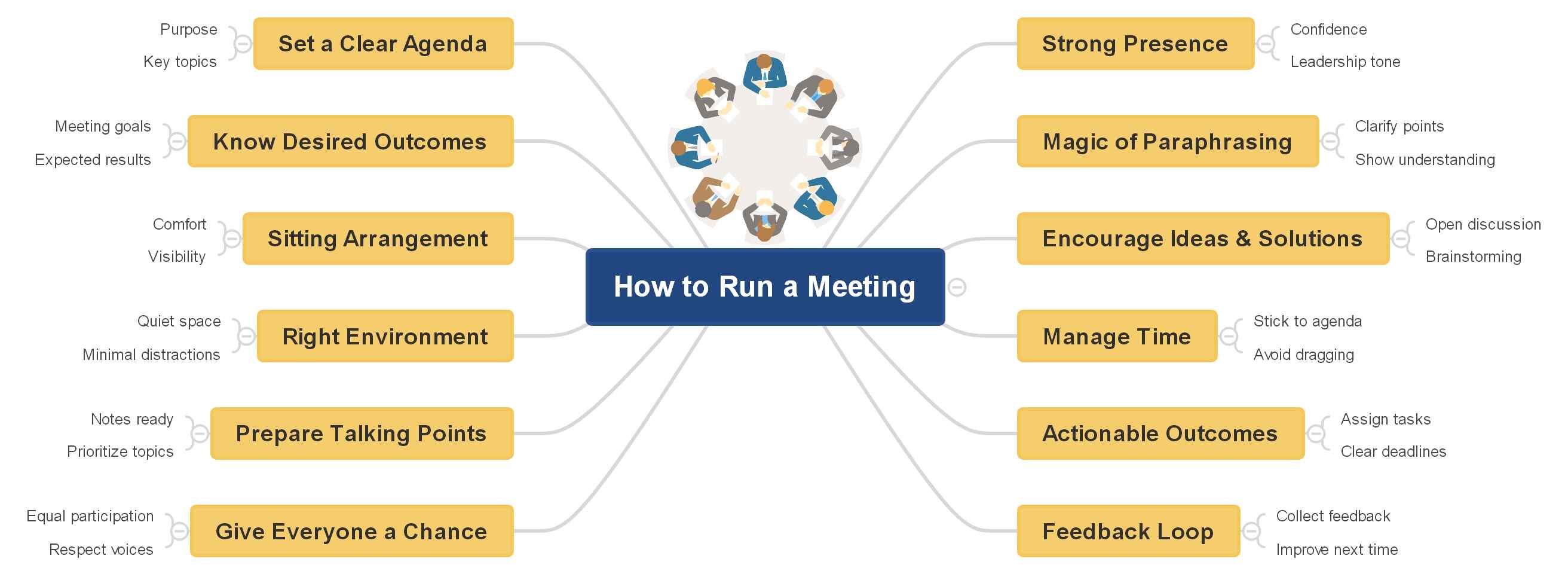


No matter what the purpose of your meeting is. It’s not enough to just gather all people in a room and hope for the best. Some simple and effective rules can be a game-changer.
We’ve done our fair share of research. And these rules are trusted by even Harvard and Stanford. Yet they’re an absolute no-brainer and will make you think, “Why did I not think of this before?”.
Set a clear agenda
Nothing kills motivation faster than a meeting with no purpose. If people don’t know what they’re walking into, chances are they’ll tune out. The fix? Send an agenda in advance. Keep it simple. Let everyone know what’s being discussed. What’s expected of them, and if they need to prepare anything. Whether it's research or updates, that way, nobody shows up empty-handed.
Agendas aren’t just nice to have – they’re lifesavers. They keep conversations from spiraling into tangents. And if someone throws in an off-topic idea?. Simply say “Great thought, let’s discuss it in next week’s meeting”.
Well done – you just saved your meeting from getting hijacked. Thank me later.
You can even display the agenda on the screen or share it virtually. AI presentations are a great way to do so. By simply putting in a few prompts, you can create professional, interactive presentations. In remote meetings, this keeps everyone aligned on the discussion.
Know your desired outcomes
If you don’t know what you want from a meeting, chances are you’ll leave with nothing as well. Before you gather people in a room (or Zoom), ask yourself: What’s the point here?
Are you looking for fresh ideas? Do you need a budget signed off? Or maybe it’s just about giving your team some much-needed support on a tricky project. Whatever it is, be clear from the start. Outcomes matter more than conversations.
The last few minutes of your meeting are golden. That’s when you wrap things up, outline next steps, and assign responsibilities. Also, don’t invite people just for the sake of it. If someone has no role in the discussion, spare them the wasted time. Meetings should feel essential – not like a box to tick.
Connecting your agenda to your desired outcomes is essential to avoid diversions. However, doing it all in your mind? That can be a mess. Tools like EdrawMind’s AI Mind Mapping can help you with that. This AI tool acts like your second brain. Helping you map out and visualize what’s on the table and what your desired outcome is.
Sitting arrangement
Have you decided on who’s going to attend the meeting? Good. Now start thinking of a correct seating arrangement. Casually speaking, there is no thumb rule as to where each attendee of a meeting should sit.
Psychologically, the participant whose chair is nearest to the boss is considered the most senior. Simply put, the proximity to the chairperson subconsciously defines the seniority of the members. Not only during the meeting but also outside.
Find the right environment
Not every meeting has to be an in-person meeting. Ten people, all stacked in the same room every day for a 5-minute check-in? Chaos. Some meetings work just fine online. While others may demand a face-to-face setting.
Quick operational check-ins? Perfect for Zoom. Do a roundtable. Let everyone share updates, and leave room for questions. If you’re building business plans or reviewing performance, online still works. Just keep the agenda tight and use screen sharing for slides or visuals.
But when it comes to big-picture meetings. Take initiatives, strategy, or brainstorming, for example. Nothing beats being in the same room. Everyone is bouncing ideas off each other. The energy and the ideas flow better that way.
Remember to be flexible with people’s situations, but never forget the purpose. The environment should support the outcomes – not the other way around.
Prepare talking points
Brainstorming meetings without structure? That’s a recipe for disaster. That is why we always suggest not just having an agenda but also coming armed with talking points. Think of them as your anchor when the conversation starts drifting.
You can phrase these as simple questions on a board: What worked? What didn’t? What can we try next? Even if the answers vary, don’t worry. You can easily start spotting patterns and a consensus. That can help shape smarter campaigns or strategies.
Pro Tip: Not sure where to start? Tools like EdrawMind’s AI Text to MindMap can generate and organize talking points for you. Start by brainstorming your main topic. Use the AI tool to expand on your central ideas and sub-topics. This will help you distill complex information into actionable statements.
Give everyone a chance to speak
A meeting works best when everyone feels part of the conversation. Start by setting the tone. Help people ease in with a quick check-in or light icebreaker. Some light humor works well, too. It breaks the formality and gets people talking.
Make it clear that raising hands (virtually or in person) is always welcome. It signals openness. And encourages everyone to share thoughts, questions, or concerns. You can also switch things up by assigning different speakers to lead sections. Rotating presenters keeps energy fresh. And reminds participants that they have ownership over the discussion.
If the agenda calls for more insightful conversations, consider breakout groups. Smaller circles allow the quieter people to contribute without feeling overshadowed. Keep attention alive with visuals, think images, videos, or diagrams. EdrawMind’s AI Presentation tool can help you with that. Reading off dense slides is so old school.
Have a strong presence
A strong presence can make or break your communication. And no, it’s not just about what you say – but how you say it. Simple phrases like “as you know” or “you might be wondering” pull people in. Polls do the same. They make everyone feel included. And if you can do that? Congratulations, you might be in line to get the next “Best Boss” cup.
Where you stand in the room matters too. Don’t stay glued to one spot. Move around. Make sure everyone can see you. Step closer to spark someone’s input – or quiet things down when needed.
Presence is both verbal and physical. Mastering the balance of an authoritative yet inviting stance is crucial not only to having meetings but also to leading them.
Know the magic of paraphrasing
Paraphrasing is one of those quiet superpowers in meetings. And no, it’s not the same as a five-year-old repeating your words back to you. It’s about catching the essence of what someone said – and using it to steer the conversation.
Take an overtalker, for example. You don’t have to embarrass them. Just pull out a point they made, then connect it back to the agenda. Smooth. Or when a discussion drifts off course? Paraphrasing can snap it right back without anyone even noticing.
Best of all, you can use it to weave different viewpoints together. A simple restatement makes people feel heard. While ensuring the meeting doesn’t go off course.
Encourage ideas and solutions
If the goal is brainstorming, make it clear from the start. Don’t wait until the room is silent and awkward. Ask people beforehand to jot down two or three ideas.
Then go around the table. Let everyone share. After each one, open it up for quick feedback. Focus on the idea, not the person. That way, nobody feels judged. And good ideas won’t be lost in ‘who said what’ battles.
It works just as well for problem-solving. Say the challenge is: “How do we reach 18–25 year olds?” Everyone comes prepared, so you skip the awkward silence.
This prep also helps the silent observers have a say in the matter. They know they’ll be asked. And unlike other times, they’ll actually have something ready to say. Clever right?
Manage time to maintain focus
Always start the meeting on time, even if some seats are empty. Because let’s face it, latecomers learn fast when the meeting doesn’t wait. And don’t pause the flow to catch them up. It breaks focus. They’ll take it as a silent nudge toward punctuality.
Keep the meeting moving and end it on time. Other people have planned their day around that slot. And it would be unfair to them to wait or pause for latecomers.
However, if the meeting is taking more time than expected. Then it is better to take two minutes for coffee or just breathing. Being considerate goes a long way in the corporate world.
Once the meeting wraps, share a recording and a polished summary using EdrawMind’s AI Summarizer. It turns long meeting notes into snappy mind maps and key bullet points. So late or absent folks get up to speed. Without slowing everyone else down.
Leave with actionable outcomes
The most effective meetings don’t just end. They set the stage for the next meeting. Wrap up by reviewing key takeaways. And don’t forget to assign tasks to specific individuals.
Avoid vague promises like “We’ll do this and that” – no. Set clear deadlines. This ensures accountability and gives everyone a clear roadmap.
You can take the help of EdrawMind’s AI Note-Taker to jump-start the process. Write down the meeting minutes and automatically organize them into actionable items. Share the mind-map directly with your team. Avoid scattered notes or missed details. Everyone leaves the room and returns up to date.
Maintain a feedback loop for improvement
Even if you feel a meeting went smoothly, others may have a different experience. Make it a habit to check in with your team. About a month works well. To gather feedback on the format, frequency, and usefulness of meetings.
Keep the process light and open-ended. Instead of putting pressure on anyone, frame it positively, like: “Is there anything that would make these meetings more helpful for you?”
This not only surfaces areas for improvement but also empowers team members. They get to know their voice matters. Leading to shaping meetings that serve them better. You can also run a quick “meeting audit” to see how many sessions people attend in a week.
Always check if constant meetings are cutting into deep work time. If they are, it may be worth trimming or combining them to increase work productivity.
Meeting Wrapped!
So now you know. Meetings don’t have to be a time black hole. All you need are an organized structure, clear goals, and the right people. This way, meetings can actually spark innovation instead of draining it.
A touch of AI support also goes a long way in conducting effective meetings. EdrawMind’s AI tools can do that for you.
In just one software, you can share notes instantly. Generate meeting summaries and even visualize everything with mind maps. No need to switch from one software to another. With EdrawMind, you get all AI tools to streamline your meetings in one place.
FAQs
FAQ
-
What are the 4 P’s of effective meetings?
The 4 P’s are Purpose, People, Process, and Preparation. These are the rules of thumb to ensure every meeting has a clear goal. The right attendees, a structured flow, and being well-prepared in advance. -
What are the 5 P’s of powerful presentations?
The 5 P’s are Planning, Preparation, Practice, Performance, and Passion. Together, they help you create engaging presentations that connect with your audience. And help deliver your message clearly, and leave a strong impression. -
What are the golden rules of meeting management?
The golden rules are what we’ve discussed above. Like setting a clear agenda, inviting necessary participants, respecting time limits, encouraging participation, and following up with action items. These keep meetings productive, focused, and respectful of everyone’s time. -
What are the best tools for effective meeting management?
Top tools include Zoom for virtual calls. ClickUp and Asana for task tracking, Loom for quick updates. And EdrawMind’s AI tools for agendas, brainstorming, and visual planning. Making meetings smoother and more effective.
 EdrawMind
AppsEdrawMind Online
EdrawMind
AppsEdrawMind Online

