




A good presentation outline acts as your roadmap. It keeps your ideas organized and ensures your flow is clear.
Outlines help your audience follow your message. Without it, even a great topic may fail to connect. This guide will show you how to create a presentation outline and also over 20 practical tips.
To make things faster, you can use Wondershare EdrawMind. It has AI-powered tools to create outlines, generate slides, and visualize ideas.
In this article
What Is a Presentation Outline?
A presentation outline is a structured plan of what you will say and show. It includes your key points, supporting details, and the order of your slides. Instead of full sentences, it gives a clear overview.
Outlines help you stay organized and focused. They prevent information overload and ensure you deliver a clear message from start to finish. With a strong outline, slides become easier to design.
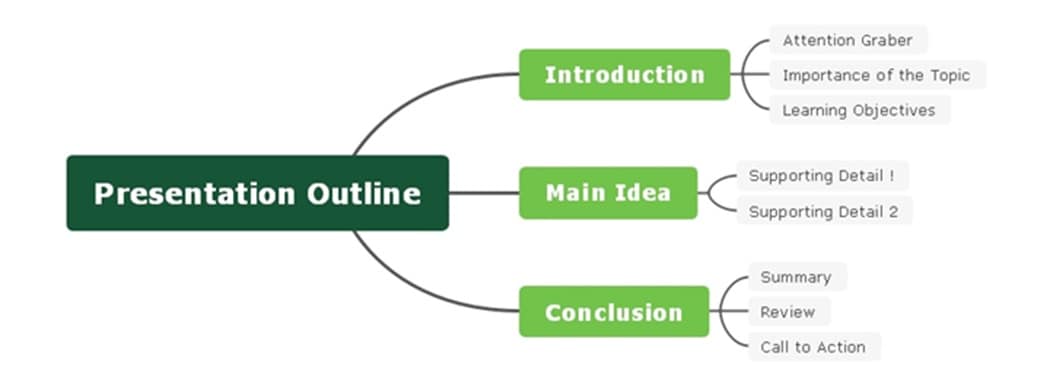
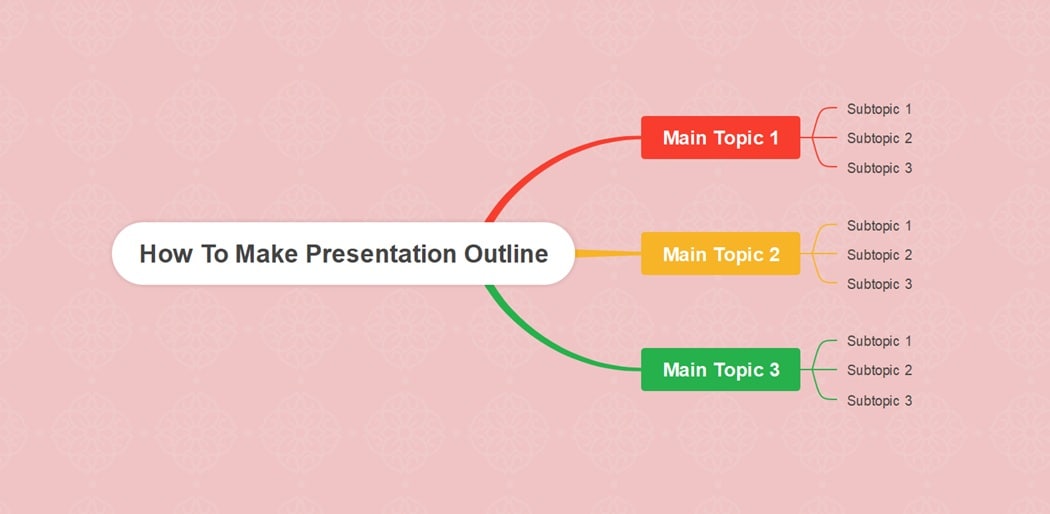
The purpose of an outline is to create a logical structure that your audience can follow. It helps you avoid unnecessary tangents and maintain control over timing. Here’s a sample presentation outline mind map created using Wondershare EdrawMind.


Why Should You Create a Presentation Outline?
A presentation outline helps you prepare for any pitch, lecture, or talk. It gives you a clear path to guide your audience from start to finish. It shapes how people see your planning and communication skills.
A strong outline can make your presentation more convincing and easier to follow.
Creating an outline saves time during brainstorming because you know what to focus on. It also helps you structure ideas so they appear in a logical order. With this, you can highlight your main points and avoid getting lost in extra details.
An outline also helps you divide ideas into groups. They make it simple to assign slides to each section. It supports rehearsal, allowing you to go over your key points. For your audience, the outline becomes a visual aid that makes complex topics easier to understand.
How To Create a Presentation Outline
The steps below show how to build a clear and effective outline.
Define the purpose of your presentation
Start by knowing your main goal. Do you want to inform, educate, motivate, persuade, or inspire? Decide what you want people to learn and what action they should take afterward. Answering these questions helps you set the tone and direction.
Organize your structure
Every presentation has three parts: an introduction, a main body, and a conclusion. Place your points in these sections so they flow in a natural order. A clear structure helps you move between topics without confusion.
Add an attention grabber
Decide how to open your talk in a way that hooks the audience. You can ask a question, tell a short story, or share a quote. A strong opening sets the tone for the rest of your outline.
Plan for visuals
Think about where to include images, videos, or charts. Visual content makes your points more memorable and adds energy to your slides. Even simple design choices like colors and fonts improve engagement.
Write a call to action
End your outline with a clear action you want your audience to take. This shows the value of your presentation and leaves them with a next step.
Why Use EdrawMind for Presentation Outlines?
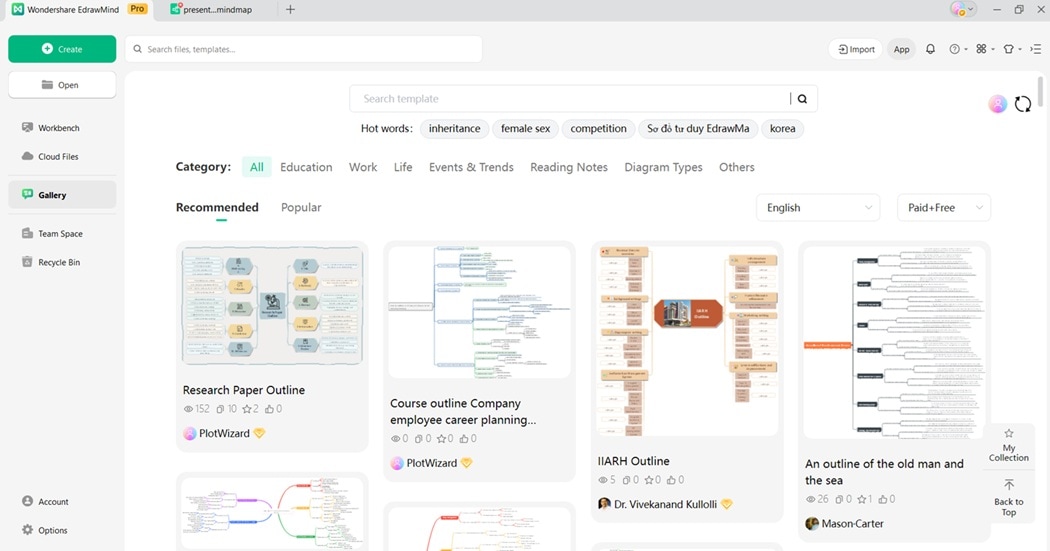
EdrawMind is more than a mind mapping tool. It is designed to help you plan, structure, and transform your ideas. Instead of starting from scratch, you can use templates and AI features to save time.
For presenters, EdrawMind makes outlining simple and visual. You can build step-by-step structures, expand details, and convert them into slides. Its AI-powered tools ensure your outline flows logically. It keeps your presentation engaging and easy to follow.
Here are EdrawMind’s main advantages for making presentation outlines:
AI Presentation
This feature lets you generate an entire presentation from a single topic. You enter your subject, and AI creates a full outline with slide-ready points. An AI Presentation can save hours of manual planning and formatting.
File To Slide
Instead of copying and pasting, upload a Word or text file. EdrawMind converts it into a complete slide deck in seconds. This feature keeps your outline structure intact and improves workflow efficiency.
Pic To Slide
Turn images of notes, diagrams, or hand-drawn outlines into slides with a click. EdrawMind uses AI to recognize content from pictures. The feature makes it easier to digitize ideas and transform brainstorming sessions into polished presentations.
AI Mapping
Create mind maps automatically from keywords or topics. This tool organizes your ideas into branches, sections, and sub-points. It provides a structured outline that you can easily switch into outline mode or slides.
Text To Mind Map Maker
Paste a block of text, and EdrawMind converts it into a clear mind map. It’s easy to turn rough notes or documents into a visual structure that can become a professional outline.
3 Ways To Make a Presentation Outline
There are many tools you can use to build a presentation outline. Each tool has its strengths. Below are three popular methods that work for different needs and styles.
Method 1: Using Microsoft Word
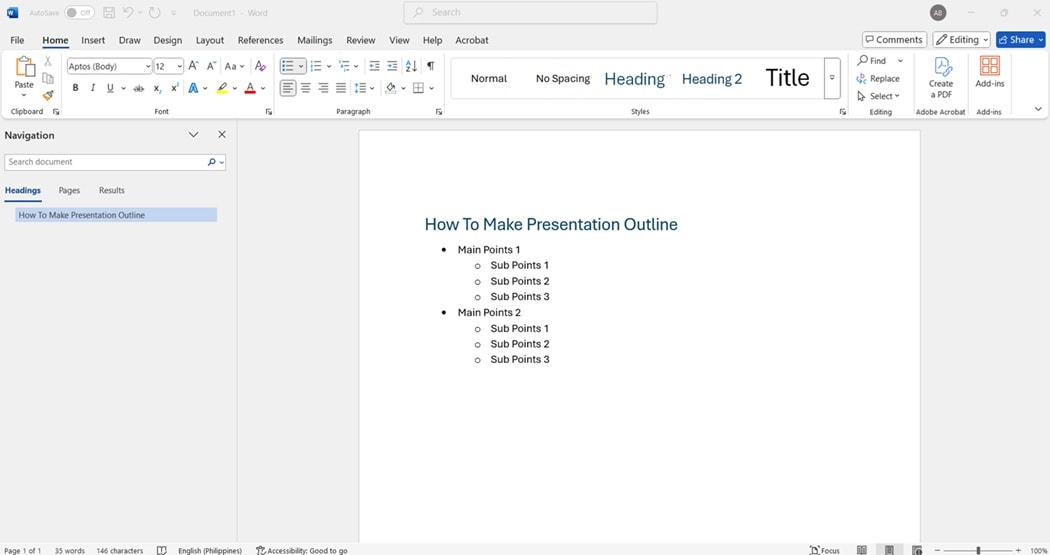
Microsoft Word is simple and familiar. It works best if you prefer a clean, text-based format. Outlining in Word helps you focus on structure without being distracted by design. Here are the steps:
Step 1:
Open a blank document and type your presentation title as the header. List your main points using bullet points or numbered lists.
Step 2:
Add sub-points under each item for supporting details or examples. Rearrange points by cutting and pasting until your flow feels logical.
Step 3:
Save your file and print it as a guide when creating slides.
Method 2: Using Microsoft PowerPoint
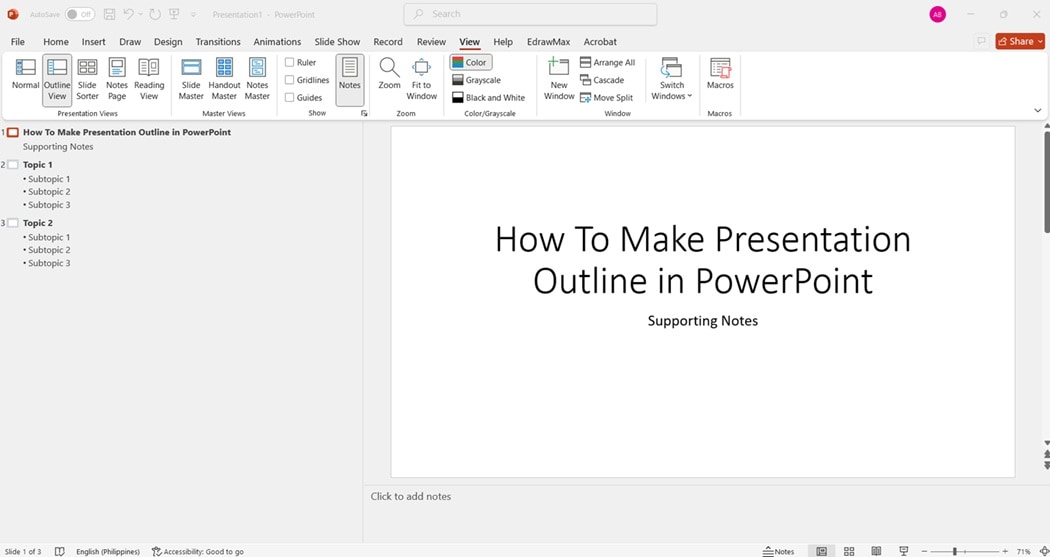
PowerPoint allows you to see your outline and slides at the same time. This is useful if you want to plan content and visual flow together while preparing your presentation. Follow the steps below:
Step 1:
Open a new presentation and switch to the outline view. Enter your main ideas as slide titles in the outline panel. Add supporting notes or talking points under each title.
Step 2:
Drag and reorder slides to improve the structure and pacing. Insert placeholders where you want to include visuals, charts, or videos.
Method 3: Using EdrawMind
EdrawMind combines outlines with mind maps. It helps you brainstorm, structure, and visualize simultaneously. With AI tools, you can turn ideas into slides quickly and effortlessly. Here’s how:
Step 1:
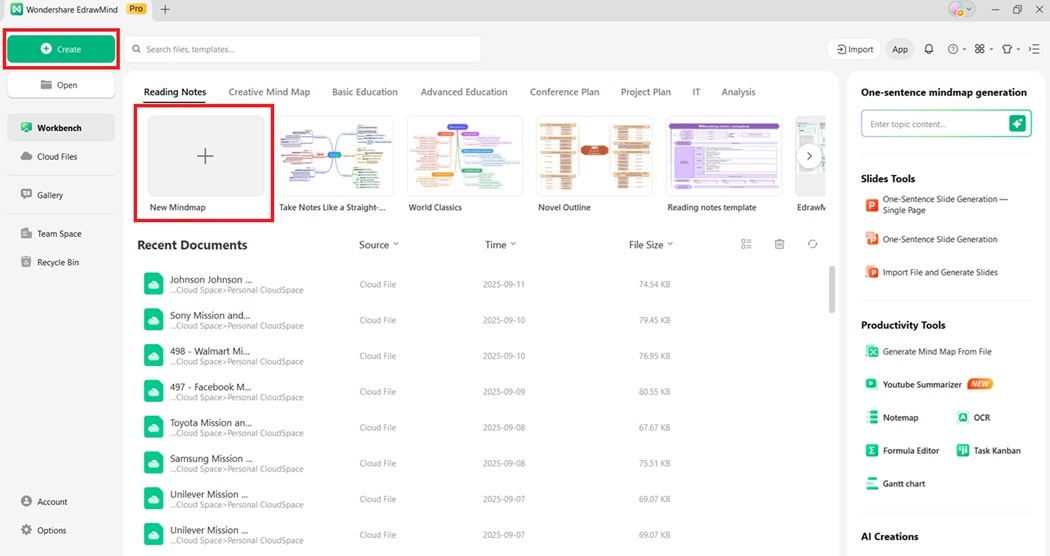
Download and install EdrawMind on your computer. Open EdrawMind and log in or register for a Wondershare account. Next, create a new mind map project.
 Try the app & get 500 free AI tokens


Step 2:
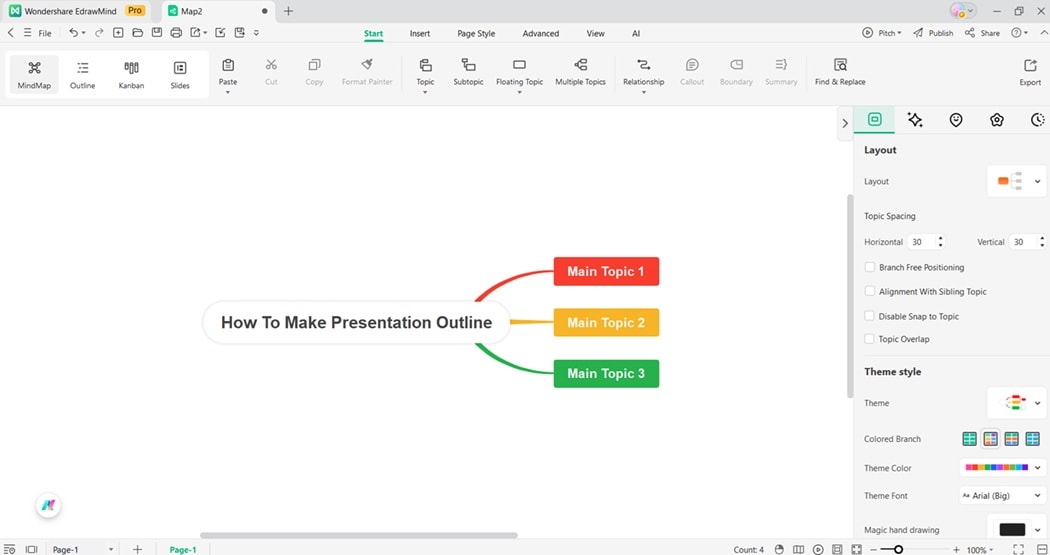
Type your central topic in the center node of the map.
Step 3:
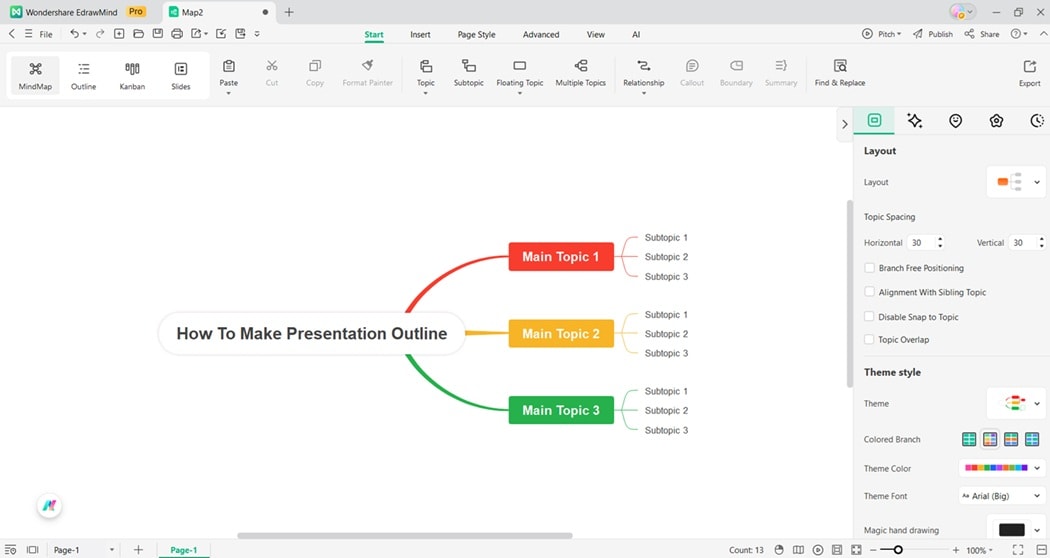
Add branches for the introduction, main body, and conclusion sections. Expand branches with sub-points, examples, and key visuals.
Step 4:
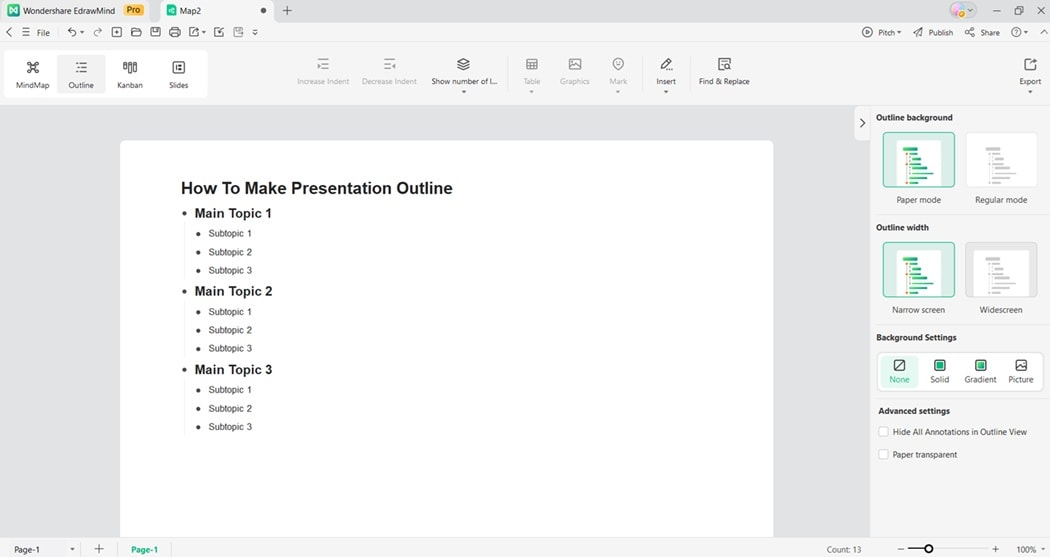
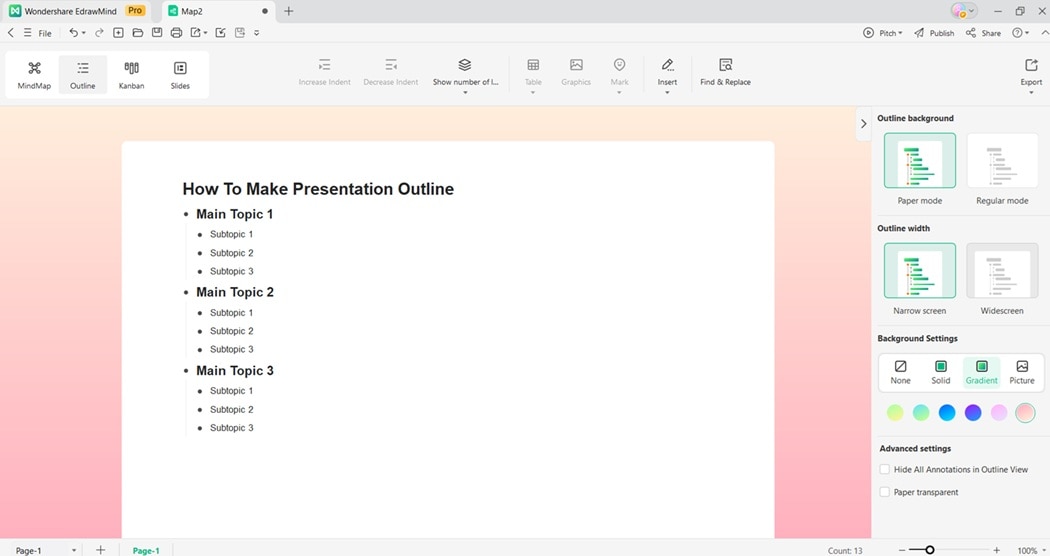
From the topic toolbar, click the Outline button. This mode switches to outline mode instantly.
Step 5:
Use the right-side panel to customize the presentation outline. Switch between paper and regular mode. Choose the outline width, then change the background settings.
Step 6:
Review the generated presentation outline. When you’re done, save and share your work.
Each method can help you create a clear outline, but EdrawMind offers the most flexibility. Its ease of use makes mind-mapping faster. What’s more, it has pre-made templates and AI-powered tools to speed up presentation outline creation.
Try EdrawMind’s AI-powered tools or pre-made templates to speed up your workflow.
10 Ways To Improve Your Presentation Outlines
Improving your presentation outline makes your message stronger. These 10 simple methods help you plan smarter and deliver better.
- Know your audience. Research who will attend so you can shape your outline around their interests, background, and expectations. A personalized approach makes your presentation more engaging and relatable.
- Start with clear goals. Define what you want people to learn, feel, or do after your talk. Having measurable goals keeps your outline focused and prevents unnecessary points from distracting the audience.
- Keep points concise. Long paragraphs in an outline can confuse. Use short phrases to highlight the main idea. Expand on them during your actual presentation to keep delivery natural and clear.
- Use logical flow. Arrange your ideas in a sequence that feels natural. Move from simple to complex, or from problem to solution. This allows your audience to follow along without confusion.
- Add strong visuals. Decide where images, charts, or videos will appear in your outline. Visual aids make your content more memorable and add variety to your presentation.
- Include transitions. Plan how to move between topics. Adding transitions in your outline ensures smoother delivery. It helps your audience see how each point connects to the next.
- Highlight key takeaways. Emphasize the main points you want your audience to remember. Place them at the end of sections in your outline to reinforce retention.
- Balance text and visuals. Avoid clutter by outlining where visuals will replace words. This balance keeps slides clean and allows your audience to focus on your spoken explanation.
- Practice with your outline. Use your outline as a guide during rehearsals. Doing so helps you spot weak areas, refine timing, and improve your confidence before presenting live.
- Revise after feedback. Share your draft outline with peers or mentors. Adding their feedback helps you improve clarity, flow, and engagement before finalizing your slides.
Conclusion
A strong presentation outline guides your message and keeps ideas in order. It helps you focus, avoid tangents, and deliver a clear flow that your audience can follow with ease. Good planning leads to more confident presentations.
EdrawMind makes outlining faster with AI tools. Use them to create presentation outlines in seconds. These features turn rough notes or files into organized outlines and slides. They save time and ensure your presentation structure remains clear and effective.
To create professional outlines with less stress, try EdrawMind on desktop or mobile. Its AI-powered functions help you brainstorm, design, and polish slides. With EdrawMind, you can build presentations that are more engaging and easier to deliver.
FAQ
-
What makes a good presentation outline?
A good outline is simple, logical, and audience-focused. It highlights main points, uses supporting details, and avoids clutter. It should flow naturally from the introduction to the conclusion, guiding you as you deliver your message. -
How can I improve my presentation outline?
Review your structure, cut unnecessary points, and make ideas clearer. Add visuals and plan transitions between sections. Always keep your audience in mind so your outline supports engagement and understanding. -
Do I need special tools to create an outline?
No, you can use pen and paper or Word. But using EdrawMind saves time with AI features and export options, letting you build, edit, and share professional outlines more effectively.
 EdrawMind
AppsEdrawMind Online
EdrawMind
AppsEdrawMind Online

