


Launching a new product is exciting, but getting customers to notice it can be stressful. A social media post disappears within hours, while paid ads can drain your budget fast. That’s why email has become a trusted tool for product launches.
In 2025, average open rates for email campaigns are around 42%, far higher than the visibility most brands get on social media. That means your announcement has a real chance of being seen, opened, and acted on.
This guide covers proven best practices to introduce a new product through email and get results you can measure.
In this article
What is a Product Launch Email?
A product launch email is a message a company sends to customers or subscribers to announce something new. It can be a product, a collection, an update, or a major feature. The goal is to highlight the value of the launch, explain how it benefits users, and encourage action.
A strong product launch email doesn't overwhelm readers with details. Instead, it reveals just enough to improve awareness and build curiosity.
Types of Product Launch Emails
While the purpose is always to announce something new, there are several variations of launch emails, each serving a distinct role:
- Product release emails share news of a brand-new product or an updated version
- Feature announcements highlight added functionality or improvements
- Pre-order emails let customers secure access early and create buzz before release
- Sales launch emails focus on special pricing or limited-time offers
- Event invitations promote webinars, demos, or launch parties tied to the release.
Each type is designed to educate, excite, and guide customers toward engaging with your new product.
Best Practices to Introduce a New Product through Email
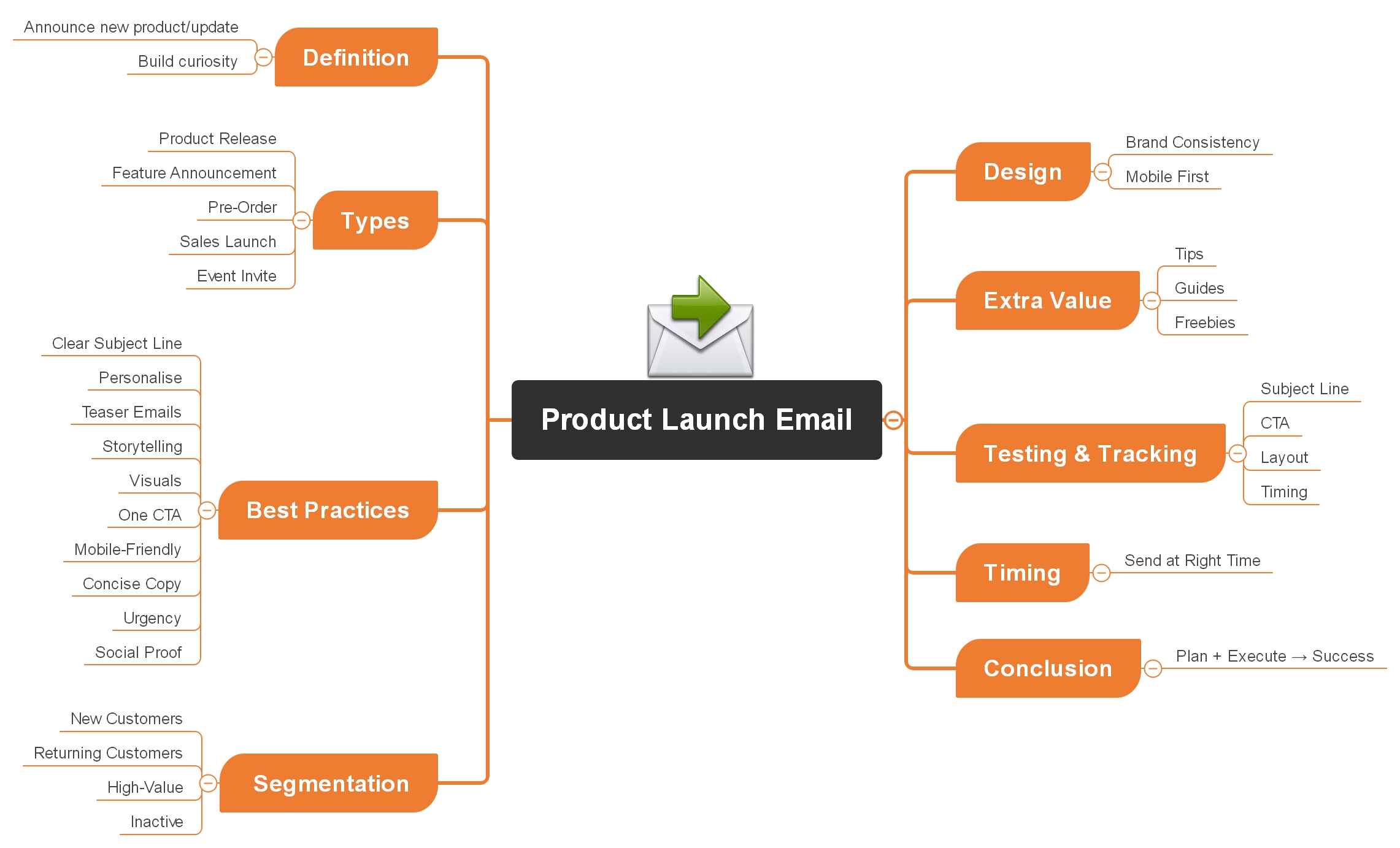


Here are practical tips to make your product launch emails engaging and successful:
Focus On Subject Line Clarity and Curiosity
A product launch email will never perform if people don't open it. The subject line is the gatekeeper, and too many campaigns fail because the line is vague, too long, or packed with jargon.
The best subject lines are short and make readers curious about what's inside. Aim for under 50 characters so it displays properly on mobile.
Use simple, benefit-led wording like "Be the first to try our new AI tool" instead of "We have something new." Testing multiple versions of your subject line before sending the data you collect will help you refine your approach for future launches.
Personalise Based on Audience Segments
Nothing makes an email feel irrelevant faster than generic messaging. Customers engage more when the content reflects who they are and what they need. Here's what you can do:
- Start with the customer's name
- Study your audience, ICP, and demographics
- Segment each audience based on behaviour and interests
- Draft benefit- and outcome-driven emails with storytelling
Mapping these audience groups and their expectations is easier when you use visual tools like EdrawMind's AI Mapping. It helps you quickly sketch out personas and their needs, giving you the clarity to create targeted versions of your product launch email that feel specific and valuable to each group.
Build Anticipation with Teaser Emails
A common mistake in product launches is relying on a single announcement email. If your audience misses it or doesn't act right away, the opportunity is lost. A launch works best as a sequence of emails that gradually build interest and keep your product top of mind.
The success of these emails depends on both timing and messaging. Here's a simple structure you can follow:
- Build anticipation (Two weeks before launch): Send a teaser email that hints at the problem your product solves without giving away too much. This creates curiosity but keeps the suspense alive.
- Announce the product (One week before launch): Reveal what's coming, share images or screenshots, and provide the release date or pre-order details. This ends the suspense and sets expectations.
- Celebrate the reveal (Launch day): Share your excitement with your audience. Include strong visuals, clear CTAs, and social share buttons so customers can help spread the word.
- Follow up (One week after): Send a reminder email targeted to people who haven't purchased or upgraded yet. This #ICYMI message ensures your product stays on their radar.
Planning this sequence is easier when you map it visually. In EdrawMind's Concept Map Maker, you can lay out teaser ideas, such as "feature sneak peek," "early access invite," or "coming soon countdown," and arrange them into a timeline.
Showcase Value Through Storytelling
Many launch emails fail because they only list features. Customers don't connect with a set of specs; they want to see how the product will make their life easier. Without that link, even a great product can be ignored.
Storytelling helps you bridge this gap. Instead of leading with "what the product does," frame your message around the problem your audience faces and how your product solves it.
Here's how to do it:
- Show a situation your audience struggles with. Keep it short and relatable.
- Position your product as the answer to that problem.
- Talk about the benefits customers will enjoy, not just the features they'll use.
To plan these stories, EdrawMind's AI Mind Map can help. Add the customer's problem in the centre, branch out into pain points, emotions, and goals, and then link each one to the way your product helps.
Highlight Visuals, Not Just Text
Long blocks of text can overwhelm readers and cause them to skim past your email. When people can't quickly see the value of your product, they're less likely to click through.
Visuals make your launch email more engaging and easier to understand. A single image or short video often explains what a paragraph of text cannot. They also help customers imagine themselves using your product.
Here's how to do it:
- Use high-quality images
- Add short videos or GIFs
- Use infographics or slides
- Keep file sizes small
If you only have product photos, EdrawMind's Pic-to-Slide can convert them into a polished slide deck. This lets you showcase benefits in a visual format that feels professional and easy to share. Adding one or two slides from such a deck can make your launch email stand out.
Maintain One Clear Call-to-Action
When an email includes multiple buttons or links, it splits attention and reduces the chance of action. Customers respond better when you guide them toward a single, clear step.
Your CTA should be specific, benefit-driven, and easy to see. Instead of vague wording like "Click Here," use direct language tied to your launch offer or product benefit.
Strong CTA examples for product launch emails include:
- Pre-Order Now and Save 20%
- Use Code LAUNCH15 at Checkout
- Claim Your Launch Discount – Limited Time
- Upgrade Now for Exclusive Features
- Get Your Free Trial – Ends Soon
Design for Mobile-First Readability
Most product launch emails are opened on a phone. If your design isn't mobile-friendly, readers may delete the message before even seeing what you're offering. Small fonts, cluttered layouts, or buttons that are hard to tap can ruin the experience and cost you conversions.
Designing with mobile-first in mind guarantees your message is clear, no matter what device customers use. Keep the layout simple and make key actions easy to complete on a small screen.
Keep Copy Concise and Skimmable
When customers open a launch email, they scan before they read. Long blocks of text are intimidating and often ignored. If the value of your product isn't obvious in the first few seconds, the reader will move on without clicking.
Concise, well-structured copy makes your message easy to digest. Readers should be able to understand what's new, why it matters, and what to do next in just a quick glance.
Incorporate Urgency and Exclusivity
One reason readers delay acting on a product launch email is because they don't feel any pressure to decide now. Without urgency, they think, "I'll come back later," and never do. The result is lost momentum and fewer conversions.
Urgency and exclusivity give your audience a reason to act quickly. Limited-time offers, countdowns, or exclusive early access make the launch feel important and time-sensitive.
Ways to add urgency to your launch emails:
- Use countdown timers
- Mention limited stock, spots, or licenses available.
- Give early entry to loyal customers or subscribers.
- Use phrases like "Ends Sunday" or "Offer valid for 48 hours."
For example, a tech brand releasing new headphones could send a launch email with "Be one of the first 500 to order and receive a free case. Offer ends in 3 days." This makes the benefit clear and the deadline unavoidable.
Use Social Proof
Even the most well-written product launch email can feel like marketing hype if it only contains your own claims. Customers are naturally sceptical and want proof that others trust and value your product. Without that reassurance, many will hesitate to take action.
Social proof gives your launch email credibility. By showing how real people or trusted sources respond to your product, you reduce doubt and build confidence. Here are some key elements you can try:
- Customer testimonials
- Ratings and reviews.
- Case studies
- Media mentions
- User numbers
Segment New vs Returning Customers
Not every subscriber should receive the same launch email. New customers need education, while loyal ones expect recognition. Segmenting your audience makes sure that each group gets a message that feels relevant.
| Audience Type | What They Need | Example Message |
| New customers | Simple explanation of product benefits | "Discover how our latest update helps you get started faster." |
| Returning customers | Appreciation, early access, or loyalty perks | "As one of our most valued users, you're invited to try our new feature first." |
| High-value customers | Premium features or upgrades to enhance usage | "Unlock exclusive tools designed for power users like you." |
| Inactive subscribers | Re-engagement hooks or limited-time incentives | "We've saved your spot, use code WELCOME20 to rejoin today." |
When each group gets an email that matches what they care about, they are more likely to engage and feel appreciated. This makes your launch emails work better and helps build lasting customer loyalty.
Align Design with Brand Identity
If your product launch email looks different from the rest of your brand, it can confuse customers and weaken trust. A mismatched design, using new colours, fonts, or tones, makes the message feel disconnected, as if it came from another company.
Consistency builds recognition and credibility. When subscribers see familiar design elements, they instantly know the email is from you, which makes them more likely to read and act.
Provide Value Beyond Promotion
If your product launch email only sells, many readers will tune out. Customers are flooded with promotional content every day, and without added value, your message risks being ignored.
The solution is to mix promotion with something useful. Even if a subscriber isn't ready to buy right away, they should feel that opening your email was worth their time.
Here's how you can add value:
- Share a short how-to guide or checklist
- Offer a free resource or template
- Include tips that solve a common customer problem
For example, a software company launching a new product could share a simple, quick-start guide to help users get started fast. Converting that guide into an easy-to-read slide deck with EdrawMind's File-to-Slide makes it even more helpful and easy to share.
Test and Track Performance Metrics
One of the biggest mistakes in product launch emails is sending them out and never checking how they performed. Without testing and tracking, you don't know what worked, what failed, or how to improve the next campaign. This leads to missed opportunities and repeated mistakes.
Key areas to test and track:
- Subject lines: A/B test different lengths, tones, or curiosity hooks.
- CTA buttons: Try variations in wording, placement, and colour.
- Email layout: Test single-column vs multi-section designs.
- Send times: Morning vs evening, weekdays vs weekends.
Important metrics to monitor:
- Open rate: How many people opened the email?
- Click-through rate (CTR): How many of clicks a link or button receives.
- Conversion rate: How many completed the desired action, like purchasing or signing up.
- Unsubscribe rate: A warning sign if your content isn't hitting the mark.
Testing lets you make smarter choices using real data instead of guessing. Even small changes, like adjusting a subject line or moving a button, can quickly improve open rates and clicks.
Optimize Email Timing
Even the best product launch email can fail if it arrives at the wrong time. Send it when people are busy, asleep, or not checking their inbox, and your message risks being missed or ignored.
Choosing the right time increases the chances of your email being opened and acted on. Since every audience is different, testing is the only way to know what works best for you.
For example, a fashion retailer might find that emails sent at 8 a.m. on Saturday get higher open rates, while a B2B software company may see better results by sending at 10 a.m. on Tuesday.
Sending at the right time guarantees your product launch email gets the attention it deserves.
Conclusion
A successful product launch email comes down to planning and execution. Strong subject lines, clear storytelling, engaging visuals, and well-timed follow-ups all work together to make your announcement more memorable and effective.
To make the process easier, you can use EdrawMind. Its tools let you map out your campaign ideas, build simple visuals and slides, helping you deliver launch emails that connect with customers.
FAQs
FAQ
-
Should I announce a new product to my entire email list?
Not always. If your product is only relevant to a segment of your audience, it's better to target that group. Sending to everyone may lower engagement and increase unsubscribes. -
How soon before launch should I start building an email list?
Ideally, start list-building at least one to two months before launch. Use landing pages, sign-up forms, and incentives so you have a warm audience ready when your product goes live. -
Can I reuse a product launch email for future launches?
Yes, but adapt it each time. Keep the structure, subject line, visuals, CTA, but update the story, urgency, and customer proof so it feels fresh and specific to the new product.
 EdrawMind
AppsEdrawMind Online
EdrawMind
AppsEdrawMind Online

