About this User Education Plan template
Launching a new feature requires more than just code. It needs a clear plan to teach users how to use it. This template helps teams organize their strategy for maximum feature adoption and long-term customer satisfaction.
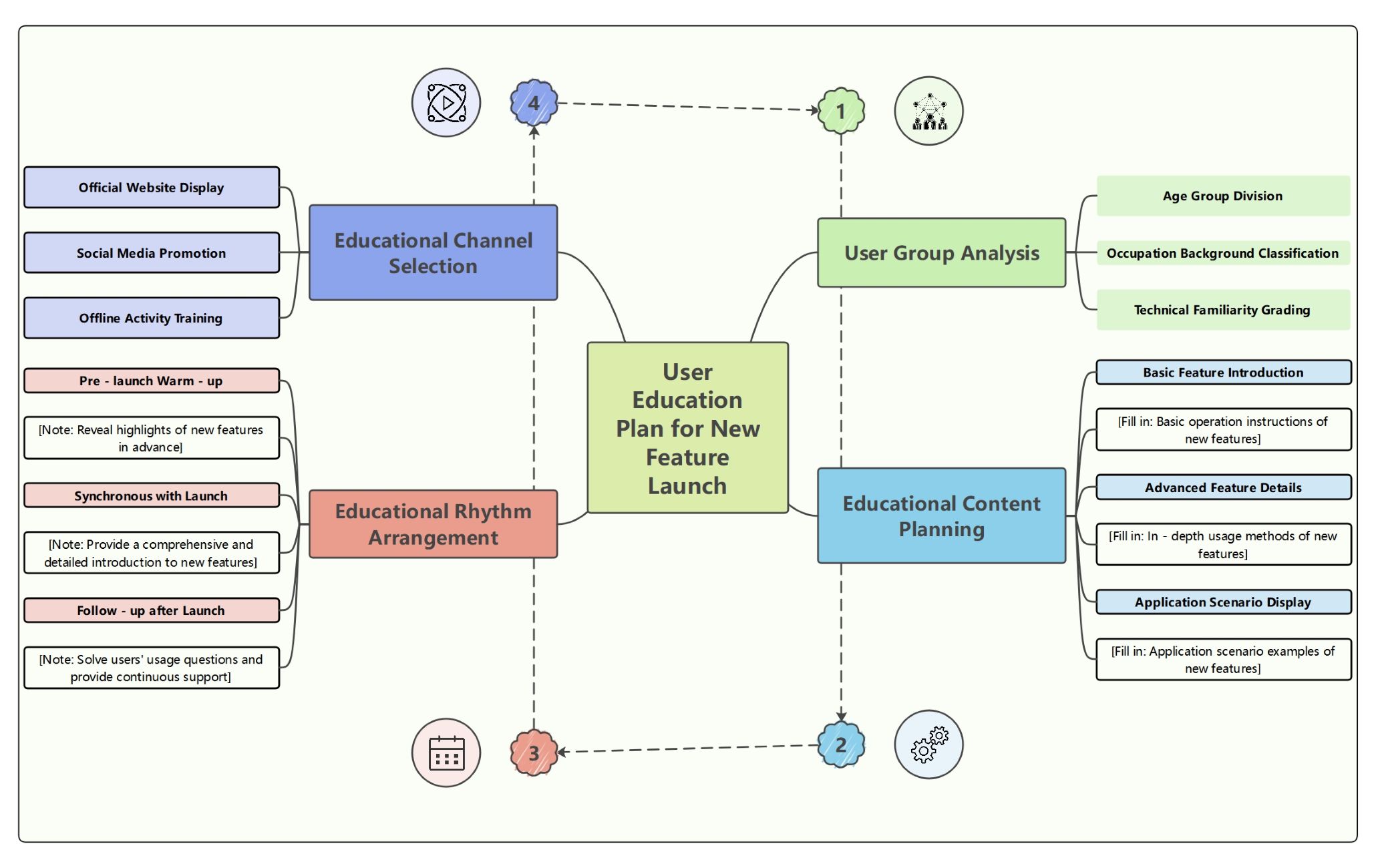
User Group Analysis
Understanding your audience is the first step in any successful feature launch. This section helps you categorize users by age, professional background, and technical skills. This ensures your educational materials match their specific learning needs perfectly.
- Age Group Division
- Occupation Background Classification
- Technical Familiarity Grading
Educational Content Planning
Creating the right materials is essential for user adoption. This section focuses on developing basic guides, advanced tutorials, and real-world scenarios. It helps users understand how the new feature solves their specific problems and improves their daily tasks.
- Basic Feature Introduction
- Basic operation instructions of new features
- Advanced Feature Details
- In-depth usage methods of new features
- Application Scenario Display
- Application scenario examples of new features
Educational Rhythm Arrangement
Timing is everything when introducing new updates to your customer base. This phase covers the pre-launch buzz, the release day information, and long-term support. A structured timeline ensures users feel supported throughout the entire transition process.
- Pre-launch Warm-up
- Reveal highlights of new features in advance
- Synchronous with Launch
- Provide a comprehensive and detailed introduction to new features
- Follow-up after Launch
- Solve users' usage questions and provide continuous support
Educational Channel Selection
You must choose the best platforms to reach your target audience effectively. This part of the plan focuses on website updates, social media engagement, and hands-on training sessions. Diversifying your channels helps maximize the visibility of your educational content.
- Official Website Display
- Social Media Promotion
- Offline Activity Training
FAQs about this Template
-
Why is user education critical for a new feature launch?
User education is vital because it bridges the gap between a new tool and a confident user. Without proper guidance, customers might feel overwhelmed or ignore the update entirely. By providing clear instructions and use cases, you increase feature adoption rates. This leads to higher customer satisfaction, reduced support tickets, and long-term loyalty as users see the continuous value you provide in every update.
-
How do I choose the best channels for user education?
To choose the best channels, you must first understand where your users spend their time. If your audience is professional, email newsletters and official documentation are key. For younger or more casual users, social media and short videos work best. A mix of digital platforms and direct training ensures that all segments of your audience receive the necessary information effectively throughout the launch.
-
What should be included in a pre-launch warm-up phase?
The pre-launch warm-up should focus on building excitement and curiosity. Start by revealing teaser videos or highlight snippets of the upcoming features. You can also offer early access to power users for feedback. This phase prepares the audience for change and ensures they are looking forward to the update, making the actual transition smoother and much more successful for your entire user base.