
The Whittakers are a family from Odd, West Virginia, who became widely known through Mark Laita's Soft White Underbelly videos. Because much of the public information about the family comes from documentaries, interviews, and online family-tree reconstructions, specific genealogical claims should be treated as reported accounts rather than independently verified records.
How are the Whittakers related? The best-known household in Odd, West Virginia, is documented mainly through Mark Laita's Soft White Underbelly interviews. Public family-tree reconstructions trace several branches that reconnect across generations, but the videos themselves are not a complete civil-record genealogy. This article therefore separates relationships visible in the documentary coverage from lineage claims that remain secondary-source reconstructions, and it avoids drawing medical conclusions about any person from appearance, speech, or behavior.
Primary-source context: Mark Laita's Soft White Underbelly videos document the family members and household in Odd, West Virginia, but they are not a complete birth-marriage-census genealogy. That distinction matters when reading exact kinship claims.
In this article
Whittaker Family Tree: Reported Generations and Relationships
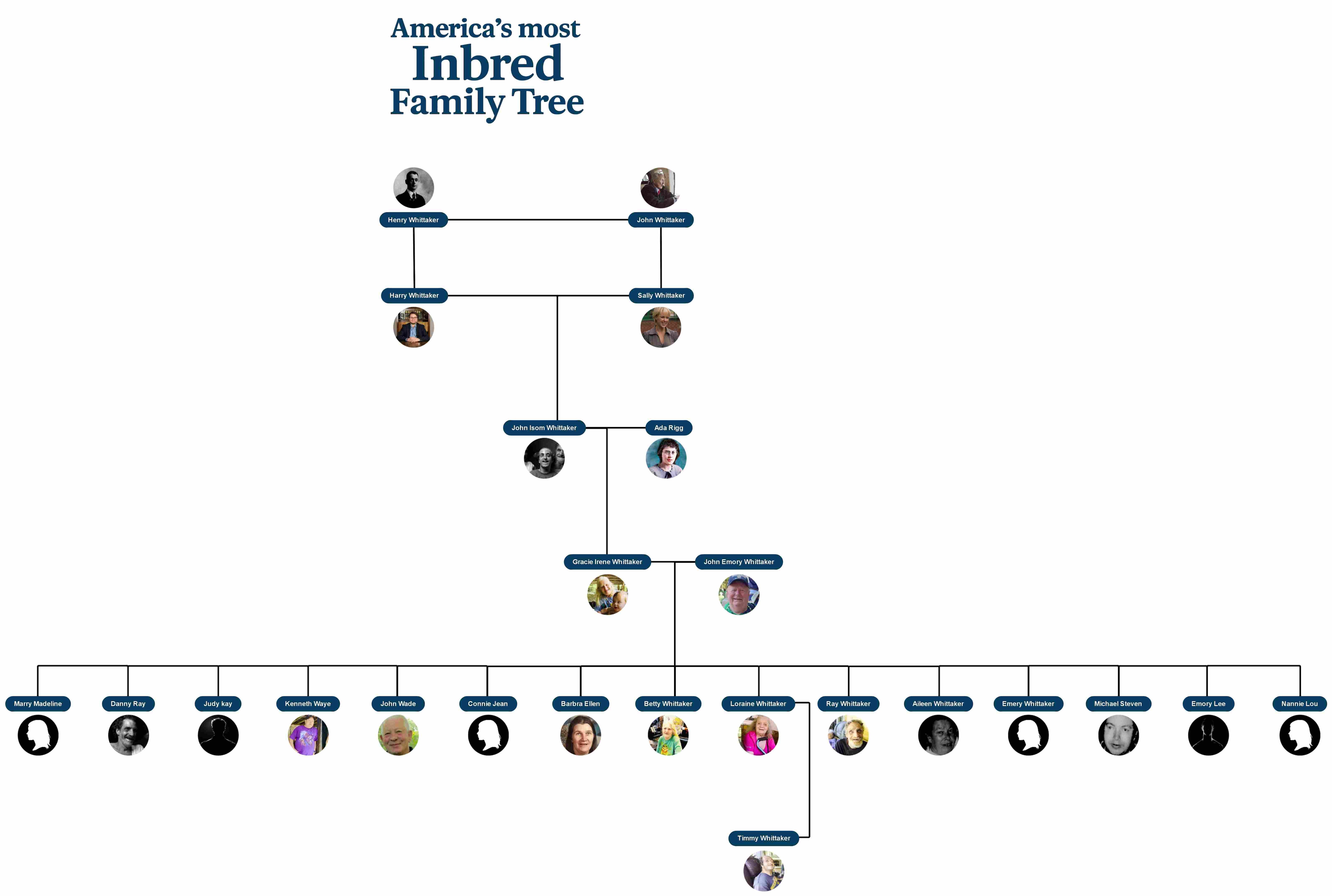


The Whittakers are frequently described online with the sensational label "America's most inbred family." A more accurate way to read the diagram is as a reported genealogy showing repeated relationships between branches of an extended family in Odd, West Virginia. The label itself is not a formal genealogical or medical classification.
This family tree is most useful as a relationship guide: it shows how the reported branches reconnect across generations and which relatives appear in documentary coverage. Because the underlying civil records are not reproduced here, use the diagram to understand reported family connections rather than as a fully verified genealogical record.
Generation 1: The Twins
- Henry Whittaker
- John Whittaker
The Whittaker story begins with two twin brothers, Henry and John, born in the 1880s. They were the roots of the family tree, the ones from whom later generations grew. Both of them married and started families of their own.
For a time, their children and grandchildren followed separate paths. But as the years passed, the two family lines crossed again. Through marriages between cousins, the branches of the family tree curved back together, and this set the stage for the unique Whittaker bloodline.
Generation 2: Their Children
From Henry's side came John Emory Whittaker.
From John's side came Gracie Irene Whittaker.
Publicly circulated family-tree reconstructions identify John Emory and Gracie as close relatives whose marriage reconnects two branches of the family. Because this page does not reproduce the underlying birth, marriage, and census records needed to prove the exact degree of kinship, that relationship should be read as a reported genealogy claim rather than a fully verified pedigree.
Generation 3: The Key Couple
- John Emory Whittaker (Henry's grandson)
- Gracie Irene Whittaker (John's daughter)
John Emory and Gracie married each other, bringing the two bloodlines back together. Life was not easy for them. According to family stories, John worked long hours as a coal miner, facing the dangers of the mines, while Gracie stayed home to raise their children. They struggled, but they also built a large household full of life. Together, they became the parents of 15 children. Their union is the turning point of the Whittaker tree, because nearly all the well-known members today come directly from their marriage.
Generation 4: Their 15 Children
Public family-tree reconstructions list 15 children in this generation. Several relatives from this branch and the next generation appear in Mark Laita's Soft White Underbelly coverage. Because biographical details vary across secondary sources, the names below are best used as a relationship guide rather than as a substitute for primary genealogy records.
- Mary Magdalene: The first child, who sadly died at only 10 months old.
- Danny Ray: Little information is known about him.
- Judy Kay: Married Arnold Accord, had 7 children, and passed away in 2021.
- Kenneth Wayne (Kenneth): He appears in accounts of the family and has been shown as part of the household.
- John Wade: Married Rosemary, became the father of 5 sons, and died in 2022 from cancer.
- Connie Jean: She married James, but little is recorded about her life.
- Barbara Ellen: She was known as a homemaker and churchgoer; she passed away at 68.
- Betty Whittaker: The heart of the family, never married, and takes care of her siblings.
- Lorraine Whittaker: She is part of the household featured in the documentaries and is identified in public family-tree accounts as Timmy's mother.
- Ray Whittaker: Non-verbal, but always expressive and cheerful in his own way.
- Aileen Whittaker: She Married, had a son named Frankie, and died of a heart attack at 60.
- Emery Whittaker: Died as a baby from pneumonia.
- Michael Steven (Stevie): He died in 2001, remembered in early family photos.
- Emory Lee: Little is known about his life.
- Nannie Lou: She married, and now buried in West Virginia, though details of her life remain scarce.
This is the generation that most people recognize today. The Whitakers in Mark Laita's videos. Betty, Ray, Lorraine, and Kenneth are from this group. They became the face of the family's story to the outside world.
Generation 5: The Next Line
The fifth generation includes grandchildren shown in public family-tree reconstructions. Timmy Whittaker, identified as Lorraine's son, is one of the relatives who appears regularly in the Soft White Underbelly coverage and lives with members of the extended family in Odd.
There are also other grandchildren. Judy's seven children, John Wade's five sons, and Aileen's son Frankie carry the Whittaker line forward. But Timmy is the most familiar face because he remains at the center of the household in Odd, West Virginia.
How to Make Similar Family Trees in EdrawMind?
A family tree explains how family members are linked, but drawing one by hand takes time and effort. That's where EdrawMind helps. It comes with ready-made templates, editable branches, and images to make the process simple.
Want to visualize a complex family history in the same way? You can build a Whittaker-style family tree diagram in EdrawMind while clearly labeling which relationships are documented and which are based on secondary-source reconstructions.
Step 1: Create a New File
- Install and launch EdrawMind.
- Sign in with a free Wondershare account or log in using your social accounts.
- Click the Create button at the top-left corner of the homescreen.
- Choose Local MindMap from the menu to start a new file.
 Try the app & get 500 free AI tokens



Step 2: Add a Title
- We don't need default Main Topics or subtopics in a family tree. So, let's delete them.
- We can use text or an image for adding the title. We will use an image here.
- Click Insert > Picture and upload a picture.
- You can also add AI generated images or Pixel images.

Step 3: Add Family Members
- Click Floating Topic in the top menu and place them on the canvas for each family member.
- Repeat until all members of the Whittaker family are represented.

Step 4: Customize Each Member
- Double-click a topic to edit the name of the family member.
- Use the floating menu to change fonts, sizes, and other text properties.
- Customize color, border, and shape from the right toolbar to make the family tree visually appealing.

Step 5: Connect the Family Members
- Select Relationship from the top menu.
- For direct relations, use a straight line; for extended relations, use an ordinary relationship line.
- Click a topic, drag the line to connect it to another topic, and adjust the line style as needed.
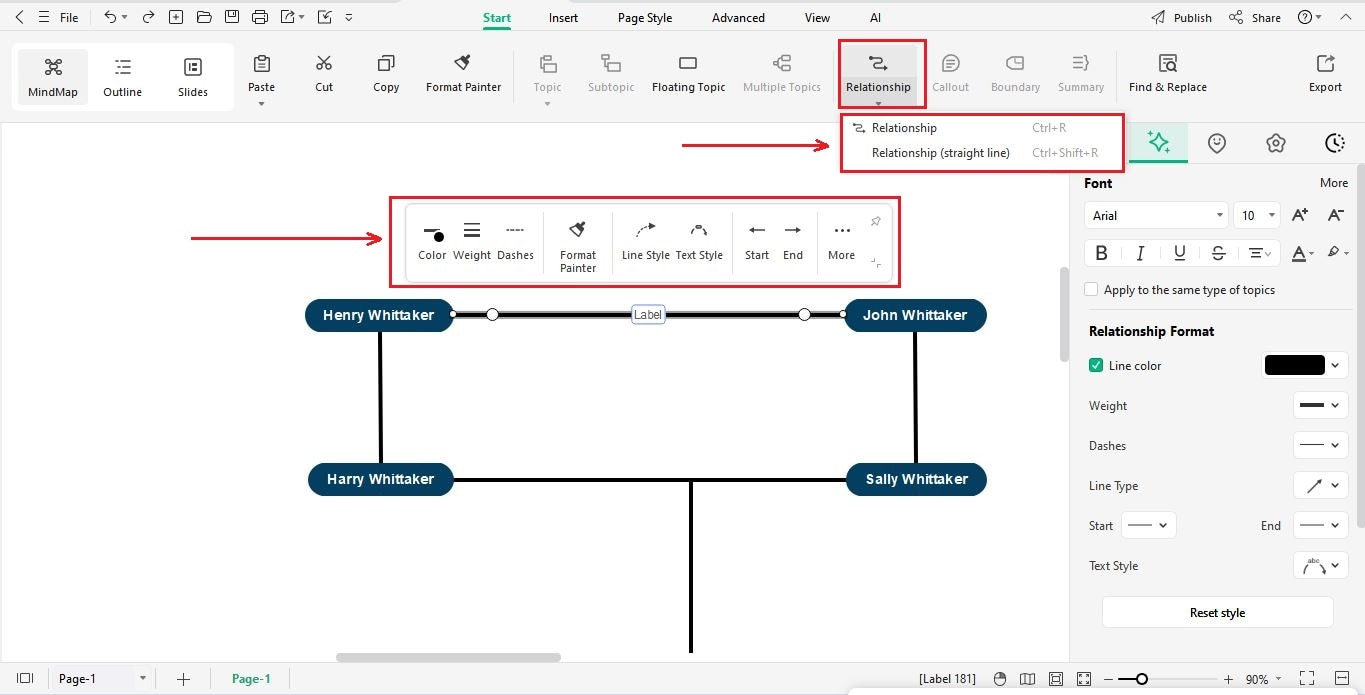
Step 6: Add Pictures of Family Members
- Copy and paste images into EdrawMind.
- Customize size, shape, and position using the right toolbar and floating menu.

Bonus Tip:
Open the image in EdrawMax, select Crop to Shape, position it, then copy and paste into EdrawMind for a perfectly shaped photo in your family tree.

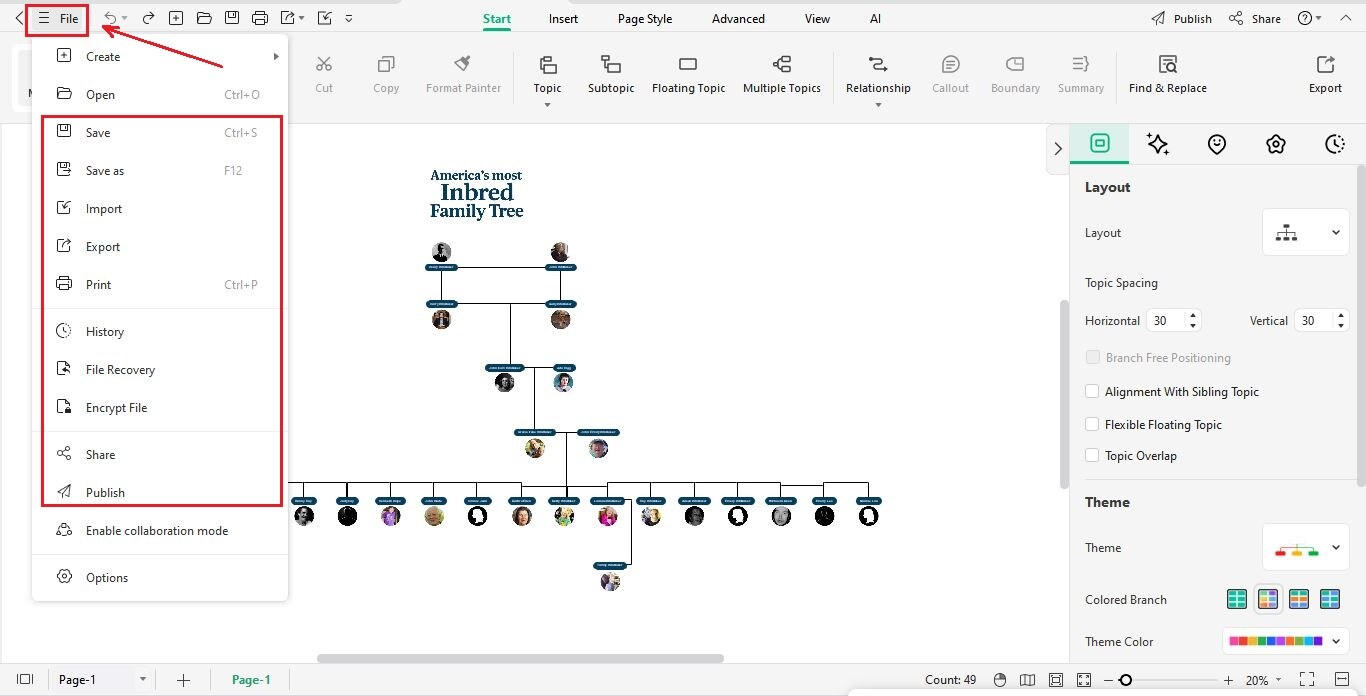
Step 7: Save or Export Your Family Tree
- Click the File icon at the top-left corner.
- Click Save to download your file.
- Alternatively, choose Export to save the family tree in your preferred format (PDF, PNG, etc.).
Source note: The family's public profile is documented primarily through Soft White Underbelly interviews and videos. Exact genealogy details should be cross-checked against primary records where available. Source: https://www.softwhiteunderbelly.com/videos/the-whitakers
Closing Thoughts
The Whittaker family tree shows a life shaped by hardship, loyalty, and survival. From the twins Henry and John in the 1880s to today's well-known members like Betty, Ray, and Timmy, their story is both unique and emotional. Mark Laita's videos gave them attention, but they also revealed their humanity.
If this story inspires you to explore your own roots, try EdrawMind. With easy templates and flexible tools, you can map your family history clearly and beautifully.
 EdrawMind
AppsEdrawMind Online
EdrawMind
AppsEdrawMind Online