Toyota combines corporate governance and executive leadership with company-wide functions, regional operations, production, engineering, and business groups. Its public structure changes as responsibilities are reorganized, so a current org chart should carry a clear ‘as of’ date.
This article explains Toyota’s hybrid structure, distinguishes officially disclosed roles from simplified analytical groupings, and shows how regional execution and cross-functional coordination support a global manufacturing and mobility business.
In this article
Quick answer: Toyota uses a hybrid organizational structure that combines top-level corporate leadership with functional, regional, production, engineering, and operating groups. Public executive roles can be mapped from Toyota disclosures, but a simplified chart should not imply that every internal reporting line is publicly confirmed.
| Layer | Role in Toyota’s structure |
|---|---|
| Board / top leadership | Governance, company direction, major strategic decisions |
| Operating officers and chief officers | Lead company-wide functions and major operating areas |
| Regions and business operations | Adapt execution to markets and operating needs |
| Production / engineering groups | Coordinate product, manufacturing, technology, and production capabilities |
Sources checked:Official source 1 | Official source 2
Toyota Organizational Structure and Leadership Hierarchy
Toyota is better described as a hybrid/divisional structure that combines a global hierarchy with regional, product, production, engineering, and company-wide operating groups. Cross-functional coordination supports that structure, but Toyota does not present a single public “matrix org chart” as the definitive model.
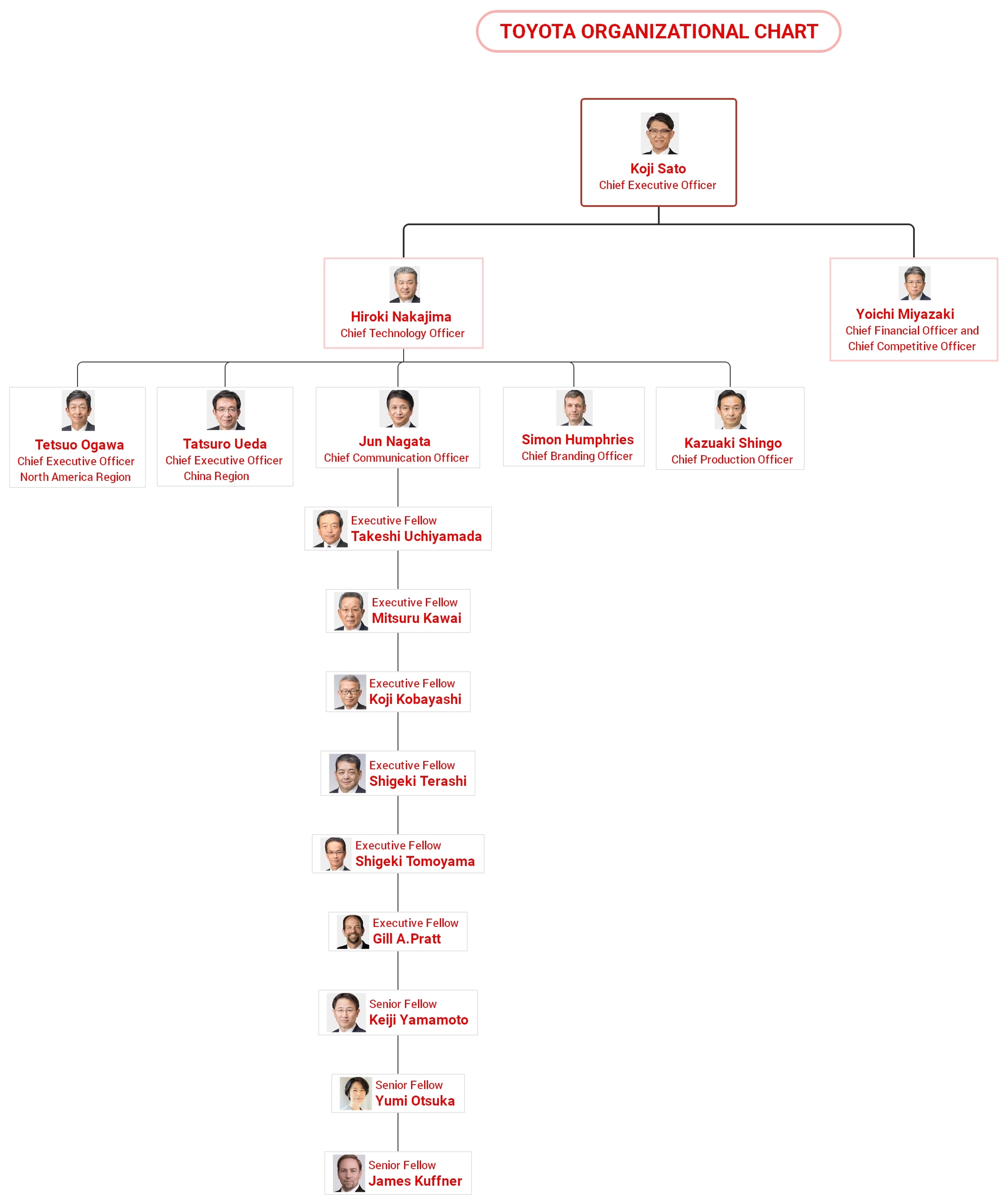
 below.
  below.

Functional and Executive Hierarchies
Toyota's structure is built on key functional departments, each specializing in critical business areas:
- Research and Development (R&D) – Focuses on innovation and new vehicle technologies.
- Production & Manufacturing – Oversees vehicle assembly and quality control.
- Sales & Marketing – Manages customer engagement and market strategies.
- Supply Chain & Logistics – Ensures efficient distribution of parts and vehicles.
These hierarchies allow Toyota to maintain expertise and efficiency across all operational levels.
Regional and Market Organization
Toyota divides its global operations into key regional units, such as:
- Toyota North America
- Toyota Europe
- Toyota Asia & Oceania
Each regional division operates with a degree of autonomy, enabling localized decision-making to serve customer needs better and comply with regional regulations.
Project-Based Teams
To drive innovation and agility, Toyota integrates cross-functional project teams for specific initiatives, such as:
- Electric Vehicle Development
- Sustainability & Carbon Neutrality Projects
- Autonomous Driving & AI Research
These teams bring together experts from different departments, fostering collaboration and accelerating product development.
Alignment with the Toyota Production System (TPS)
Toyota’s structure aligns with TPS and lean manufacturing principles, emphasizing:
- Kaizen (Continuous Improvement) – A culture of innovation and efficiency.
- Just-in-Time (JIT) Production – Reducing waste and optimizing inventory.
- Quality Control & Standardization – Ensuring high manufacturing standards.
By integrating these elements, Toyota maintains its reputation for excellence, adaptability, and long-term success in the global automotive market.
Advantages of Toyota’s Organizational Structure
Toyota’s matrix organizational structure provides several key advantages that enhance its efficiency, innovation, and adaptability in the global automotive industry.
Operational Efficiency
By integrating functional hierarchies, regional divisions, and project-based teams, Toyota optimizes workflow and resource allocation. Each department specializes in its area of expertise, ensuring smooth operations while maintaining high production standards.
Enhanced Communication & Collaboration
The matrix structure promotes cross-functional collaboration between departments and teams. Project-based teams allow experts from R&D, production, and marketing to work together, fostering knowledge sharing and faster decision-making. This synergy accelerates innovation and problem-solving.
Strong Quality Control
Toyota’s structure aligns with the Toyota Production System (TPS), ensuring stringent quality control at every stage of production. The Just-in-Time (JIT) approach minimizes waste while maintaining high manufacturing standards, reinforcing Toyota’s reputation for reliability and durability.
Agility & Market Adaptability
With regional divisions operating independently, Toyota quickly responds to local market demands, consumer preferences, and regulatory changes. This decentralized approach enhances flexibility, allowing Toyota to stay competitive across diverse global markets.
Innovation & Technological Advancements
Cross-functional project-based teams drive technological advancements in electric vehicles, artificial intelligence, and sustainability. This structure enables Toyota to stay at the forefront of innovation while adapting to industry trends.
How to Create an Org Chart Easily
Understanding an organization’s structure is essential for clarity, coordination, and efficient decision-making. An organizational chart (org chart) visually represents reporting relationships, helping teams streamline communication and workflow. Whether for a global corporation like Toyota or a small business, an org chart simplifies management and enhances operational efficiency.
Wondershare EdrawMind is a powerful and user-friendly tool designed to create professional org charts easily. It offers pre-designed templates, intuitive editing tools, and customization options, making it simple for individuals and businesses to visualize their organizational hierarchy efficiently. With EdrawMind, users can design, edit, and share org charts in just a few clicks.
 Try the app & get 500 free AI tokens


Steps to Create an Organizational Chart Using EdrawMind
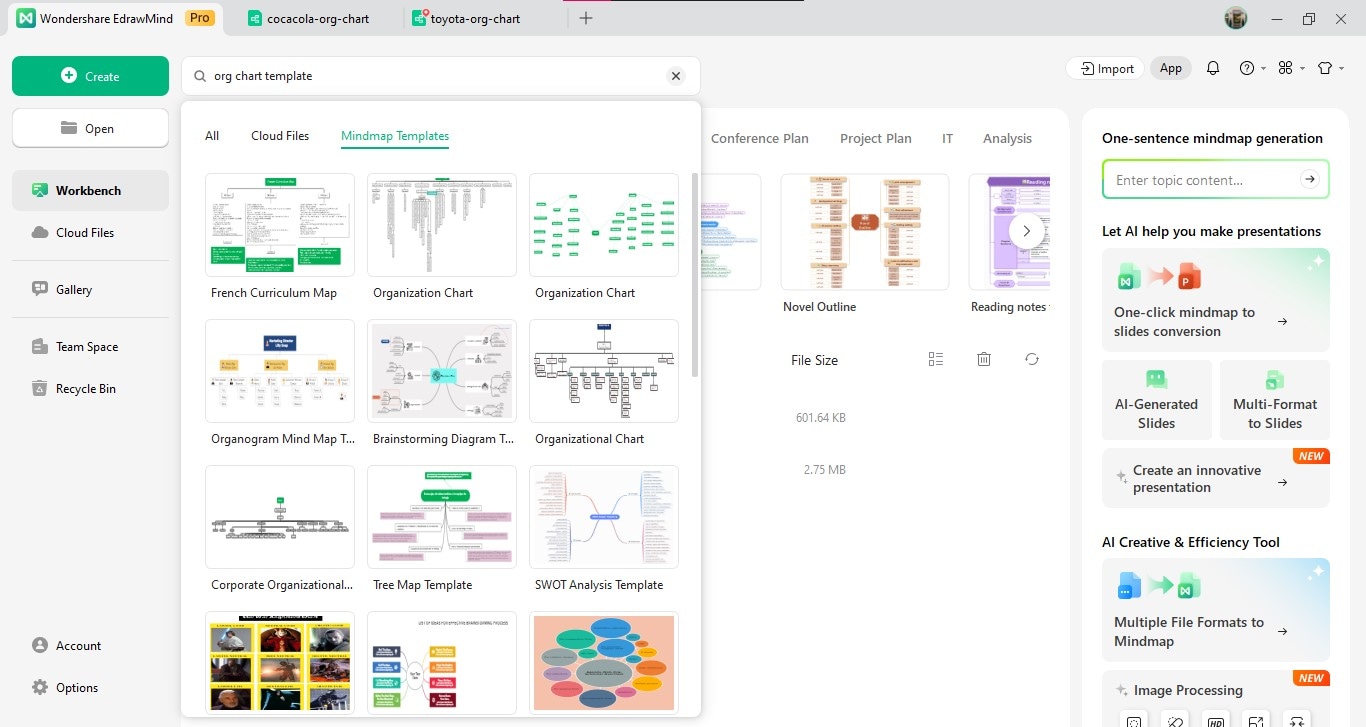
Step 1Choose a Suitable Template
Open Wondershare EdrawMind and select an org chart template from its extensive library. Pick a layout that best represents your organization’s structure.
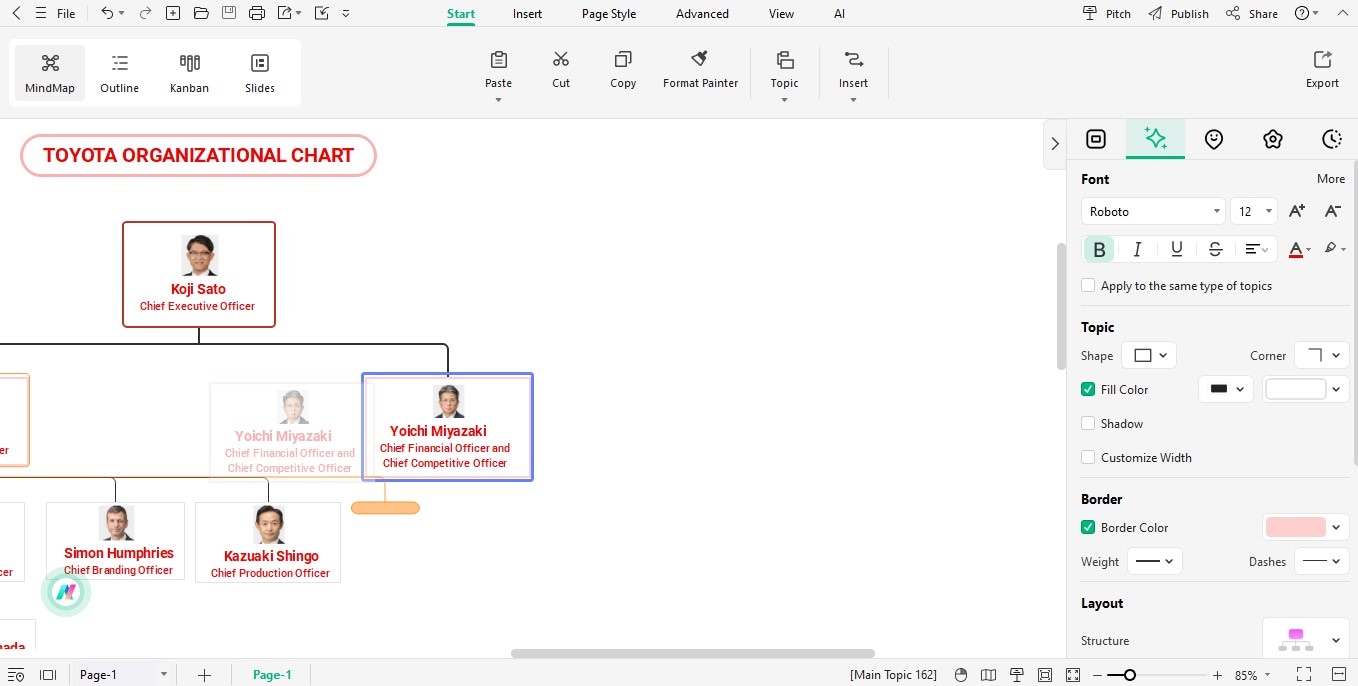
Step 2 Add Team Members and Departments
Use the drag-and-drop feature to add team members, departments, and reporting lines. Customize the hierarchy by adjusting positions and connections.
Step 3 Customize Design Elements
Modify colors, fonts, and layouts to match your organization’s branding. Use icons, images, and shapes to enhance visualization.
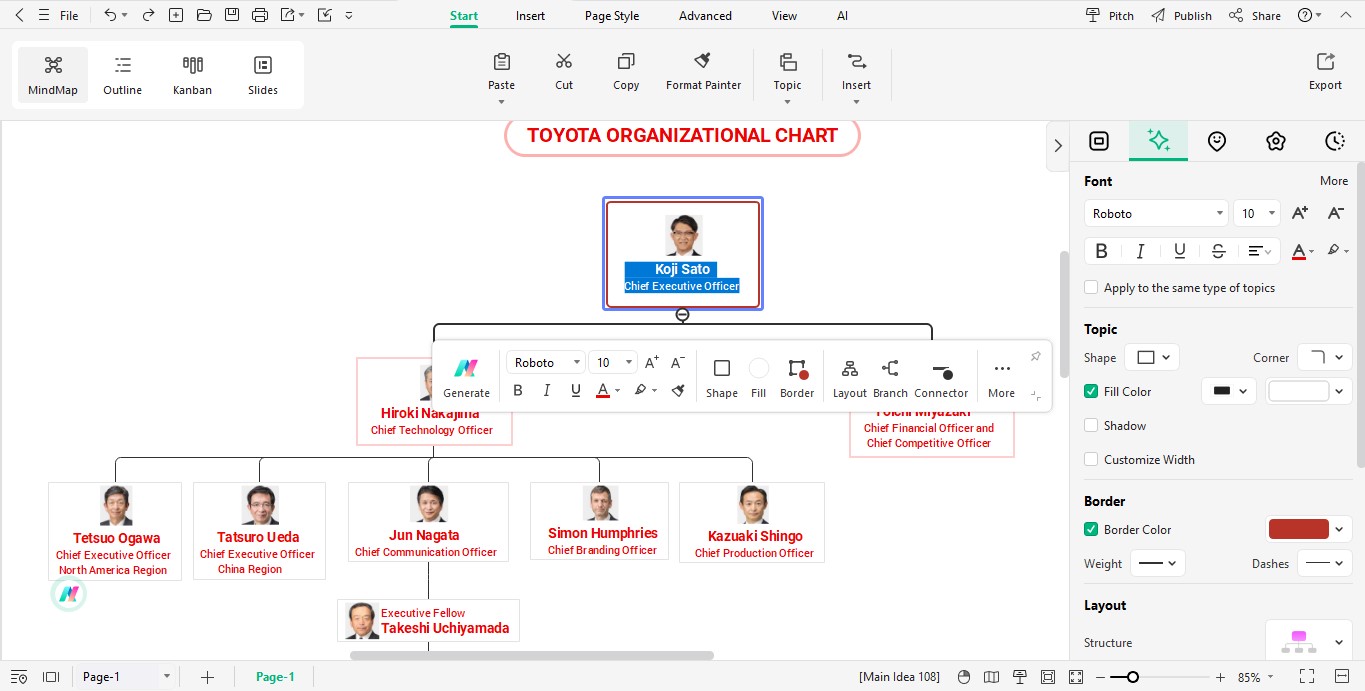
Step 4 Export, Share, or Print
Save the org chart in multiple format,s such as PDF, PNG, or Excel. Share it digitally with your team or print a physical copy for reference.
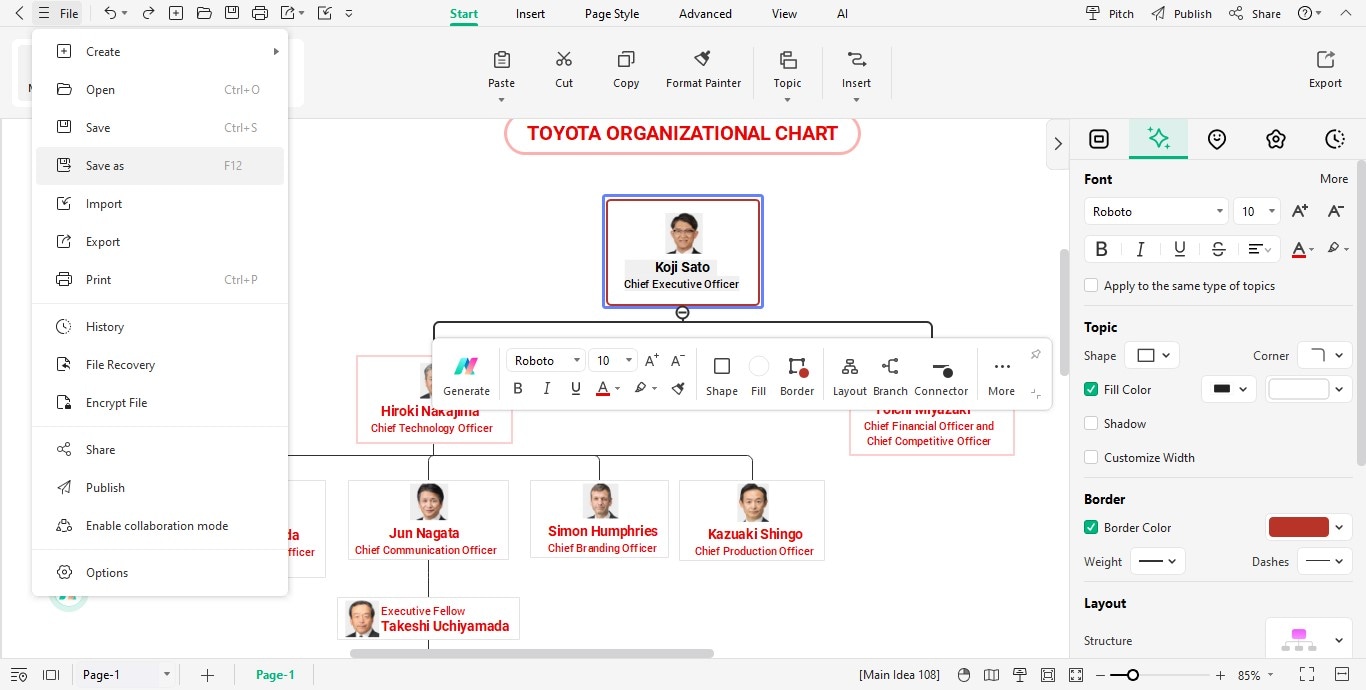
Following these steps, you can effortlessly create a clear and professional org chart with Wondershare EdrawMind.
Why Use EdrawMind to Make an Organizational Chart
Choosing the right tool for organizational planning is crucial for efficiency and clarity. Wondershare EdrawMind offers a comprehensive solution for easily creating org charts, mind maps, and strategic plans. With its intuitive interface and advanced features, EdrawMind simplifies complex structures, making planning and collaboration seamless.
Key Features of EdrawMind
- Intuitive Interface – User-friendly design with drag-and-drop functionality.
- Pre-designed Templates – Wide range of org charts and mind map templates.
- Real-time Collaboration – Teams can edit and update charts simultaneously.
- Cloud Integration – Sync with platforms like Google Drive and OneDrive.
- Multiple Export Formats – Save charts as PDF, PNG, and Excel.
- Customization Options – Personalize colors, fonts, and layouts for branding.
Try the app & get 500 free AI tokens
User Feedback
Wondershare EdrawMind has received positive feedback from users on G2, Shreyansh P.
Graduate Engineer Trainee, highlighting its features and benefits:
- Collaborative Editing: Users appreciate EdrawMind's real-time collaboration capabilities, scoring it 9.4 out of 10. This feature enables teams to collaborate seamlessly on mind maps and organizational charts.
- Visual Tools: The software offers a variety of styles and themes, with a rating of 9.4, allowing users to create visually appealing diagrams.
- Image Import: EdrawMind excels in integrating visuals, scoring 9.8, which enhances the clarity and impact of presentations.
- Desktop Availability: With a score of 9.8, EdrawMind provides robust desktop support, ensuring users can work offline and access their projects conveniently.
These features contribute to EdrawMind's reputation as a comprehensive tool for creating detailed and professional organizational charts and mind maps.
FAQs
What type of organizational structure does Toyota use?
Toyota is best described as a hybrid structure combining corporate leadership with functional, regional, production, engineering, and operating groups. A simple hierarchy alone does not capture all of these relationships.How does the Toyota Production System influence the organization?
TPS reinforces cross-functional problem solving, standard work, continuous improvement, quality at the source, and close coordination between production, engineering, suppliers, and management.Does Toyota publish a complete internal org chart?
Toyota publishes executive roles, governance information, and organizational changes, but not every internal reporting line. Detailed third-party diagrams should therefore be checked against an ‘as of’ date and official disclosures.
Conclusion
Toyota’s success directly results from its strategic organizational structure, which fosters innovation, operational efficiency, and adaptability across its global operations. The matrix structure and regional divisions and project teams have allowed Toyota to remain a leader in the automotive industry.
For companies seeking to streamline their organizational planning, Wondershare EdrawMind is an essential tool. Its user-friendly interface and powerful features make creating and managing effective org charts effortless, ensuring clear communication and enhanced productivity.
 EdrawMind
AppsEdrawMind Online
EdrawMind
AppsEdrawMind Online