About this How to Use OpenClaw template
This template provides a comprehensive guide to understanding and deploying OpenClaw, an advanced AI agent framework. It covers everything from technical requirements to practical use cases for automating complex digital workflows effectively.
What is Lobster Farming?
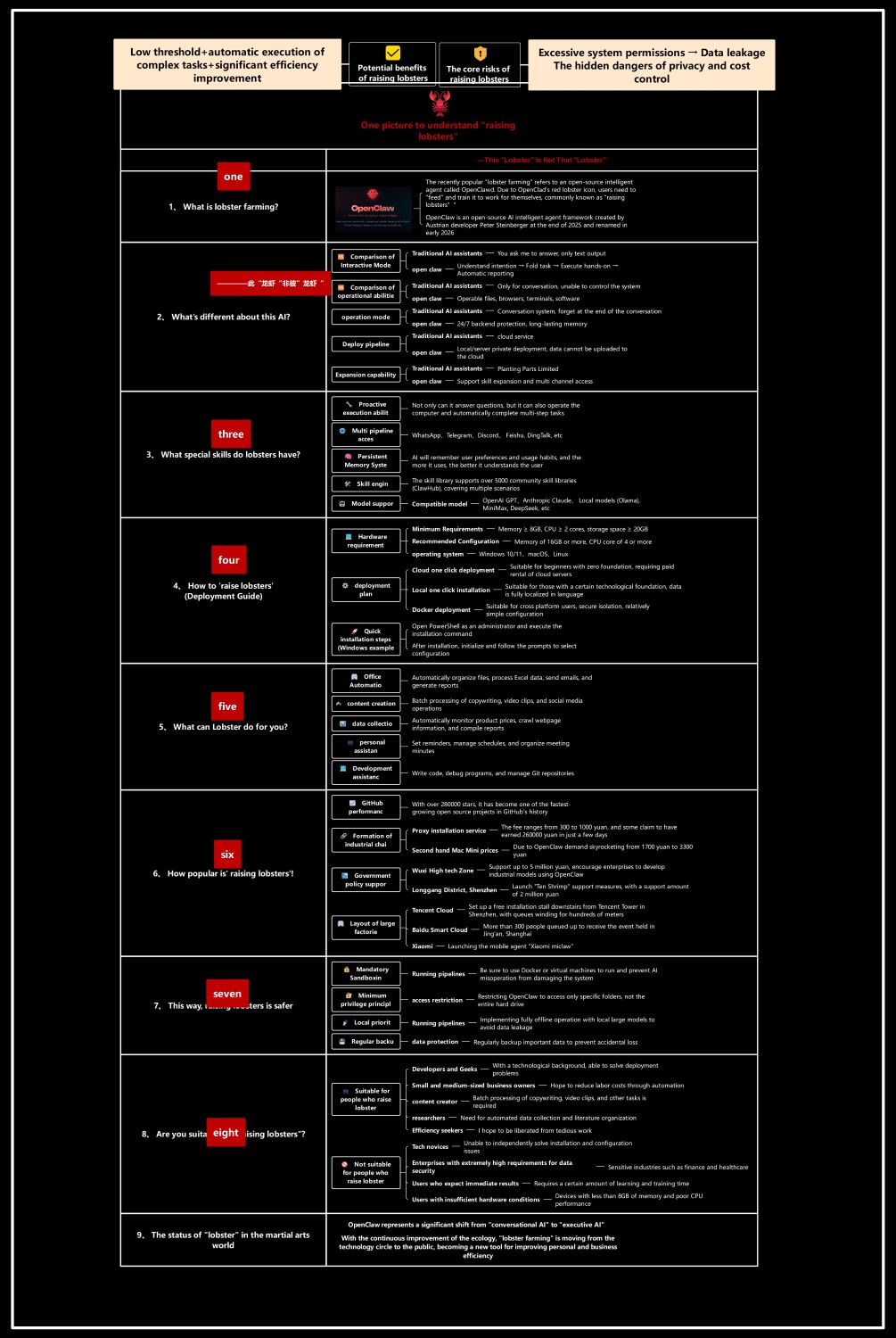
Lobster farming is a popular term for using the OpenClaw AI agent framework. Developed by Peter Steinberger, this open-source tool allows users to train autonomous agents to perform tasks for them independently.
- Open-source intelligent agent framework
- Created by developer Peter Steinberger
- Renamed in early 2025
- Involves feeding and training digital agents
Operational Abilities and Differences
Unlike traditional AI assistants that only respond to text, OpenClaw can actively control systems. It understands intentions and executes multi-step tasks hands-on, providing automatic reporting and persistent 24/7 backend operation capabilities.
- Hands-on task execution
- 24/7 backend processing
- Local or server deployment options
- Multi-channel expansion support
Core Skills and Model Support
OpenClaw features proactive execution and a persistent memory system that learns user habits. It supports over 5,000 community skill libraries and integrates seamlessly with major AI models like OpenAI and Anthropic.
- Proactive multi-step execution
- Persistent user memory system
- Access to 5,000+ skill libraries
- Support for OpenAI and DeepSeek
Deployment and Hardware Guide
Setting up OpenClaw requires moderate hardware, specifically 8GB of memory and a dual-core CPU. Users can choose between one-click cloud deployment for beginners or local Docker installations for those seeking better privacy.
- Minimum 8GB RAM requirement
- One-click cloud deployment
- Local Docker installation for privacy
- Windows PowerShell installation steps
Practical Applications for OpenClaw
OpenClaw excels at automating repetitive digital tasks across various domains. It can organize office files, generate social media content, and even assist developers with debugging code and managing complex Git repositories automatically.
- Office and email automation
- Social media content creation
- Web data collection and monitoring
- Code debugging and Git management
Safety and Privacy Measures
To ensure system safety, OpenClaw should be run in mandatory sandboxes like Docker. Implementing the principle of minimum privilege and choosing local offline operation helps prevent data leakage and unauthorized system access.
- Mandatory Docker sandboxing
- Restricted folder access permissions
- Local offline operation priority
- Regular data protection backups
FAQs about this Template
-
What are the hardware requirements to run OpenClaw?
To run OpenClaw effectively, your system should meet specific hardware standards. The minimum requirements include 8GB of memory, a dual-core CPU, and at least 20GB of storage space. For a smoother experience with complex tasks, we recommend 16GB of RAM and a quad-core processor. These specifications ensure the AI agent can handle background processes without system lag.
-
How does OpenClaw differ from traditional AI assistants?
Traditional AI assistants are usually passive, meaning they only respond to specific text queries. In contrast, OpenClaw is an executive AI that proactively completes multi-step tasks. It can manage files, access various communication channels like Discord, and remember your specific usage habits over time. This transition from conversational to operational AI allows for true automation of manual digital workflows.
-
Is OpenClaw safe to use with private data?
Security is a core component of the OpenClaw framework. You can protect your data by running the agent within a mandatory Docker sandbox to isolate it from your main operating system. Additionally, using local deployment allows for offline operation with local large language models. This ensures that sensitive information stays on your hardware and is never uploaded to external servers.