



Just imagine how it feels to be named the Bastard throughout your childhood, and then you are a king. It is a story of William, the Conqueror. The William the Conqueror family tree shows how an illegitimate son became a legend. His family lineage changed England permanently. Let us explore his incredible family and learn how to trace family ancestry.
William the Conqueror Family Tree
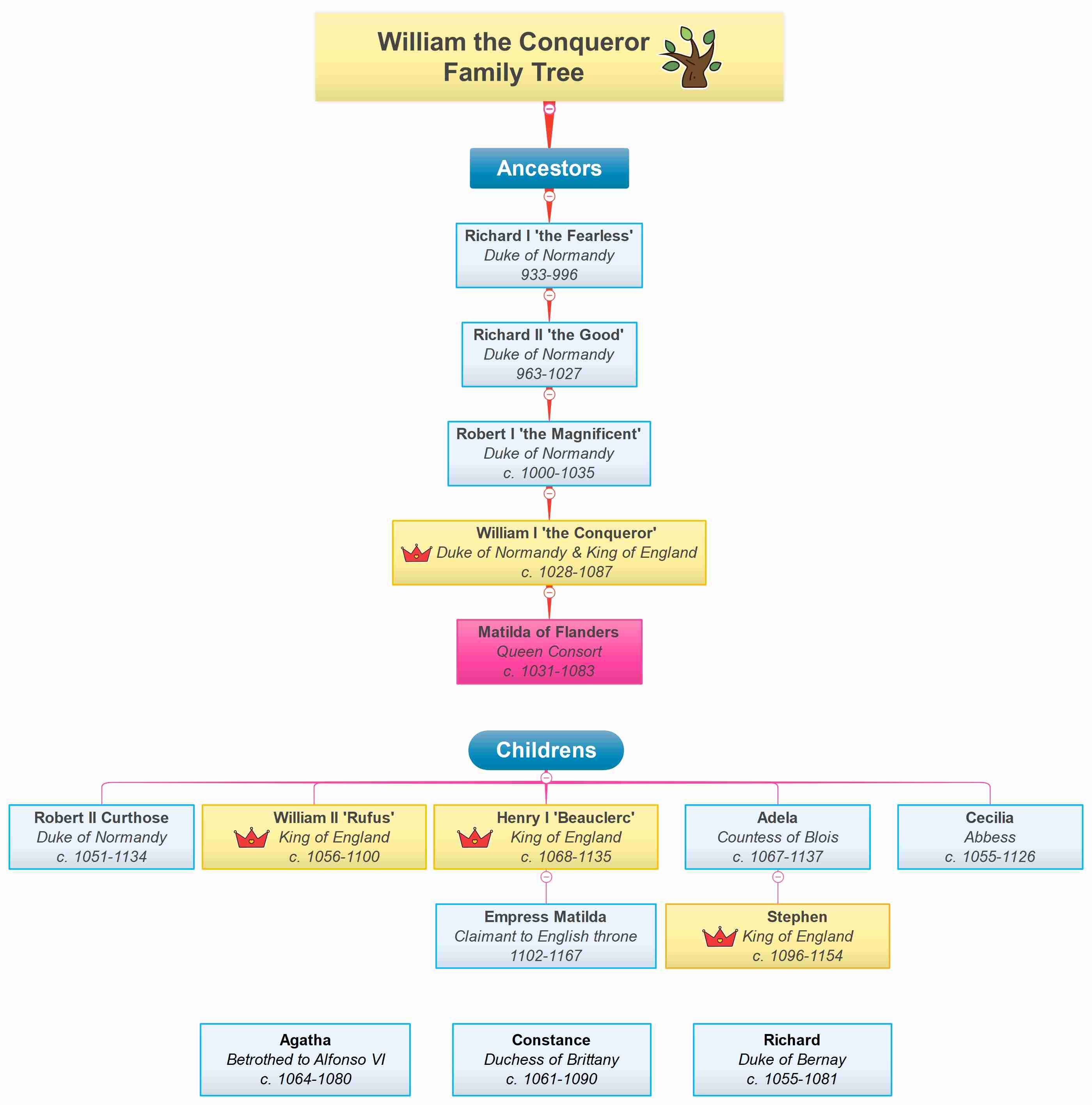


The William the Conqueror family tree is an epic drama. There is betrayal, fighting, and brilliant marriages in each branch. William was born around 1028, and he began with practically nothing. His mother was the daughter of a tanner. His father? The Duke of Normandy, who refused to marry her. But this bastard child had overthrown a kingdom.
His Norman Ancestry
William is deep-rooted in Viking soil. His great-grandfather Richard I "the Fearless" (933-996) was able to receive the name because he survived assassination attempts and political turmoil. He was an iron-fisted and Viking ruler of Normandy.
This was succeeded by Richard II the Good (963-1027), but “good” is relative when you are a medieval warlord. He increased Norman authority and established the rule of his family on the duchy.
Next was Robert I “the Magnificent” (c. 1000-1035), the father of William. Robert was killed mysteriously on a pilgrimage to Jerusalem. People whispered that he was poisoned. He had his barons swear to defend his illegitimate son, William, before his death. This is one of the harsh lessons that William gained in this family lineage: trust no one, fear nothing.
These were not just names; they were invaders who came to Scandinavia and cut Normandy out of the French land. Their Viking blood ran hot. Their ambition was unlimited. William inherited both
William’s Marriage and Children
The best move that William made was to marry Matilda of Flanders (c. 1031-1083). She initially refused him. It is said that he caught her by her braids and hurled her in the street. Weirdly enough, this impressed her. Medieval romance was a complication. Their union had given birth to at least nine children who would transform European politics.
You can see the children of the William the Conqueror family tree, spread across the bottom:
- Robert II Curthose (c. 1051-1134) was made Duke of Normandy, but was in a state of perpetual rebellion with his father. He even injured William in a fight. Father and son were in a bad relationship that never mended.
- Rufus (c. 1056-1100) was the King of England who had replaced his father. He was killed mysteriously as he was hunting, struck by an arrow. His younger brother Henry was conveniently close. Suspicious? Absolutely.
- Henry I "Beauclerc" (c. 1068-1135) was another King of England who took over power after the convenient death of William II. He was the most successful Norman king of England who reigned for 35 years.
- Adela (c. 1067-1137), Countess of Blois, was a long-term player. When her brothers were struggling over kingdoms, she was silently bringing up children. Her son Stephen (c. 1096-1154) was later to be King of England. Smart woman.
- There is also Cecilia (c. 1055-1126), an Abbess, Agatha (c. 1064-1080), a betrothed of Alfonso VI of Spain, Constance (c. 1061-1090), a Duchess of Brittany, and Richard (c. 1055-1081), Duke of Bernay, in the family tree.
This wasn't just a family. It was a group of greedy people fighting for power.
The Royal Legacy Continues
This is where the William the Conqueror Family Tree becomes crazy. By his son Henry I, was Empress Matilda (1102-1167), as indicated in the diagram as "Claimant to the English throne." Her fight with her cousin Stephen over the crown led to the first civil war in England. The war, known as The Anarchy, tore England apart for almost twenty years.
The cousin fought with the cousin. The Uncle battled nephew. The family tree was turned into a battlefield scheme. But despite all this mess, the blood of William ruled the English royalty for centuries.
All of the English kings since 1066 relate to William in one way or another. That extends to the royal family today. The DNA of one man was scattered on a continent. Talk about leaving a legacy.
Impact on English History
Everything was different on September 28, 1066. William arrived at Pevensey with 7,000 warriors. He killed the King of England, Harold, two weeks later, on October 14 at the Battle of Hastings. French was suddenly the upper-class language of England for 300 years. Castles of stones grew all over. Laws shifted. Culture transformed.
To know the genealogy of William the Conqueror is to understand why English is half-French, half-German, and absolutely incomprehensible. Such expressions as beef (French) replaced cow (English). The ruling elite spoke French. The peasants spoke English. This division continues to resonate in the English vocabulary even today.
How Do You Make a Similar Family Tree?
There will be no conquests and crowns in your family tree. But it has something better, your story. And that tale ought to be told with grace.
Imagine your family tree is a treasure hunt. Each family member you add opens a new mystery. Why did great-grandpa abandon Ireland? What became of Aunt Rosa, who vanished from family pictures after 1932? These queries render genealogy an addiction.
Start simple. Grab a notebook. List all your relatives that you know personally. Grandparents, cousins, aunts, and uncles. Include birth years, where available. Now call the eldest living relative. Seriously, do it today. They are walking history books, and every year we are losing more of their stories. Question them about their parents, their childhood, and the old days. Tape the interview when they allow.
Then, quickly, literally, figuratively, raid the attic of your family. Photos, letters, documents, old--gold. That withered marriage certificate? That's proof. That picture of a person you do not know? That is an enigma that should be unraveled. Scanning all before it turns to dust.
And here is the secret: do not attempt to construct the perfect tree at once. It starts to get messy. Gather names, anecdotes, dates, and gossip. Figure it out later with family tree software.
Step-by-Step Guide to Create a Family Tree
Huge family ancestry? It is easy to draft a family with a few steps. I have used the EdrawMind family tree maker to create this family tree. Follow the steps given below to design your own family tree easily.
 Try the app & get 500 free AI tokens


Step1 Start with a New Canvas
- Open EdrawMind and breathe.
- Choose Mindmap to create from scratch.
- Select a family tree layout that appeals to you. Vertical layouts are excellent in following a single line way back in history. Horizontal lines are extended, displaying brothers and cousins.

Step2 Begin with the Main Member of the Family
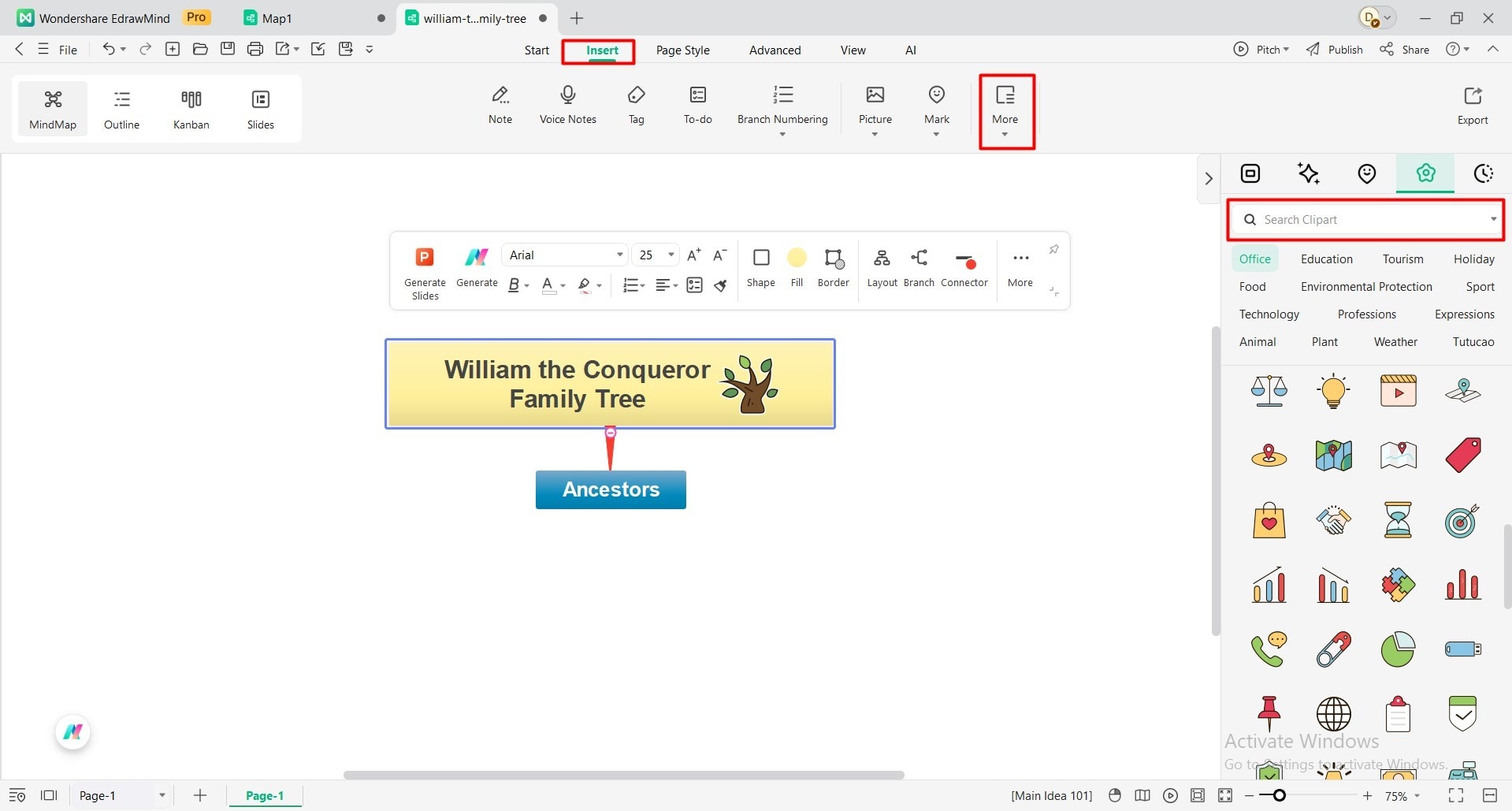
- In the Main Idea box, write down the name of the family, like “William the Conqueror family tree”.
- Go to the top toolbar, click Insert, then More.
- Navigate to Clipart and search for an icon that is suitable for the family tree you are making.
- Begin with your eldest known relative, and place their name, the date of birth, and any other information into the first sub-main topic. You can also write “Ancestors” like the one I have written, or directly start with a member of the family. There is no need to be concerned about incomplete information. This individual turns out to be your point of reference.
Step3 Add Parents and Spouse
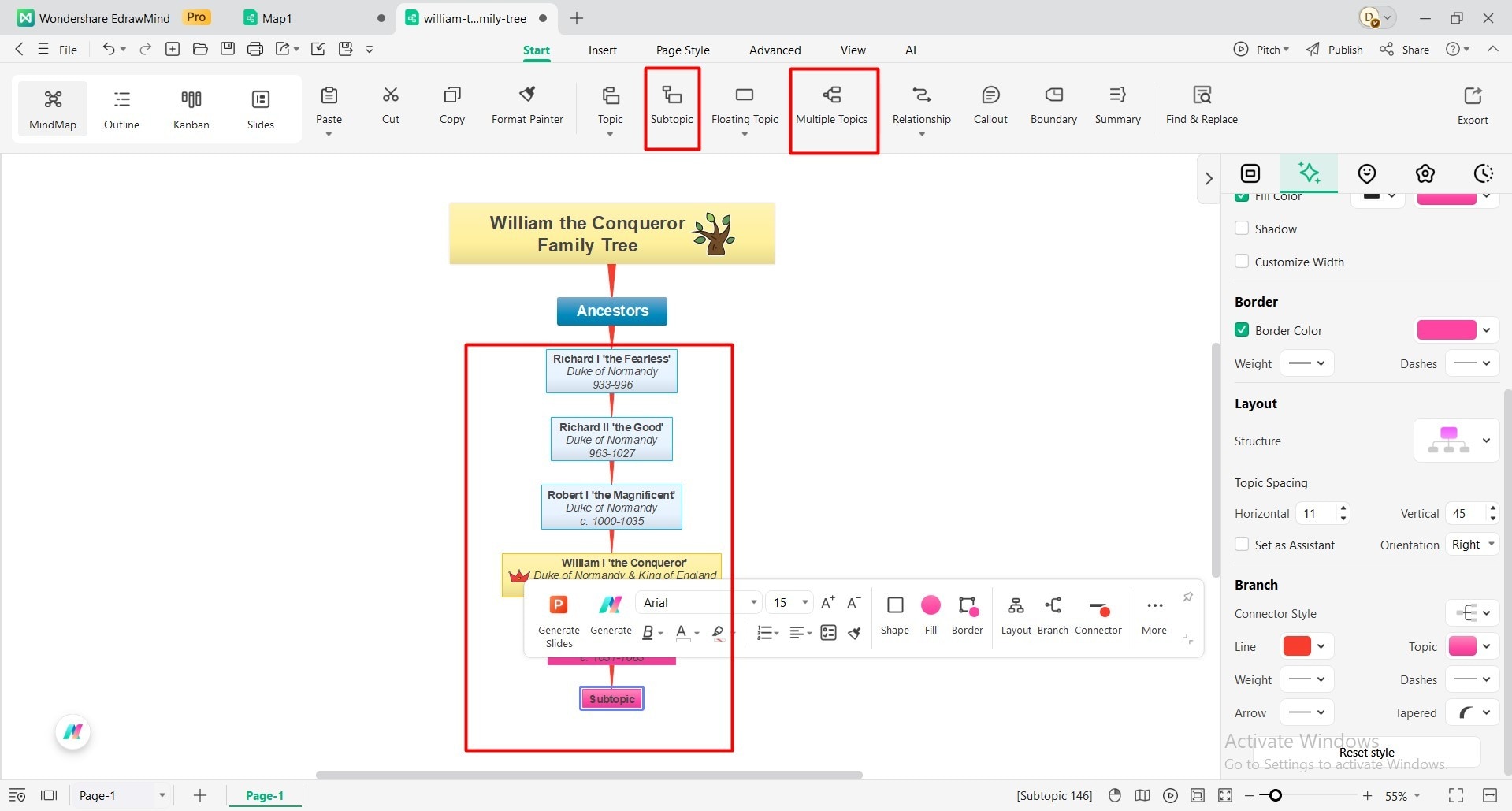
- Add a Subtopic from the top toolbar, and remove boxes that are not required at the moment.
- Branch upward to parents. Branch sideways to spouses. The family tree maker generates the connecting lines automatically. Magic!
- Add dates and locations, where you can. If not, add them later. You can also add Multiple Topics as well.
Step4 Multiple Generations.
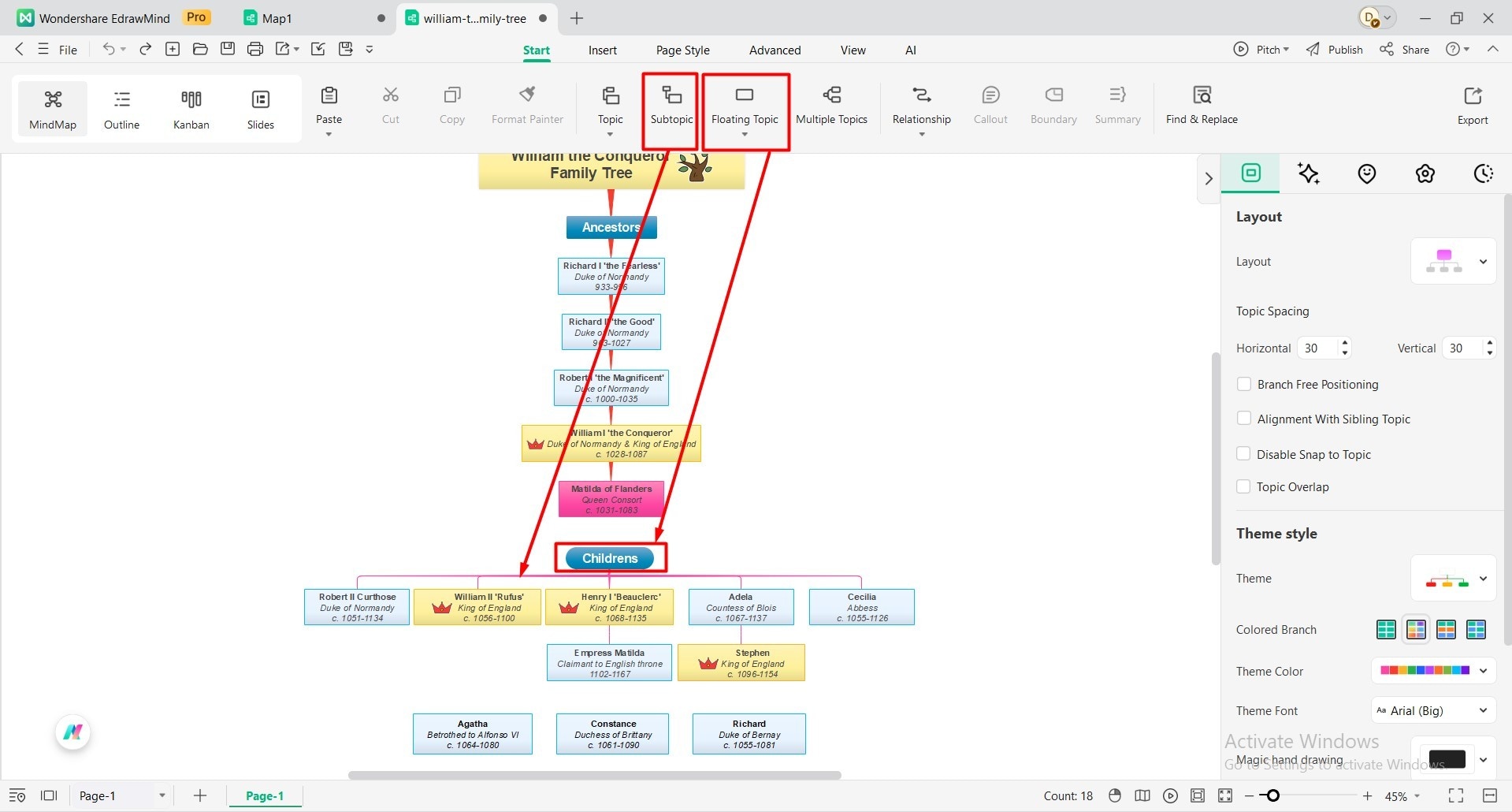
- Now the fun begins. Include children, grandparents, and siblings. You can use the Floating Topic from the toolbar for this.
- Add Subtopics below and connect them all to represent as siblings. Every new name is linked to a person you are familiar with. Work systematically. Complete one generation and then the next.
- EdrawMind supports unlimited family members, and there is no need to restrain. That cousin twice removed who is so mysterious? Add them.
Step5 Add Details
- This is where good trees are made great trees. Upload photos. Include jobs, place of origin, and facts. Did Grandpa survive the war? Note it.
- Any relation you think is unique or has a title, make them stand out from others by using different colors and shapes of the boxes for them.
- You can change the connectors, branches, colors and experiment with the layout until you are satisfied with the tree.

Step6 Save, Share, or Download
- Carefully check all the details and information of the family tree. If there is anything you feel off, check the records and make changes.
- Now you can save this or download it by clicking the File option.
- Or export it into different formats, like PDF, SVG, HTML, Slides, Excel, Word, etc.
- Or share it via link to collaborators, public to the internet, or share as an image.

Conclusion
The William the Conqueror family tree demonstrates that there are epic stories in every family that should be preserved. William was a bastard who became a king by sheer force and brutality. Your forefathers had their struggles, migrations, and their victories.
Those are stories that should be remembered. Using the latest family tree software, such as Wondershare EdrawMind, is a fun task to record your family background rather than a task. Begin your family tree this weekend. You will solve mysteries, get answers to questions, and relate to relatives that you had no idea existed. What you do today will be valued by your descendants.
 EdrawMind
AppsEdrawMind Online
EdrawMind
AppsEdrawMind Online

