


A timeline diagram is a powerful tool in any classroom, online or offline. Teachers use them to organize history lessons, plan project deadlines, or map out a syllabus.
Visual aids like these help make complex information simple for students. You can show historical events, a project's phases, or a story's plot. This format helps students see connections and remember key details more easily.
A good timeline can make your school presentations more engaging and successful. If you are a teacher seeking innovative ways to present information, keep reading.
This article has listed several beautiful timeline examples for teachers to inspire your next lesson.
10 Timeline Examples for Teachers
Get creative with these built-in timeline templates for school in Wondershare EdrawMind. They are simple to edit, so you can quickly add text, icons, or new colors to create an eye-catching visual aid for your class.
Anglo Saxon
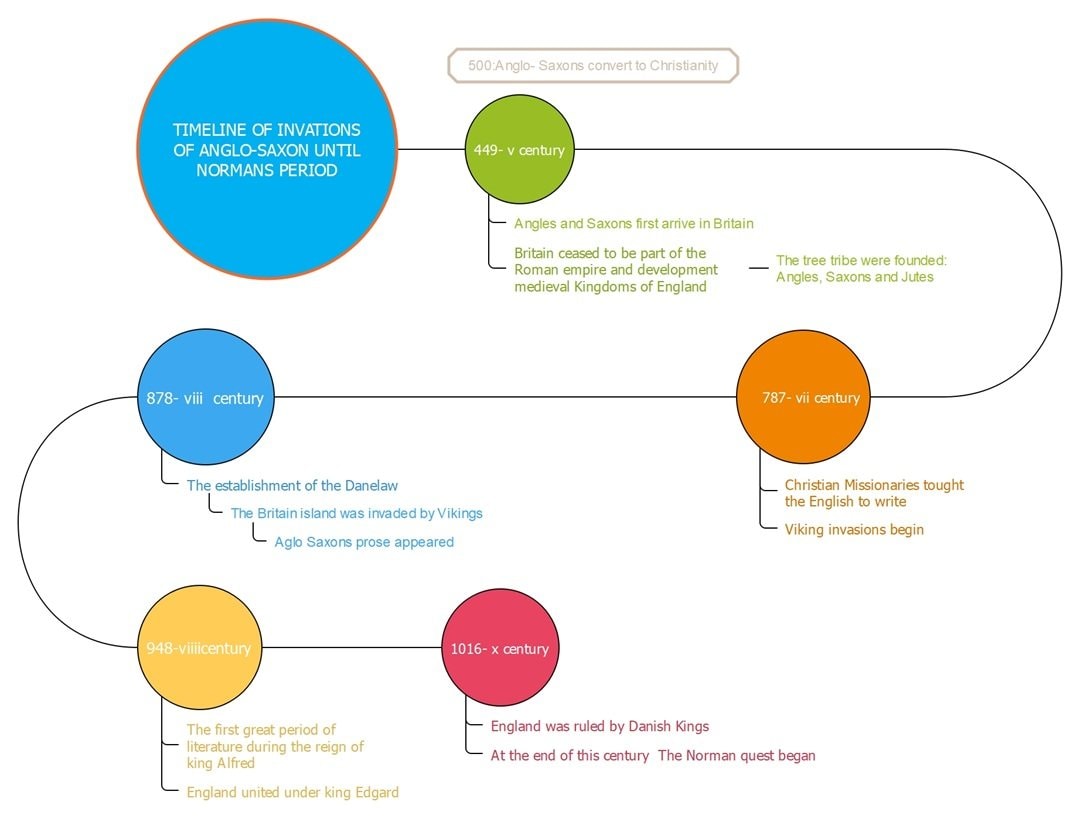
Some topics are too complex for a simple, linear progression. This design connects different eras with a flowing, curved path. You can take your students from the 5th century all the way to the Norman conquest.
Each colored circle represents a major period. Below, notes branch off to list key events for that time. This timeline example helps you organize complex topics. The bubble-map design lets you cluster multiple facts under one main historical era.
Business Planning
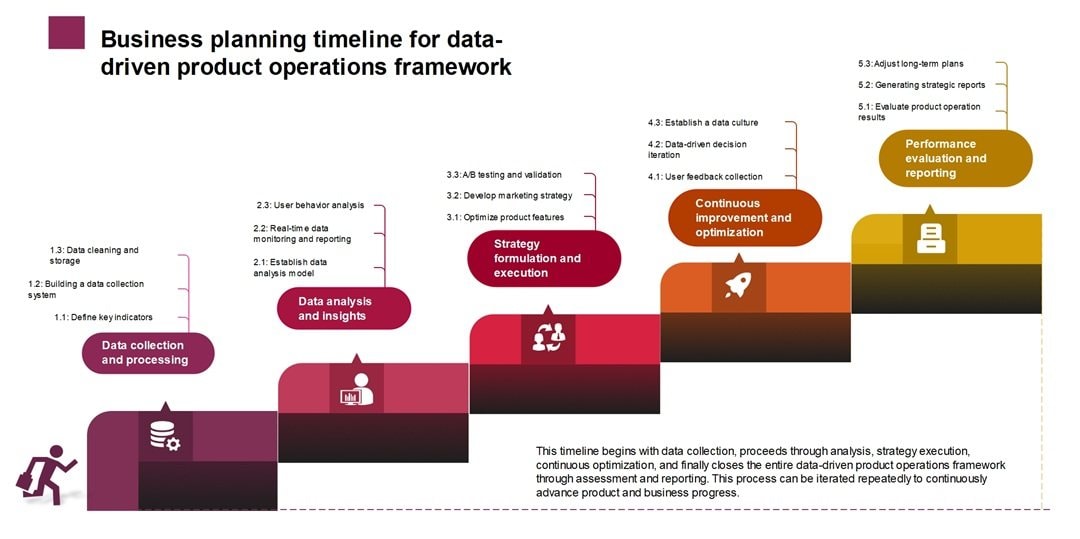


"Data-driven operations" can sound very complex to students. This visual diagram turns that process into a simple set of rising stairs. It’s a great timeline example for a teacher who wants to break down a big project.
You can use this in an economics or business class to show the six stages of a product launch. The best part is the small sub-tasks.
They branch off from each main step, which shows students the details such as 'user analysis' or 'A/B testing.' The stair design visually guides the user to complete one step before starting the next.
Computer History
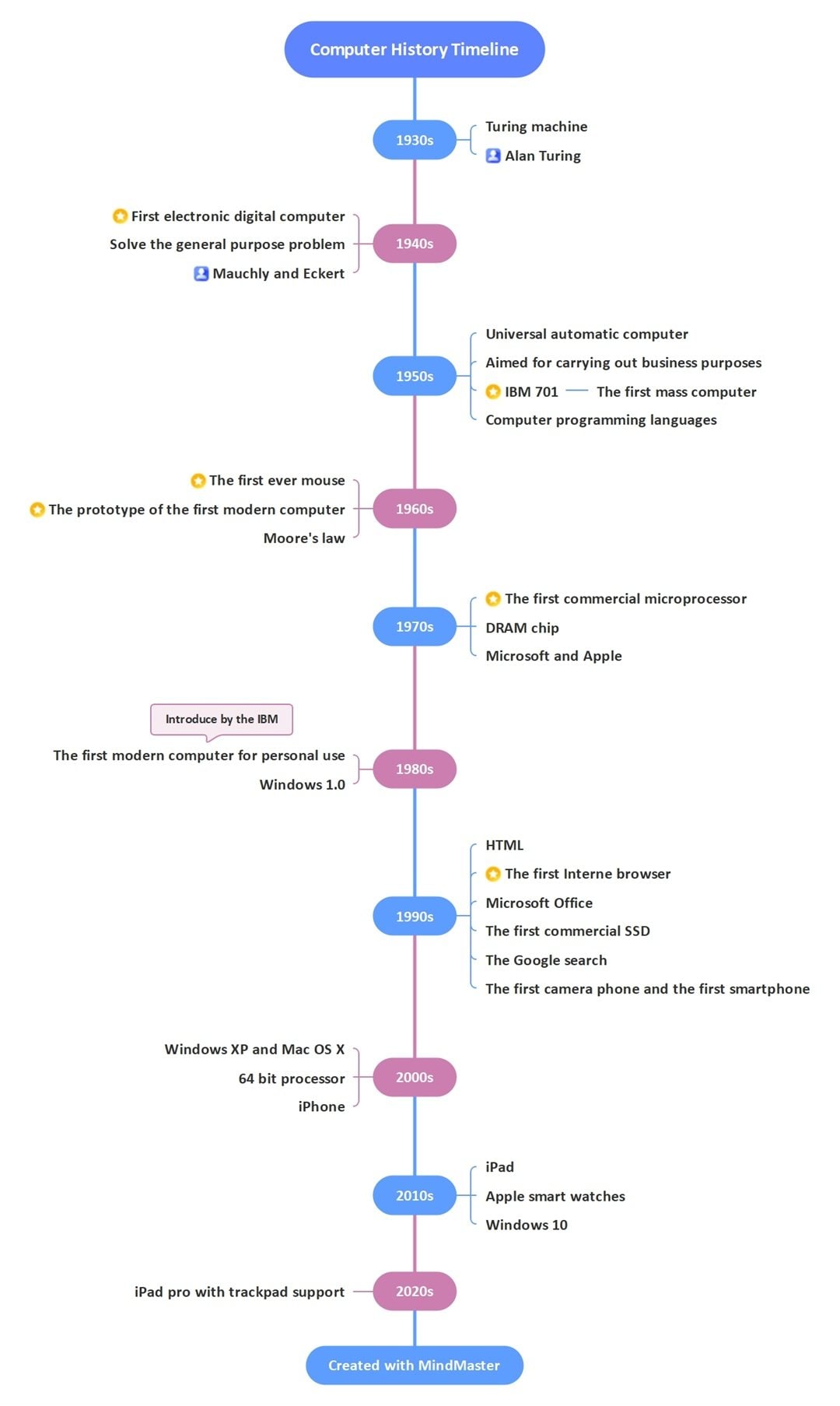
How do you cover 90 years of computer history? That topic can overwhelm students. This vertical timeline organizes that long story. It follows a single line from the 1930s down to the 2020s.
You can use this in a computer science or history class. One of the best timeline examples is to trace the path from Alan Turing to the first smartphone.
Customize this template to trace the reigns of different kings and queens. Or detail the critical engagements of a long war. The central line connects every decade, so students can follow the full story without getting lost.
Educational Technology
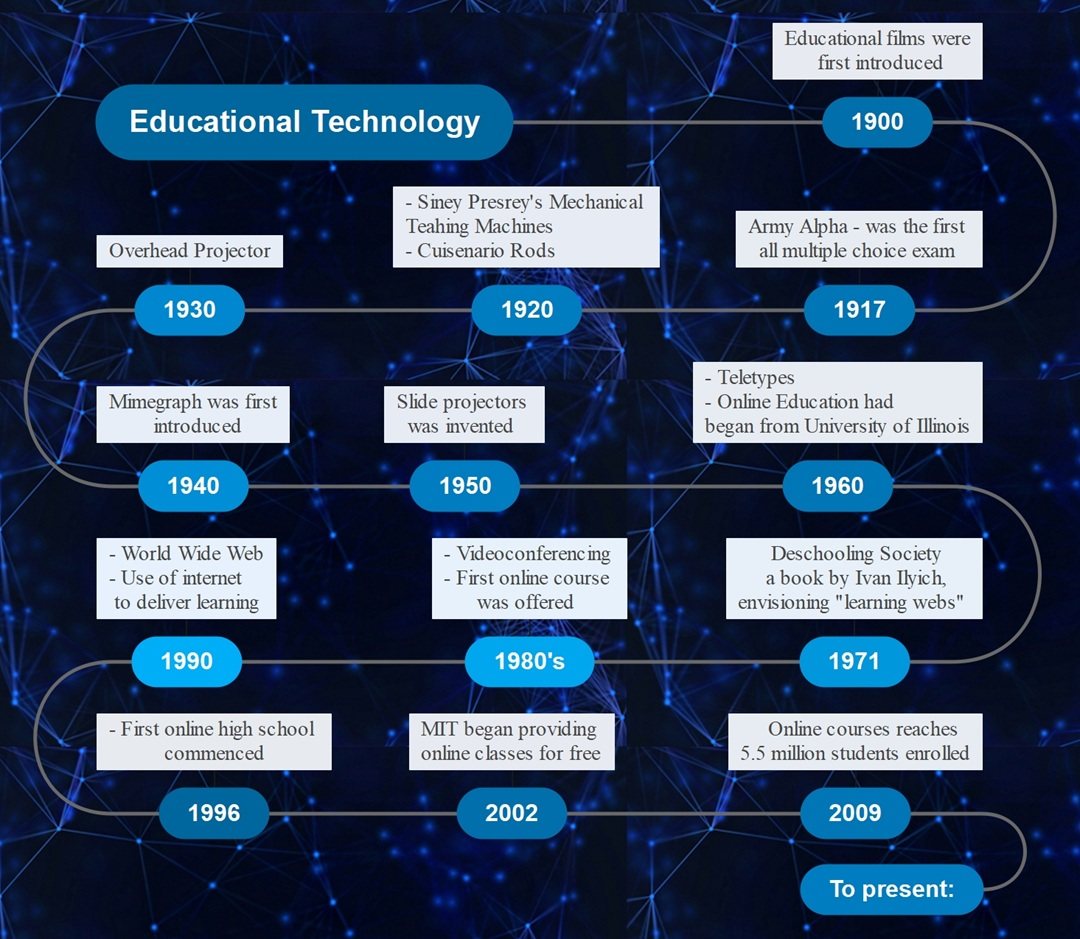
What do you do when you have 15 key events, but not much space? Snaking back and forth allows the timeline to accommodate a wide range of events. Your class can explore classroom technology from 1900 to the present day.
Now, what other timeline examples can handle this much detail? You could trace a famous artist's entire career. Detailing a complex scientific discovery that developed over many years is another great use for it.
Voyage
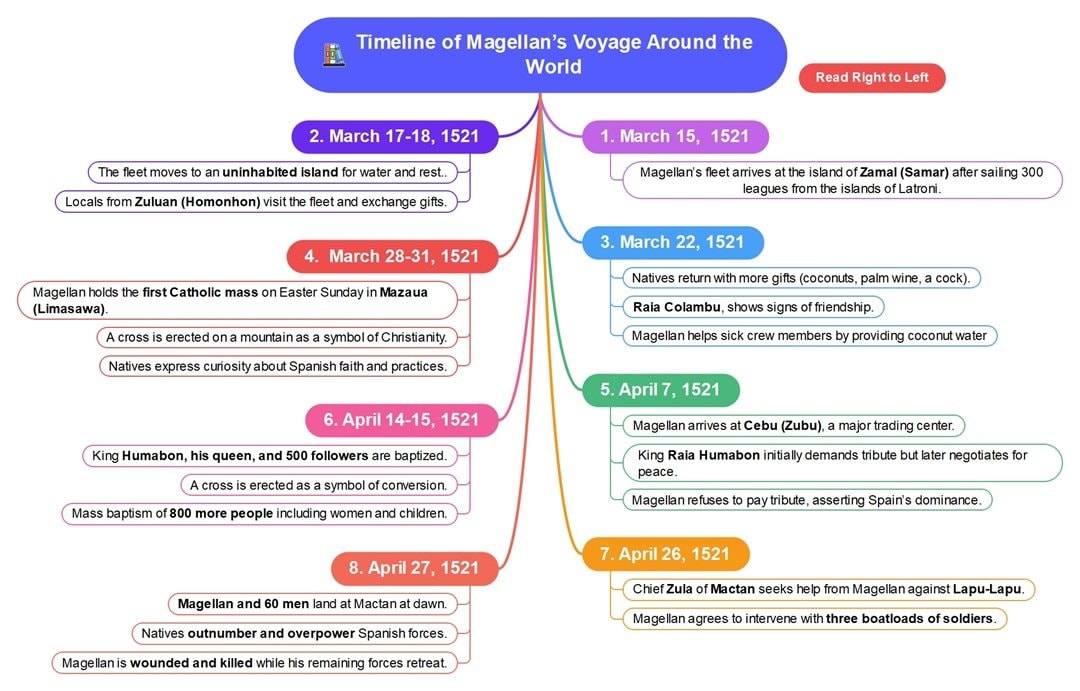
Some stories, like Magellan's voyage, are too big for a straight line. The central focus of this template is the main adventure. From there, colorful branches burst out to show each key event.
Your students get more than just a date. They also see the small details that make the story interesting.
This is one of the most flexible timeline examples for a deep dive. It also works well for a complex book plot. The central topic holds the entire story together.
Pre-Historic Era
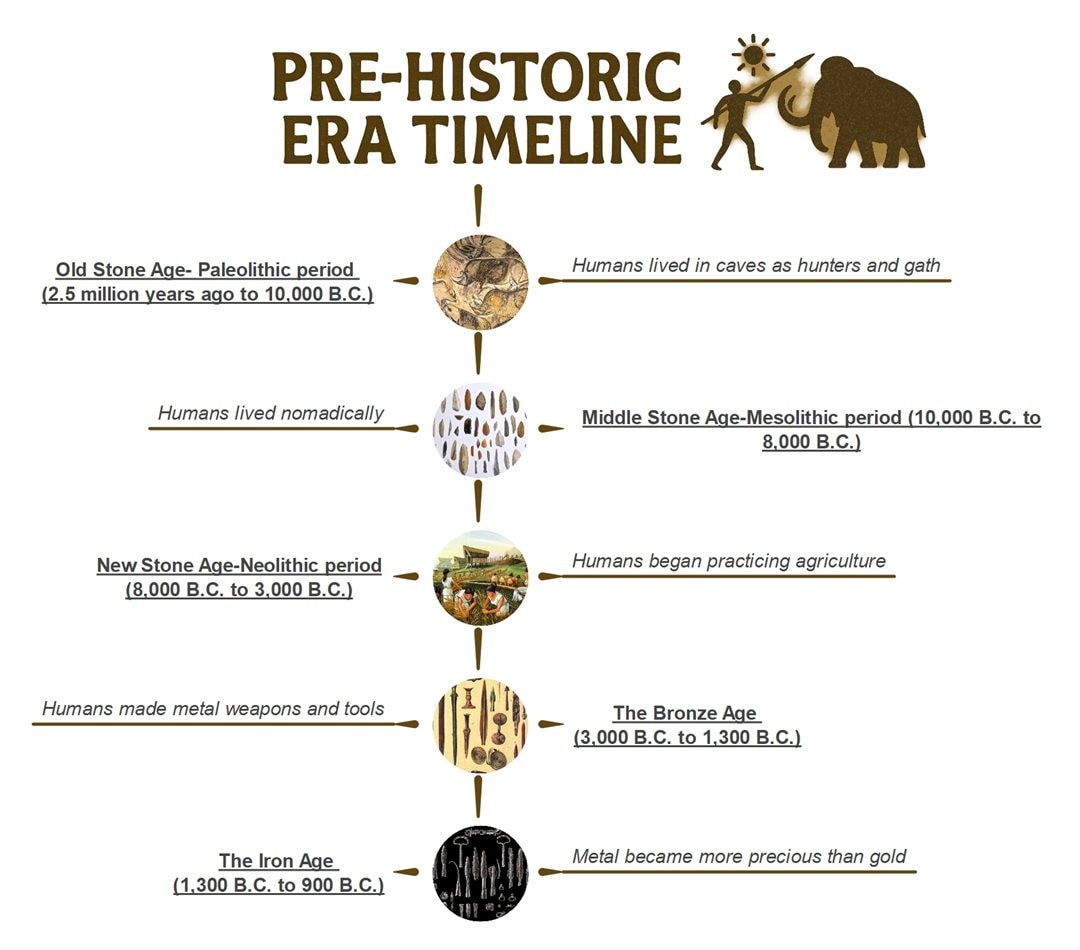
Prehistory covers millions of years. This vertical timeline makes that huge topic simple for students. It organizes everything into five distinct periods. You see the Old Stone Age at the top and the Iron Age at the bottom.
A simple icon illustrates each era, from cave art to metal tools.
This is a great timeline example for a teacher who covers early human history. The top-down flow neatly guides students from hunting and gathering to the development of the first metal weapons.
Psychology

Dense topics, including psychology, can overwhelm a class. Look how this design snakes back and forth to fit the key events. It folds over 90 years of history into four distinct rows.
Students can follow the subject's growth from 1868 without getting lost.
This timeline example for a teacher is also great for charting an author's publications or the different eras of an art movement. The continuous line connects every event, so students see the correct order.
Reconstruction Era
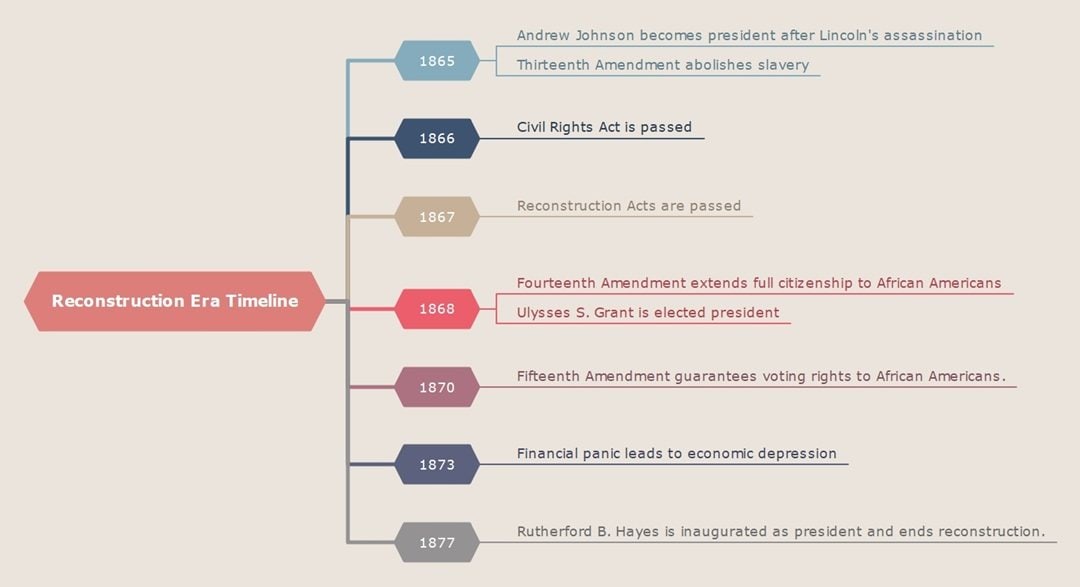
Customizing this timeline example helps spark curiosity, given that each date highlights a dramatic shift in the Reconstruction era. Students notice patterns as events unfold, which lead to sharper conversations about change, leadership, and national growth.
Each color signals a new turn in the story, so classes stay focused. Additionally, the layout supports quick comparisons across years.
Teachers who want a visual that encourages students to think more about cause and effect gain strong value from this timeline.
You can also use timeline examples like this to map a novel. The central topic is the book, and the branches are "Key Themes" or "Plot Points." Or, in science, map an animal's features.
Research Plan
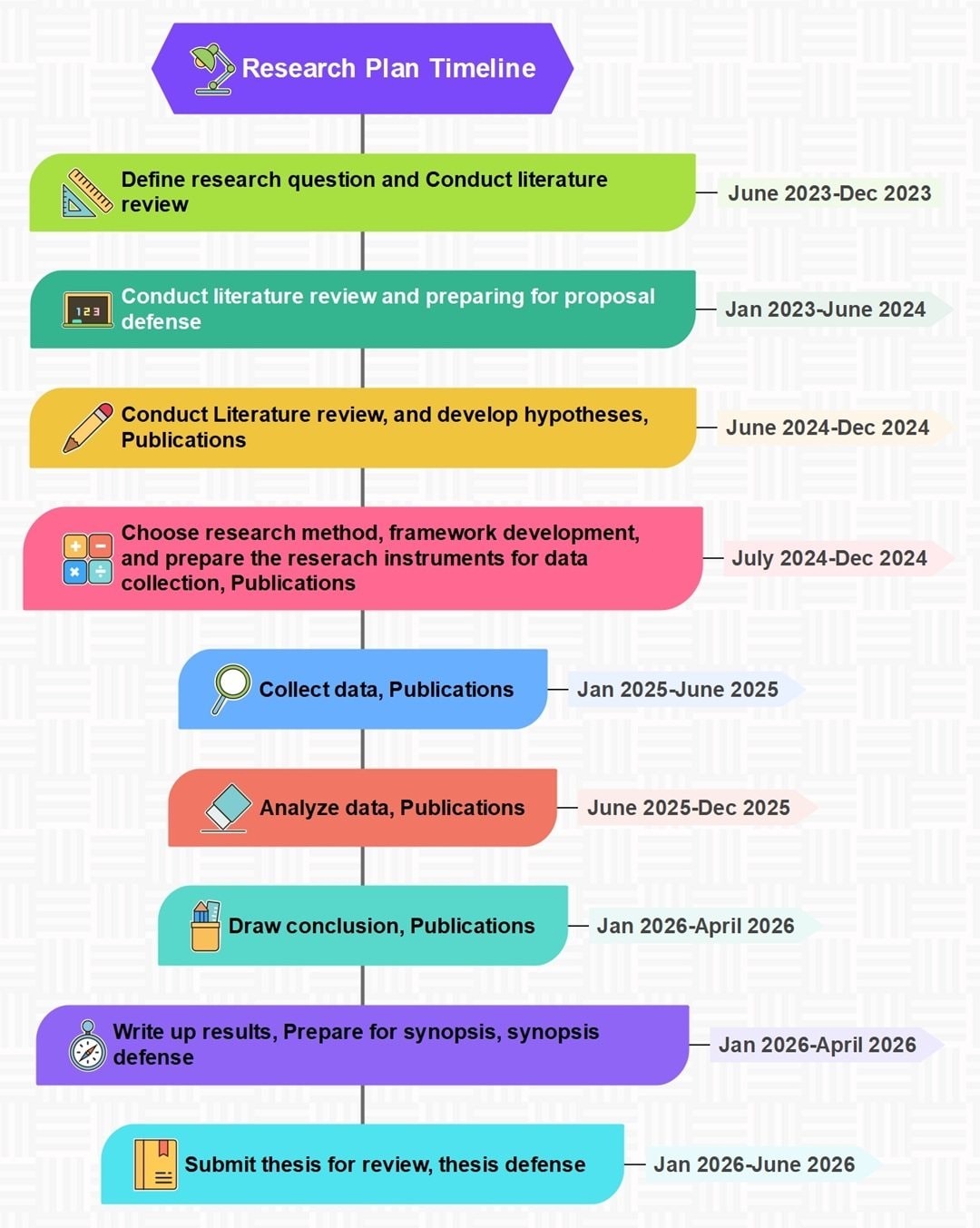
Guiding your students through a long thesis? This visual plan is a fantastic resource for your methods or capstone class. It shows them every stage, from the "research question" all the way to the "thesis defense."
As a timeline example for teachers, this is a great way to demystify the process. You can use it to point out how key tasks like "Draw conclusion" and "Write up results" must happen at the same time.
Additionally, color steps provide students a sense of direction as they move from early questions to the final output.
Icons support quick recall during class discussions. You gain a visual that builds stronger planning habits and helps students understand how ideas grow across each phase of their work.
World War History
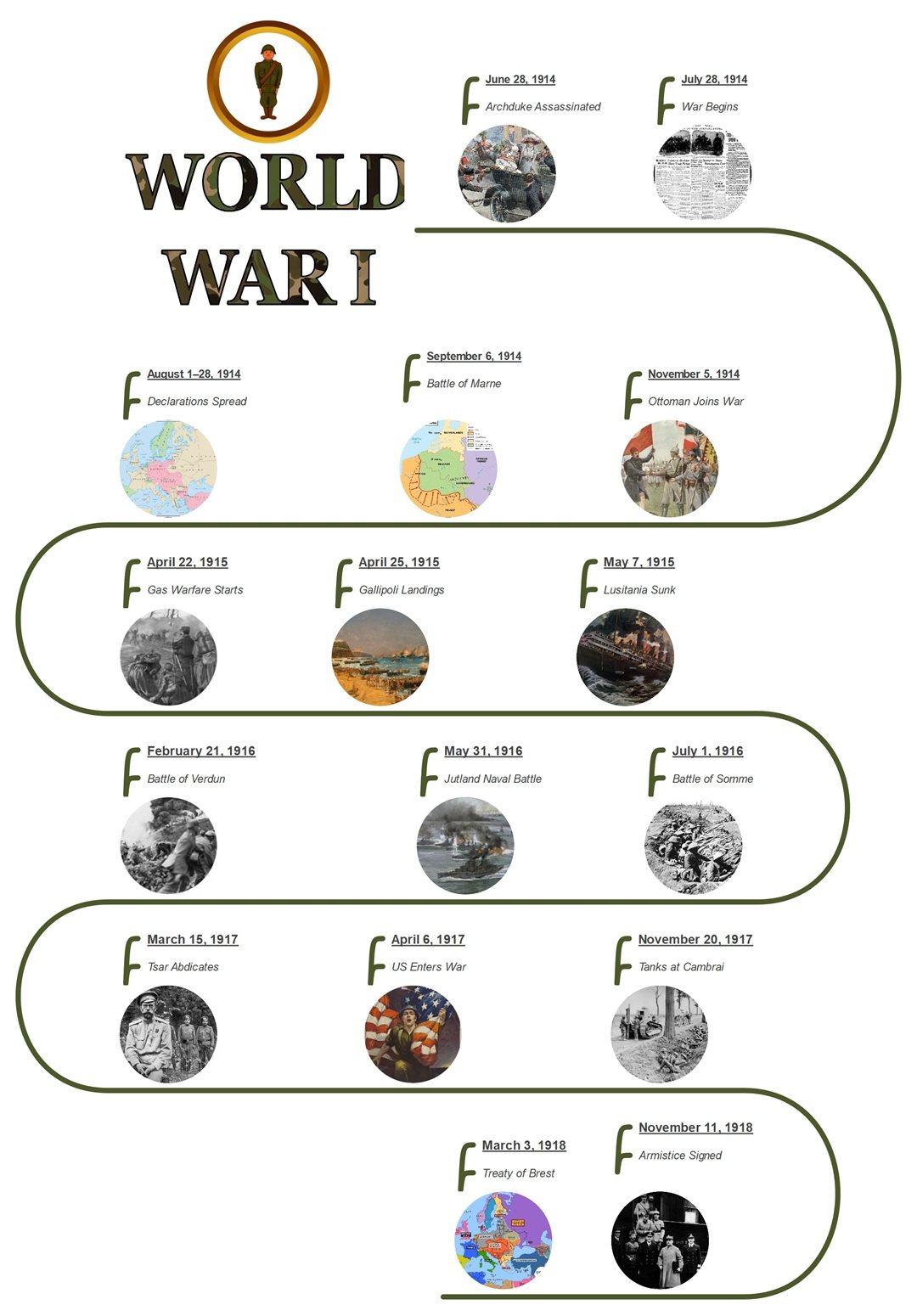
Teaching the massive scope of World War I can be challenging. This S-curve layout is a fantastic way to guide your students through the complex sequence of events.
The winding path visually pulls them along from the 1914 assassination to the 1918 Armistice.
You can use this timeline to display powerful images for each entry. This helps students connect abstract dates, like the "Battle of the Somme," to concrete visuals from the era.
How To Make a Timeline in EdrawMind?
Boosting a teacher's productivity is essential. To help achieve this, a timeline maker with a simple workflow enables them to create lessons and presentations more quickly.
With that in mind, EdrawMind offers pre-designed templates, AI tools, and layout options to transform an idea into a beautiful timeline in minutes.
Go ahead and customize an example above, pick a style, and create a timeline that matches your next lesson.
Additionally, you can use it on desktop, mobile, or online for flexible work sessions. If you want a fast and easy way to create visual diagrams, EdrawMind works well for your routine.
Key Features
Here are some features that help you make diagrams in a few minutes:
- Large Template Gallery: Access over 5,000 built-in templates. You can find options for many fields, including education.
- AI Tools: Create a mind map in one click, brainstorm ideas, write a copy, translate text, and more.
- Real-Time Collaboration: Work with over 100 team members simultaneously. This feature helps your group generate new ideas and find inspiration.
- Many Layouts and Themes: Choose from 30 different layouts, like horizontal or S-shape styles. You can also apply 52 themes to change your color scheme with options such as rainbow, monochrome, or gradient.
- Multiple View Modes: Visualize your project in different ways. Switch between Outline Mode, Kanban, Slides, and Presentation mode.
Follow these steps to make a timeline chart:
 Try the app & get 500 free AI tokens


Step 1 Create a New Diagram
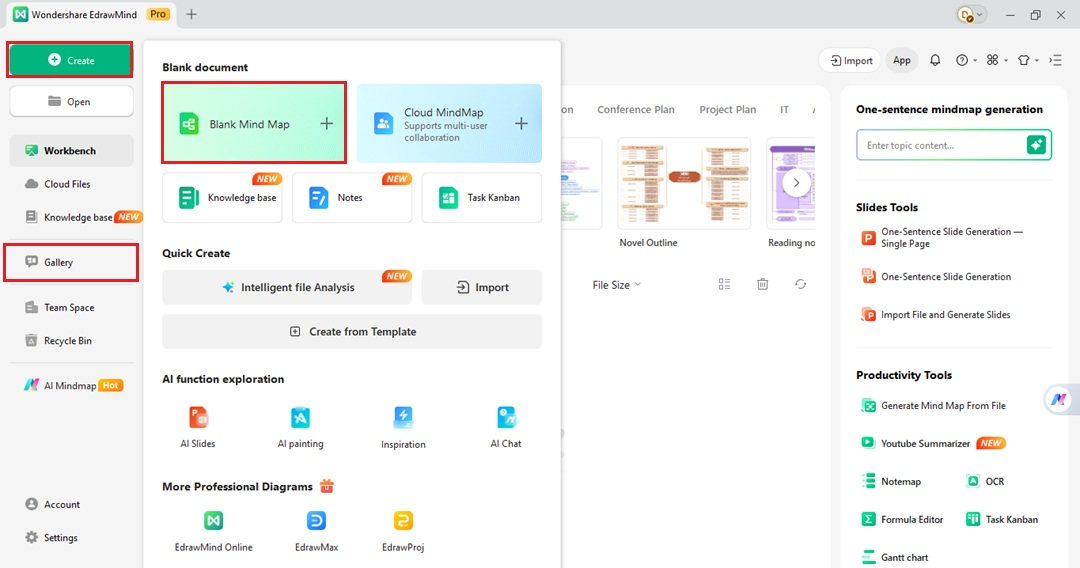
- From the Workbench menu, click Create on the top left. Then, choose b to start.
- You can also access the Gallery through the left-side menu. Search for a timeline template and click Duplicate to customize it.
Step 2 Add Event Details
- Double-click a text placeholder to add your event details.
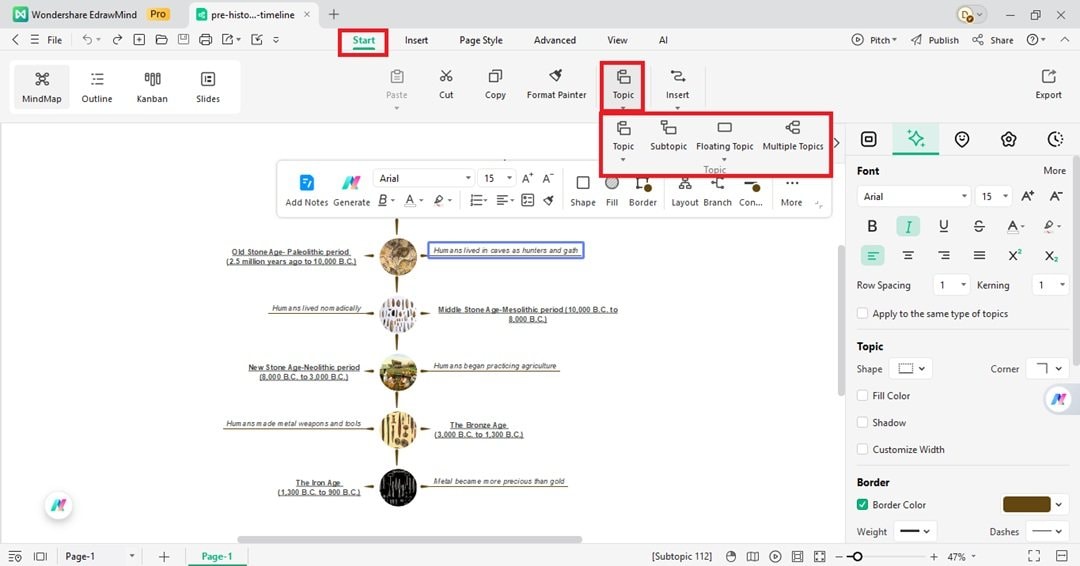
- Select a branch to add more sections, then go to the Start tab at the top.
- Next, choose either Topic or Subtopic from the dropdown list.
Step 3 Add Images and Icons
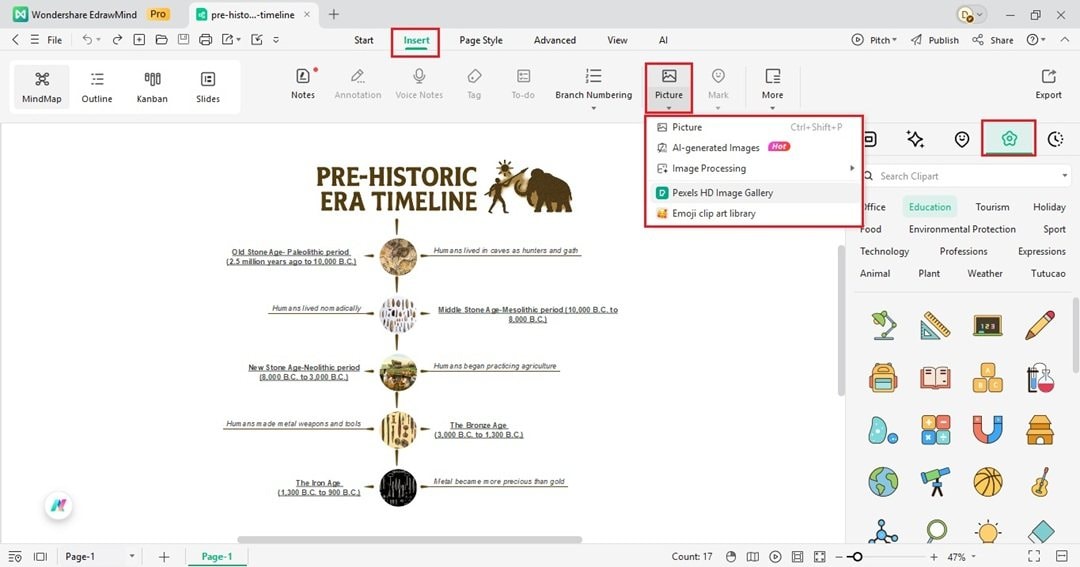
- Go to the Insert tab from the top menu. Choose an option from the Picture dropdown list. You can add an image from your computer, Pexels, or use AI.
- Open the right panel and go to the Clipart tab. Select a category, such as Education, or search for a specific symbol. Then, drag and drop it onto the editing canvas.
Step 4 Customize the Timeline
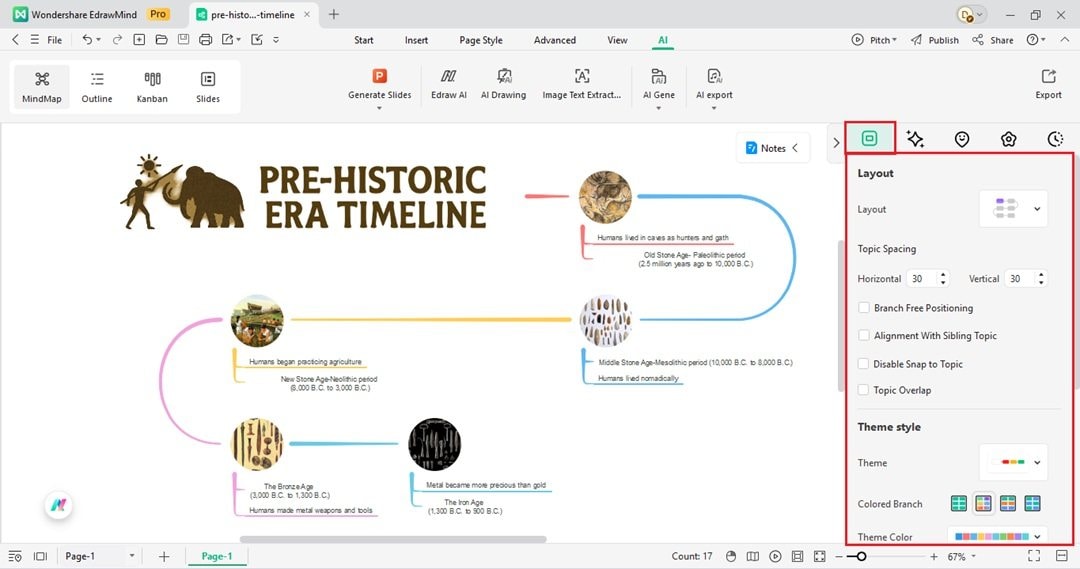
- Go to the Map tab in the right panel. This lets you change the timeline style.
- Next, choose an option from the Layout dropdown menu.
- Scroll down to the Theme style section. Choose an option from the Theme dropdown menu to change all the colors in one click.
Step 5 Export or Share
- Save your finished timeline to use in your lesson.
- Go to File > Export from the top left menu.
- Or click Share at the upper right corner and invite others with a link for feedback or group work.
Conclusion
Creating timelines for your lessons can be a fast and simple task. You've seen ten creative timeline examples for teachers in this guide.
Now you have the steps to build one for your own students. These visual aids help them understand complex events or project plans.
With EdrawMind, you have access to the AI tools, customization options, and templates to create these diagrams fast. You can create professional and visually appealing timelines for any subject. Download EdrawMind today and start designing your first project.
 EdrawMind
AppsEdrawMind Online
EdrawMind
AppsEdrawMind Online

