



This article explores the work breakdown structure and its benefits for your company. Later on, you will also look at different examples of WBS maps.
In this article
What Is a WBS
The work breakdown structure (WBS) is defined as the "deliverable-oriented hierarchical decomposition of the work to be executed by the project team to accomplish the project objectives and create the required deliverables."
WBS defines and organizes the scope of work. In project management, a work breakdown structure aims to make a project more manageable.
Breaking a project into smaller components increases the efficiency and productivity of the team, making project management more manageable. For your reference, here are standard terms that are used in WBS for project management:
- Acceptance Criteria. These standards must be met to meet the stakeholders’ or customers’ requirements.
- Budget. These are the project's associated expenses.
- Deliverables. A deliverable is a product, service, or result created at different project stages.
- Milestones. These are critical stages of the project.
- Phases. The various stages of a project are referred to as its phases.
Key Characteristics and Components of the WBS
One of the critical characteristics of a WBS is the 100% principle, which means that it constitutes all aspects of a project. Moreover, WBS is also known for its leveled structure.
If the level is not self-explanatory, a WBS may have a description of the project at the top level. Each subsequent group breaks down the project into further details.
Here are the specific reasons why a WBS would be helpful for project management:
- Simplifies complexity: It divides the project into smaller, manageable components, making large projects easier to handle.
- Provides clear direction: Acting as a roadmap helps different teams coordinate effectively while allowing each member to focus on their assigned tasks.
- Measures progress: By applying the 100% rule, managers can evaluate whether the project scope is fully covered and properly budgeted, ensuring accurate completion tracking.
The 3 Different Forms of WBS
Here are the three usual forms of the work breakdown structure. They can be identified as phase-based, deliverable-based, and responsibility-based.
Phase-Based Work Breakdown Structure
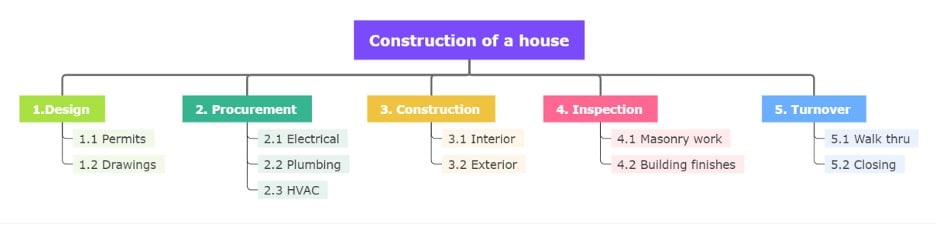
Level 1 consists of the major project phases, often five in a phase-based structure. Level 2 then outlines the unique deliverables within each phase.
At every lower level, the WBS continues to focus on deliverables. This approach helps break a project into manageable phases, making it easier to track progress and complete tasks step by step.


Deliverable-Based Work Breakdown Structure
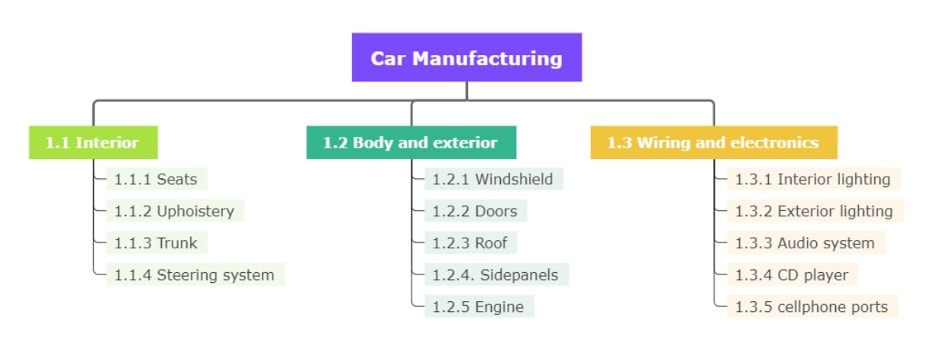
A deliverable-based WBS organizes work around the project’s outputs. It highlights the relationship between deliverables and the overall project scope.
For example, a deliverable-based WBS for a car project may divide the work into the interior, exterior, and electronics, then break each area into smaller components.
This form provides a clear picture of what each deliverable consists of and how they contribute to the final product.
Responsibility-Based Work Breakdown Structure
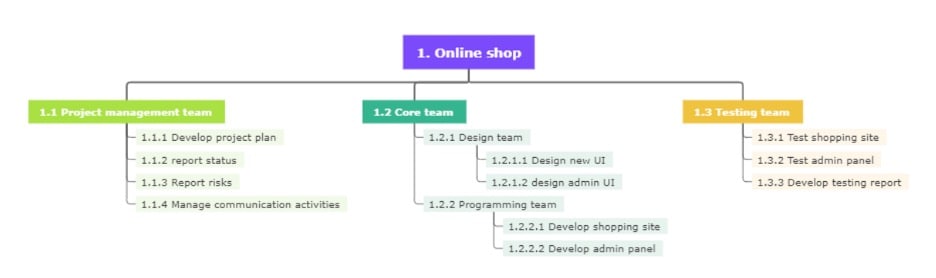
A responsibility-based WBS defines activities according to the teams or organizational units responsible for them.
For instance, in an online shop project, different groups may be assigned specific responsibilities such as website development, customer service, or logistics.
This approach ensures accountability and helps streamline project completion by aligning tasks with responsible parties.
How To Create a WBS Step-by-Step?
Creating a Work Breakdown Structure (WBS) involves breaking a project into manageable parts, ensuring that nothing is overlooked. Here’s a simple way to do it:
Step 1 Gather Key Inputs and Identify Deliverables
Start by collecting key project documents, like the Project Charter, Project Management Plan, or scope statements. In this step, your team should review these materials and identify the main deliverables. This ensures your WBS covers the entire project.
Step 2 Define To-Level Elements and Decompose Further
Once you know the deliverables, define the Level 1 elements that represent the whole project scope. Then, break these elements into smaller, more specific tasks through decomposition. Keep going until you reach tasks that can be managed individually. Ensure that each component is unique and follows the 100% rule—every element in the project should be included without overlap.
Step 3 Document Details and Structure the Work
After breaking down the work, add details to each task in a WBS dictionary. Include boundaries, milestones, costs, and other important information. You can also link the WBS to a schedule, like a Gantt chart, for easier tracking. Select a format that suits your team's needs, whether a simple list or a visual diagram.
Step 4 Create Your WBS With EdrawMind Online for Free
Finally, bring your WBS to life using EdrawMind Online. The platform enables you to create structured WBS diagrams using drag-and-drop features, pre-made templates, and customization tools.
You can also collaborate with your team in real-time, add notes or costs directly to work packages, and switch seamlessly between outline, tree, or Gantt chart views.
Since EdrawMind is free and browser-based, you can create, edit, and share your WBS from anywhere without hassle. Specifically, here are the steps you should follow when making your first work breakdown structure with EdrawMind:
Step 1 Choose a Top-Down Chart Layout
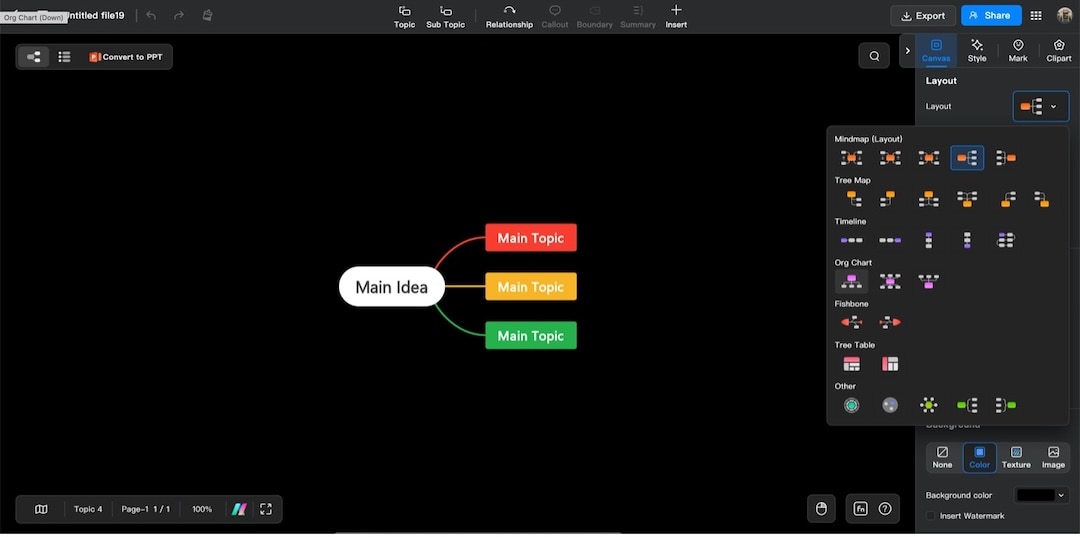
Create a new mind map from EdrawMind’s homepage. Once in, navigate to the right-hand panel Canvas > Layout > Org Chart. Choose a top-down chart layout.
 Try the app & get 500 free AI tokens


Step 2 Edit the Main Idea and Main Topic Nodes
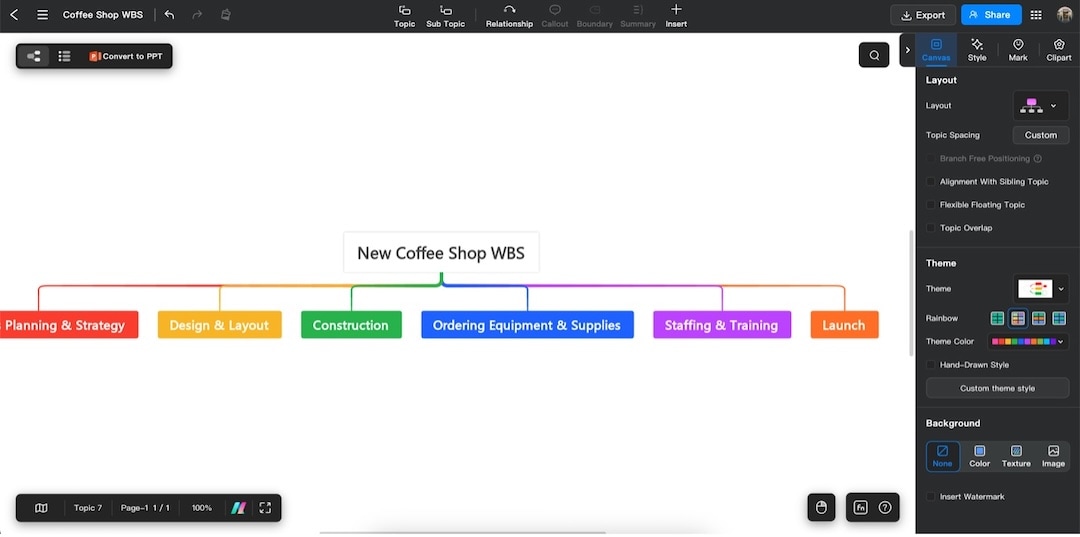
Edit the Main Idea node to your project name. Edit the Main Topics to the different categories or phases of your work. Use the Topic tool on the top ribbon to add more nodes, or hit Enter while selecting the Main Idea node.
Step 3 Add the Subtopics/Tasks
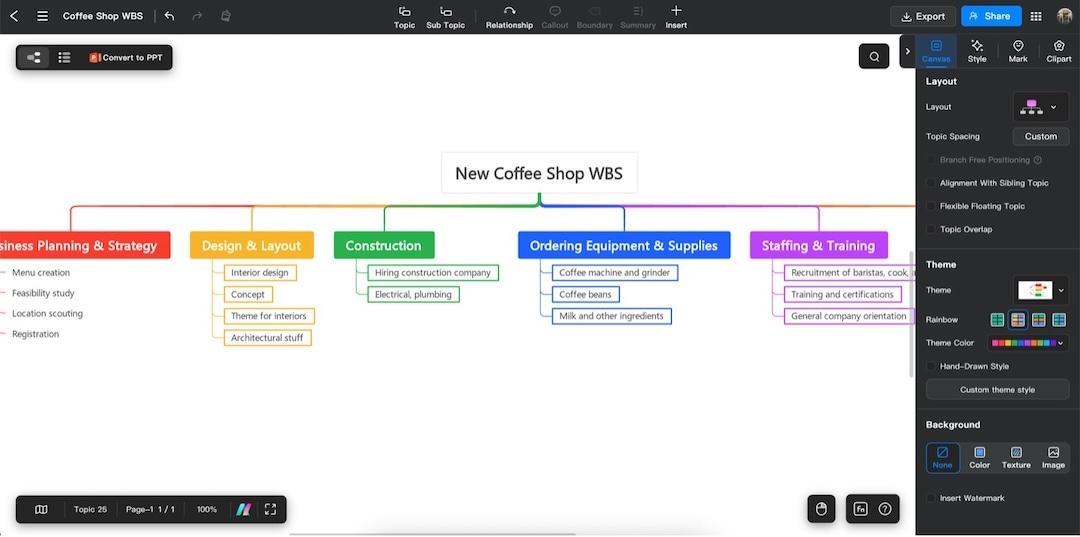
Use the Subtopic tool to add new nodes under the Main Topic branches. Press the Enter button on your keyboard to add more subtopics while selecting a same-level subtopic. Add in the “tasks” in these subtopic nodes.
Step 4 Design the Chart
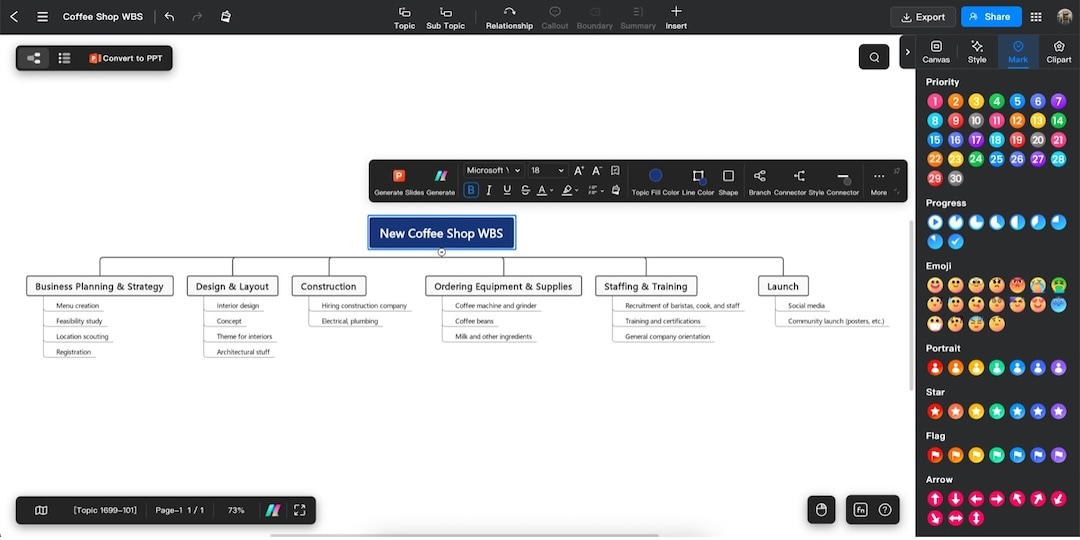
Use the Canvas and Style tabs from the panel to edit themes, colors, shapes, and more. Use the Mark and Clipart tabs to add icons and symbols relevant to the business. Click on an element to bring up context-specific design tools (floating customization bar).
Step 5 Export Your Diagram
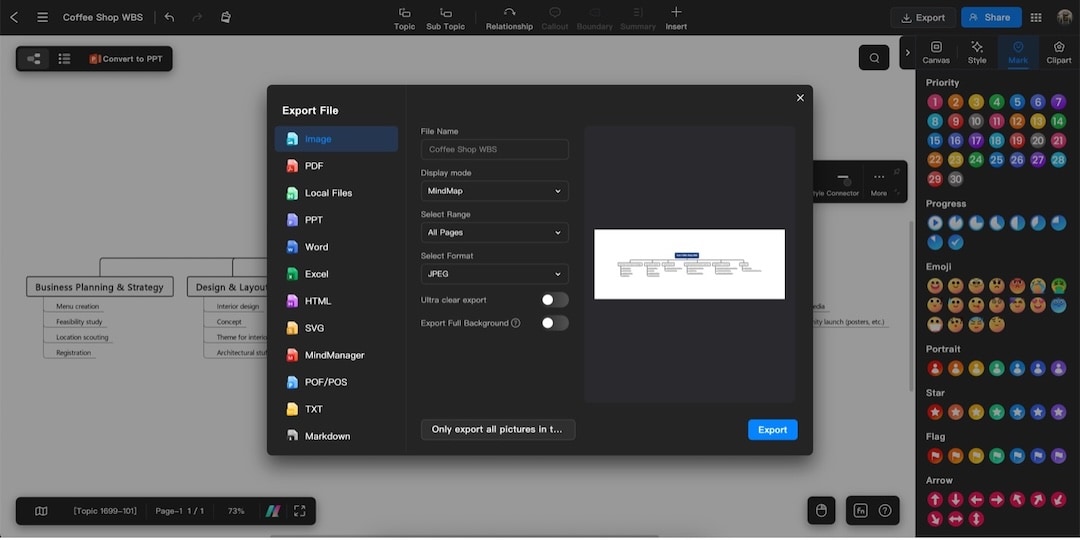
Press the Export button in the top-right portion of the window. Set the export parameters (file type, range, etc.). Hit Export once done.
Elements of a Good WBS
A Work Breakdown Structure (WBS) simplifies the assignment and tracking of project tasks. A good WBS will usually have the following traits or attributes:
- Manageable: The WBs should be able to assign the duties to specific individuals. This makes it easy to pinpoint who’s responsible for managing what.
- Defined: A WBS is a diagram. Hence, as a visual tool, it must be easy to read. The hierarchy and other details should be well-defined.
- Flexible: A WBS must also be easy to edit, so that when changes occur within the team, such as resignations, it’s easy to adapt.
- Measurable: The tasks within the WBS should be defined with start and completion dates or include specific metrics.
Guidelines for an Effective WBS
To ensure your WBS delivers value, follow these simple guidelines:
- Check for Accuracy: Review all deadlines, resources, and deliverables to confirm they are correct.
- Verify Work Packages: Each work package must be independent and non-overlapping. Avoid duplication or repetition across tasks.
- Get Granular: Break deliverables into the most minor possible tasks, ideally expressed in verb form for clarity.
- Include Supporting Activities: Don’t overlook testing, training, implementation, or documentation. These procedural activities are essential for project success.
Who Uses WBS?
Different groups rely on a Work Breakdown Structure (WBS) to keep projects on track and achieve success. Here are some examples:
Event Planners
Event planners use a WBS to manage organizing events’ many tasks and subtasks. Because event planning often involves tight deadlines, a WBS helps maintain order and ensures that no critical detail is overlooked.
Account Directors
For account directors, a WBS is a visual tool to show clients how a project is progressing. It keeps the account team and the client aligned, ensuring everyone shares the exact expectations about deliverables and timelines.
Commercial Project Managers
Commercial project managers depend heavily on WBS structures, especially when multiple contractors are involved. By highlighting dependencies between teams, a WBS ensures coordination and helps prevent delays, making timely delivery more achievable.
Software Developers
In software development, a WBS breaks the project into phases and milestones. This structure provides visibility across teams, clarifies deliverables, and supports a smoother workflow throughout the development cycle.
Examples of Work Breakdown Structures
Here are different examples of work breakdown structures. Some are real-world examples, while some are just generic options you can use and edit quickly when you want to start.
Most of these are from Wondershare EdrawMind’s user-made gallery. You can also check out the gallery for other diagrams that you might need.
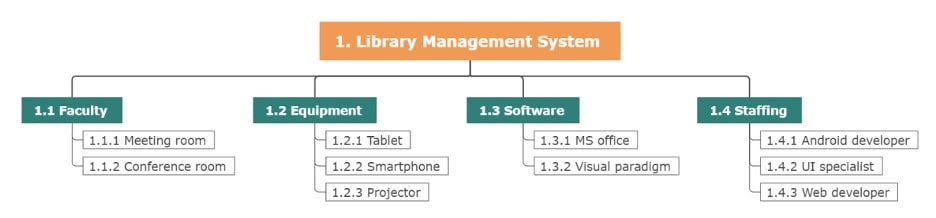
Resource Breakdown Structure
An RBS shows the hierarchical decomposition of project resources, organized by type, category, or function. For example, a Library management system can be broken down into different resource groups, clarifying allocation and usage.
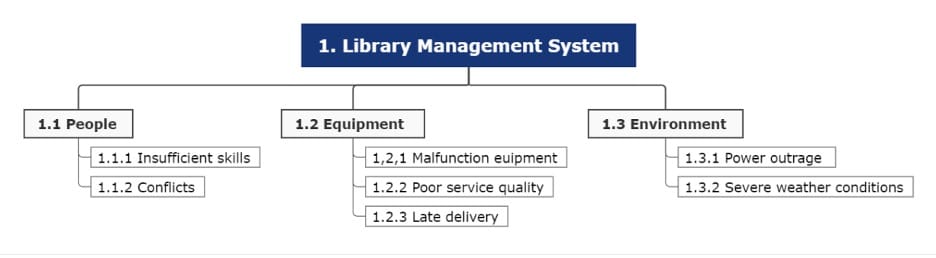
Risk Breakdown Structure
This structure categorizes project risks into levels, from general to specific. A library system example might include risk levels color-coded by impact, making it easy to assess and prioritize potential threats.
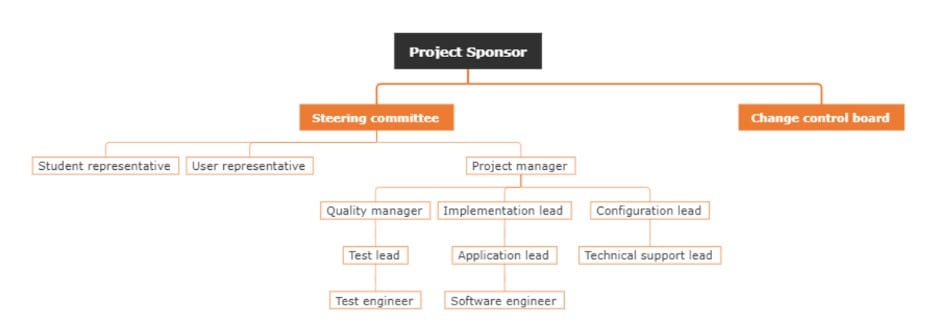
Organizational Breakdown Structure
Also called an organizational chart, an OBS maps the project’s hierarchy of stakeholders. It typically starts with the project sponsor and breaks into teams or individuals, clarifying roles, responsibilities, and authority.
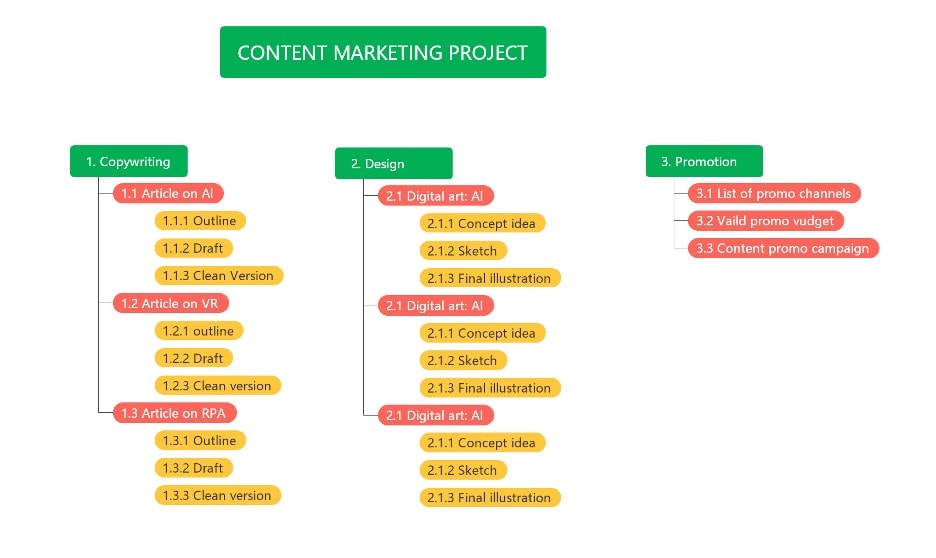
Content Marketing Breakdown Structure
The following example is particular to content marketing. To stage a content marketing project, use this WBS example as a reference. It hits key target metrics for copywriting, design, and promotion.
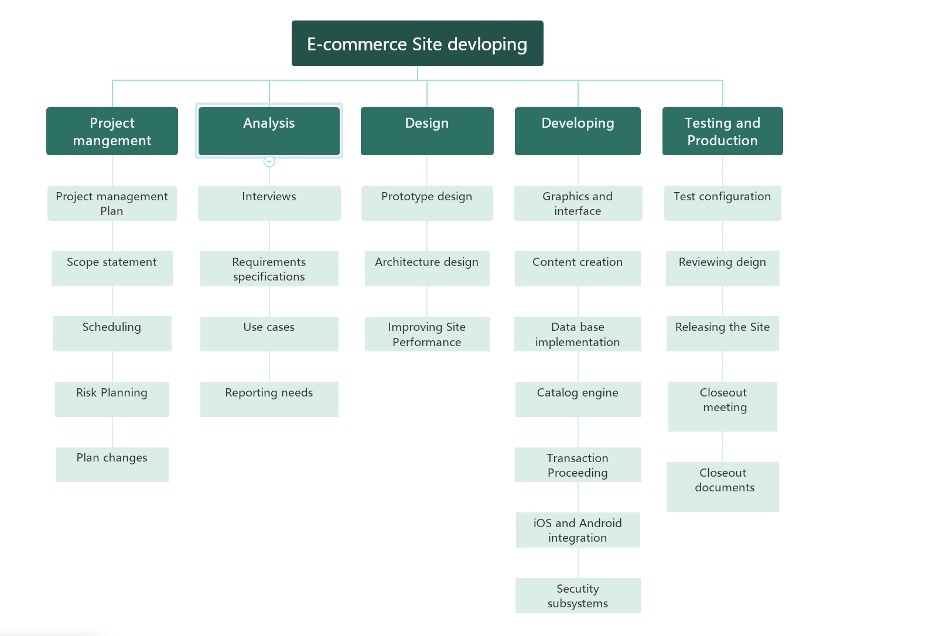
E-Commerce Site Development
If you want to start an e-commerce site, this one’s for you. A WBS template can break the project into phases like website design, payment integration, product listing, and marketing setup. This ensures each task is tracked, deadlines are met, and your online store launches smoothly.
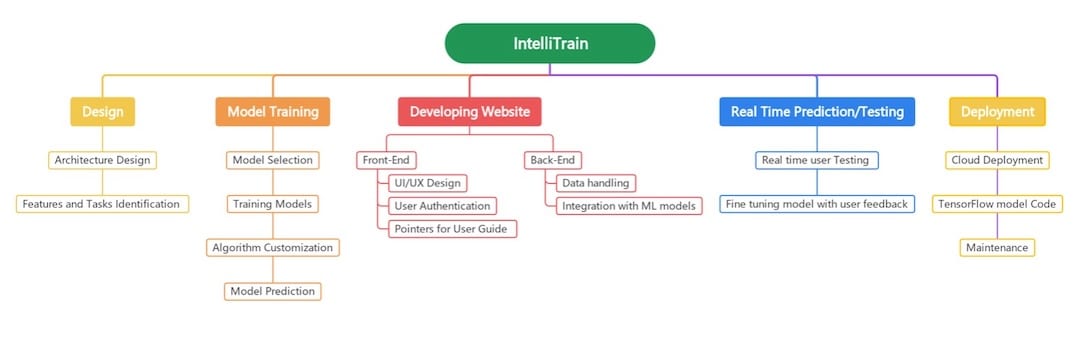
IntelliTrain Work Breakdown Structure
IntelliTrain is a real-life company from which you can take reference whenever you’re trying to create a work breakdown structure for a tech company. You can edit this with your company name and distribute the tasks accordingly.
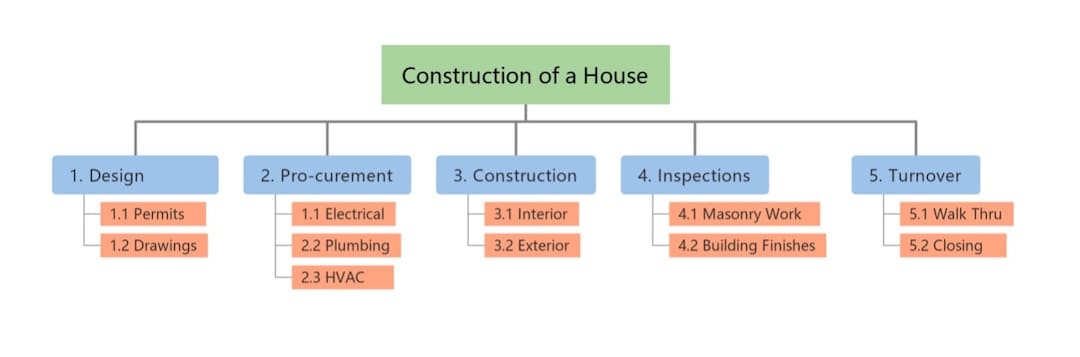
House Construction Breakdown Structure
If you’re a project manager or foreman of a construction site, this WBS may help you. It covers the various aspects of house construction. Once you do this, delivering the deliverables to your construction workers and staff will be easy.
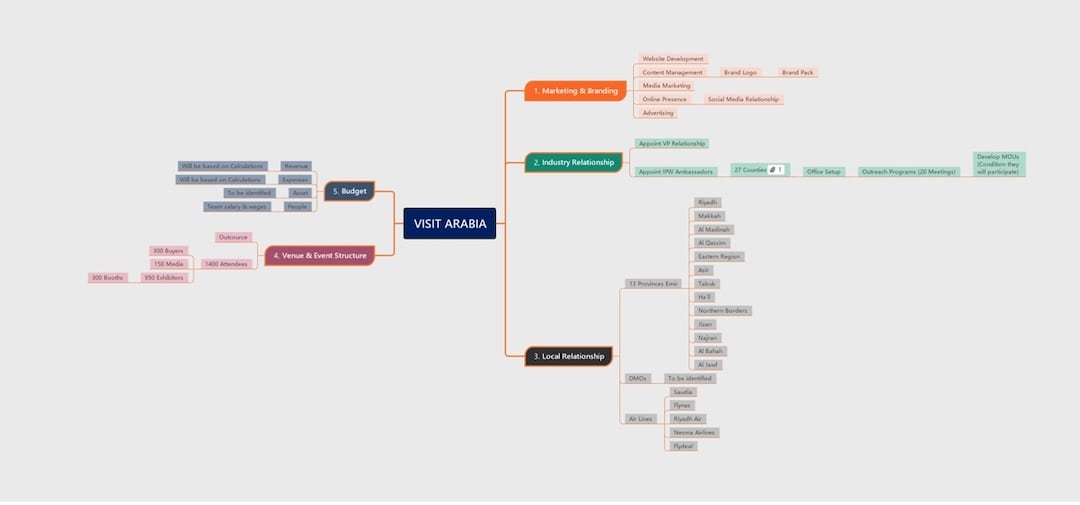
Visit Arabia Work Breakdown Structure
Travel campaigns require considerable effort on the part of a corporation. You’ll have to plan the marketing, initial design, logos, delivery of copywriting, ads, and more. If you want to start a marketing campaign, this “VISIT ARABIA” WBS can provide you with a head start or guidance on where to begin.
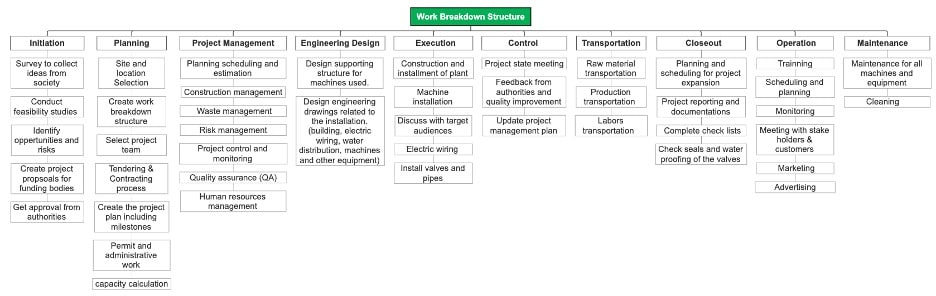
Standard Construction Work Breakdown Structure
Next, you have this comprehensive construction work breakdown structure. Unlike the house introduced earlier, this has almost all the elements or tasks for a construction project. You can continually expand or delete the nodes as necessary.
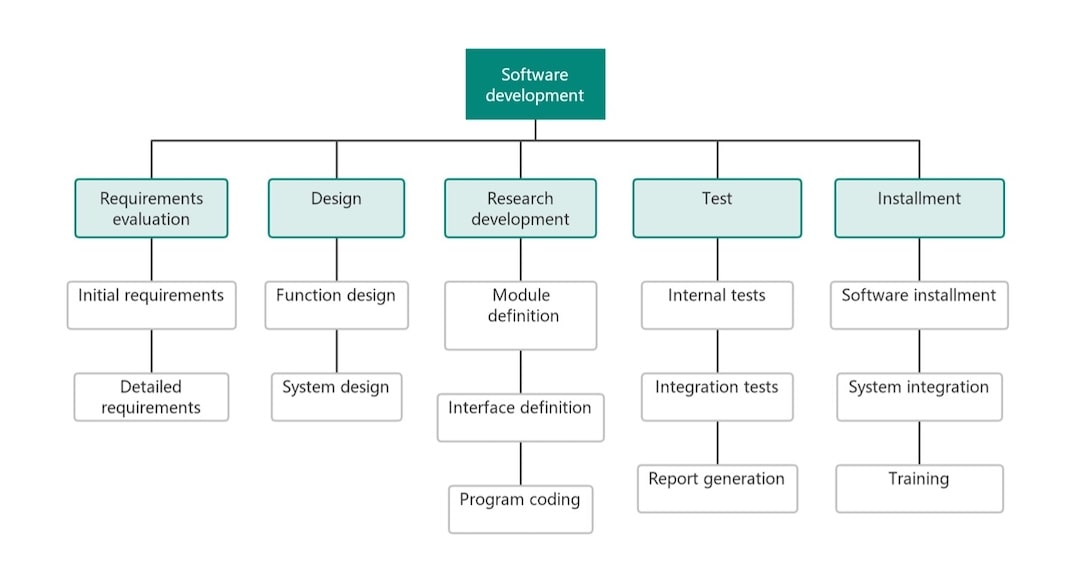
Software Development Work Breakdown Structure
Another example of tech companies is this software development WBS. It involves processes from requirements evaluation to the software project’s test and installation phases. This ensures that software released to users is thoroughly tested and researched, with minimal bugs.
Key Takeaways
A work breakdown structure is an effective management tool that ensures the successful completion of a project. Different groups of people utilize this structure for various purposes. You can create a WBS using many online tools.
EdrawMind is a valuable tool that can help you create a work breakdown structure. It has plenty of templates and tools to assist you in making an impressive and effective WBS.
EdrawMind can also help you brainstorm your work breakdown and execute it smoothly. It ensures that your hard work leads to the successful completion of your tasks.
 EdrawMind
AppsEdrawMind Online
EdrawMind
AppsEdrawMind Online
