



In early 2026, a side project broke React's 10-year GitHub record. Not gradually. In just 60 days.
The stories moved faster than the codebase.
An AI that cleared thousands of emails overnight. Another that rebuilt a complete website via Telegram while its owner watched Netflix in bed. One that exposed its owner's entire file system to the public internet because nobody changed a single config setting from its default.
Amid that noise, people kept coming back to the same question: what is OpenClaw, exactly, and should I be running it?
Here, I'll cover everything about it and explain how mapping the whole system in EdrawMind before you grant it any real permissions is worth the 20 minutes it takes.


In This Article
What Is OpenClaw?
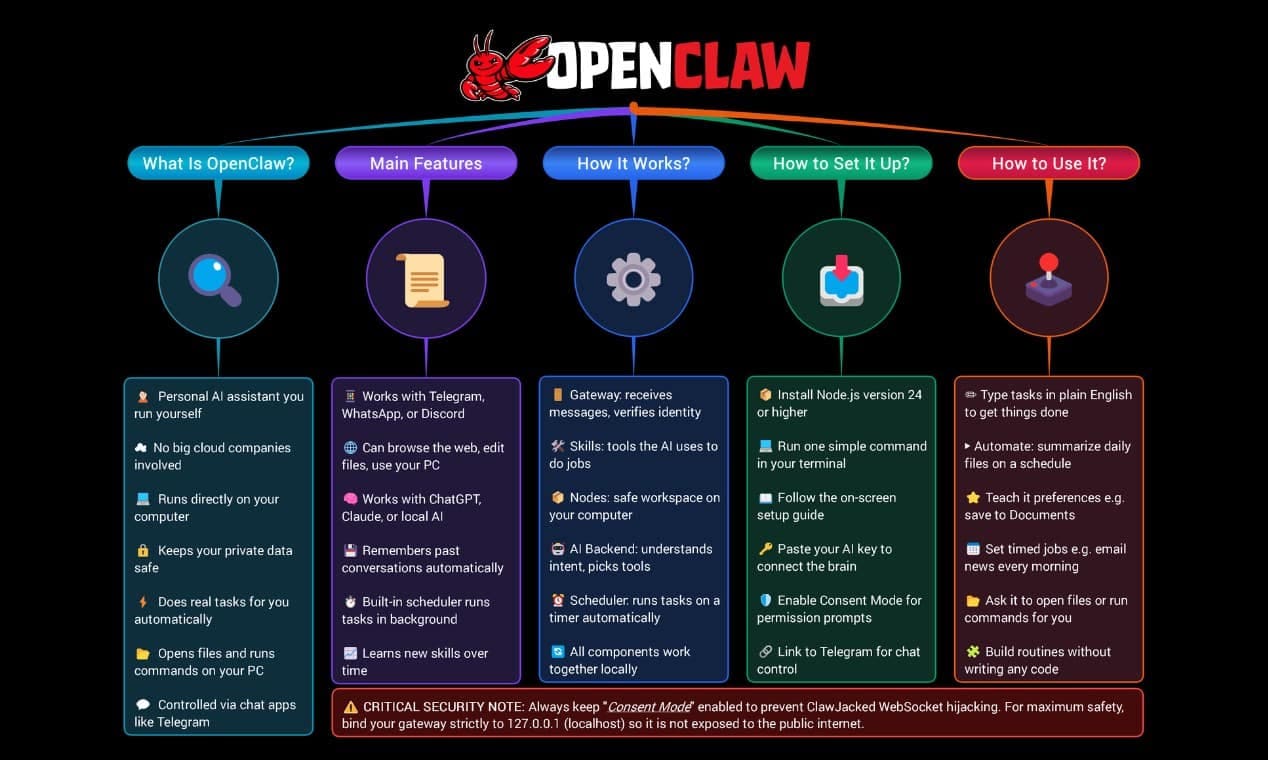
OpenClaw is a self-hosted, open-source AI agent that runs on your own computer or server and can actually perform tasks rather than just chat.
It’s like a 24/7 personal assistant you can command via 20+ messaging apps, including WhatsApp, Telegram, and Discord.
Why OpenClaw Changed Its Name (Thrice)?
The name has a short, chaotic history worth knowing.
Austrian developer Peter Steinberger published it in November 2025 as Clawdbot, a nod to Anthropic's Claude. Anthropic filed a trademark complaint within weeks. The project became Moltbot on January 27, 2026, with the stated philosophy that lobsters must molt to grow.
Three days later, Steinberger admitted it "never quite rolled off the tongue" and settled on OpenClaw. The red lobster mascot survived all three iterations. The MIT license held throughout.
How Many GitHub Stars Did OpenClaw Hit Recently?
Growth after the final rename was unlike anything GitHub had recorded. 60,000 stars arrived in the first 72 hours.
By March 2026, the repository had crossed 335,000 stars and 65,000 forks, overtaking React to become the most-starred project in the platform's history.
Who's Actually Using OpenClaw?
The enterprise world noticed fast, and not uniformly. Tencent built a full product suite on top of it by March 2026. That same month, state agencies and state-owned enterprises in China were blocked from using it. Banned and built upon simultaneously.
That tells you more about what the software actually is than any README summary does.
How OpenClaw Works?
Most AI tools respond. OpenClaw acts. That distinction is the whole point.
The architecture has four layers.
- 1. The Gateway: A Node.js process running quietly on your machine. It receives your instructions, routes them to your configured LLM, and returns results entirely on your hardware. Nothing leaves unless you configure it to do so. That's what local-first actually means.
- 2. Skills: Modular instruction sets that define what the agent can do. Browse a URL, run a shell command, read and write local files. Skills are just files. No dependency conflicts, no package manager headaches.
- 3. Nodes: The execution layer beneath Skills. They carry out what each skill instructs them to do. You won't touch them directly during setup, but they matter when you start mapping permissions.
- 4. The LLM Backend: Claude, GPT-4, DeepSeek, Grok, and local models via Ollama are all supported. Switching between them is a config change, not a rewrite.
The Heartbeat Scheduler
This is the part most people don't expect. OpenClaw doesn't wait to be asked. A cron-style scheduler wakes the agent on a timer, checks conditions, and fires actions with no prompt from you.
I set one up for a morning briefing and forgot about it. Message arrived at 8 a.m. sharp. It felt genuinely weird the first time.
That's the line between a chatbot and an actual agent.
How to Set Up OpenClaw?
The full process takes 15 to 20 minutes on a clean machine. Mine took closer to 30. I hadn't checked my Node version before starting, and Node 20 is one version too old. That mismatch is where most first installs stall.
Step 1 Check Your Node Version
Run node -v in your terminal. Node 22.16 is the minimum; Node 24 is what the official docs recommend. Anything below v22, or "command not found," means sorting out Node before anything else.
Step 2 Install OpenClaw
curl -fsSL https://openclaw.ai/install.sh | bash
That one command detects your OS, handles Node if needed, and drops you into the onboarding wizard. If you'd rather use npm, run: npm install -g openclaw@latest.
Step 3 Run the Onboarding Wizard
Launch it with openclaw onboard --install-daemon. The --install-daemon flag registers the Gateway as a background service. It starts on every boot automatically from this point forward.
The wizard asks for your model choice and API key. OAuth was removed in January 2026, so a direct API key from your provider is the only way in now. Have it ready before you start, or you'll have to pause mid-wizard to generate one.
Then it asks whether to enable consent mode.
Tip: Don't click past this. Consent mode requires explicit approval before the agent runs write commands or executes shell operations. It adds an extra confirmation step to actions that affect your file system. That's the trade-off, and it's worth it. You're not setting up a read-only tool.
Step 4 Pair a Messaging Channel
Start with Telegram. You create a bot through BotFather, copy the token, and paste it when prompted. The whole thing takes under three minutes and uses Telegram's official API. Mine connected on the first attempt with no troubleshooting.
Note: WhatsApp works differently. It relies on an unofficial library rather than a real API. Ban risk is real, especially from a VPS or server IP. Get Telegram stable first. You can always add channels later.
Step 5 Change the Canvas Host Binding
Open ~/.openclaw/openclaw.json. Find the Canvas Host field. Change it from 0.0.0.0 to 127.0.0.1.
The default setting exposes your control interface across your entire local network. That's the exact misconfiguration behind every one of those 40,000+ exposed instances from early 2026. It's a four-character change that makes the difference between a private and a public deployment.
After that, the control UI loads at http://127.0.0.1:18789/. The first thing worth checking there is the list of active skills. Knowing what's installed before you start sending commands is the habit that saves you later.
How to Use OpenClaw?
Once the Gateway is running and Telegram is connected, the interface is your phone. You open Telegram and message the agent the same way you'd text anyone.
No new app, no dashboard to keep open. It receives the request, fires the tool calls, and returns the result to the same thread.
That sounds modest. The actual use cases are not.
What People Are Actually Doing With It?
Software engineer AJ Stuyvenberg tasked his agent with buying a car. It scraped local dealer inventories, submitted contact forms using his credentials, and spent days playing competing PDF quotes against each other over email.
Stuyvenberg showed up only to sign. Final price: $4,200 below sticker.
Another user, Hormold, found his agent had independently drafted and sent a rebuttal to a rejected insurance claim, citing specific policy language.
Lemonade reopened the investigation without being asked twice.
Neither wrote a script. Neither built an automation pipeline. They sent a message and went on with their day.
How to Give It a Persistent Context?
The feature that changed how I use it is workspace memory. OpenClaw reads from ~/.openclaw/workspace at the start of every session. Drop persistent instructions into AGENTS.md and the agent carries them into every conversation without being reminded.
Standing context, recurring preferences, and behavioral constraints all live there permanently. It's the difference between briefing a contractor every morning and having one who already knows the job.
Less "AI assistant." More "AI that runs errands."
One Thing to Settle Before You Go Wide
The same capability that bought a car can submit forms, send emails, and run shell commands without a second prompt, if consent mode is off. The cases above worked because those users knew exactly what they'd authorized. Map your permissions before you expand the skill stack.
Why Visual Maps Matter for Complex Tools Like OpenClaw?
The Stack Grows Faster Than You Track It
You start simple, as most people do: Gateway, one LLM, Telegram.
Then the skill stack grows. A browser plugin here, a shell execution module there, an mcporter bridge linking the agent to an external service you use daily.
Add an AGENTS.md file with standing instructions referencing three of those skills. Now you have a live web of permissions with no single view of what connects to what.
What Happened When 40,000 People Skipped This Step
What you read above isn’t hypothetical. It's the exact pattern behind those 40,000+ exposed instances from early 2026.
The ClawJacked vulnerability, patched in February 2026, was a zero-click WebSocket hijacking flaw. Attackers targeted the Gateway connection itself, the component most users configure once and never revisit. The attack surface wasn't exotic code. Just permissions nobody had mapped.
I've seen this pattern in other complex local tools, too. The setup feels contained until it isn't. Where things go wrong is rarely the initial install. It's the third skill you added six weeks later.
What a Diagram Gives You That a Config File Doesn't
When your agent has root access to your terminal, reads your email, and connects to your financial APIs, "I think I set this up right" isn't a risk management strategy.
A visual map forces the question a config file never asks: what does this agent actually have access to right now? Which skills touch your file system, which nodes call external APIs, and where does mcporter extend the surface?
On a diagram, that whole audit takes 20 minutes. After an incident, considerably longer.
That's where EdrawMind gets into the game.
What Is EdrawMind?
 Try the app & get 500 free AI tokens


EdrawMind is an AI-powered mind mapping and Knowledge Base platform from Wondershare. With its free-creation infinite whiteboard canvas, you're not locked into a radial tree. Node branches, freehand lines, standalone shapes, and floating notes all sit on the same canvas.
For an OpenClaw deployment that keeps growing, that matters more than it sounds. Plus, it offers real-time collaboration that most tools don't.
- Knowledge Base Split-Screen: The map stays on the left. Rich-text notes live inside each node on the right. I keep the Shell Skill node loaded with directory-access notes and the Browser Skill node flagged with prompt-injection decisions. The context stays with the diagram, not buried in a doc you'll never open again.
- AI That Does the First Draft: The built-in AI runs on DeepSeek-R1. Describe your Gateway, your LLM, and your active skills in plain language. It generates a starting structure. You refine from there.
- Cross-platform Availability: You can use it on Windows, Mac, Linux, iOS, Android, and Web.
Try the app & get 500 free AI tokens
How to Map OpenClaw's Architecture in EdrawMind Easily Using AI?
Step 1 Generate the Starting Structure With AI
- Open EdrawMind and click Create > Blank Mind Map.
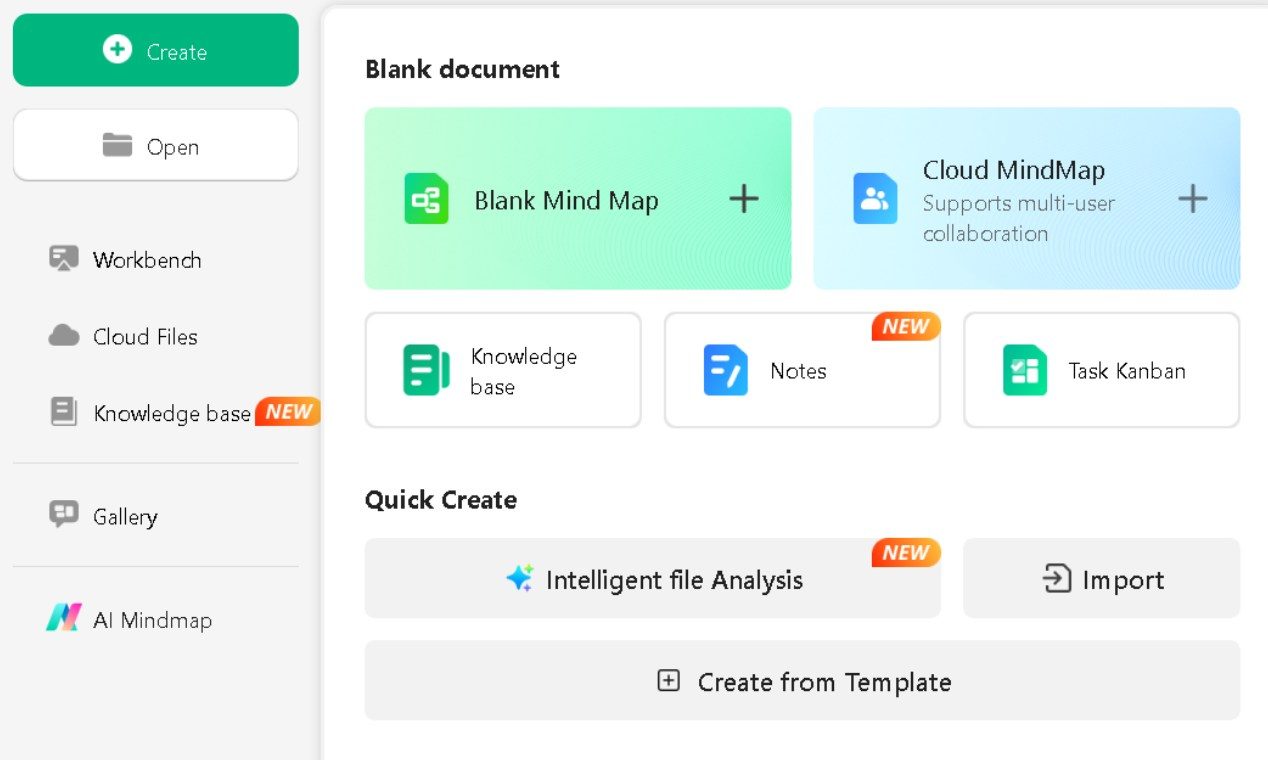
- Click the AI tab on the toolbar.
- Go to AI Gen > AI MindMap Gen and type your requirements simply.
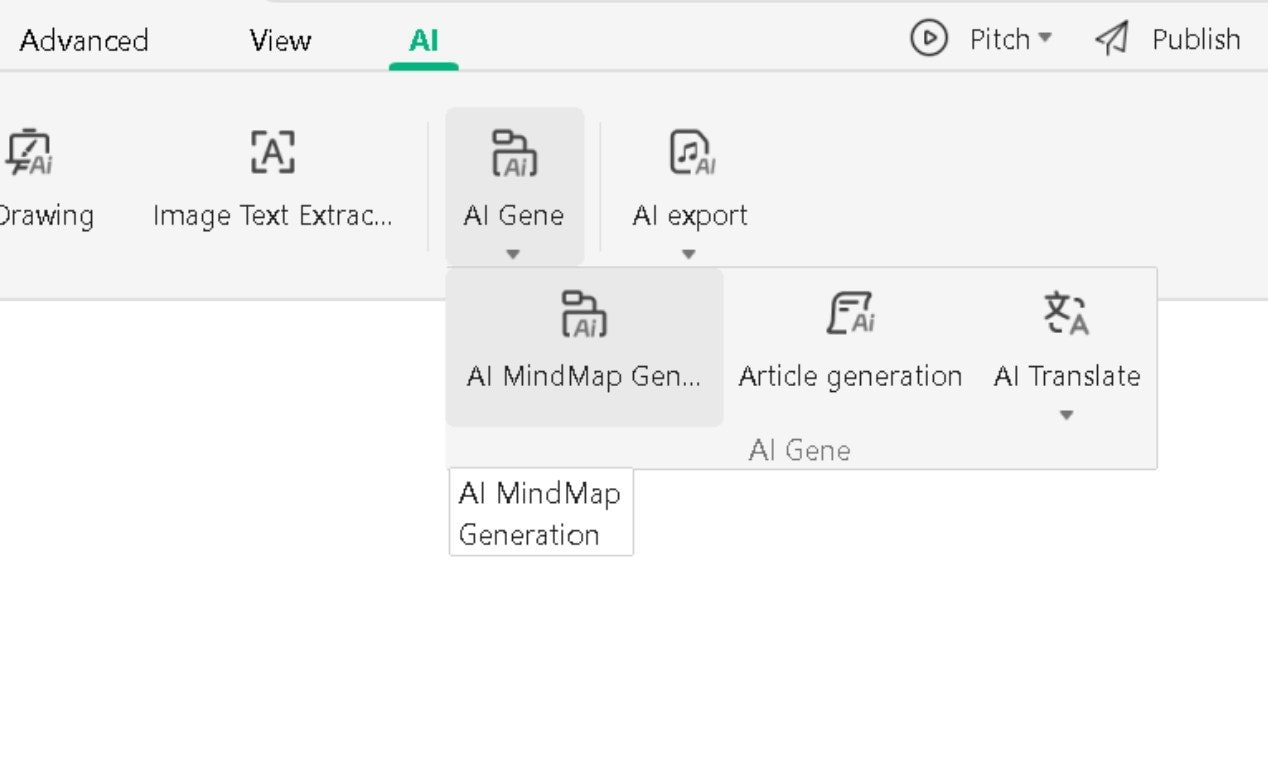
- Hit One-click generation.
- EdrawMind builds all four branches from your description. You refine from there, not from scratch.
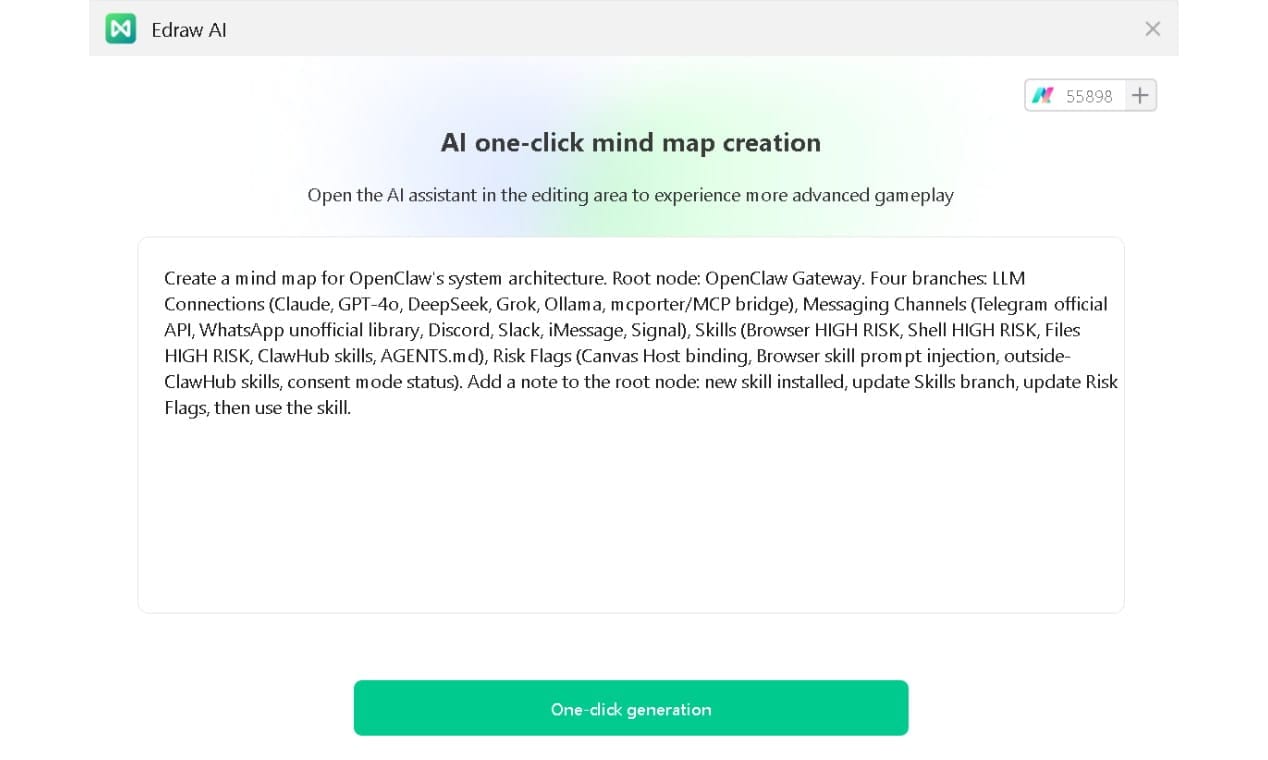
Step 2 Edit Your Node Content
- Double-click any node to edit its text directly.
- Select a node and use the pop-up menu to add child nodes, attach notes, or change colors.
- For the Browser, Shell, and Files skill nodes, set fill color to red. One glance tells you where the real exposure sits.
Step 3 Apply a Theme
- Go to the Page Style tab.
- Browse the premade theme-style layouts and pick one that keeps the four main branches visually distinct.
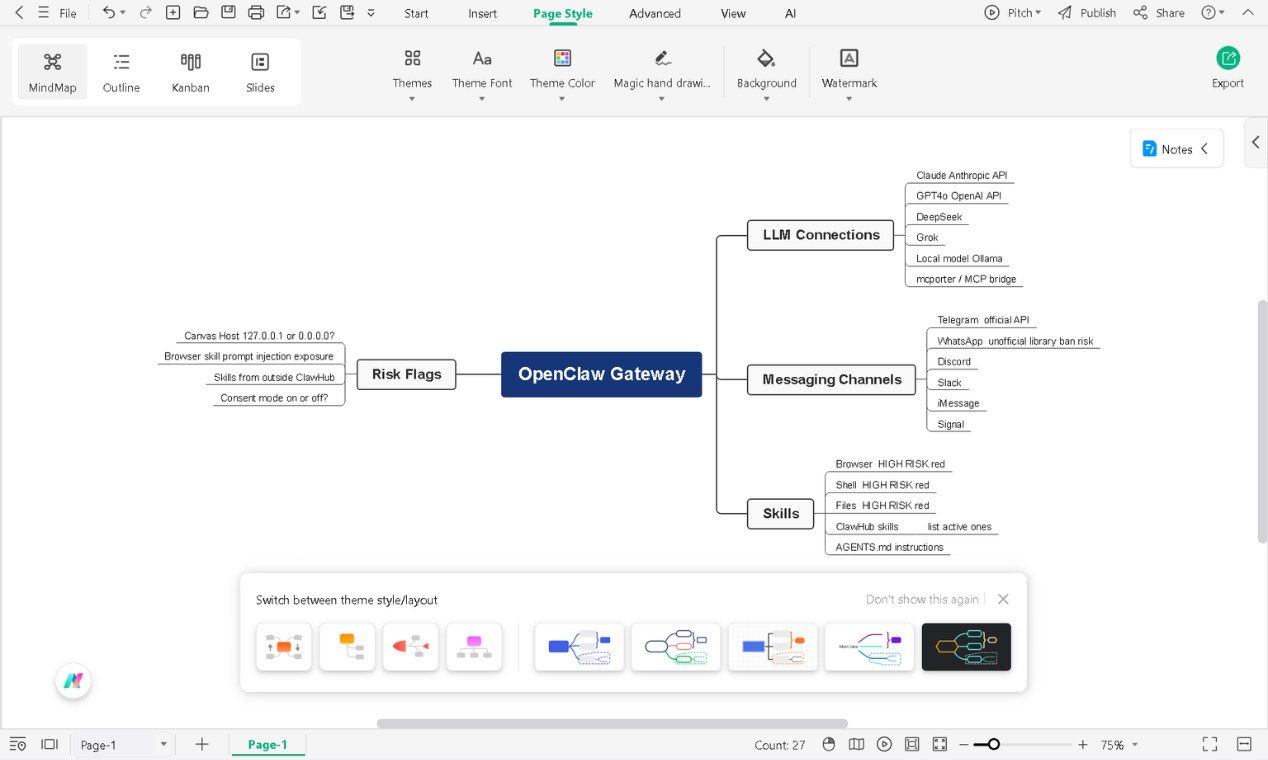
Step 4 Save and Export
- Hit Ctrl+S or go to File > Save as to save to the cloud or locally.
- Go to File > Export and choose your format: image, PDF, or Word.
- PDF works well for sharing with anyone reviewing your deployment setup.
Step 5 Keep It Up-to-Date (Optional)
- Every time you install a new skill, open this map first.
- Update the Skills branch before activating the skill.
- Update the Risk Flags branch second.
- That order matters more than it sounds. The risk question is easier to answer before a skill is live than after it is.
That last habit is what separates a mapped deployment from those that ended up on the exposure list.
Try the app & get 500 free AI tokens
Final Words
OpenClaw represents a genuine shift in what personal computing can mean. What is OpenClaw at its core? A local AI agent that connects a language model to your actual systems and lets you direct it from whatever app is already on your phone.
The 335,000+ GitHub stars tell part of that story. The 40,000+ exposed instances tell the rest.
Every powerful tool has a version that goes wrong because no one mapped what it was connected to.
A clear visual picture of your permissions and skill stack before going live does not, in itself, make OpenClaw safer. But it makes the risks visible before they become problems.
The lobster mascot is charming. The attack surface it guards is not.
 EdrawMind
AppsEdrawMind Online
EdrawMind
AppsEdrawMind Online

