



Knowledge Mapping is the process and techniques to define players, sources, flows, constraints, and knowledge sinks in an establishment.
This navigation aid illustrates the significance and relationship between knowledge stores and processes, encompassing both explicit and implicit knowledge.
Who, what, and why should the knowledge mapping process be considered? Effective knowledge maps help identify knowledge assets, solve business problems, socialize newcomers, and enhance organizational learning.

In this article
What Is Knowledge Mapping?
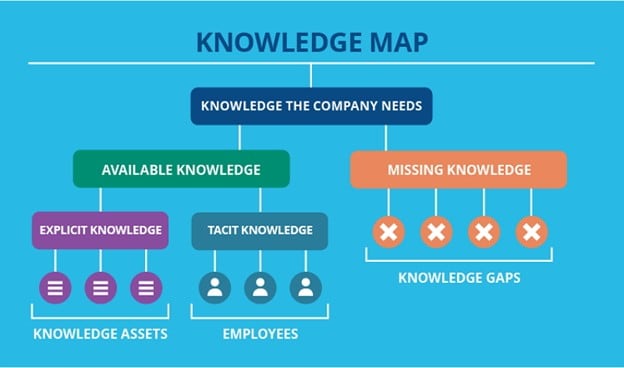
Knowledge mapping is one of the most critical methods in knowledge management. A map of information visually represents the intellectual capital of the company. It helps stakeholders assess where essential information resides, how it moves, and any challenges or gaps.
It allows businesses to focus on the most severe effects of knowledge and the most successful knowledge opportunities.
Knowledge mapping is the best way to store a company's expertise and identify knowledge gaps impacting business growth, preventing market opportunities, or causing failures.
Knowledge is the understanding of the subject acquired through an individual's learning or experience. Information is the optimized form of data that helps interpret meaning. Knowledge, on the other hand, is the relevant and objective information that makes a difference.
The Use of Knowledge Mapping
There are many applications of knowledge mapping:
- Enhancing productivity: It is impossible to be an expert in every field when dealing with vast quantities of complex information. Therefore, providing a simple tool to find people inside an organization with specific skills makes sense.
- Decision making: Knowledge mapping enables organizations to consider and utilize the current state of knowledge resources within the organization to inform assessments and plan analysis-based decisions.
- Risk Identification: Knowledge maps can identify risk areas within the organization. The act of creating a map of knowledge often reveals its weak links. The flow of data and expertise can also expose bottlenecks.
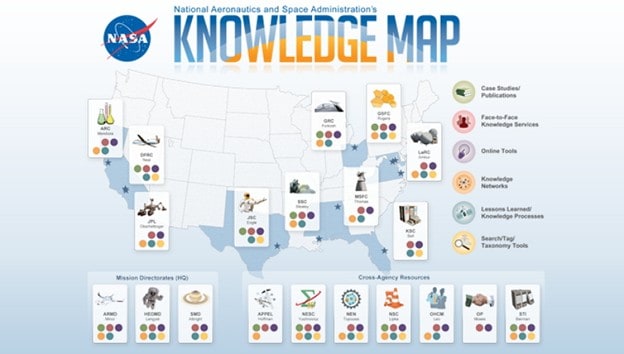
Benefits of Knowledge Mapping
It can be time-consuming to monitor the details you need to remain efficient, especially if it requires endless messaging or searching through multiple or moderately sound data files.
There is also a chance that you might not wholly appreciate the knowledge until you have it.
To assess the flow of essential information between individuals and processes, many organizations use knowledge maps to resolve obstacles to gaps that hinder the flow of this knowledge. Additional advantages include the potential to:
- Optimize activity and processes through structured workflows.
- Apply the most relevant experience to a business problem.
- Enable business learning, which can enhance efficiency and encourage innovation.
- Avoid the loss of expertise typically induced by outsourcing, resignation, leave, or retirement.
- Knowledge maps can also serve as a method for preparing new hires to accelerate the expertise process and help define career paths for businesses.
The Knowledge Mapping Tool
Wondershare EdrawMind is excellent for creating knowledge maps. Here’s why:
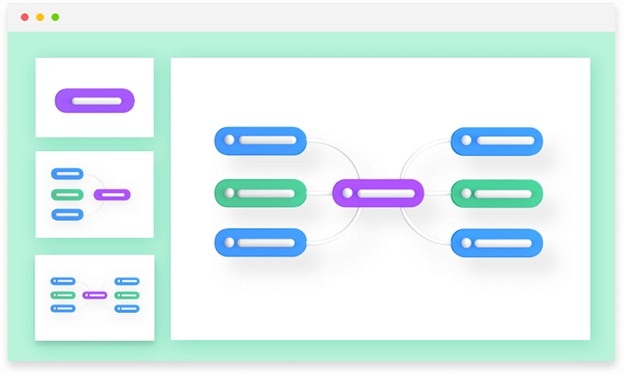
- This easy-to-use, flexible mind mapping tool is designed to help you create modern and visually appealing mind maps.
- By combining bullet points into a mind map for a project, EdrawMind enables you to organize thoughts and concepts, and create strategies that are not only visually appealing but also detailed.
- The software offers 12 different map types, 33 themes, and over 700 clip art materials to design mind maps, providing almost unlimited possibilities.
- By incorporating more details, such as callouts, relationships, summaries, points, comments, and hyperlinks, the mind map can communicate clearly and precisely. It is the best software for creating knowledge maps.
How To Create a Knowledge Map in EdrawMind
Four steps lead you to create a knowledge map in EdrawMind:
Step 1
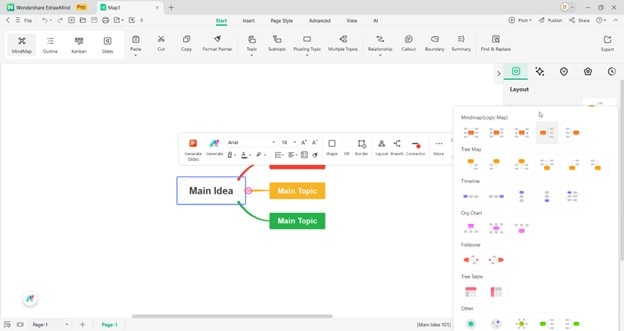
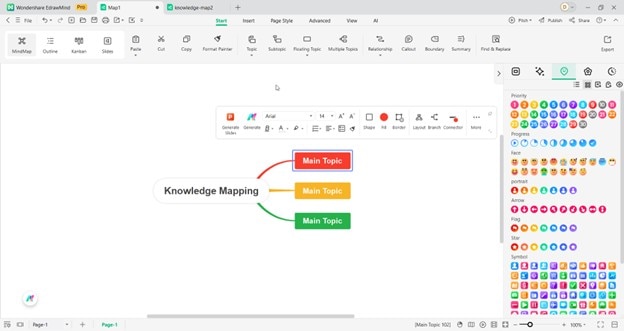
Open EdrawMind on your desktop or laptop. Make a new mind map and choose a Layout from the left-hand panel.
 Try the app & get 500 free AI tokens


Step 2
Utilize the extensive range of symbols from the available libraries to create your knowledge map.
Step 3
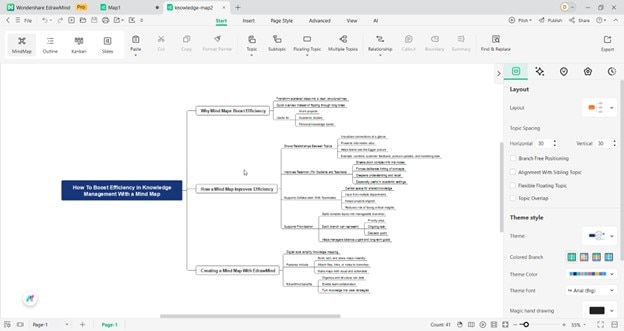
Add in your text and design the knowledge map to suit the requirements. You can also use icons from the multitude of options available.
Step 4
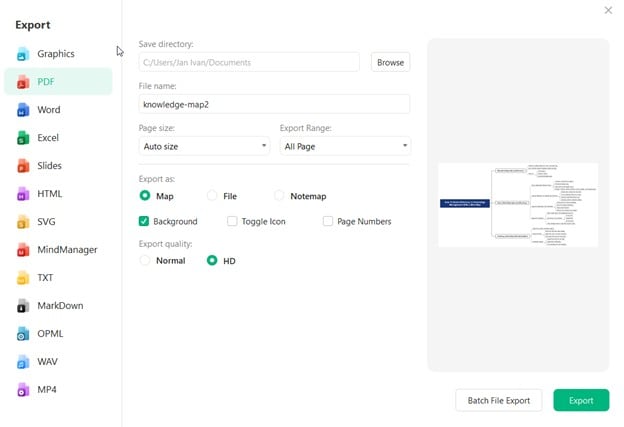
Save and export your diagram to any file type you wish. EdrawMind is compatible with multiple file types.
Examples of Knowledge Maps
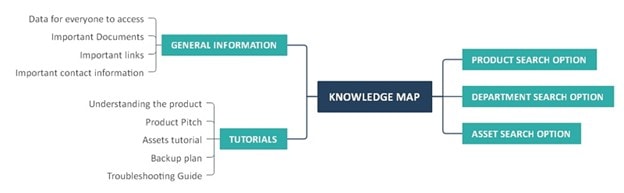
In the above example, a knowledge map is created. The mind map depicts the following sections: general information, tutorials, product search options, department search options, and asset search options.
The diagram details a knowledge map's core concepts and discusses data access, product understanding, troubleshooting guides, essential links, and other vital factors.
The diagram presents a bird's-eye perspective of knowledge maps and systematically displays their essential elements to ensure better retention.
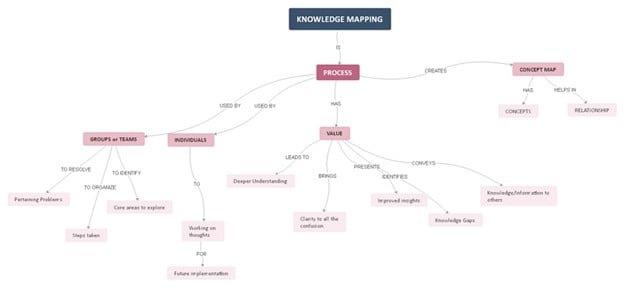
In the above example, knowledge mapping has been depicted in a visual graphical representation. It is divided into groups and teams, individuals, and concept maps.
The diagram represents the various processes for knowledge mapping and gives a more in-depth insight into these processes.
From value-based processes, like a more profound understanding, improved insights, clarity to all the confusion, knowledge gaps, and knowledge information to others.
This example enables us to examine the various processes related to knowledge mapping and provides insight into critical areas for improvement and more effective implementation strategies.
Tips When Creating a Knowledge Map
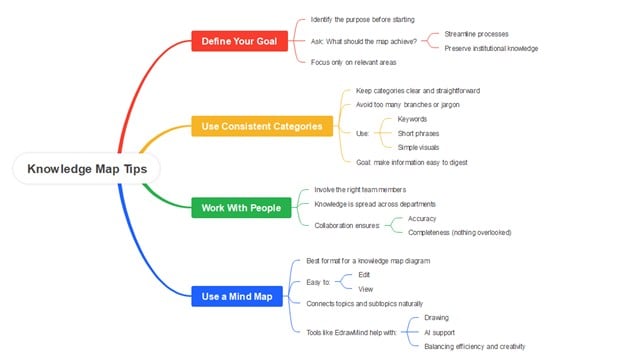


Remember that clarity and usability matter more than complexity when creating a knowledge map. A well-structured map should make it easy for team members to follow, update, and use in their daily work.
As summarized in the mind map above, here are a few practical tips to guide you.
Define Your Goal
First, always define your goal before starting. Ask yourself what the map should achieve. It can be used to streamline processes or preserve institutional knowledge. It depends on what you need.
This will help you focus on the most relevant areas.
Use Consistent Categories
Second, use consistent and straightforward categories. Avoid overloading the map with too many branches or jargon, as this can make it confusing rather than helpful.
Stick to keywords, short phrases, or simple visuals that make the information easy to digest.
Work With People
Third, the right people should be involved in building the knowledge map. Since knowledge is often distributed across departments, collaboration ensures accuracy and prevents important information from being overlooked.
Use a Mind Map
A mind map is the best format or tool for a knowledge map diagram. It’s easy to edit and view because it effectively connects the topics and subtopics.
Tools like EdrawMind make this even easier. EdrawMind offers both drawing and AI tools that can help you strike a balance between efficiency and creativity.
In the next section, it will explore how mind maps are the right choice as a visual format for a knowledge map.
How To Boost Efficiency in Knowledge Management With a Mind Map
A mind map’s main upside is that it boosts efficiency. It turns scattered knowledge or ideas into a nice-looking and comprehensive map. Instead of going through pages of notes, you can see the connections quickly.
This section explores how using a mind map enhances your efficiency in both work and academic endeavors. You can even use it to create a personal knowledge bank.
How a Mind Map Improves Efficiency
Here are the different ways in which a mind map can help you in knowledge mapping or knowledge management:
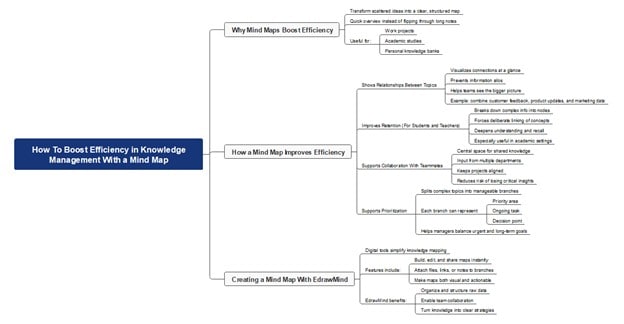
Shows Relationships Between Topics
The first way a mind map helps is by showing relationships between topics. Instead of relying on long documents or isolated notes, you can see how ideas connect at a glance.
This prevents information from being siloed and helps teams understand the bigger picture. For example, a company can map customer feedback, product updates, and marketing data into one diagram.
Improves Retention (for Students or Teachers)
Another benefit, especially for students, teachers, professors, or other individuals in academia, is that creating your mind map forces you to transform complex information into nodes.
Aside from that, you're bound to understand more of the material by making the conscious and deliberate process of establishing relationships. This process is helpful for retention.
Supports Collaboration With Teammates
Mind maps also support collaboration. Knowledge is often spread across departments, and valuable insights get lost without proper tools. Teams can input their expertise in one place with a shared mind map.
This keeps projects aligned and reduces the risk of missing critical information.
Supports Prioritization
In knowledge management, prioritization is another challenge. A mind map helps by breaking complex topics into smaller, manageable nodes.
Each branch can represent a priority area, ongoing task, or decision point. This allows managers to focus on what is urgent without losing sight of long-term goals.
Creating a Mind Map With EdrawMind To Boost Efficiency
Digital tools make knowledge mapping more efficient. Free online platforms let you build, edit, and share maps instantly, with options to attach files, links, or notes to specific branches. This ensures that knowledge is not only visual but also detailed and actionable.
EdrawMind is one such tool built for knowledge management. It allows you to organize data, create collaborative maps, and turn raw information into structured strategies.
Conclusion
Get started capturing your knowledge with a knowledge map! Unlike the information report, the knowledge mapping visualizes a company or organization's in-depth knowledge. Hence, developing a knowledge map when dealing with complicated stuff is crucial.
At the same time, EdrawMind is the most straightforward mapping tool for creating any mind map. With diverse mind map themes and solutions, creating an eye-catching mind map can be achieved in just a few minutes.
FAQs
Lastly, here are some frequently asked questions by people across the globe on forums related to knowledge mapping:
-
1. What are the recommended knowledge mapping tools?
Popular tools include EdrawMind, XMind, and Miro. EdrawMind is suitable for structured knowledge management. XMind works well for brainstorming. Miro is widely used for team collaboration on shared maps. EdrawMind is good if you want the right balance between efficiency and creativity because it has AI tools that can also help you expand your knowledge. It can even generate maps for you. -
2. What’s the difference between knowledge mapping, mind mapping, and knowledge graphs?
Knowledge mapping focuses on organizing and linking information for practical use. Mind mapping is primarily about brainstorming and visually structuring ideas. Knowledge graphs are data-driven, often using AI to show relationships between concepts. For instance, a mind map could show a student’s study topics, while a knowledge graph could track how research papers are related. -
3. What are the real-world benefits of knowledge mapping for organizations?
Knowledge maps enhance decision-making by illustrating the existing information and identifying gaps. They also reduce duplication of work, since employees can see what has already been done. For example, a healthcare organization can map patient data, training materials, and regulations to streamline processes. -
4. What are people's most common mistakes when building knowledge maps?
One mistake is making maps too complicated, which makes them hard to use. Another issue is failing to update maps, resulting in outdated or missing information. For example, a tech company that hasn’t refreshed its knowledge map may still show obsolete software tools. -
5. Can knowledge mapping be practical for personal learning and not just business?
Yes. Students can map study materials to organize subjects and track progress. Writers can map characters and themes for more straightforward storytelling. For example, a law student might build a knowledge map of cases and legal principles to prepare for exams.
 EdrawMind
AppsEdrawMind Online
EdrawMind
AppsEdrawMind Online

