About this weekly study/work plan template
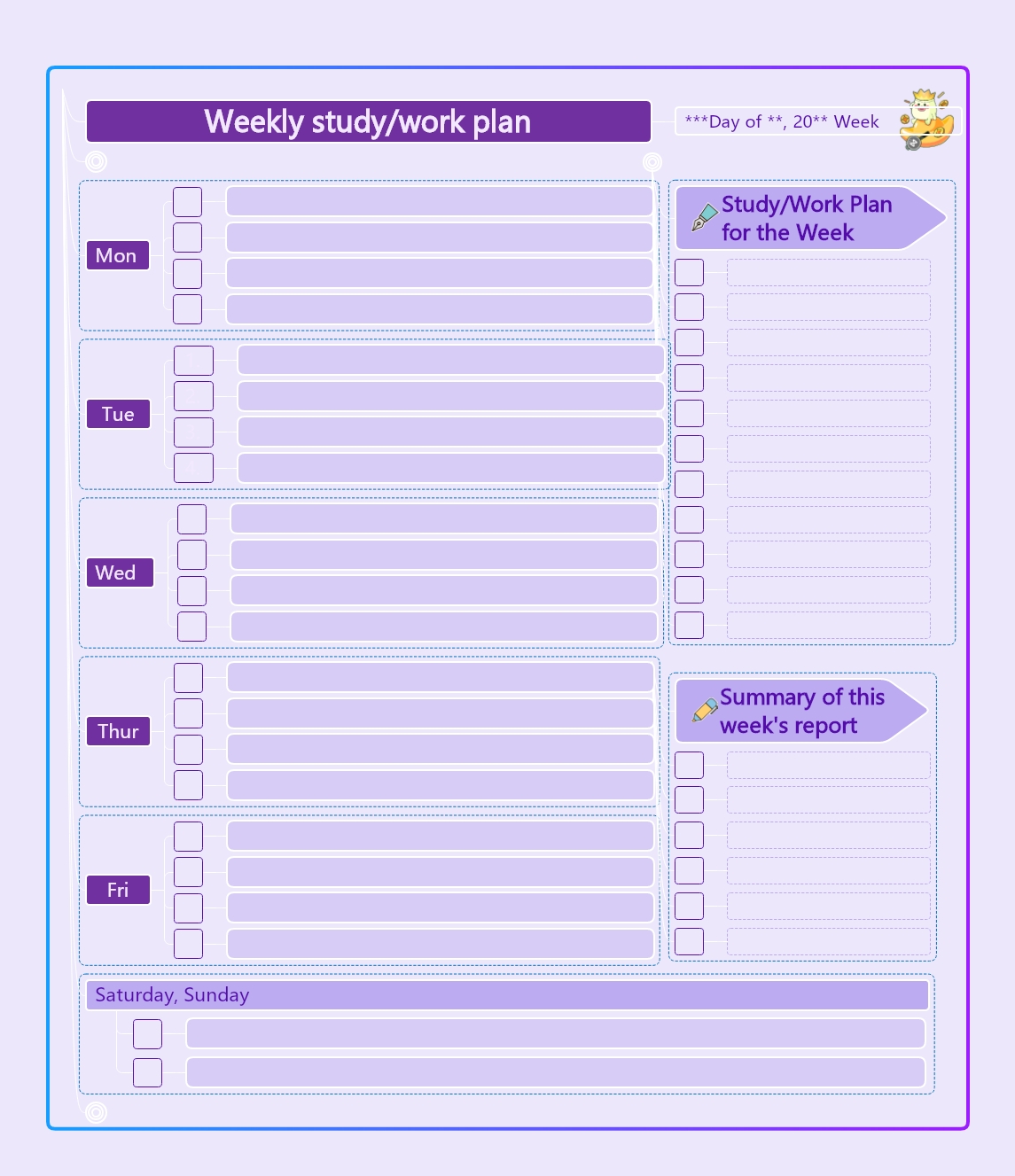
This purple-themed weekly planner template offers a professional layout for tracking your study and work tasks. It includes dedicated sections for daily goals, weekend activities, and a final summary report. Using this template helps you visualize your workload and maintain a consistent routine throughout the week.
Daily Productivity Blocks
This section helps you manage your time from Monday to Friday. Use the checkboxes to track your progress and stay focused on daily tasks. It ensures no assignment or work duty is ever forgotten.
- Individual blocks for Monday through Friday
- Checkboxes for task completion tracking
- Ample space for specific task descriptions
- Easy-to-read daily goal alignment
Weekly Strategy Sidebar
Use this vertical space to list high-priority goals for the entire week. Having a central list keeps you aligned with your long-term objectives while navigating daily schedules. It acts as your primary focus guide.
- General study or work plan section
- Space for ten major weekly objectives
- Highlighted area for top-level priorities
- Vertical layout for quick visual reference
Weekend Planning Section
Weekends are perfect for lighter tasks or catching up on personal projects. This combined Saturday and Sunday block allows you to plan your relaxation and preparation for the upcoming week in one clear space.
- Shared block for Saturday and Sunday
- Flexible lines for non-standard work days
- Checkboxes for weekend chore management
- Integrated design with the weekly layout
Progress Summary Report
Reflect on your achievements at the end of every week. This summary helps you evaluate your performance and identify areas for improvement. It is a critical step for continuous growth and better future planning.
- Dedicated weekly report summary area
- Lines for reflecting on completed milestones
- Space for identifying future challenges
- Review section for productivity assessment
FAQs about this Template
-
Why is using a weekly study or work planner effective?
A weekly planner is effective because it provides a bird's-eye view of your entire schedule. By visualizing your tasks in advance, you can avoid last-minute stress and manage your time better. It helps you build a consistent routine, which is key to long-term success. Plus, checking off completed tasks provides a rewarding sense of achievement and keeps you motivated every day.
-
How can I best prioritize tasks in my weekly planner?
To prioritize effectively, identify your most important goals at the start of the week. List these high-priority tasks in the weekly strategy sidebar so they stay visible. For daily blocks, schedule difficult assignments when your energy is highest. Using the summary section at the end of the week allows you to see what was missed and helps you adjust your focus for the next week.
-
Can this template be used for both personal and professional goals?
This template is versatile enough for both personal and professional use. Students can track study hours and deadlines, while professionals can manage meetings and project milestones. The layout includes specific sections for daily tasks and weekend activities, making it perfect for maintaining a healthy work-life balance. Its simple design allows you to customize the content to fit your unique lifestyle and planning needs perfectly.