About this SCAMPER template
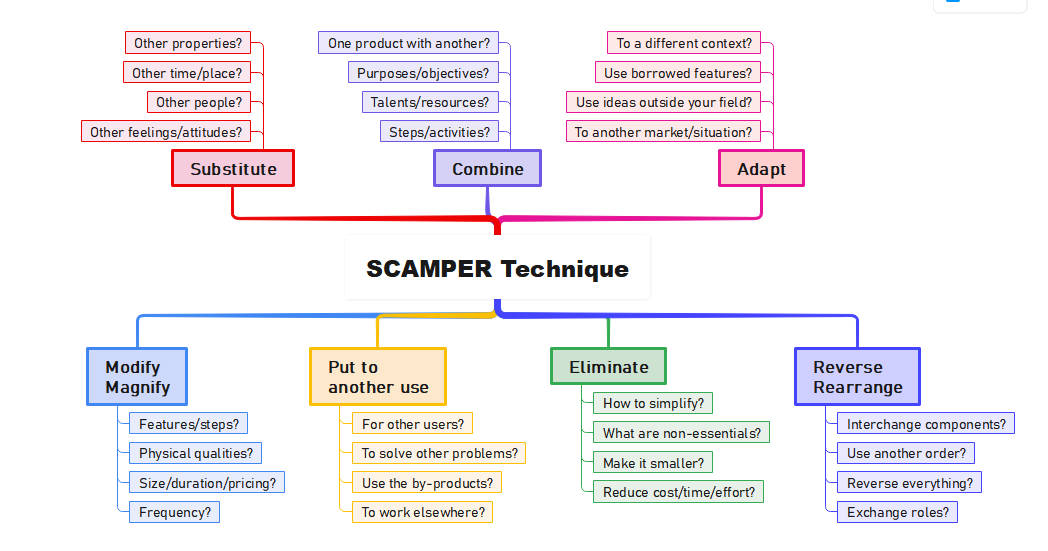
This SCAMPER template provides a clear visual framework for creative problem-solving. It organizes the seven key thinking prompts into a structured mind map. Use this tool to guide your team through productive brainstorming sessions and unlock new levels of innovation.
Substitute
The substitute stage focuses on replacing parts of your product, service, or process with something else. This technique helps you find better alternatives to current materials, people, or even specific feelings to improve the final outcome.
- Other properties?
- Other time/place?
- Other people?
- Other feelings/attitudes?
Combine
Combining involves merging two or more parts of your project to create a more efficient or unique solution. Look for ways to integrate different talents, resources, or steps to add value and streamline your current workflow.
- One product with another?
- Purposes/objectives?
- Talents/resources?
- Steps/activities?
Adapt
Adaptation encourages you to look at ideas outside your current field and apply them to your specific context. Borrowing successful features from different markets or situations can help you overcome challenges and reach new audiences effectively.
- To a different context?
- Use borrowed features?
- Use ideas outside your field?
- To another market/situation?
Modify Magnify
This step asks you to change or emphasize specific elements of your project. By altering physical qualities, pricing, or the frequency of tasks, you can discover which features are most important and how to make them stand out.
- Features/steps?
- Physical qualities?
- Size/duration/pricing?
- Frequency?
Put to another use
Consider how your current product or its by-products could serve a different purpose or target a new user group. This stage helps you maximize the utility of your existing resources by finding creative new applications.
- For other users?
- To solve other problems?
- Use the by-products?
- To work elsewhere?
Eliminate
Elimination focuses on simplifying your process by removing non-essential parts. By reducing costs, time, or unnecessary effort, you can create a leaner and more effective result that focuses entirely on the core needs of your users.
- How to simplify?
- What are non-essentials?
- Make it smaller?
- Reduce cost/time/effort?
Reverse Rearrange
The final stage involves flipping your process upside down or changing the order of steps. Reversing roles or interchanging components can reveal new perspectives and more efficient ways to organize your work for better results.
- Interchange components?
- Use another order?
- Reverse everything?
- Exchange roles?
When to use the SCAMPER technique?
It's easy to start a SCAMPER-based brainstorming session, regardless of if you're in the same room as your collaborators. Many websites offer templates and pre-populated examples for you to pull from in your creative processes. It is better to be non-linear in your SCAMPER brainstorming sessions; you don't have to begin at a specific key point or feel like you can't come back to touch on it later if you've moved on to a different one. You can bounce between sections if you are the moderator of the sessions.
Here's a guide on how to go about SCAMPER-based brainstorming
1. Get everyone on the same page with regard to the problem at hand. Communicate clearly, set goals, and list boundaries or limits before you begin scampering.
2. Work through each letter and keyword in the SCAMPER acronym. You can use the following breakdown, with included questions, to get the creative juices stirring.
- Substitute: What can be substituted or changed? Is that your product, a problem, or the process? Can you substitute in something else entirely?
- Combine: At this point, considering ways of combining segments within your process or your product may result in achieving something fresh or different. An example could be that some product features may be in conflict with each other or in the way of each other. Can these be combined to bring a better customer experience?
- Adapt: In this portion of brainstorming, consider the parts of your process or product that could be added, adjusted or tweaked, or updated, or modified to improve it. Some standard questions could be: What adjustments can we make to the existing product? Could this process become more flexible in outworking it?
- Modify: Could the process, problem, or product be modified in order to improve results? Can the entire process be modified to be more efficient?
- Put to another use: Is there an alternative use for the product or process? Are there any benefits in using the process or product in a different area?
- Eliminate: Which things can be simplified or removed within the process or product? Can you achieve the results you desire without the parts considered for removal, and if so, how? The main focus in the segment is to remove aspects that don't contribute anything to the table.
- Reverse: Are there any elements that could be interchanged or rearranged in order to drive improved results? Should we consider turning the whole process or product upside down (metaphorically)? Yes? Maybe?
Getting started with SCAMPER Template
If you want to generate ideas using the SCAMPER technique, understanding how it works is imperative, and having software, templates, or tools to use helps the process reach its full potential. There are many tools and templates available to help you create your own SCAMPER template.
These tools help you work through each keyword section, where you're able to add ideas onto sticky notes or similar structures for the subheadings. Once you've worked through the keywords, it's important to review the ideas, vote to find favorites, and shortlist any preferred or worthwhile options.
FAQs about this Template
-
What is the primary goal of using a SCAMPER template?
The main goal of a SCAMPER template is to provide a structured way to generate creative ideas for product or process improvement. By using seven distinct prompts, it forces you to think beyond standard solutions. This method helps teams break out of routine thinking patterns, leading to innovative breakthroughs and more efficient problem-solving strategies in any professional environment.
-
When is the best time to perform a SCAMPER analysis?
You should use a SCAMPER analysis when you feel stuck or when a product has reached a plateau in development. It is especially useful during the early stages of brainstorming or when you need to modernize an existing service. This technique is perfect for team meetings where diverse perspectives can help challenge the current status quo and drive innovation.
-
Can individuals use SCAMPER, or is it strictly for teams?
While SCAMPER is highly effective in group settings, individuals can also use it to enhance their personal creativity. Single users find it helpful for organizing their thoughts and looking at personal projects from different angles. Whether working alone or in a large group, the structured prompts ensure that no creative stone is left unturned during the ideation process.