About this Purchase Ordering Workflow template
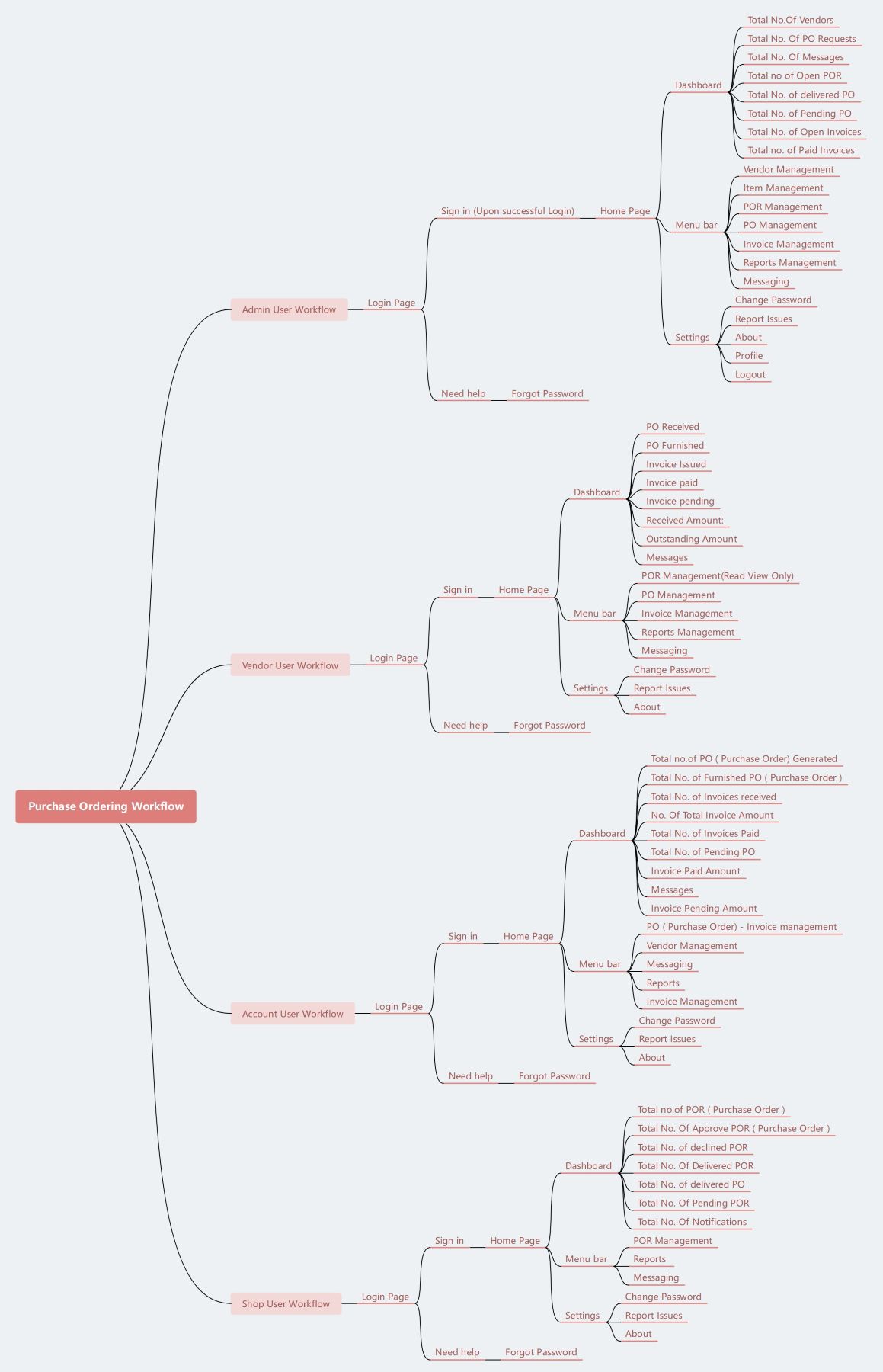
This template provides a clear roadmap for managing procurement processes across multiple departments. It helps organizations streamline communication between admins, vendors, accounts, and shop users. By using this map, you ensure every order is accurately tracked, approved, and fulfilled without manual errors or delays.
Admin User Workflow
The admin workflow manages high-level system operations and oversight. It includes tracking vendors, managing item catalogs, and reviewing comprehensive reports. Admins use centralized dashboards to monitor every open invoice and pending purchase order across the entire organization for better control.
- Vendor Management
- Item Management
- POR/PO Management
- Invoice Management
- Reports Management
- Messaging System
- Dashboard Statistics
- System Settings
Vendor User Workflow
The vendor workflow allows suppliers to interact directly with purchase orders and invoices. They can view received orders, issue digital invoices, and track outstanding payments. This transparency helps build trust and ensures that fulfillment stays on schedule for every transaction.
- PO Received and Furnished
- Invoice Issuance and Tracking
- Outstanding Amount Monitoring
- Received Amount Dashboard
- POR Read-Only View
- Messaging Interface
- Account Settings
Account User Workflow
The account workflow focuses on the financial side of the procurement cycle. Users manage invoice tracking, payment approvals, and budget monitoring. By overseeing generated orders and total amounts, they ensure that the company maintains accurate financial records throughout the billing cycle.
- PO Generation Tracking
- Furnished PO Monitoring
- Invoice Receipt Management
- Total Invoice Amount View
- Payment Status Dashboard
- Vendor Interaction
- Financial Reports
Shop User Workflow
The shop workflow is where the initial purchase order requests begin. Shop users create requisitions, track approval statuses, and confirm when items are delivered. This role is essential for maintaining proper inventory levels and ensuring the team has necessary supplies.
- POR Creation and Management
- Approved/Declined Status Tracking
- Delivery Confirmation
- Pending POR Monitoring
- System Notifications
- Messaging
- Issue Reporting
FAQs about this Template
-
Why is a structured purchase ordering workflow important for businesses?
A structured purchase ordering workflow is vital because it ensures every company expenditure is authorized and documented properly. By following a clear path from request to payment, businesses can significantly reduce the risk of unauthorized spending. This process also improves communication between departments and external vendors. Ultimately, it provides the transparency needed for accurate financial auditing and better budget management.
-
How do different user roles improve the procurement process?
Defining specific roles like Admin, Vendor, and Shop User helps segment tasks based on expertise. It prevents confusion by giving each person access only to relevant data. For example, shop users focus on requests, while accountants handle payments. This division of labor speeds up approvals and minimizes data entry errors. It also ensures that no single person controls the entire transaction.
-
What are the benefits of using a dashboard in a PO system?
A dashboard acts as a central hub for real-time data visualization. It allows users to track key performance indicators, such as pending orders or total invoice amounts, at a single glance. This immediate access to information helps managers identify bottlenecks before they cause delays. It also simplifies decision-making by providing up-to-date metrics on vendor performance and overall spending patterns.